STAX Service User's Guide
STAf eXecution engine
Version 3.5.17
June 27, 2016
Document Owner: Sharon Lucas
Table of Contents
Overview
Concepts
Using XML to Define STAX Jobs
Using Python for Expression Evaluation
Element Syntax and Usage
System Requirements
Installation and Configuration
Request Syntax
STAX Monitoring
STAX Logging
STAX Variables
STAXGlobal Class
STAX Python Interfaces (STAFMarshalling)
STAF Java Classes (STAFUtil, STAFRC, STAFVersion, etc)
STAX File and Machine Caching
STAX Extensions
Generating STAX Function Documentation
Debugging
Using Breakpoints to Debug STAX Jobs
Events Generated by STAX that Provide Job Status
Support Information
Appendix A: STAX XML Document Examples
Appendix B: STAX Error Code Reference
Appendix C: STAX Document Type Definition (DTD)
Appendix D: STAX Extensions Document Type Definition (DTD)
Appendix E: References
Appendix F: Jython and CPython Differences
Appendix G: Licenses and Acknowledgements
STAX (STAf eXecution engine) is an XML-based execution engine implemented
as an external STAF service. STAX was designed to make it significantly
easier to automate the workflow of your tests and test environments.
STAX accepts job definitions, in the form of XML documents. Fundamentally,
these job definitions allow you to specify the processes and STAF commands
necessary to perform the job. STAX provides a wealth of expressive functionality
on top of this, making it easy to implement, manage, track, and monitor
your jobs.
STAX uses the Python scripting language for variable and expression evaluation.
The Python code is executed by Jython, a version of Python written entirely in Java.
This allows STAX to take advantage of the powerful and easy-to-use
features of Python.
The sections that follow describe the basic concepts behind STAX, explain
the STAX XML language used to define your jobs, and detail the commands
externalized by the STAX service. Read on to find out more about the exciting
new world of STAX.
STAX Elements
A STAX Element is a node in a STAX XML document. Some of the items that
STAX Elements can represent are: data to be used during the job,
commands/processes to be executed, definitions of the logic and control
flow within the job, exceptions and signals, and wrappers such as functions and
blocks that encompass other STAX Elements.
Processes and Commands
A STAX job definition describes the execution flow for processes and STAF
commands.
- A process element really defines the execution information for
a STAF PROCESS START command. A process element specifies a command to be executed
and the machine where it should run. For example, the command could specify to
run a Java application or a Python file which is one of your testcases.
A process element may contain many optional elements (which correspond to
optional options that you can specify for a STAF PROCESS START command).
For example, the parms, workdir, env, stdin, stdout, and stderr elements
are some of the optional elements that can be specified within a process
element. Note that you may specify an "if" attribute for each of these
optional elements which provides a convenient shortcut to deal with many
variations of optional process elements that, otherwise, would have to be
specified using the if/elseif logic elements and multiple different
process elements.
- A stafcmd element defines execution information for other STAF commands.
A stafcmd element specifies the STAF service and request to be executed
(e.g. RESPOOL REQUEST POOL, FS COPY FILE) and the machine where it should be run.
Processes and stafcmds may be put into sequential and/or parallel wrappers which can be nested.
Expression Evaluation via Python
STAX allows you to avoid hard-coding information in your job definition by
using Python to assign values to variables and then using Python scripting
language to evaluate expressions and to execute Python code. STAX also sets some
variables in Python that provide runtime information about the
job definition's execution.
For example, instead of hardcoding the name of the machines where processes
and commands are executed during the job, a Python variable can be assigned
the name of the machine and specified for the location element. Python
variables also be provided at the time the job is requested to be executed.
A Python variable may also be assigned a list of machine names.
After STAX processes some elements (e.g. process and stafcmd), the return code
and result (if applicable) are accessible via STAX variables. These variables
can be referenced by other STAX elements (e.g. via the if element's expression
attribute) to determine logic flow within the job.
Groups
STAX can execute groups of STAX Elements sequentially or in parallel.
When Elements are executed in parallel, STAX will run each of the Elements
on a separate thread.
Loops
Loop Elements are available which allow a STAX Element to be executed repeatedly.
Additionally, there are Iterate Elements which allow a STAX Element to
be executed repeatedly while stepping through a list of data for each iteration
(this could be used, for example, to execute a sequence of commands for
each machine in a list).
STAX-Threads
When the STAX Service executes elements in parallel, rather than using
real system threads (and thereby potentially creating an overabundance
of system threads), the STAX Service will simulate the threading capabilities
via a thread pool which will utilize a manageable number of real system
threads. These simulated threads are called STAX-Threads.
Whenever a new STAX-Thread is created, existing variables are cloned from the parent
STAX-Thread. To create a global variable that can be accessed across STAX-Threads,
use the STAXGlobal class described in "STAXGlobal Class"
section. STAX elements that can create STAX-Threads include the following: <parallel>,
<paralleliterate>, <process-action>, <job-action>, and <function> elements
with a local scope.
Wrappers
STAX has several Wrapper Elements which simply provide additional functionality
to another STAX Element. These Wrapper Elements can denote Testcases
(with testcase status), Blocks (for which execution control
can be manipulated), Timers (for time-based execution control), and Functions
(which provide a unique name that can be called from other STAX Elements
in the Job Definition.
Functions
Functions are a nearly universal program-structuring device. Functions
serve two primary development roles: code reuse and procedural decomposition.
Functions are the simplest way to package logic you may wish to use in more
than one place and more than one time. Functions allow us to group
and parameterize chunks of XML to be used arbitrarily many times later.
Functions also provide a tool for splitting jobs into pieces that have
a well-defined role. STAX allows functions to be imported from other XML
files so that you can build up libraries of STAX functions that can be
reused by many different STAX jobs.
Sub-Jobs
STAX provides a "job" element so that sub-jobs can be executed within a
parent job with synchronized completion as well as providing access to
the sub-job result.
Logic Flow
STAX provides an "if" element which can evaluate conditions using Python
(for example, a return code) to determine logic flow within the STAX Job
Definition, thus allowing job flow to branch dynamically.
Exceptions and Signals
The STAX Service provides exception and signal handling capabilities.
STAX exception handlers, as well as finally blocks, alter the execution
flow of the job. STAX signal handlers provide asynchronous error handling
of raised signals. The STAX execution engine may also raise signals
or throw exceptions for errors which occur during job execution.
Monitoring STAX Jobs
A STAX Monitor application is available for the STAX Service. This application
displays a graphical representation of the currently running elements of
a given Job. The STAX Monitor makes it easy to see which processes and STAF
commands are currently running as well as the blocks which contain them.
You may select a process or STAF command to get more detailed information about
it. You may also select a block and then control the
execution of the job by choosing to hold, release, or terminate the block.
The STAX Monitor also displays a list of testcases that
have been run and the number of passes and fails for each.
Also, a messages panel displays any messages that are sent by the job. This can
help make debugging a job definition easy.
Logging
The STAX Service maintains a service log which records high level information
about all jobs that have been submitted.
The STAX Service also maintains an individual job log for each submitted
job. These job-specific logs record information such as testcase
status and job execution tracing. If the "log" element is used within the
STAX Job Definition, then a user log is also created for the submitted job.
Queues
The STAX Service uses the STAF QUEUE service for sending messages.
Each STAF handle has a queue (see the STAF User's Guide for more information
on STAF handles, queues, and the QUEUE service).
Each STAX job has a handle associated with it (and, thus, a queue).
A STAX job uses it's STAF Queue for lots of things, so you should not
use the STAX job handle's queue (e.g. don't get try to get data off a
STAX job handle's queue) as that can interfere with the use of the queue
by the STAX service.
Alternatively, if you want your STAX job to use a queue on the STAX
service side to send and receive messages, you can create your own
STAF handle and use it's queue. Refer to Sample
STAX Job 3 - Creating a STAF Handle and Using it's Queue for an example
of how to create a STAF handle within a STAX job and use it's queue to get
messages.
STAX uses XML (Extensible Markup Language) to describe STAX job definitions.
XML is a language defined by the World Wide Web Consortium (W3C), the body that sets the
standards for the Web.
It is called extensible because it is not a fixed format like HTML (a single, predefined markup language).
Instead, XML is actually a 'metalanguage' -- a language for describing other languages -- which lets you
design your own customized markup languages for limitless different types of documents.
This section reviews some XML fundamentals. Refer to the "References" section
for where to get more information about XML.
Both markup and text in an XML document are case-sensitive.
All XML processing instructions start with <? and end with ?>.
XML comments start with <!-- and end with -->.
In XML, tags always start with < and end with >.
The names that can be used for a tag are defined by the DTD (Document Type Definition).
XML documents are made up of XML elements. Much like in HTML, you create XML
elements with an opening tag, such as <stax>, followed by the element content (if any),
such as text or other elements, and ending with the matching closing tag that starts with </,
such as </stax>. It's necessary to enclose the entire document, except for
processing instructions, in one element, called the root element -- that's the <stax>
element here:
<?xml version="1.0" encoding="UTF-8" standalone="no"?>
<!DOCTYPE stax SYSTEM "stax.dtd">
<stax>
   .
   .
   .
</stax>
Empty Elements
Empty elements have only one tag, not a start and end tag. In XML, you close an empty
element with />. For example, nop is an empty element:
<nop/>
Attributes
Attributes in XML are name-value pairs that let you specify additional data in start and
empty tags. To assign a value to an attribute, you use an equal sign.
Because markup is always text, attributes are also text. Even if you're assigning
a number to an attribute, you treat that number as a text string and
enclose it in quotes. In XML, you must enclose attribute values in quotation marks.
Usually, you use double quotes, but if the attribute value itself contains
double quotes, you can use single quotes to surround the text.
If the attribute value contains both single and double quotes, you can use the XML-defined
entity ' for a single quote and " for double quotes.
An example of a defaultcall element with a function attribute is:
<defaultcall function="MainFunction"/>
Creating a STAX XML document
The root element can contain other elements, of course.
Here, I added elements for three functions to the document and added one element that defines the
function to call first by default. Note that the function element has an
attribute called name and the defaultcall element is empty and has an attribute called function.
<?xml version="1.0" encoding="UTF-8" standalone="no"?>
<!DOCTYPE stax SYSTEM "stax.dtd">
<stax>
  <defaultcall function="FunctionA"/>

  <function name="FunctionA">
      ...
  </function>

  <function name="FunctionB">
      ...
  </function>

  <function name="FunctionC">
      ...
  </function>
</stax>
The function element can contain a single task element as defined by the STAX DTD.
Here, I added a process element to FunctionA, a stafcmd element to FunctionB, and
a log element to functionC. A process element can contain other elements. In this
case I added location, command, and parms. A stafcmd element can contain other elements.
In this case I added location, service, and request.
<?xml version="1.0" encoding="UTF-8" standalone="no"?>
<!DOCTYPE stax SYSTEM "stax.dtd">
<stax>
  <defaultcall function="FunctionA"/>

  <function name="FunctionA">
      <process>
        <location>'local'</location>
        <command>'java'</command>
        <parms>'com.ibm.staf.service.stax.TestProcess 2 4 0'</parms>
      </process>
  </function>

  <function name="FunctionB">
      <stafcmd>
        <location>'local'</location>
        <service>'misc'</service>
        <request>'version'</request>
      </stafcmd>
  </function>

  <function name="FunctionC">
      <log>'This function logs this message'</log>
  </function>
</stax>
Document Type Definition (DTD)
The STAX DTD specifies the correct syntax of the document.
A STAX XML document is valid if it complies with the STAX DTD.
A DTD is a formal description in XML Declaration Syntax of a particular type of document. It defines
what names are to be used for the different types of elements, where they may occur, and how they all fit
together. Refer to the "STAX Document Type Definition (DTD)" section
to see the entire STAX DTD.
For example, the STAX DTD allows you to describe a STAF Command which has a name attribute and contains
location, service, and request elements.
The relevant part of the STAX DTD contains:
            <!ELEMENT stafcmd   (location, service, request)>
            <!ATTLIST stafcmd
                      name      CDATA    #IMPLIED
            >
            <!ELEMENT location  (#PCDATA)>
            <!ELEMENT service   (#PCDATA)>
            <!ELEMENT request   (#PCDATA)>
This defines a stafcmd as an element type containing location, service, and request elements; and it defines
location, service, and request as element types containing just plain text (Parsed Character Data or PCDATA)
and defines name as an attribute type containing just plain text (Character Data or CDATA).
Validating parsers read the DTD before they read your document so that they can identify where every element type ought
to come and how each relates to the other, so that applications which need to know this in advance (such as the
STAX service) can set themselves up correctly. The example above lets
you create STAF commands like:
            <stafcmd name="'Delay'">
              <location>'local'</location>
              <service>'delay'</service>
              <request>'delay 5000'</request>
            </stafcmd>
A DTD provides applications with advance notice of what names and structures can be used in a
particular document type. Using a DTD when editing files means you can be certain that all documents
which belong to a particular type will be constructed and named in a consistent and conformant manner.
The STAX service parses an XML document to break it down into its component parts and then handles the
resulting data. STAX uses the XML Parser for Java which is a validating XML parser.
Refer to the References section for
where to get more information about the XML Parser for Java.
You can use your favorite text editor to create a STAX XML document,
or you can use an XML editor such as
Cooktop. If you use an XML editor, you'll probably want to get the
STAX DTD file so that the XML editor can use it to validate the XML syntax
by updating the DOCTYPE statement in the xml file so that the SYSTEM value
is the location of the stax.dtd file you created.
The stax.dtd file is not provided with the STAX service because its contents
can vary because you can extend it by registering STAX service extensions.
You can get the stax.dtd file by running the following from a command prompt
on your STAX service machine:
  set STAF_QUIET_MODE=1               (or if on Unix:  export STAF_QUIET_MODE=1)
  STAF local STAX GET DTD > stax.dtd
  set STAF_QUIET_MODE=                (or if on Unix:  unset STAF_QUIET_MODE)
This creates a stax.dtd file in the current directory.
Or, see Appendix D: STAX Extensions Document Type
Definition (DTD) for the contents of the STAX DTD (without any extensions).
STAX uses the Python for variable and expression evaluation.
STAX uses Jython to execute the Python code. Jython is an implementation
of the Python scripting language written in 100% pure Java that runs under
any compliant Java Virtual Machine (JVM). Using Jython, you can write
Python code that interacts with any Java code.
STAX variable names must follow the Python variable naming conventions. In Python,
variable names come into existence when you assign values to them, but
there are a few rules to follow when picking names for variables.
-
Syntax: (underscore or letter) + (any number of letters, digits or underscores)
Variable names must start with an underscore or letter, and be followed
by any number of letters, digits, or underscores. _machine, machine, and
Mach_1 are legal names, but 1_Mach, mach$, and @#! are not.
-
Case matters: MACHNAME is not the same as machname
Python always pays attention to case, both in names you create and
in reserved words. For instance, X and x refer to two different variable names.
-
Python reserved words are off limits
You cannot define variable names to be the same as words that mean
special things in the Python language. Following are reserved words in
Python: and, assert, break, class, continue, def, del, elif, else, except,
exec, finally, for, from global, if, import, in, is, lambda, not, or, pass,
print, raise, return, try, while.
Note: Python lets you use the names of Python built-in functions as
variable names. However, we recommend that you don't use the name
of a Python built-in function as a variable name because you may want
to use the Python built-in function at some point in your STAX job.
Following are names of Python built-in functions: abs, basestring, bool,
callable, chr, classmethod, cmp, compile, complex, delattr, dict, dir,
divmod, enumerate, eval, execfile, file, filter, float, getattr, globals,
hasattr, hash, help, hex, id, input, int, isinstance, issubclass, iter,
len, locals, long, map, max, min, object, oct, open, ord, pow, property,
range, raw_input, reduce, reload, repr, round, setattr, slice, staticmethod,
str, sum, super, tuple, type, unichr, unicode, vars, xrange, zip.
-
STAX reserved words are off limits
You should not define variable names to be the same as words that mean
special things to the STAX service. Following are reserved words in STAX:
- RC
- STAFResult
- any word beginning with STAX (e.g. STAXJobName, STAXThreadID)
- any word beginning with STAF (e.g. STAFResult, STAFRC)
Python string constants can be enclosed in single or double quotes, which
allows embedded quotes of the opposite flavor.
For example, the following two lines do exactly the same thing in a
STAX XML document. They assign a string constant (literal) "CoolTest"
to the value of a variable named testName.
<script>testName = "CoolTest1"</script>
<script>testName = 'CoolTest1'</script>
However, the following line is not the same. It assigns the value
of a variable named CoolTest1 to the value of a variable named
testName. If this was not what you intended and a variable named
CoolTest1 does not exist, a STAXPythonEvaluationError signal is raised.
<script>testName = CoolTest1</script>
For elements and attributes whose values are evaluated via Python, we
need to distinguish between literals and variables.
For example, the following request element's value contains a string
constant which is concatenated with the value of a variable named
machName. So, if the value of variable machName is 'testA.austin.ibm.com',
after being evaluated by Python, the request element's value would be:
'RELEASE POOL ClientMachPool ENTRY testA.austin.ibm.com'.
<request>'RELEASE POOL ClientMachPool ENTRY ' + machName</request>
Another way to do this is:
<request>'RELEASE POOL ClientMachPool ENTRY %s' % (machName)</request>
where the %s indicates a String format (and can also be used for decimal format, etc.),
and where the value of the machName variable would replace the %s marker.
Also, note that the following two lines do exactly the same thing in a STAX
XML document. They assign a string constant (literal) "VerifyRC"
to the function attribute's value.
<call function="'VerifyRC'"/>
<call function='"VerifyRC"'/>
However, the following line is not the same. It assigns the value
of a variable named VerifyRC to the function attribute's value.
If a variable named VerifyRC does not exist, a STAXPythonEvaluationError
signal is raised.
<call function="VerifyRC"/>
Also, note that XML processors assume that < always starts a tag and that & always
starts an entity reference, so you should avoid using those characters for anything else.
You must use the entity reference < instead of < and
entity reference & instead of & or else you'll get an XML parsing error.
This can be difficult sometimes as the < character is used as the less-than operator
in Python, as in this example, where RC < 0 is being assigned to the expression attribute.
<if expr="RC < 0">
Here's another example that shows a <script> element that contains Python code using
the regular expression (re) module to look for pattern '<pass>' anywhere in the
STAFResult string variable and must use the entity reference < instead of <.
<script>
import re
matchstr = r'.*?<pass>.*?'
matchFlag = re.match(matchstr, STAFResult)
</script>
Refer to the "References" section for
where to get more information about Jython and Python.
If you are already a CPython programmer, or are hoping to use CPython
code under Jython, refer to the
"Jython and CPython Differences" section for information about
differences in the two implementations of Python.
A job to be executed by the STAX Service is described by an XML document.
The XML document must comply with the STAX document type definition (DTD)
shown in "STAX Document Type Definition (DTD)".
The function of the STAX XML document is to describe STAF command and process
execution.
The first line in an XML document should start with an XML declaration.
This indicates the document is written in XML and specifies the XML version,
the language encoding for the document, and indicates that the document refers
to an external DTD (standalone="no").
The second line in an XML document should be the document type declaration. This
is used to indicate the DTD used for the document. It defines the name of the root
element (stax), and the DTD to be used. STAX checks the syntax of XML
documents using a validating XML parser to verify that the document complies with the DTD.
Note that DTDs are all about specifying the structure and syntax of XML documents (not their content).
So, the first two lines in a STAX XML document should look like:
<?xml version="1.0" encoding="UTF-8" standalone="no"?>
<!DOCTYPE stax SYSTEM "stax.dtd">
The DOCTYPE statement's value for SYSTEM must end in stax.dtd (not case-sensitive)
or a STAXXMLParseException error will be returned when executing the STAX XML document.
Note that references to external entities in a STAX XML document are not supported.
If a STAX XML document references an external entity (other than the stax.dtd in
the DOCTYPE statement), a STAXXMLParseException error will be returned when
executing the STAX XML document.
This section describes the elements that can be used in a STAX XML document.
To ease the description of the elements, some elements will be grouped
as follows so that they can be referenced as a group and will be shown
in bold italics:
Reference Elements
   task              process | stafcmd | nop |
                     sequence | parallel | paralleliterate |
                     call | call-with-list | call-with-map | return | import |
                     if | loop | iterate | break | continue |
                     try | throw | rethrow |
                     signalhandler | raise |
                     hold | release | terminate |
                     testcase | tcstatus | script |
                     block | timer | log | message
Notes:
-
Elements and attribute names in an XML document are case sensitive. That
is, element <sequence> is different from <Sequence> and <SEQUENCE>.
-
Only sequence, parallel and stax elements can contain
multiple task elements.
- Names for elements (e.g. function names, block names, etc.) should not begin with STAX as these names are
reserved for future extensions and enhancements.
Also, some examples of the usage of elements use "..." for brevity to represent that additional XML would be
included in place of the "...".
An XML document must contain a root element which contains all other elements
in the document. The root element of a STAX XML document is stax.
The stax element consists of any number of function,
script, and/or signalhandler elements and an optional
defaultcall element.
Usage:
<?xml version="1.0" encoding="UTF-8" standalone="no"?>
<!DOCTYPE stax SYSTEM "stax.dtd">

<stax>

  <defaultcall function="FunctionA"/>
  <script>machName = "test1.austin.ibm.com"</script>

  <function name="FunctionA">
    ...
  </function>

  <function name="FunctionB">
    ...
  </function>
  ...

</stax>
STAX uses Python, which is an object-oriented scripting language. To specify Python code to be executed, you
can use the script element. The Python code can include any Python statements such as variable
assignments, importing and running Python modules, accessing Java libraries, and running built-in Python tools.
All script elements contained in the root stax element are initialized at the beginning of
the job, as each is encountered in sequential order, regardless of their
placement within the stax element, and are accessible throughout the job
(like global variables). All script elements contained in
elements other than the stax element (e.g. such as the sequence element)
are assigned as each is encountered and are accessible within their scope and
are inherited from parent STAX-Threads.
Whenever a new STAX-Thread is created, existing variables are cloned from the parent
STAX-Thread. To create a global variable that can be accessed across STAX-Threads,
use the STAXGlobal class described in "STAXGlobal Class"
section. STAX elements that can create STAX-Threads include the following: parallel,
paralleliterate, process-action, job-action, and function
elements with a local scope.
The script element is used to specify Python code to be executed. For example,
the script element can be used to define STAX variables which are
utilized during the parsing of the XML document and the subsequent execution
of the STAX job. Note that a STAX variable is used solely by the STAX job
and is not associated with STAF variables. You can also use the script
element to import and run Python modules and built-in Python tools.
Usage:
Goal: Create a variable named testName and assign it value "CoolTest1"
<script>testName = "CoolTest1"</script>
Goal: Create a variable named machName and assign it the value of the
STAFResult variable.
<script>machName = STAFResult</script>
Goal: Create a list called machList containing 10 machine names by running
the STAF Resource Pool Request command in a loop ten times, each time adding
the STAF Result value from the RESPOOL REQUEST POOL command (which contains
a machine name) to the list. Note that this example first creates an empty
list and then adds a machine name to the list 10 times.
<script>machList = []</script>
<script>clientPool = 'ClientMachinePool'</script>
<loop var="i" from="1" to="10">
  <sequence>
    <stafcmd>
      <location>'server1.austin.ibm.com'</location>
      <service>'RESPOOL'</service>
      <request>'REQUEST POOL %s' % (clientPool)</request>
    </stafcmd>
    <script>machList.append(STAFResult)</script>
  </sequence>
</loop>
Goal: Create a list called allMachList by combining lists named unallocMachList
and allocMachList. New list allMachList contains ['MachA','MachB','MachC','MachD','AllocMachA','AllocMachB'].
<script>unallocMachList = ['MachA','MachB','MachC','MachD']</script>
<script>allocMachList = ['AllocMachA','AllocMachB']</script>
<script>allMachList = unallocMachList + allocMachList</script>
Goal: Generate a random number (which could be used to randomly select which function to call) using
the random module provided by Python.
Note that in Python, you can use a semicolon to separate multiple statements on the same line.
<script>from random import random; r=random()*100</script>
Goal: Use a Java class, com.ibm.staf.STAFUtil (provided in JSTAF.jar), and it's wrapData() method
to turn strings containing spaces into the colon-length-colon form needed for submitting a STAF
Notify request. For more information on the STAFUtil Java class, see the
STAF Java Classes (STAFUtil, STAFRC, STAFVersion, etc) section.
This example also shows that for statements that are too long to fit on one line,
Python lets you continue typing the statement on the next line, if you're coding
something enclosed in (), {}, or [] pairs. Continuation lines can start at any
indentation level.
<script>
  NotifyProfile = 'Jane Smith'
  Message = 'STAX Job ID %s failed.' % (STAXJobID)
  Request = ('NOTIFY PROFILE %s LEVEL NORMAL MESSAGE %s' %
            (STAFUtil.wrapData(NotifyProfile), STAFUtil.wrapData(Message)))
</script>

<message>NotifyRequest</message>
The message element would display something like:
NOTIFY PROFILE :10:Jane Smith LEVEL NORMAL MESSAGE :21:STAX Job ID 6 failed.
Goal: Create a Python class object, Server, and generate three instance objects from the class
and create a list of these Server objects. Then iterate through the server list, logging
information about each server object in the server list.
<script>
  # Define Server class
  class Server:
    def __init__(self, hostname, dir):
      self.hostname = hostname
      self.dir      = dir
    def __repr__(self):
      return "<Server: hostname=%s, directory=%s>" % (self.hostname, self.dir)
    def getHostname(self):
      return self.hostname
    def getDir(self):
      return self.dir

  # Create an array of 3 Server objects
  serverList = [
                 Server('myServer.austin.ibm.com', 'C:/install'),
                 Server('serverA.portland.ibm.com', 'D:/install'),
                 Server('linuxServer.austin.ibm.com', '/usr/local/install')
               ]
</script>

<iterate var="server" in="serverList" indexvar="i">
  <log>
    'Server #%s: hostname=%s, directory=%s' % (i+1, server.getHostname(), server.getDir())
  </log>
</iterate>
Goal: Get the current date/time. Since STAX uses Jython to execute
Python code, you can also import and use Python modules or Java classes
to perform date/time functions such as getting the current date/time.
Here are some ways to get the current date/time:
- Get the current date/time in the format you wanted using strftime
from the Python time module.
<script>
  from time import strftime  # Only need to do once
  currTimestamp = strftime("%Y-%m-%d %H:%M:%S")
</script>
- Get the current date/time using the Python datetime module:
<script>
  from datetime import datetime  # Only need to do once
  currTimestamp = datetime.now()
</script>
- Get the current date/time using Java classes java.sql.Timestamp and
java.lang.System:
<script>
  from java.sql import Timestamp   # Only need to do once
  from java.lang import System     # Only need to do once
  currTimestamp = Timestamp(System.currentTimeMillis())
</script>
The process, stafcmd,
job, and nop elements perform actions.
The process element represents a STAF process which will be executed
on a specified machine. It submits a START request to the STAF PROCESS service
to run the specified command on the specified machine and waits for the
process to complete running before continuing to the next element in the STAX job.
You should use the process element instead of a stafcmd element if
you want to start a process and wait for it to complete.
After a process has completed (or if it could not be started) the following variables are set and
can be referenced by the job:
-
RC - the return code from the process. It is numeric.
If it's the actual return code from the process, it is a Python Long numeric type (e.g. 0L, 25L).
If an error occurred starting the process, it is a Python Integer numeric type.
-
STAFResult - the STAF result from starting the process. If the process failed to start
successfully, it contains any error messages from starting the process in a Python string type.
If the process started successfully, it is set to special Python object None.
-
STAXResult - contains any files specified by returnstdout, returnstderr, and/or
returnfile(s). If no files are returned, STAXResult is set to special Python object None.
If one or more files are returned, the format of STAXResult is a list as follows:
[ [<File 1 rc>, <File 1 data>], [<File 2 rc>, <File 2 data> ], ... ]
Each entry in the list represents a returned file and consists of a 2-element list as follows:
- <File n rc> is a number containing the STAF return code indicating the success or failure of retrieving
the file's contents
- <File n data> is a string containing the file's contents
Files will be returned in the order of standard output, then standard error, then any files
specified with the returnfile(s) element(s).
For example, assume that the standard output of a process was simply "This is stdout data", and
that the standard error of a process was "This is stderr data", and that you asked for both of
these to be returned. STAXResult would look like the following.
[ [0, 'This is stdout data'], [0, 'This is stderr data'] ]
The process element has one optional attribute:
-
name - specifies the name that the STAX Monitor uses to refer to the <process>
element. It defaults to 'Process<number>', where <number> is a
unique number for each process executed in a job. The value is evaluated via Python to
a string. This element is optional.
The process element contains two required elements (location and command) with
many optional elements. The location element must be specified first, followed
by the command element. The rest of the elements are optional.
Note that the process elements are equivalent to the options allowed for the
STAF Process Service's START request (except where noted), so see the STAF User's Guide
for more information.
Required process elements:
-
location - specifies the machine where the process should be run.
The value is evaluated via Python to a string. This element is required.
To run the process on the local STAX service machine, specify 'local'.
To run the process on a remote machine, specify the endpoint of the remote
machine. The format for an endpoint is:
[<Interface>://]<System Identifier>[@<Port>]
where:
- <Interface> is the name of the network interface (e.g. ssl, tcp).
If not specified, it defaults to thee default interface defined on the
STAX service machine.
- <System Identifier> is a valid network identifier for the interface
in question. You may specify logical or physical identifiers.
For example, for a TCP/IP interface, the physical identifier for a system
is the IP address, while the logical identifier is the hostname.
- <Port> is a valid port to use for a TCP/IP interface. If not specified,
it defaults to the port for the network interface being used.
One of the things this allows you to do is communicate with an instance
of STAF that is using a different TCP/IP port. Note that the port specified
does not have to be configured on the machine submitting the request.
Some examples of possible values for the location element are:
'local', 'server1.company.com', '9.3.77.999',
'ssl://client.company.com', and 'tcp://client2.company.com@6500'.
-
command - specifies the command to be executed by the process element.
The value is evaluated via Python to a string. This element is required.
This element has the following optional attributes:
- mode - specifies whether the command should be executed as though you were at a shell prompt.
The value must evaluate via Python to one of the following:
- 'default' - specifies that the command should not be started via a separate shell.
This is the default.
- 'shell' - specifies that the command should be started via a separate shell.
This allows complex commands involving pipelines to be readily executed.
- shell - specifies the shell to use when starting the process via a separate shell.
This attribute is used only if the command's mode is set to 'shell'. The value overrides
any shell defaults specified in the STAF configuration file.
The value is evaluated via Python to a string.
Optional process elements:
Here are some important notes about optional process elements:
- If specified, these optional process elements must be specified in
the order listed below (with some variations).
Refer to the "STAX Document Type
Definition (DTD)" section to see the DTD for the process element and to
see the variations in process element order that are allowed.
- Each of these optional elements may specify an if attribute.
The if attribute must evaluate via Python to a true or false value.
If it does not evaluate to a true value, the element is ignored. The default
value for the if attribute is 1, a true value. Note that in
Python, true means any nonzero number or nonempty object; false means
not true, such as a zero number, an empty object, or None. Comparisons
and equality tests return 1 or 0 (true or false).
Using the if attribute provides a convenient shortcut to deal
with many variations of optional process elements that, otherwise, would
have to be specified using the if/elseif elements and
multiple different process elements.
The process element may contain any of the following optional elements
in the order listed (with some variations):
-
parms - specifies any parameters that you wish to
pass to the command.
The value is evaluated via Python to a string.
This element is optional.
-
workdir - specifies the directory from which the
command should be executed. If you do not specify this
element, the command will be started from whatever directory
STAFProc is currently in.
The value is evaluated via Python to a string.
This element is optional.
-
title - specifies the program title of the process.
Unless overridden by the process, the title will be the text
that is displayed on the title bar of the application.
The value is evaluated via Python to a string.
This element is optional.
-
workload - specifies the name of the workload for which this
process is a member. This may be useful in conjunction with other
process elements. The value is evaluated via Python to a string.
This element is optional.
-
vars (or var) - specifies STAF variables that go into the
process specific STAF variable pool.
The value must evaluate via Python to a string or a list of
strings. Multiple vars elements may be specified for a process.
The format for each variable is: 'varname=value'
So, a list containing 3 variables could look like:
['var1=value1', 'var2=value2', 'var3=value3'].
Specifying only one variable could look like either:
['var1=value1'] or 'var1=value1'.
There can be 0 or more occurrences of this element.
-
envs (or env) - specifies environment variables that will be
set for the process. Environment variables may be mixed case,
however most programs assume environment variable names will
be uppercase, so, in most cases, ensure that your environment
variable names are uppercase.
The value must evaluate via Python to a string or a list of
strings. Multiple envs elements may be specified for a process.
The format for each variable is: 'varname=value'
So, a list containing 3 variables could look like:
['ENV_VAR_1=value1', 'ENV_VAR_2=value2', 'ENV_VAR_3=value3'].
Specifying only one variable could look like either:
['ENV_VAR_1=value1'] or 'ENV_VAR_1=value1'.
There can be 0 or more occurrences of this element.
-
useprocessvars - specifies that STAF variable
references should try to be resolved from the STAF variable
pool associated with the process being started first.
If the STAF variable is not found in this pool, the STAF
global variable pool should then be searched.
This element is optional and is an empty element.
-
username - specifies the username under which
the process should be started.
The value is evaluated via Python to a string.
This element is optional.
-
password - specifies the password with which to
authenticate the user specified with the username element.
The value is evaluated via Python to a string.
This element is optional.
-
disabledauth - allows you to specify the action to take if a
username/password is specified but authentication has been disabled.
This element is optional and is an empty element.
This element has the following required attribute (in addition to the if attribute):
- action - Must evaluate via Python to a string containing either:
- 'error' - specifies that an error should be returned.
- 'ignore' - specifies that any username/password specified
is ignored if authentication is disabled.
This action overrides any default specified in the STAF
configuration file.
-
stdin - specifies the name of the file from which
standard input will be read. The value is evaluated via
Python to a string.
This element is optional.
-
stdout - specifies the name of the file to which
standard output will be redirected.
The value is evaluated via Python to a string.
This element is optional.
This element has the following required attribute (in addition to
the if attribute):
- mode - specifies what to do if the file already exists.
The value must evaluate via Python to one of the following:
- 'replace' - specifies that the file will be replaced. This is the default.
- 'append' - specifies that the process' standard
output will be appended to the file.
-
stderr - specifies the file to which standard error will be redirected.
The value is evaluated via Python to a string.
This element is optional.
This element has the following attribute (in addition to the if attribute):
- mode - specifies what to do if the file already exists or to
redirect standard error to the same file as standard output.
The value must evaluate via Python to one of the following:
- 'replace' - specifies that the file will be replaced. This is the default.
- 'append' - specifies that the process' standard error will be appended to the file.
- 'stdout' - specifies that standard error will be redirected to the same file to
which standard output is being redirected. If a file name is specified, it is ignored.
-
returnstdout - specifies to return in STAXResult the contents of the file where standard
output was redirected when the process completes. This element is optional and is an
empty element.
-
returnstderr - specifies to return in STAXResult the contents of the file where standard
error was redirected when the process completes. This element is optional and is an
empty element.
-
returnfiles (or returnfile) - specifies to return in STAXResult the contents of the
specified file(s) when the process completes.
The value must evaluate via Python to a string (containing a file name) or a list of
strings (each containing a file name). There can be 0 or more occurrences of this element.
-
stopusing - allows you to specify the method by
which this process will be STOPed, if not overridden on the
STOP command.
The value is evaluated via Python to a string.
This element is optional.
-
console - allows you to specify if the process should
get a new console window or share the STAFProc console.
This element is optional and is an empty element.
This element has the following required attribute (in
addition to the if attribute):
- use - Must evaluate via Python to a string containing either:
- 'new' - specifies that the process should get a new console
window. This option only has effect on Windows systems.
This is the default for Windows systems.
- 'same' - specifies that the process should share the
STAFProc console. This option only has effect on Windows systems.
This is the default for Unix systems.
-
focus - allows you to specify the focus that is to be
given to any new windows opened when starting a process on a Windows
system. The window(s) it effects depends on whether you are using
the 'default' or the 'shell' command mode. If the process is started
using the default command mode, then the specified focus specified is
given to any new windows opened by the specified command. Otherwise,
if the process is started using the shell command mode, then the
specified focus is given only to the new shell command window opened,
not to any windows opened by the specified command.
This element only has effect on Windows systems and requires
STAF V3.1.4 or later on the machine where the process is run.
This element is optional and is an empty element.
This element has the following required attribute (in addition to
the optional if attribute):
- mode - Must evaluate via Python to a string containing
one of the following values:
- 'background' - indicates to display a window in the background
(not give it focus) in its most recent size and position.
This is the default mode.
- 'foreground' - indicates to display a window in the foreground
(give it focus) in its most recent size and position.
- 'minimized' - indicates to display a window as minimized.
Note: This element was added in STAX V3.1.3.
-
statichandlename - specifies that a static handle should be
created for this process.
The value is evaluated via Python to a string. It will be the
registered name of the static handle. Using this option will also
cause the environment variable STAF_STATIC_HANDLE to be set
appropriately for the process.
This element is optional.
-
other - specifies any other STAF parameters that may arise in the future.
It is used to pass additional data to the STAF PROCESS START request.
The value is evaluated via Python to a string.
This element is optional.
-
process-action - specifies a task which will be executed after the process has started.
This task will be executed in parallel with the process via a new STAX-Thread.
If the mode="'shell'" attribute is not specified for the <command> element, the task will
be able to use the variable STAXProcessHandle to obtain the process' handle in order to
interact with the process.
If the process completes before the task completes, the process will remain in a non-complete
state until the task completes. If the process cannot be started, the process-action task is
not executed. This element is optional, but if specified must be the last element
in the <process> element.
Note: To create a global variable that can be accessed across STAX-Threads,
use the STAXGlobal class described in "STAXGlobal Class"
section.
Note: Currently, the STAXProcessHandle variable will only be valid if
the mode="'shell'" attribute is not specified for the <command> element.
If you need to specify the mode="'shell'" attribute, then you will need
to use the handle's name. For more information on this problem, see
Bug #1172800 - Using SHELL option causes incorrect handle # to be returned.
Options allowed for the STAF Process Service which are not allowed for
the STAX process element are as follows.
These options should not be put in the other element.
Notes:
- See the timer element section for special
considerations regarding accessing stdout/stderr data when using a <timer>
element to terminate a process that runs continously. An example is also
provided in the timer's "Usage" section.
- You can use the <stdout> and/or <stderr> elements to stream a process's
standard output and standard error, respectively, into a specified file.
The contents of the file won't be returned to the user (e.g. via the STAXResult
variable if using the <returnstdout> and/or <returnstderr> elements) until the process
has completed. But, you could look at the contents of the stdout/stderr file while the
process is still running by using a <parallel> or <process-action> element to do
this in parallel with the process running.
- After you obtain the content of a file created by the <stdout> or <stderr>
element, if you no longer need the file, you can delete it using a <stafcmd>
element to run the FS service's DELETE ENTRY command. Or, if you didn't need the
file deleted immediately, you could create the stdout/stderr file in the
{STAF/DataDir}/tmp directory. All contents of the {STAF/DataDir}/tmp directory
are deleted when STAFProc is restarted.
Usage:
In the following example of a process element, a Java program is executed.
When the process completes, the if element is run which checks the
return code from the process.
<sequence>

  <process name="'TestProcess'">
    <location>'local'</location>
    <command>'java'</command>
    <parms>'com.ibm.staf.service.stax.TestProcess 5 1 0'</parms>
    <title>'Test Process'</title>
  </process>

  <if expr="RC != 0">
    <raise signal="'NonZeroRCError'"/>
  </if>

</sequence>
In the following example of a process element, a ping command is executed as though
you were at a shell prompt. The ping is executed within a loop contained within
a timer. If the ping command does not complete successfully (indicated by RC 0)
within 30 seconds, a failure message is sent.
<sequence>

  <timer duration="'30s'">
    <loop until="RC == 0">
      <process name="'Ping'">
        <location>'local'</location>
        <command mode="'shell'">'ping -n 1 -w 1 %s' % machName</command>
      </process>
    </loop>
  </timer>

  <if expr="RC != 0">
    <message>'Ping of machine %s failed' % machName</message>
  </if>

</sequence>
The following example of a process element shows many of the
optional elements that a process can contain and shows the use of the
if element to specify whether an optional element should be
used based on an expression evaluated while the job is running.
<script>
  machName = 'local'
  opSys = 'Win32'
  className = 'com.ibm.staf.service.stax.TestProcess'
  commonEnvVarList = ['COMMON_ENV_VAR_1=value1','COMMON_ENV_VAR_2=value2']
</script>

<process name="'aProcess'">
  <location>machName</location>
  <command>'java'</command>

  <parms if="opSys != 'Linux'">
    '%s 2 15 100' % className
  </parms>

  <title>'Title example for process with many elements'</title>

  <vars if="opSys == 'Win32'">
    ['tempPath=C:/temp', 'winRunPath=C:/temp/processa']
  </vars>

  <vars if="opSys == 'Linux'">
    ['tempPath=/test/temp']
  </vars>

  <var>
    'commonMachName=%s' % (machName)
  </var>

  <envs if="opSys == 'Win32'">
    ['TEMP_DIR=C:/temp']
  </envs>

  <envs>commonEnvVarList</envs>

  <useprocessvars if="opSys == 'Win32'"/>

  <disabledauth if="opSys == 'Win32'" action="'ignore'"/>

  <stdout mode="'replace'">
    'c:/temp/aProcess.out'
  </stdout>

  <stderr mode="'append'">
    'c:/temp/aProcess.err'
  </stderr>

  <console if="opSys == 'Win32'" use="'same'"/>

  <focus if="opSys == 'Win32'" mode="'minimized'"/>

</process>
In the following example of a process element, a command which writes to stdout and
stderr and produces a couple of files (C:\process1.inf and C:\process2.inf) is run.
The contents of the stdout file and the two additional files are returned
in STAXResult when the process completes.
Note that the stdout file also contains stderr output because <stderr> specified
mode 'stdout' instead of specifying a different file name.
Then the contents all returned files are written to one central place, the STAX Job User Log.
<sequence>

  <process>
    <location>machName</location>
    <command>cmd</command>
    <stdout>'C:/temp.out'</stdout>
    <stderr mode="'stdout'"/>
    <returnstdout/>
    <returnfiles>['C:/process1.inf', 'C:/process2.inf']</returnfiles>
  </process>

  <if expr="RC != 0">
    <log level="'error'">
      'Process failed with RC=%s, Result=%s' % (RC, STAFResult)
    </log>

    <elseif expr="STAXResult != None">
      <iterate var="fileInfo" in="STAXResult" indexvar="i">
        <if expr="fileInfo[0] == 0">
          <sequence>
            <log level="'info'">fileInfo[1]</log>
          </sequence>
          <else>
            <log level="'error'">
              'Retrieval of file %s contents failed with RC=%s' % (i, fileInfo[0])
            </log>
          </else>
        </if>
      </iterate>
    </elseif>

    <else>
      <log level="'info'">'STAXResult is None'</log>
    </else>

  </if>

</sequence>
In the following example of a process element, the following shell-style command
is executed, "grep 'Node Count = ' /tests/cli.out | awk '{print $8}'" redirecting its
standard output and standard error to /tests/awk.out and returning the output.
Note the use of the caret (^) as an escape character for "{" so that it doesn't try to
resolve a variable named "print $8".
<process name="'Grep_and_awk_numClustNodes'">
  <location>machName</location>
  <command mode="'shell'">
    "/bin/grep 'Node Count = '  /tests/cli.out | awk '{print $8}'"
  </command>
  <stdout mode="'replace'" >'tests/awk.out'</stdout>
  <stderr mode="'stdout'"/>
  <returnstdout/>
</process>
In the following example of a process element, the command is started in a
separate Cygwin shell on Windows, redirecting its standard output and standard error
to D:/temp/copy.out and returning the output (if any).
<process name="'copyFiles'">
  <location>machName</location>
  <command mode="'shell'" shell="'D:/Cygwin/bin/bash -c %C'">
    'cp -fr D:/tests/test1/*.java D:/output/test1'
  </command>
  <stdout mode="'replace'" >'D:/temp/copy.out'</stdout>
  <stderr mode="'stdout'"/>
  <returnstdout/>
</process>
In the following examples of a process element, a process-action
element is specified. The process-action task will be executed after
the process starts and will send several messages via the QUEUE service to the
process. Here is the Java application used in these examples:
import com.ibm.staf.*;
import java.util.*;

public class QueueListener implements Runnable
{
    private STAFHandle fHandle;
    private Thread fQueueThread;
    private static String delimiter = "";

    public static void main(String[] args)
    {
        QueueListener queueListener = new QueueListener();
        return;
    }

    public QueueListener()
    {
        try
        {
            fHandle = new STAFHandle("QueueListener");
            System.out.println("QueueListener's handle is: " +
                fHandle.getHandle() + ". Send a \"QueueListenerExit\" message" +
                " to terminate the program.");
        }
        catch (STAFException e)
        {
            System.out.println(e);
        }

        char[] delimiterArray = new char[80];
        Arrays.fill(delimiterArray, '=');
        delimiter = new String(delimiterArray);

        fQueueThread = new Thread(this);
        fQueueThread.start();
    }

    public void run()
    {
        STAFResult queueGetResult;

        while (true)
        {
            queueGetResult = fHandle.submit2("local", "QUEUE", "GET WAIT");

            STAFMarshallingContext mc =
                STAFMarshallingContext.unmarshall(queueGetResult.result);

            Map queueMap = (Map)mc.getRootObject();
            String message = (String)queueMap.get("message");

            System.out.println(delimiter);
            System.out.println(message);

            // is this a special exit message to tell the program to terminate?
            if (queueGetResult .result.indexOf("QueueListenerExit") >  -1)
            {
                System.out.println(delimiter);
                System.out.println("Exiting");
                System.exit(0);
             }
        }
    }
}
In the following example, since the mode="'shell'" attribute is not specified
for the <command> element, the queued messages can be sent using the
STAXProcessHandle variable.
<script>
  machName = 'local'
  messages = [
               STAFUtil.wrapData('First message'),
               STAFUtil.wrapData('Second message'),
               STAFUtil.wrapData('QueueListenerExit')
             ]
</script>

<process>
  <location>machName</location>
  <command>'java'</command>
  <parms>'QueueListener'</parms>
  <stderr mode="'stdout'"/>
  <returnstdout/>
  <process-action>
    <sequence>
      <iterate var="message" in="messages">
        <stafcmd>
          <location>'local'</location>
          <service>'QUEUE'</service>
          <request>'QUEUE HANDLE %s MESSAGE %s' % (STAXProcessHandle, message)</request>
        </stafcmd>
      </iterate>
    </sequence>
  </process-action>
</process>
In the following example, since the mode="'shell'" attribute is specified
for the <command> element, the queued messages must be sent using the
handle name.
<script>
  machName = 'local'
  messages = [
               STAFUtil.wrapData('First message'),
               STAFUtil.wrapData('Second message'),
               STAFUtil.wrapData('QueueListenerExit')
             ]
  processHandleName = 'QueueListener'
</script>

<process>
  <location>machName</location>
  <command mode="'shell'">'java QueueListener'</command>
  <stderr mode="'stdout'"/>
  <returnstdout/>
  <process-action>
    <sequence>
      <iterate var="message" in="messages">
        <stafcmd>
          <location>'local'</location>
          <service>'QUEUE'</service>
          <request>'QUEUE NAME %s MESSAGE %s' % (processHandleName, message)</request>
        </stafcmd>
      </iterate>
    </sequence>
  </process-action>
</process>
The stafcmd element represents a STAF command which will be executed
on a specified machine.
Note: If you want to start a process and wait for it to complete (e.g. if you
want to submit a START request to the PROCESS service and wait for the
process to complete), you should use the process
element instead of the stafcmd element.
After the STAF command has completed, the following variables are
set and can be referenced by the job:
-
RC - the return code from the STAF command. It is an integer.
-
STAFResult - the result from the STAF command. It can be a string, or,
if the result is marshalled, it is the root object of the marshalled result
which could be a Python List or a Python Dictionary (aka Map).
-
STAFResultContext - the STAF marshalling context object for the result
from the STAF command. It is an object of type org.python.core.PyInstance.
The STAFMarshallingContext class provides a container for map class definitions
and an object that uses (or is defined in terms of) them.
Its string representation is equivalent to the "verbose format" (the hierarchical
nested format) provided by the STAF executable.
-
STAFResultString - The result string from the STAF command. It is
a string. If the result is marshalled, it is the marshalled result string.
Note: This variable would only be used if you needed the actual result string
from a STAF command, such as if submitting a GET FILE request to the FS service
when the specified file contains marshalled data and you want the actual contents
of the file.
The stafcmd element has one optional attribute:
-
name - specifies the name that the STAX Monitor uses to refer to the
<stafcmd> element. It defaults to 'STAFCommand<number>', where
<number> is a unique number for each STAF command executed in a job.
The value is evaluated via Python to a string. This element is optional.
The stafcmd element contains the following required elements.
These elements must be specified in the order listed here:
-
location - specifies the machine where the STAF command should be run.
The value is evaluated via Python to a string. This element is required.
To run the STAF command on the local STAX service machine, specify 'local'.
To run the STAF command on a remote machine, specify the endpoint of the
remote machine. The format for an endpoint is:
[<Interface>://]<System Identifier>[@<Port>]
where:
- <Interface> is the name of the network interface (e.g. ssl, tcp).
If not specified, it defaults to thee default interface defined on the
STAX service machine.
- <System Identifier> is a valid network identifier for the interface
in question. You may specify logical or physical identifiers.
For example, for a TCP/IP interface, the physical identifier for a system
is the IP address, while the logical identifier is the hostname.
- <Port> is a valid port to use for a TCP/IP interface. If not specified,
it defaults to the port for the network interface being used.
One of the things this allows you to do is communicate with an instance
of STAF that is using a different TCP/IP port. Note that the port specified
does not have to be configured on the machine submitting the request.
Some examples of possible values for the location element are:
'local', 'server1.company.com', '9.3.77.999',
'ssl://client.company.com', and 'tcp://client2.company.com@6500'.
-
service - specifies the name of the STAF service to which you are
submitting a request.
The value is evaluated via Python to a string. This element is required.
Some examples of possible values for the service element are:
'PING', 'FS', 'RESPOOL', and 'SEM'.
-
request - specifies the actual request string that you wish to submit
to the STAF service.
The value is evaluated via Python to a string. This element is required.
Usage:
This is an example of a stafcmd element that submits a PING request
to the PING service on machine server1.company.com to see if STAFProc is
running on that machine. When the STAF command completes, the if
element checks the return code variable (RC) set by the STAF command. If the
return code is not 0, the PING request failed and a message is logged.
<sequence>

  <stafcmd>
    <location>'server1.company.com'</location>
    <service>'PING'</service>
    <request>'PING'</request>
  </stafcmd>

  <if expr="RC != 0">
    <log>
      'STAF %s PING PING request failed with RC: %s, Result: %s' % (RC, STAFResult)
    </log>
  </if>

</sequence>
This is an example of a stafcmd element that submits a request to the RESPOOL
(Resource Pool) service on a machine specified by a variable named resPoolServer.
The STAF RESPOOL request is requesting a machine name from a pool specified
by a variable named clientPool. When the STAF command completes, the if
element checks the return code variable set by the STAF command. If the
return code is 0 (aka STAFRC.Ok), the value of the STAFResult variable
is stored to another variable named machName, otherwise, the RC and
error message are logged.
For more information on the STAFRC alias for the com.ibm.staf.STAFResult
Java class, see the STAF Java Classes (STAFUtil,
STAFRC, STAFVersion, etc) section.
<sequence>

  <script>resPoolServer = "server1.austin.ibm.com"</script>
  <script>clientPool = "clientMachinePool"</script>

  <stafcmd name="'Respool Request Pool'">
    <location>resPoolServer</location>
    <service>'RESPOOL'</service>
    <request>'REQUEST POOL %s' % (clientPool)</request>
  </stafcmd>

  <if expr="RC == STAFRC.Ok">
    <script>machName = STAFResult</script>
    <else>
      <log message="1">'RC=%s STAFResult=%s' % (RC, STAFResult)</log>
    </else>
  </if>

</sequence>
If you want to submit a START request to the PROCESS service and wait for the
process to complete, you should use the process
element, not the stafcmd element. However, if you want to submit a START
request to the PROCESS service and not wait for it to complete (e.g. start the process
asynchronously) before continuing to the next element in the STAX job, then
you can use the stafcmd element. Here's an example of starting
notepad on a Windows machine:
<sequence>

  <stafcmd name="'Start Notepad'">
    <location>'client1.company.com'</location>
    <service>'PROCESS'</service>
    <request>'START COMMAND notepad'</request>
  </stafcmd>

  <if expr="RC != STAFRC.Ok">
    <log message="1">
      'Starting Notepad failed with RC=%s STAFResult=%s' % (RC, STAFResult)
    </log>
  </if>

</sequence>
In the following example of a stafcmd element, a "SEND MESSAGE" request
is submitted to the Email service on machine server1.company.com to send
message "STAX Job ID 6 failed" to Jane Smith@company.com.
Note that STAFUtil's wrapData() method is used to turn strings containing spaces into
the colon-length-colon form needed for submitting a SEND MESSAGE request to
the Email service. For more information on the STAFUtil Java class,
see the STAF Java Classes (STAFUtil, STAFRC, STAFVersion, etc)
section.
<sequence>

  <script>
    emailServiceMachine = 'server1.company.com'
    message = 'STAX Job ID %s failed.' % (STAXJobID)
    subject = 'STAX Job Failed'
    address = 'JaneSmith@company.com'
    request = 'SEND MESSAGE %s' % (STAFUtil.wrapData(message))
    request += ' SUBJECT %s' % (STAFUtil.wrapData(subject))
    request += ' TO %s' % (address)
  </script>

  <stafcmd>
    <location>emailServiceMachine</location>
    <service>'Email'</service>
    <request>request</request>
  </stafcmd>

  <if expr="RC != 0">
    <log message="1">
      'Email request failed with RC=%s STAFResult=%s' % (RC, STAFResult)
    </log>
  </if>

</sequence>
In the following example of a stafcmd element which executes a
FS QUERY ENTRY request on the local machine. A FS QUERY ENTRY
request returns a PyDictionary (aka Map) if successful containing
information about the file such as its name, type, size, and timestamp
that it was last modified. Log the file information in a verbose
format by specifying the STAFResultContext variable:
<sequence>

  <stafcmd>
    <location>'local'</location>
    <service>'FS'</service>
    <request>'QUERY ENTRY C:/tmp/testA.exe'</request>
  </stafcmd>

  <if expr="RC == STAFRC.Ok">
    <log message="1">STAFResultContext</log>
    <else>
      <log message="1">'FS QUERY failed with RC=%s STAFResult=%s' % (RC, STAFResult)</log>
    </else>
  </if>

</sequence>
The message logged in verbose mode could look like:
{
  Name              : C:/tmp/testA.exe
  Type              : F
  Upper 32-bit Size : 0
  Lower 32-bit Size : 12505
  Modified Date-Time: 20030506-19:14:40
}
In the following example of a stafcmd element which executes a
FS LIST DIRECTORY LONG DETAILS request on the local machine.
A FS LIST DIRECTORY LONG DETAILS request returns a PyList of PyDictionary
(aka Map) if successful, where each PyDictionary represents an entry in
the specified directory and has keys such as 'name', 'lowerSize', 'type',
and 'lastModifiedTimestamp'. It then checks for entries in the directory
which are files with a size > 500000 bytes and logs a message containing
the names of all the files meeting this criteria, along with their
size and the timestamp that they were last modified.
<sequence>

  <stafcmd>
    <location>'local'</location>
    <service>'FS'</service>
    <request>'LIST DIRECTORY C:/tmp LONG DETAILS'</request>
  </stafcmd>

  <script>
    msg = ''

    if RC == STAFRC.Ok:
      for entryMap in STAFResult:
        # Check if the entry is a file whose size is greater than 500000 bytes
        if entryMap['type'] == 'F' and int(entryMap['lowerSize']) > 500000:
          # Print the name, size, and last Modified Timestamp for the entry:
          msg += 'Name: %s, Size: %s, Timestamp: %s\n' % \
               (entryMap['name'], entryMap['lowerSize'], entryMap['lastModifiedTimestamp'])
    else:
      msg = 'FS LIST ENTRY failed with RC=%s Result=%s' % (RC, STAFResult)
  </script>

  <log message="1">msg</log>

</sequence>
The message logged could look like:
Name: en_platformsdk_win2003.exe, Size: 340488704, Timestamp: 20040512-18:07:52
Name: project-docs.tar, Size: 1239040, Timestamp: 20040517-11:57:10
The job element represents a sub-job which will be executed within the parent job.
Notes:
- A sub-job will appear as a separate job.
- Terminating a parent job will terminate any sub-jobs as well.
- Holding/releasing a parent job will not hold/release its sub-jobs.
After a sub-job has completed (or if it could not be started) the following variables are set and
can be referenced by the job:
-
RC - the return code from submitting the request to execute the sub-job. It is an integer.
-
STAFResult - the STAF result from submitting the request to execute the sub-job. If the sub-job
failed to start successfully, it contains any error messages from trying the execute the sub-job.
It is a string.
-
STAXSubJobID - the job ID of the sub-job. If the sub-job was not successfully submitted
for execution and a job ID was not yet assigned, it is set to 0. It is an integer.
-
STAXResult - contains the result returned by the starting function of the sub-job.
If nothing is returned (due to a problem submitting the request to execute the sub-job, or
an error running the sub-job, or if an empty <return> element or if no <return> element
is specified in the starting function), STAXResult is set to special Python object None.
-
STAXSubJobStatus - contains the completion status of the sub-job.
The sub-job completion status is a string that will be set to one of the following values:
- 'Normal' if the sub-job ended normally
- 'Terminated' if the sub-job was terminated (this means if the 'main'
block was terminated) or if the sub-job was not successfully submitted for execution
(e.g. due to an XML parsing error, etc)
- 'Abnormal' if the sub-job ended abnormally. A couple of examples of
a sub-job ending abnormally are when at least one unhandled inherited condition remains
on the condition stack when the sub-job completes. This can occur when a break or
continue condition remains on the condition stack because there was no outer loop
or iterate element, or when an exception is thrown but there's no catch element for it.
This state takes precedence if the sub-job is also terminated.
- 'Unknown' if an unknown error occurred submitting the sub-job
(should not occur).
The job element has the following optional attributes:
-
name - specifies the name of the sub-job that is used to identify the sub-job.
This attribute is equivalent to the JOBNAME option for a STAX EXECUTE command.
The value is evaluated via Python to a string.
-
clearlogs - specifies whether to delete the STAX Job and Job User logs before
the sub-job is executed to ensure that only this sub-job's contents are in the log.
This attribute is equivalent to the CLEARLOGS option for a STAX EXECUTE command.
The value must evaluate via Python to one of the following (not case-sensitive):
- 'parent' - specifies to use the same value that was specified for the parent job.
This is the default.
- 'default' - specifies to use the default STAX service setting for "Clear Logs".
- 'enabled' - specifies to clear its job logs
- 'disabled' - specifies to not clear its job logs
- otherwise, if it evaluates to a true value, the job logs are cleared;
if it evaluates to a false value, the job logs are not cleared.
-
monitor - specifies whether the job should be automatically monitored
by the STAX Monitor (when the current job is already being monitored by the
STAX Monitor). Note that "Automatically monitor recommended sub-jobs" must be
selected in the STAX Job Monitor properties in order for it to be used.
The value is evaluated via Python to a boolean value. The default value is 0,
a false value.
-
logtcelapsedtime - specifies whether to log the elapsed time for testcases in the
summary records at the end of a STAX Job log and in the LIST TESTCASES output for the
sub-job. This attribute is equivalent to the LOGTCELAPSEDTIME option for a STAX
EXECUTE command. The value must evaluate via Python to one of the following
(not case-sensitive):
- 'parent' - specifies to use the same value that was specified for the parent job.
This is the default.
- 'default' - specifies to use the default STAX service setting for "Log TC
Elapsed Time".
- 'enabled' - specifies to log the elapsed time for testcases
- 'disabled' - specifies to not log the elapsed time for testcases
- otherwise, if it evaluates to a true value, the elapsed time for testcases
is logged; if it evaluates to a false value, the elapsed time for testcases
is not logged.
-
logtcnumstarts - specifies whether to log the number of starts for testcases
in the summary records at the end of a STAX Job log and in the LIST TESTCASES output
for the sub-job. This attribute is equivalent to the LOGTCNUMSTARTS option for a STAX
EXECUTE command. The value must evaluate via Python to one of the following
(not case-sensitive):
- 'parent' - specifies to use the same value that was specified for the parent job.
This is the default.
- 'default' - specifies to use the default STAX service setting for "Log TC
Num Starts".
- 'enabled' - specifies to log the number of starts for testcases
- 'disabled' - specifies to not log the number of starts for testcases
- otherwise, if it evaluates to a true value, the number of starts for testcases
is logged; if it evaluates to a false value, the number of starts for testcases
is not logged.
-
logtcstartstop - specifies whether to log 'start' and 'stop' level records
for testcases in the STAX Job log. This attribute is equivalent to the
LOGTCSTARTSTOP option for a STAX EXECUTE command. The value must evaluate via Python
to one of the following (not case-sensitive):
- 'parent' - specifies to use the same value that was specified for the parent job.
This is the default.
- 'default' - specifies to use the default STAX service setting for "Log TC
Start/Stop".
- 'enabled' - specifies to log the 'start' and 'stop' records for testcases
- 'disabled' - specifies to not log the 'start' and 'stop' records for testcases
- otherwise, if it evaluates to a true value, the 'start' and 'stop' records
for testcases are logged; if it evaluates to a false value, the 'start' and 'stop'
records for testcases are not logged
-
pythonoutput - specifies where Python stdout/stderr should be redirected
(e.g. if you use the print statement in a <script> element in the sub-job).
This attribute is equivalent to the PYTHONOUTPUT option for a STAX EXECUTE
command. The value must evaluate via Python to one of the following (not
case-sensitive):
- 'parent' - specifies to use the same value that was specified for the parent job.
This is the default.
- 'default' - specifies to use the default STAX service setting for "Python
Output".
- 'jobuserlog' - specifies to redirect Python stdout/stderr to the STAX Job
User Log
- 'message' - specifies to redirect Python stdout/stderr to the Messages panel
in the STAX Monitor.
- 'jobuserlogandmsg' - specifies to redirect Python stdout/stderr to the STAX
Job User Log and to the Messages panel in the STAX Monitor.
- 'jvmlog' - specifies to redirect Python stdout/stderr to the JVM Log for the
STAX service.
- otherwise, if it evaluates to something else, an error will occur when
the job is submitted for execution and the RC variable will be set to 47
(Invalid value) with additional information in the STAFResult variable.
-
pythonloglevel - specifies the STAF log level to use when Python stdout is
redirected to the STAX Job User Log (so it only has an effect if pythonloglevel
is set to 'jobuserlog' or 'jobuserlogandmsg'). This attribute is equivalent
to the PYTHONLOGLEVEL option for a STAX EXECUTE command. The value must
evaluate via Python to one of the following (not case-sensitive):
- 'parent' - specifies to use the same value that was specified for the parent job.
This is the default.
- 'default' - specifies to use the default STAX service setting for "Python
Log Level".
- One of the STAF logging levels: 'fatal', 'error', 'warning', 'info', 'trace',
'trace2', 'trace3', 'debug', 'debug2', 'debug3', 'start', 'stop', 'pass', 'fail',
'status', 'user1', 'user2', 'user3', 'user4', 'user5', 'user6', 'user7', or
'user8'.
- otherwise, if it evaluates to something else, an error will occur when
the job is submitted for execution and and the RC variable will be set to 47
(Invalid value) with additional information in the STAFResult variable.
-
invalidloglevelaction - specifies the action to take when a log or
message element uses an invalid log level.
This attribute is equivalent to the INVALIDLOGLEVELACTION option for a STAX
EXECUTE command. The value must evaluate via Python to one of the following
(not case-sensitive):
- 'parent' - specifies to use the same value that was specified for the
parent job. This is the default.
- 'default' - specifies to use the default STAX service setting for "Invalid
Log Level Action".
- 'raisesignal' - specifies to raise a STAXLogSignal signal.
- 'loginfo' - specifies to use the "Info" logging level instead of the
invalid log level.
- otherwise, if it evaluates to something else, an error will occur when
the job is submitted for execution and the RC variable will be set to 47
(Invalid value) with additional information in the STAFResult variable.
The job element contains the following elements in the order listed (with some
variations). Refer to the "STAX Document Type
Definition (DTD)" section to see the DTD for the job element.
Note that these elements are equivalent to the options allowed for the
EXECUTE request (except where noted), so refer to the "EXECUTE"
section for more information.
The job element must contain either a job-file or job-data element as follows:
-
job-file - specifies the fully qualified name of a file containing the XML document
for the sub-job to be executed. The job-file element is equivalent to the FILE option
for an EXECUTE request. The value is evaluated via Python to a string.
This element has the following optional attribute:
- machine - specifies the name of the machine where
the XML document is located. If not specified, it defaults to Python variable STAXJobXMLMachine.
The machine attribute is equivalent to the MACHINE option for an EXECUTE request.
-
job-data - specifies a string containing the XML document contents for the job to be
executed. This element is equivalent to the DATA option for an EXECUTE request.
Its value is evaluated via Python to a string only if its eval attribute
evaluates to a true value via Python.
This element has the following optional attribute:
- eval - specifies whether the job-data is to be evaluated by Python in the
parent job. This value must evaluate via Python to a true or false value.
For example, if the job-data value is dynamically generated and
assigned to a Python variable, rather then just containing the literal XML value,
you would need to set the eval attribute to true (e.g. eval="1").
The default is false (eval="0").
The job element has the following optional elements. Each of these
optional elements may specify an if attribute. The if
attribute must evaluate via Python to a true or false value. If it
does not evaluate to a true value, the element is ignored. The default
value for the if attribute is 1, a true value. Note that in
Python, true means any nonzero number or nonempty object; false means
not true, such as a zero number, an empty object, or None. Comparisons
and equality tests return 1 or 0 (true or false).
-
job-function - specifies the name of the function element to call
to start the job, overriding the defaultcall element, if specified, in the
XML document. It must specify the name of a function element specified
in the XML document. This element is equivalent to the FUNCTION option
for an EXECUTE request. The value is evaluated via Python to a string.
This element is optional.
-
job-function-args - specifies arguments to pass to the function
element called to start the job, overriding any arguments for the
defaultcall element, if specified, in the XML document.
This element is equivalent to the ARGS option for an EXECUTE
request.
Its value is evaluated via Python only if its eval attribute
evaluates to a true value via Python.
This element is optional and has the following optional attribute:
- eval - specifies whether the job-function-args value is to be evaluated by
Python in the parent job. The default is false (eval="0").
-
job-script - specifies Python code to be executed.
This element is equivalent to the SCRIPT option for an EXECUTE request.
Multiple job-script elements may be specified for a job.
Its value is evaluated via Python only if its eval attribute
evaluates to a true value via Python.
This element has the following optional attribute:
- eval - specifies whether the job-script value is to be evaluated by
Python in the parent job. The default is false (eval="0").
-
job-scriptfile (or job-scriptfiles) - specifies the
fully qualified name of a file containing Python code to be executed,
or a list of file names containing Python code to be executed.
The value must evaluate via Python to a string or a list of strings.
This element is equivalent to the SCRIPTFILE option for a STAX
EXECUTE command.
Specifying only one script file could look like either:
'C:/stax/scriptfiles/scriptfile1.py' or ['C:/stax/scriptfiles/scriptfile1.py']
Specifying a list containing three script files could look like:
['C:/stax/scriptfiles/scriptfile1.py', 'C:/stax/scriptfiles/scriptfile2.py', 'C:/stax/scriptfiles/scriptfile3.py']
The job-scriptfile element has the following optional attribute:
- machine - specifies the name of the machine where the
script file(s) are located. If not specified, it defaults to
Python variable STAXJobScriptFileMachine. This attribute is
equivalent to the SCRIPTFILEMACHINE option for an EXECUTE
request.
-
job-hold - specifies to hold the sub-job after it has been
successfully parsed before it starts running. When used in conjunction
with the monitor attribute for the job element, this allows
you to start the STAX Monitor application and monitor the sub-job from
its beginning if desired. To do this, you must also specify a monitor
attribute to specify that the sub-job should be automatically monitored
by the STAX Monitor (when the current job is already being monitored by the
STAX Monitor). Note that "Automatically monitor recommended sub-jobs" must be
selected in the STAX Job Monitor properties in order for it to be used.
Then the STAX Monitor will automatically monitor the sub-job and release the
job so that the sub-job can be monitored from its beginning.
The job-hold element is an empty element and has the following
optional attributes:
- if - is an expression that is evaluated via Python to a boolean value.
If it evaluates to false, the job is not held. It defaults to true ('1').
- timeout - specifies the maximum length of time to hold the sub-job.
Its value must evaluate via Python to a string or a positive integer.
It defaults to 0 which indicates to hold the sub-job indefinitely.
The timeout can be expressed in milliseconds, seconds, minutes, hours, days,
or weeks. Its format is <Number>[s|m|h|d|w], where
<Number> is an integer >= 0 and indicates milliseconds unless
one of the following case-insensitive suffixes is specified:
- s (for seconds)
- m (for minutes)
- h (for hours)
- d (for days)
- w (for weeks).
Note that the calculated timeout cannot exceed 4294967294 milliseconds.
For example:
- timeout="'1000'" specifies 1000 milliseconds or 1 second
- timeout="'5s'" specifies 5 seconds
- timeout="'1m'" specifies 1 minute
- timeout="'2h'" specifies 2 hours
- timeout="'1w'" specifies 1 week
- timeout="0" specifies to hold indefinitely
A signal is raised if you specify an invalid timeout value.
-
job-action - specifies a task which will be executed after
the sub-job has started execution. This task will be executed in
parallel with the sub-job via a new STAX-Thread. The task will
be able to use the variable STAXSubJobID to obtain the sub-job's
job ID in order to interact with the sub-job, if desired.
If the sub-job completes before the task completes, the sub-job
will remain in a non-complete state until the task completes.
If the sub-job cannot start execution, the job-action task is
not executed. This element is optional, but if specified, it must
be the last element in the <job> element.
Note: To create a global variable that can be accessed across STAX-Threads,
use the STAXGlobal class described in "STAXGlobal Class"
section.
Options allowed for the EXECUTE command which are not allowed for
the job element are as follows.
Usage:
In the following example of a job element, a sub-job defined
by an XML file named
C:/stax/xml/myJob2.xml (located on the machine specified by STAXJobXMLMachine)
is executed and given a job name of "MyJob". Since the monitor attribute is set
to a true value, if the current job is being monitored by the STAX Monitor, and
the "Automatically monitor recommended sub-jobs" option has been selected in the
STAX Job Monitor Properties, a STAX Monitor window will be opened automatically
for the sub-job. Also, since the <job-hold> element is specified, the sub-job
will be held for up to 1 minute. If the current job is being monitored when the
sub-job starts execution, the STAX Monitor will automatically start monitoring
the sub-job and release it so that the sub-job is monitored from the beginning.
  <job name="'Job 2'" monitor="1">
    <job-file>'C:/stax/xml/myJob2.xml'</job-file>
    <job-hold timeout="'1m'"/>
  </job>
In the following example of a job element, a sub-job defined
by an XML file named tests/testB/xml located on machine myMachine
is executed and given a job name of 'Test B'. The job is
started by calling function 'Main' and passing this function an argument list of
[1, 'server']. In addition, two scriptfiles are specified as well as a couple
of script elements. This sub-job is similar to the following STAX EXECUTE request:
  EXECUTE FILE /tests/testB.xml MACHINE myMachine JOBNAME "Test B" CLEARLOGS
          FUNCTION Main ARGS "[1, 'server1']" SCRIPTFILEMACHINE myMachine
          SCRIPTFILE /tests/testB1.py SCRIPTFILE /tests/testB2.py
          SCRIPT "MachineList = ['machA', 'machB'] SCRIPT "maxTime = '1h'"
          WAIT RETURNRESULT
In addition, a job-action element is run in parallel with
the sub-job after the sub-job has been started. In this example, it
simply logs a message containing the job ID for the sub-job being
executed. When the sub-job completes, the return code (RC) set when
starting the sub-job is checked so that either a message is logged providing
information about the sub-job that run (e.g. it's job ID, status, and result)
or a message is logged providing information about why the sub-job could not
be started. Checking the RC after a <job> element and logging an error
message if the RC is not 0, is highly recommended.
<job name="'Test B'" clearlogs="'Enabled'">
  <job-file machine="'myMachine'">'/tests/testB.xml'</job-file>
  <job-function>'Main'</job-function>
  <job-function-args>[1, 'server1']</job-function-args>
  <job-scriptfiles machine="'myMachine'">['/tests/testB1.py', '/tests/testB2.py']</job-scriptfiles>
  <job-script>machineList = ['machA', 'machB']<job-script>
  <job-script>maxTime = '1h'</job-script>
  <job-action>
    <log>'Started sub-job %s' % (STAXSubJobID)</log>
  </job-action>
</job>

<if expr="RC == 0">
  <log message="1">
    'Sub-job %s completed.  Status: %s  Result: %s' % (STAXSubJobID, STAXSubJobStatus, STAXResult)
  </log>
  <else>
    <log message="1" level="'Error'">
      'Sub-job could not be started. RC: %s  Result: %s' % (RC, STAFResult)
    </log>
  </else>
</if>
In the following example of a job element, a sub-job defined
by an XML file named C:/tests/Scenario01.xml located on machine myMachine
is executed and given a job name of 'Scenario 01'.
The option to clear the job logs is enabled, and all of the testcase
logging options are enabled as well, and the python output is being
redirected to both the STAX Job User Log and to the STAX Monitor's
Messages panel and Python stdout is logged to the STAX Job User Log
using logging level 'User1'.
  EXECUTE FILE C:/tests/Scenario01.xml MACHINE myMachine JOBNAME "Scenario 01"
          CLEARLOGS Enabled LOGTCELAPSEDTIME Enabled LOGTCNUMSTARTS Enabled
          LOGTCSTARTSTOP Enabled PYTHONOUTPUT JobUserLogAndMsg PYTHONLOGLEVEL User1
<job name="'Scenario 01'" clearlogs="'Enabled'"
     logtcelapsedtime="'Enabled'" logtcnumstarts="'Enabled'" logtcstartstop="'Enabled'"
     pythonoutput="'JobUserLogAndMsg'" pythonloglevel="'User'">
  <job-file machine="'myMachine'">'C:/tests/Scenario01.xml'</job-file>
</job>
This example of a job element uses the job-data sub-element
instead of the job-file sub-element to define the STAX XML job to be
run and evaluates it via Python to a string in the parent job.
<script>
machine = 'myMachine'
xml = '<?xml version="1.0" encoding="UTF-8" standalone="no"?>\n'
xml = xml + '<!DOCTYPE stax SYSTEM "stax.dtd">\n'
xml = xml + '<stax>\n'
xml = xml + ' <defaultcall function="Main"/>\n'
xml = xml + ' <function name="Main">\n'
xml = xml + ' <function-single-arg>\n'
xml = xml + ' <function-required-arg name="machList"/>\n'
xml = xml + ' </function-single-arg>\n'
xml = xml + ' <sequence>\n'
xml = xml + ' <log message="1">\'machList=%s\' % (machList)</log>\n'
xml = xml + ' <return>machList</return>\n'
xml = xml + ' </sequence>\n'
xml = xml + ' </function>\n'
xml = xml + '</stax>'
</script>
<job name="'My Sub Job'">
<job-data eval="1">xml</job-data>
<job-function-args eval="1">[ machine ]</job-function-args>
</job>
<if expr="RC == 0">
<log message="1">
'Sub-job %s completed. Status: %s Result: %s' % (STAXSubJobID, STAXSubJobStatus, STAXResult)
</log>
<else>
<log message="1" level="'Error'">
'Sub-job could not be started. RC: %s Result: %s' % (RC, STAFResult)
</log>
</else>
</if>
This example of a job element uses the job-data sub-element
instead of the job-file sub-element to define the STAX XML job to be
run and does not evaluate the value in the job-data sub-element via
Python.
<job name="'My Job'">
<job-data eval="0">
<?xml version="1.0" encoding="UTF-8" standalone="no"?>
<!DOCTYPE stax SYSTEM "stax.dtd">
<stax>
<defaultcall function="Main"/>
<function name="Main">
<function-single-arg>
<function-required-arg name="machList"/>
</function-single-arg>
<sequence>
<log message="1">'machList=%s' % (machList)</log>
<return>machList</return>
</sequence>
</function>
</stax>
</job-data>
<job-function-args eval="0">[ 'myMachine' ]</job-function-args>
</job>
<if expr="RC == 0">
<log message="1">
'Sub-job %s completed. Status: %s Result: %s' % (STAXSubJobID, STAXSubJobStatus, STAXResult)
</log>
<else>
<log message="1" level="'Error'">
'Sub-job could not be started. RC: %s Result: %s' % (RC, STAFResult)
</log>
</else>
</if>
The nop element indicates that no operation should be performed.
This element is typically used in conjunction with the if, elseif, and
else elements.
The nop element is an empty element and no attributes.
Usage:
In the following example of a nop element, if an expression is true,
then use the nop element to do nothing; else perform function "ErrorRoutine".
<if expr="RC == 0">
  <nop/>
  <else>
    <call function="'ErrorRoutine'"/>
  </else>
</if>
The sequence element may contain any number of STAX elements and executes them
serially.
The sequence element represents a container of STAX elements which
will be executed serially, in the order in which the contained elements
are listed in the sequence. A sequence element may contain
any number of task elements. You may nest sequence elements.
Usage:
In the following example of a sequence element, a variable
is created. Then the stafcmd element is executed. When the stafcmd
element completes, the process element is executed. When the process
element completes, the call element is executed. When the call
element completes, the sequence element is complete.
<sequence>

  <script>server1 = "machine1.test.austin.ibm.com"</script>

  <stafcmd>
    ...
  </stafcmd>

  <process>
    ...
  </process>

  <call function="'VerifyRC'"/>

</sequence>
The parallel and
paralleliterate elements
execute tasks in parallel.
The parallel element represents a container of task
elements which will be executed in parallel. Each task
element it contains will be executed on a separate STAX-Thread and existing
variables are cloned for each thread. The parallel element
is considered to be complete when each of its contained task
elements has completed. A parallel element
may contain any number of task elements. You may nest
parallel
elements.
Note: To create a global variable that can be accessed across STAX-Threads,
use the STAXGlobal class described in "STAXGlobal Class"
section.
Usage:
In the following example of a parallel element, the stafcmd,
process,
and call elements are executed at the same time. When all three
tasks are complete, the parallel element is complete and processing
will continue on to the next element defined after the </parallel>
element.
<parallel>

  <stafcmd>
    ...
  </stafcmd>

  <process>
    ...
  </process>

  <call function="'VerifyRC'"/>

</parallel>
The paralleliterate element contains a single task
element. The paralleliterate element performs the task for
each value in a list. The iterations of the contained task
element are executed in parallel (unlike the iterate element whose
tasks are performed serially). Each iteration will be executed on
a separate STAX-Thread and existing variables are cloned for each
thread. The paralleliterate element is considered to be complete
when all its iterations of the task element have completed.
Notes:
- To create a global variable that can be accessed across STAX-Threads,
use the STAXGlobal class described in "STAXGlobal Class"
section.
- If the list being iterated can contain a large number of items,
you may want to specify the maxthreads attribute to perform the
task in parallel for a subset of the list so that you don't exceed
available memory if too many STAX-Threads are running concurrently.
The paralleliterate element has the following attributes:
-
var - is the name of the variable which will contain the current
item in the list/tuple being iterated. It is a literal and
is required.
-
in - is the list to be iterated. It is evaluated via Python and
must evaluate to be a list or tuple. It is required.
Note that the list may be assigned in many ways. Here are some examples
of in attribute assignments:
- the name of the variable that is a list or tuple: in="machList"
- a literal list: in="['machA','machB','machC']"
- a literal tuple: in="('testA','testB')"
- a slice of a list/tuple: in="machList[1:]"
- a concatenation of lists/tuples: in="machList1 + ['machD','machE']"
-
indexvar - is the name of a variable which will contain the index of
the current item in the list/tuple being iterated. It
is a literal and is optional. Note that the index for the first element
in the list/tuple is 0.
-
maxthreads - specifies the maximum number of STAX-Threads that the
paralleliterate element can run simultaneously at a time. It is optional
and must evaluate to an integer value >= 0 via Python. The default value
is 0 which means there is no maximum number of threads (and has the same effect
as if the maxthreads attribute was not specified).
Usage:
The following example of a paralleliterate element runs ProcessA
simultaneously on a group of machines whose names are contained in a list.
The paralleliterate element is not complete until "ProcessA" has
completed on all of the machines whose names are contained in the list.
<script>machList = ['machA','machB','machC','machD']</script>
<paralleliterate var="machName" in="machList">
  <process>
    <location>machName</location>
    <command>'ProcessA'</command>
  </process>
</paralleliterate>
The following example of a paralleliterate element submits a
STAF request to the PING service to ping each machine in a list.
If the ping fails, the name of the machine which could not be pinged
is added to a list. The STAXGlobal class was used to store this list
so that it can be accessed across STAX-Threads that are running in
parallel.
<script>
  machineList = ['machA', 'machB', 'machC' ]
  gPingFailList = STAXGlobal([])
</script>

<paralleliterate var="machName" in="machineList">
  <sequence>

    <stafcmd>
      <location>machName</location>
      <service>'PING'</service>
      <request>'PING'</request>
    </stafcmd>

    <if expr="RC != 0">
      <script>gPingFailList.append(machName)</script>
    </if>

  </sequence>
</paralleliterate>

<if expr="len(gPingFailList) != 0">
  <message>
    'Could not ping the following machines: %s' % (gPingFailList.get())
  </message>
</if>
The following example of a paralleliterate element calls
a function to run a test on each machine in an input list of
machines. Since this machine list could contain hundreds of machines,
the maxthreads attribute is being specified to run the test in parallel
on a subset (20) of the machines at a time since running hundreds of
STAX-Threads simultaneously could cause the STAX JVM to run out of
memory.
<paralleliterate var="machine" indexvar="i" in="machineList" maxthreads="20">
  <block name="'#%s: %s' % (i + 1, machine)">
    <call function="'RunTest'">machine</call>
  </block>
</paralleliterate>
The function,
call,
call-with-list,
call-with-map,
defaultcall,
return, and
import elements
deal with functions and how they are invoked.
To understand how to use the function element, you need to understand the following
concepts:
- <function> creates a function object and assigns it to a name
The function element creates a function object and assigns it to a name.
The function name becomes a reference to the function object. There are really two
sides to the function picture: a definition (the function element that creates
a function) and a call (a call element that tells the STAX Job to run the function).
- <return> sends a result object back to the caller
When a function is called, the caller stops until the function finishes its work
and returns control to the caller. Functions that compute a value send it back
to the caller with a return element. The return element can send back
any sort of object, including multiple values.
- Scope determines how variables are to be assigned
By default, all variables assigned in a function are global to the job's current
STAX-Thread. However, you can assign a local scope to a function such that
all names assigned in a function are local to that function and exist only while
the function runs. Functions defined with a local scope provide a nested namespace,
which contains a copy of variables in the caller's scope and which localizes
any new variables created or changes to existing variables.
- STAXGlobal class provides the ability to create truly global variables
An exception to the above scoping rules are variables that are instances
of the STAXGlobal class. A STAXGlobal class is a Python class which STAX provides
as a wrapper to provide for the creation of truly global variables, even across
STAX-Threads and when used in functions declared with a local scope.
See the STAXGlobal Class section for more information
on how to create and use STAXGlobal variables.
The function element defines a named task and contains a single
task
element. A function element may only be defined within the
root stax element.
The first function called when a job is started is determined by the defaultcall element
or by the FUNCTION parameter of an EXECUTE request.
Functions are called within a job definition file using the call, call-with-list,
or call-with-map elements.
The function element has the following attributes:
- name - is the name of the function. It is required. No two function elements may have
the same name. It is a literal. It cannot contain a variable as it is not evaluated via Python.
It must be a proper XML name which means it must start with a letter, an underscore,
or a colon. The next characters may be letters, digits, underscores, hyphens,
periods, and colons (but no whitespace).
- requires - specifies other functions in the same job that must be imported
along with the specified function. This allows the function's users to only import
the function itself, without having to worry about any other functions it may call.
It is used by the <function-import> and <import> elements. The function names
must be separated by a space (e.g. requires="Function1 Function2 Function3").
It is a literal. This attribute is optional.
- scope - specifies the scope of the function. It is a literal and, if specified, must be
set to either global or local. It is optional and the default is global.
- global - the function uses the same namespace so that the effects of
variables defined/changed inside the function are global (within the same STAX-Thread).
- local - the function provides a nested namespace which localizes the
variables it uses. All variables assigned in a function are local to
that function and exist only while the function runs. Variables previously defined in other
functions with a global scope are still visible, however, any changes to these variables or
new variables created are not visible to the caller after the function completes, unless the
variable is an instance of the STAXGlobal class.
Changes to STAXGlobal variables persist after a function completes.
The function element can also optionally contain the following elements, in
the order listed, before the task element:
- function-prolog element - Contains a textual description of the function
that can be used when transforming a STAX XML document to a Function Description document in
HTML. This information will be placed before the function argument table in the Function
Description document in HTML. This element replaces the deprecated function-description
element.
Note: This information is not used by STAX in any way and is completely ignored.
In particular, this value is never passed to the Python interpreter, and thus, it should
be a literal, not a quoted string. If you want to use standard HTML markup such as <p>,
<b>, and <ol> in the description, then enclose the text in a CDATA section.
- function-epilog element - Contains a textual description of the function
that can be used when transforming a STAX XML document to a Function Description document in
HTML. This information will be placed after the function argument table in the Function
Description document in HTML.
Note: This information is not used by STAX in any way and is completely ignored.
In particular, this value is never passed to the Python interpreter, and thus, it should
be a literal, not a quoted string. If you want to use standard HTML markup such as <p>,
<b>, and <ol> in the description, then enclose the text in a CDATA section.
- function-import element - Specifies to import functions from
other STAX XML files. You can specify any number of function-import
elements. The function-import element has the following attributes:
- file - is the name of the STAX XML file from which the functions will be
imported. It is a literal. Any STAF variables contained in the file name will be
resolved on the STAX service machine. You must specify either the file attribute
or the directory attribute, but not both.
- If the machine attribute is specified, the file attribute should
specify the fully-qualified path to the STAX XML file (an absolute file name).
- If the machine attribute is not specified, the file attribute can
specify either the fully-qualified path to the STAX XML file (an absolute file name),
or a relative path to the STAX XML file. It must be relative to the parent directory
of the STAX XML file that contains the function-import element.
A relative path can only be specified if the file being imported resides on
the same machine as the STAX XML file that is importing the file.
Using the relative path name allows a group of STAX XML files to be moved to
different machines without modification to the function-import elements
in your STAX XML files (assuming the same sub-directory structure that contains
these files is maintained).
- directory - is the name of a directory that contains STAX XML files from which
functions will be imported. It is a literal. Any STAF variables contained in the
directory name will be resolved on the STAX service machine. You must specify
either the file attribute or the directory attribute, but not both.
All functions from the files contained within this directory that end in .xml
(case-insensitive) will be imported. Subdirectories within the directory are
ignored. You cannot specify a subset of functions to import when using the
directory attribute.
- If the machine attribute is specified, the directory attribute should
specify the fully-qualified path (an absolute path) to the directory containing
STAX XML files.
- If the machine attribute is not specified, the directory attribute can
specify either the fully-qualified path (an absolute path) to a directory containing
STAX XML files, or a relative path to the directory. It must be relative to the
parent directory of the STAX XML file that contains the function-import element.
A relative path can only be specified if the directory being imported resides on
the same machine as the STAX XML file that is importing the file.
Using the relative path name allows a group of STAX XML files to be moved to
different machines without modification to the function-import elements
in your STAX XML files (assuming the same sub-directory structure that contains
these files is maintained).
- machine - is the name of the machine where the STAX XML file or directory
is located. It is optional. It is a literal. Any STAF variables contained in
the machine name will be resolved on the STAX service machine.
If the machine attribute is not specified, it will default to the machine where
the STAX XML file that contains the function-import element resides.
The function-import element may optionally specify a subset of functions
to import only if the file attribute is specified. The function names must
be separated by whitespace (e.g. Function1 Function2 Function3). It is a literal.
If you don't specify any functions to import, then all functions in the specified
file will be imported.
If an error occurs while processing a function-import element:
- If the job hasn't started executing, RC 4001 (Error submitting execute
request) will be returned with detailed information about the
STAXFunctionImportException in the result.
- If the job is already running (e.g. because the function-import
element is triggered by the import element), a STAXFunctionImportError
signal is raised during run-time (which will log an error and terminate
the job if using the default signal handler provided for this signal).
Using a function-import element instead of a import element
within the function's task, provides the ability to import functions from
xml files sooner, even before run-time if you only use function-import
elements, not import elements. This allows any errors in the imported
xml files to be discovered earlier. However, since function-import
elements can be processed before run-time, you cannot specify Python variables
in the attributes or contents of a function-import element, unlike a
import element which dynamically imports an xml file during run-time.
Possible errors that could occur while processing a function-import
element include:
- The machine specified could not be contacted
- An error occurred while getting the contents of an xml file (e.g. the
file or directory does not exist, insufficient STAF trust, etc)
- An XML parse error occurred while parsing an imported XML file
- A Python Compile error occurred while compiling the Python code in an
imported XML file,
After a function-import element has imported a function from a file,
any function can then call the imported function during execution of the
STAX job.
If file caching is enabled, the file cache will be checked for an up-to-date
copy of the imported file before loading and parsing the XML from the target
machine. For a file cache hit to occur, the imported file's name and machine
must match a file cache entry. If the file is retrieved from cache,
there can be an increase in the performance of the import operation.
For more information on how caching works, refer to the
"STAX File and Machine Caching" section.
- One of the following elements can be specified to define formal function arguments.
Defining arguments can help prevent unintended namespace collisions and allows STAX
to detect argument validation errors when calling functions at runtime.
- function-no-args - is an empty element that specifies that
the function does not allow any arguments to be passed to it.
- function-single-arg - contains either a <function-required-arg>,
<function-optional-arg>, or a <function-arg-def> element.
- function-list-args - specifies a list of arguments. This element can
contain zero or more <function-required-arg> elements, followed by zero or
more <function-optional-arg elements (but must contain at least one of these arguments),
followed by an optional <function-other-args> element, or it can contain
one or more <function-arg-def> elements. Note, the order of the
arguments is important. All <function-required-args> must precede all <function-optional-args>,
and the <function-other-args> element must be last (if present).
- function-map-args - specifies a map of arguments (recorded as name/value pairs).
This element can contain any combination of one or more
<function-required-arg> and <function-optional-arg> elements, followed by an optional
<function-other-args> element, or it can contain one or more
<function-arg-def> elements.. Note that the order of the <function-required-arg>
and <function-optional-arg> elements is not relevant, unless an argument's default value
specifies another argument's value. However, the <function-other-args>
element must be specified last (if present).
If more arguments are passed to the function when called than are defined (assuming a
<function-other-args> element, or a <function-arg def> with a "type"
attribute set to "other", is not specified) or if not all required arguments are
passed to the function when called, a STAXFunctionArgValidate signal
is raised to indicate the failure and the function is not executed.
The function argument elements are defined as follows:
- function-required-arg - defines an argument that must be passed when calling
a function. It may optionally contain a description for the argument.
This element has the following attribute:
- name - is the name of the argument as it will appear inside the function.
It is a literal and is required.
- function-optional-arg - defines an argument that may optionally be passed when
calling a function. It may optionally contain a description for the argument.
This element has the following attributes:
- name - is the name of the argument as it will appear inside the function.
It is a literal and is required.
- default - is the default value for the argument. Its value is evaluated via Python.
It is optional, and defaults to the special Python object None. If an optional argument is
not provided when calling a function, its default value is used.
- function-other-args - defines the name of a list (if defined within a
<function-list-args> element) or a map (if defined within a <function-map-args> element)
which will contain any additional arguments passed when calling a function. If additional
arguments are not provided when calling a function, its value is either an empty list or an
empty map, depending on whether it was defined within a <function-list-args> element or
a <function-map-args> element, respectively. It may optionally contain a description
for the argument. The <function-other-args> element has the following attribute:
- name - is the name of the argument list or map as it will appear
inside the function. It is a literal and is required.
- function-arg-def - defines an argument which can contain private
data, as well as other user-defined properties. This element has the following attributes:
- name - is the name of the argument as it will appear inside the function.
It is a literal and is required.
- type - is the type of the argument. It is a literal and is
optional. The allowed values are "required", "optional", and "other". The
default value is "required".
- default - is the default value for the argument. Its value is evaluated via Python.
It is optional, and defaults to the special Python object None. If an optional argument is
not provided when calling a function, its default value is used.
Note: When using <function-arg-def> elements to define arguments within a
<function-list-args> element, the order of the arguments is important.
All arguments with type "required" must precede all arguments with type
"optional", and the argument with type "other" must be specified last (if
present).
Note: When using <function-arg-def> elements to define arguments within
a <function-maps-args> element, the order of the arguments with
types "required" and "optional" is not relevant, unless an argument's default
value specifies another argument's value. However, the argument with type
"other" must be specified last (if present).
A function that does not define its arguments is implicitly defined as:
<function-single-arg>
  <function-optional-arg name="STAXArg" default="None"/>
</function-single-arg>
Note that the function argument elements (function-required-arg,
function-optional-arg, and function-other-args) can contain a description of
the argument. This information, along with the values of the function-prolog element
(or the deprecated function-description element) and the function-epilog element,
can be used in conjunction with an XSLT stylesheet to generate a nicely formatted HTML file
documenting functions and their associated arguments specified in a STAX job.
Refer to the "Generating STAX Function Documentation" section
for more information on how to generate HTML documentation for your STAX functions.
The function-arg-def element can also optionally contain the following elements, in
the order listed:
- function-arg-description element - Contains a description of
the argument. This information, along with the values of the function-prolog element
(or the deprecated function-description element) and the function-epilog element,
can be used in conjunction with an XSLT stylesheet to generate a nicely formatted HTML file
documenting functions and their associated arguments specified in a STAX job.
Refer to the "Generating STAX Function Documentation" section
for more information on how to generate HTML documentation for your STAX functions.
- function-arg-private element - Indicates that the argument contains
private data. This element is optional and is an empty element.
- function-arg-property element - Allows you to specify properties
for the argument. You may have multiple <function-arg-property> elements.
The function-arg-property element has the following required attributes:
- name - is the name of the property. It is a literal.
- value - is the value of the property. It is a literal.
The function-arg-property element can also optionally contain the following elements, in
the order listed:
- function-arg-property-description element - Contains a description of
the argument property. This information, along with the attributes of the function-property-data element
can be used in conjunction with an XSLT stylesheet to generate a nicely formatted HTML file
documenting function arguments and their associated properties specified in a STAX job.
Refer to the "Generating STAX Function Documentation" section
for more information on how to generate HTML documentation for your STAX functions.
- function-arg-property-data element - Contains data associated with
the argument property. You may have multiple <function-arg-property-data>
elements. A <function-arg-property> element can contain nested
<function-arg-property-data> elements, which can be self-nested. This allows
you to define an enumerated list of values for a function argument.
The function-arg-property-data element has the following required attributes:
- type - is the type of the property data. It is a literal.
- value - is the value of the property data. It is a literal.
Usage:
Goal: Define a simple function containing a sequence element (which can then contain any number of
other elements).
<function name="FunctionA">
  <sequence>
    ...
  </sequence>
</function>
Goal: Define a function which you intend to import into other STAX XML job files. The requires
attribute defines the two additional functions it requires so that they will be automatically
imported as well when FunctionB is imported.
<function name="FunctionB" requires="FunctionC FunctionD">
  <sequence>
    ...
    <call function="'FunctionC'"/>
    ...
    <call function="'FunctionD'"/>
    ...
  </sequence>
</function>
Goal: Illustrate the use of local function scope and the STAXGlobal class.
Note that only changes to globalVar (which is an instance of the STAXGlobal class) are visible
after function Bar completes. Also, all existing variables are visible inside functions with
"local" scope. Thus, variables localVar and globalVar are visible inside function Bar, even
though function Bar has "local" scope and had not defined them. The following messages are
displayed in the STAX Monitor when this example is run:
Before Bar: localVar=[1, 2], globalVar=[1, 2]
After  Bar: localVar=[1, 2], globalVar=[1, 2, 3]
<stax>

  <script>
    localVar = [1, 2]
    globalVar = STAXGlobal([1, 2])
  </script>

  <defaultcall function="Main"/>

  <function name="Main" scope="local">

    <sequence>

      <message>
        'Before Bar: localVar=%s, globalVar=%s' % (localVar, globalVar)
      </message>

      <call function="'Bar'"/>

      <message>
        'After  Bar: localVar=%s, globalVar=%s' % (localVar, globalVar)
      </message>

    </sequence>

  </function>

  <function name="Bar" scope="local">

    <script>
      localVar.append(3)
      globalVar.append(3)
    </script>

  </function>

</stax>
Goal: Illustrate the use of the function-import element using
an absolute paths and specifying the machine attribute.
The following imports all functions from file C:/stax/baseFunctions.xml
that resides on machine server1.company.com:
<function-import file="C:/stax/commonFunctions.xml" machine="server1.company.com"/>
The following only imports functions FunctionA, FunctionB, and
FunctionC from this file:
  <function-import file="C:/stax/commonFunctions.xml" machine="server1.company.com">
    FunctionA FunctionB FunctionC
  </function-import>
The following imports all xml files from directory C:/stax/libraries
that resides on machine server1.company.com:
<function-import directory="C:/stax/libraries" machine="server1.company.com"/>
Goal: Illustrate the use of the function-import element using
relative file names. Assume the following STAX XML files reside on the
same machine:
  /stax/MyApp/job1.xml
  /stax/MyApp/commonLib.xml
  /stax/libraries/library1.xml
  /stax/libraries/library2.xml
and you wanted function "Main" in the /stax/MyApp/job1.xml file to
import all functions from files /stax/MyApp/commonLib.xml,
/stax/libraries/library1.xml and /stax/libraries/library2.xml so
that it could call functions from these imported files.
You could do this as follows:
  <function name="Main"/>
    <function-import file="commonLib.xml"/>
    <function-import file="../libraries/library1.xml"/>
    <function-import file="../libraries/library2.xml"/>

    <sequence>
      ...
    </sequence>

  </function>
Instead of specifying two function-import elements to import
the two xml files for /stax/libraries, you could use the
directory attribute and do it as follows:
  <function name="Main"/>
    <function-import file="commonLib.xml"/>
    <function-import directory="../libraries"/>

    <sequence>
      ...
    </sequence>

  </function>
Goal: Illustrate the specification of a function which does not allow any arguments to be
passed to it. If any arguments are passed to it when called, a STAXFunctionArgValidate signal
is raised and the function is not run.
  <function name="NoArgsFunction">
    <function-no-args/>

    <sequence>
      ...
    </sequence>

  </function>
Goal: Illustrate the specification of a function which requires one argument, duration, to be
passed to it. If zero or more than one argument is passed to it when called,
a STAXFunctionArgValidate signal is raised and the function is not run.
  <function name="OneRequiredArgFunction" scope="local">

    <function-single-arg>
      <function-required-arg name="duration"/>
    </function-single-arg>

    <timer duration="duration">
      <loop>
        ...
      </loop>
    </timer>

  </function>

  This function could be called in any of the following ways with the same result:

  <call function="'OneRequiredArgFunction'">'24h'</call>

  <call-with-list function="'OneRequiredArgFunction'">
    <call-list-arg>'24h'</call-list-arg>
  </call-with-list>
Goal: Illustrate the specification of a function which requires two map arguments (returnCode
and result) and has one optional argument (msg). If the two required arguments are
not passed to it when called, a STAXFunctionArgValidate signal is raised and the function is
not run. A function prolog element is provided to describe what this function does
and descriptions of the arguments passed to the function are also provided.
  <function name="Check-STAFCmd-RC" scope="local">

    <function-prolog>
      Checks if a STAFCmd was successful and updates testcase status
    </function-prolog>

    <function-map-args>

      <function-required-arg name="returnCode">
        Return Code from a STAF Command
      </function-required-arg>

      <function-required-arg name="result">
        Result from a STAF Command
      </function-required-arg>

      <function-optional-arg name="msg" default="''">
        Message to display if an error occurs
      </function-optional-arg>

    </function-map-args>

    <if expr="RC == 0">
      <tcstatus result="'pass'"/>
      <else>
        <tcstatus result="'fail'">
          '%s; RC=%s, Result=%s' % (msg, returnCode, result)
        </tcstatus>
      </else>
    </if>

  </function>

  This function could be called in any of the following ways with the same result:

  <call function="'Check-STAFCmd-RC'">
    { 'returnCode': RC, 'result': STAFResult, 'msg': 'This is the error message' }
  </call>

  <call-with-map function="'Check-STAFCmd-RC'">
    <call-map-arg name="'result'">STAFResult</call-map-arg>
    <call-map-arg name="'returnCode'">RC</call-map-arg>
    <call-map-arg name="'msg'">'This is the error message'<call-map-arg>
  </call-with-map>
Goal: Illustrate the specification of a function which requires a list argument (machName)
and may have any number of additional arguments which will be stored in a list called
testList. This example also shows the use of a STAXGlobal variable which is updated
across STAX-Threads.
<function name="RunTests" scope="local">

    <function-list-args>
      <function-required-arg name="machName"/>
      <function-other-args name="testList"/>
    </function-list-args>

    <sequence>

      <script>
        testsRun = STAXGlobal([0])   # Number of tests run
      </script>

      <paralleliterate var="testName" in="testList">

        <sequence>

          <process>
            <location>machName</location>
            <command mode="'shell'">testName</command>
          </process>

          <script>testsRun[0] += 1</script>

        </sequence>

      </paralleliterate>

      <message>'Ran %s tests' % testsRun[0]</message>

    </sequence>

  </function>

  This function could be called in any of the following ways with the same result:

  <call function="'RunTests'">
    'local', 'ping machineA', 'dir C:\ > C:\out'
  </call>

  <call function="'RunTests'">
    [ 'local', 'ping machineA', 'dir C:\ > C:\out' ]
  </call>

  <call-with-list function="'RunTests'">
    <call-list-arg>'local'</call-list-arg>
    <call-list-arg>'ping machineA'</call-list-arg>
    <call-list-arg>'dir C:\ > C:\out'<call-list-arg>
  </call-with-list>
Goal: Illustrate the specification of a function that includes a complete desription of
the function using the function-prolog and function-epilog elements. These
elements utilize a CDATA section so that the text can include standard HTML markup so that
when transformed via an XSLT processor (or by using the STAXDoc tool), the text is easily readable.
Note this function is actually provided in the sample STAXUtil.xml file provides in the
STAX zip/tar file.
  <function name="STAXUtilLogAndMsg" scope="local">

    <function-prolog>
      <![CDATA[
      <p>
        Logs a message and sends the message to the STAX Monitor.
        It's a shortcut for specifying the <message> and <log> elements
        for the same message.
      </p>
      ]]>
    </function-prolog>

    <function-epilog>
      <![CDATA[
      <h4>Returns:</h4>
      <p>Nothing.  That is, STAXResult = None.</p>
      <h4>Example:</h4>
      <pre>
  <call function="'STAXUtilLogAndMsg'">'Here is my message'</call></pre>
      ]]>
    </function-epilog>

    <function-list-args>

      <function-required-arg name="message">
        The message you want to log in the STAX Job User log and to send to
        the STAX Monitor.
      </function-required-arg>

      <function-optional-arg name="level" default="'info'">
        The level of the message to be logged in the STAX Job User log.
      </function-optional-arg>

    </function-list-args>

    <sequence>

      <message>message</message>

      <log level="level">message</log>

    </sequence>

  </function>
Goal: Illustrate the specification of a function that accepts a map of
<function-arg-def> elements. It also demonstrates how function arguments
can be denoted as containing private data, as well as defining an enumerated
list of values for a function argument. This example includes an argument
named "color" that allows values of "red" (which would be the default
selection in any form of graphical selection), "blue", and "green".
  <function name="RunCommand">

    <function-map-args>

      <function-arg-def name="command">
        <function-arg-description>
           A command to execute
        </function-arg-description>
      </function-arg-def>

      <function-arg-def name="user" type="optional" default="'anonymous'">
        <function-arg-description>
          The user id to run the command under
        </function-arg-description>
      </function-arg-def>

      <function-arg-def name="password" type="optional">
        <function-arg-description>
          The password for the user id
        </function-arg-description>
        <function-arg-private/>
      </function-arg-def>

      <function-arg-def name="numTimes" type="optional" default="1">
        <function-arg-description>
          The number of times to run the command
        </function-arg-description>
        <function-arg-property name="type" value="int"/>
      </function-arg-def>

      <function-arg-def name="color" type="required">
        <function-arg-description>
          This is the color of the entity
        </function-arg-description>
        <function-arg-property name="type" value="enum">
          <function-arg-property-description>
            This defines this argument as an enumeration
          </function-arg-property-description>
          <function-arg-property-data type="choice" value="'red'">
            <function-arg-property-data type="default"/>
          </function-arg-property-data>
          <function-arg-property-data type="choice" value="'blue'"/>
          <function-arg-property-data type="choice" value="'green'"/>
        </function-arg-property>
      </function-arg-def>

    </function-map-args>

  <function>

  Here is an example of calling this function:


  <call function="'RunCommand'">
    {
      'command' : 'TestA',
      'user'    : 'test',
      'password': 'secret',
      'numTimes': 5,
      'color'   : 'red'
    }
  </call>
The call element specifies the name of a function element
to be executed. When a call element is executed during the job execution,
the function referred to is executed. The call element has the following required attribute:
- function - is the name of the function to call. Its value must evaluate via
Python to a string. There must be a function element that exists whose name exactly matches,
including case, the evaluated string.
Optionally, arguments may be passed when calling a function. The arguments are
evaluated via Python in the caller's namespace. If no argument data is specified,
then special Python object None is passed to the function.
Any kind of argument data can be passed to functions using the <call> element and all of the
types of function arguments (<function-no-args>, <function-single-arg>, <function-list-args>,
or <function-map-args>) may be specified via this mechanism.
Usage:
Goal: Call a function named 'FunctionA', passing no arguments.
<call function="'FunctionA'"/>
Goal: Serially call each function (passing no arguments) whose name is in a list.
  <iterate var="funcName" in="['FuncA','FuncB','FuncC','FuncD']">
    <call function="funcName"/>
  </iterate>
Goal: Call a function which expects one argument.
<call function="'FunctionWithOneArg'">'Hi'</call>
Goal: Call a function which expects a list of three arguments.
  <call function="'FunctionWithThreeArgs'">
    5, 'This is a message', ['test1', 'test2']
  </call>
or
  <call function="'FunctionWithThreeArgs'">
    [ 5, 'This is a message', ['test1', 'test2'] ]
  </call>
Goal: Call a function which expects a map of two required values named "testList" and
"machineList":
  <call function="'Foo'">
    {
      'testList' : ['test1', 'test2'],
      'machineList' : ['machine1', 'machine2']
    }
  </call>
The call-with-list element specifies the name of a function element
to be executed. When a call-with-list element is executed during the job execution,
the function referred to is executed.The call-with-list element has the following
required attribute:
- function - is the name of the function to call. Its value must evaluate via
Python to a string. There must be a function element that exists whose name exactly matches,
including case, the evaluated string.
The call-with-list element can contain any number of call-list-arg elements.
Each call-list-arg element contains a value for an argument which is evaluated via
Python in the caller's namespace and will be passed to the function in the form of a list.
Usage:
Goal: Call a function named 'FunctionWithArgs' passing it three arguments in the form of a list.
  <call-with-list function="'FunctionWithArgs'">
    <call-list-arg>5</call-list-arg>
    <call-list-arg>'This is a message'</call-list-arg>
    <call-list-arg>['test1', 'test2']</call-list-arg>
  </call-with-list>
Note that this is equivalent to the following examples which use the call element instead:
  <call function="'FunctionWithArgs'">
    5, 'This is a message', ['test1', 'test2']
  </call>

  <call function="'FunctionWithArgs'">
    [ 5, 'This is a message', ['test1', 'test2'] ]
  </call>
The call-with-map element specifies the name of a function element
to be executed. When a call-with-map element is executed during the job execution,
the function referred to is executed.
The call-with-map element has the following required attribute:
- function - is the name of the function to call. Its value must evaluate via
Python to a string. There must be a function element that exists whose name exactly matches,
including case, the evaluated string.
The call-with-map element can contain any number of call-map-arg elements.
Each call-map-arg element has a required name attribute and contains an argument value.
Both the name attribute and the argument value are evaluated via Python in the caller's namespace.
The arguments are passed to the function in the form of a map of name/value pairs (also known
as a dictionary in Python).
Usage:
Goal: Call a function named 'FunctionWithArgs' passing it three arguments in the form of a map (Python dictionary).
  <call-with-map function="'FunctionWithArgs'">
    <call-map-arg name="'size'">5</call-map-arg>
    <call-map-arg name="'msg'">'This is a message'</call-map-arg>
    <call-map-arg name="'testList'">['test1', 'test2']</call-map-arg>
  </call-with-map>
Note that this is equivalent to the following example which uses the call element instead:
  <call function="'FunctionWithArgs'">
    {'size' : 5, 'msg' : 'This is a message', 'testList' : ['test1', 'test2'] }
  </call>
The defaultcall element specifies the name of the function to
call to start the job if no FUNCTION parameter is specified when the job
is started using an EXECUTE request. The defaultcall element
has the following required attribute:
- function - is the name of the function to call.
It is a literal and so it cannot contain a variable as it is not evaluated via Python.
There must be a function element that exists whose name exactly matches (including case).
Optionally, arguments may be passed via the defaultcall element. The arguments are
evaluated via Python. If no argument data is specified, then special Python object None
is passed to the function.
Any kind of argument data can be passed to functions using the defaultcall element and all of the
types of function arguments (function-no-args, function-single-arg, function-list-args,
or function-map-args) may be specified via this mechanism.
A defaultcall element may only be defined within
the root stax element, but it is not required. If a defaultcall
element is not specified, a FUNCTION parameter on the STAX EXECUTE request
must be specified.
Usage:
Goal: Call FunctionA by default to start the STAX job. No arguments are passed to FunctionA.
<stax>

  <defaultcall function="FunctionA"/>

  <function name="FunctionA">
    ...
  </function>
  ...

</stax>
Goal: Call FunctionA by default to start the STAX job. Pass a list of 2 arguments (duration and
testList) to FunctionA.
<stax>

  <defaultcall function="FunctionA">[ '24h', ['machA', 'machB'] ]</defaultcall>

  <function name="FunctionA">
    <function-list-args>
      <function-required-arg name="duration"/>
      <function-optional-arg name="testList" default="['local']"/>
    </function-list-args>
    ...
  </function>
  ...

</stax>
The return element ends the function call and sends a result back to the caller.
The return element is optional; if it's not present, a function exits when control
flow falls off the end of the function body.
After the call of a function has completed, the STAXResult variable
contains the result sent back from the call. It can be set to any type of object.
For example, an integer, a list, a string, etc.
This can be especially useful when the function called is defined with a local scope.
If no return element is specified within a function, or if no value is specified
for the result object, STAXResult is set to the special Python None object.
If an error occurred calling the function (e.g. invalid arguments, Python Evaluation error),
STAXResult is set to a result object called STAXFunctionError.
Note that because the return sends back any sort of object, it can return multiple values,
by packaging them as a tuple. Thus, call by reference can be simulated by
returning tuples and assigning back to the original argument names in the caller. See the
last example in the Usage section.
If a value is specified for the return element, it is evaluated via Python.
The return element has no attributes.
Usage:
Goal: Return control to the caller with STAXResult set to RC (e.g. an integer value
set by a process or STAF command).
<return>RC</return>
Goal: Return control to the caller with STAXResult set to None.
<return/>
Goal: Return control to the caller with STAXResult set to a list. The caller can access the
RC by specifying STAXResult[0] and the message by specifying STAXResult[1].
<return>[RC, 'A descriptive message']</return>
Goal: Simulate call by reference by returning new values in a tuple and assigning the
results to the caller's names. After the call, A = 3 and B = ['test1', 'test2', 'test3']
<function name="FunctionPassByReference" scope="local">

  <function-list-args>
    <function-required-arg name="x"/>
    <function-required-arg name="y"/>
  </function-list-args>

  <sequence>
    <script>
      x = x + 2
      y.append('test3')
    </script>
    <return>x, y</return>
  </sequence>

</function>

The above function is called from another function as follows:

<script>
  A = 1
  B = ['test1', 'test2']
</script>

<call function="'FunctionPassByReference'">A, B</call>

<script>
  A, B = STAXResult
</script>
The import element specifies a set of functions to be imported from other STAX XML file(s).
The import element has the following attributes:
- file - is the name of the STAX XML file from which the function(s) will be
imported. Its value is evaluated via Python. Any STAF variables contained in the
file name will be resolved on the STAX service machine. You must specify either the
file attribute or the directory attribute, but not both.
- If the machine attribute is specified, the file attribute should
specify the fully-qualified path to the STAX XML file (an absolute file name).
- If the machine attribute is not specified, the file attribute can
specify either the fully-qualified path to the STAX XML file (an absolute file name),
or a relative path to the STAX XML file. It must be relative to the parent directory
of the current STAX XML file (STAXCurrentXMLFile). A relative path can only be
specified if the file being imported resides on the same machine as the STAX XML
file that is importing the file (STAXCurrentXMLMachine).
Using the relative path name allows a group of STAX XML files to be moved to
different machines without modification to the import elements in your
STAX XML files (assuming the same sub-directory structure that contains these
files is maintained).
- directory - is the name of a directory that contains STAX XML files from which
functions will be imported. Its value is evaluated via Python. Any STAF variables
contained in the directory name will be resolved on the STAX service machine.
You must specify either the file attribute or the directory attribute,
but not both. All functions from the files contained within this directory that end
in .xml (case-insensitive) will be imported. Subdirectories within the directory are
ignored. You cannot specify a subset of functions to import when using the
directory attribute (that is, you cannot specify the import-include or
the import-exclude element when the directory attribute is specified).
- If the machine attribute is specified, the directory attribute should
specify the fully-qualified path (an absolute path) to the directory containing
STAX XML files.
- If the machine attribute is not specified, the directory attribute can
specify either the fully-qualified path (an absolute path) to a directory containing
STAX XML files, or a relative path to the directory. It must be relative to the
parent directory of the current STAX XML file (STAXCurrentXMLFile).
A relative path can only be specified if the directory being imported resides on
the same machine as the STAX XML file that is importing the file (STAXCurrentXMLMachine).
Using the relative path name allows a group of STAX XML files to be moved to
different machines without modification to the import elements in your
STAX XML files (assuming the same sub-directory structure that contains
these files is maintained).
- machine - is the name of the machine where the STAX XML file or directory is located.
It is optional. Its value is evaluated via Python. Any STAF variables contained in the machine
name will be resolved on the STAX service machine. If the machine attribute is not specified,
it will default to STAXCurrentXMLMachine which specifies the machine where the STAX XML
job file that contains the <import> element resides.
- replace - specifies what to do if a function already exists. It is optional.
Its value is evaluated via Python. Its default value is 0, a false value.
- If it evaluates to a "false" value (e.g. 0), then functions that already exist
will not be replaced. This is the default.
- If it evaluates to a "true" value (e.g. 1), then functions that already exist
(e.g. have already been imported or were defined in the STAX xml file
being executed) will be replaced.
Note that in Python, true means any nonzero number or nonempty object;
false means not true, such as a zero number, an empty object, or None.
- mode - specifies what happens when an error occurs when importing functions.
It is optional. Its value must evaluate via Python to one of the following:
- 'error' - specifies that a signal will be raised if an error occurs. This is the default.
- 'ignore' - specifies that no signal will be raised if an error occurs. However,
STAXResult will contain information about the error.
The import element contains the following optional elements:
-
import-include - It specifies a list of the the functions to import from the xml file.
Its value must evaluate via Python to a list.
This element cannot be specified when the directory attribute is used.
-
import-exclude - It specifies a list of functions which will not be imported from the xml file.
Its value must evaluate via Python to a list.
This element cannot be specified when the directory attribute is used.
If <import-include> is not present, then all functions will be imported (bound by any exclude list).
If <import-exclude> is not present, then no functions will be excluded.
The <import-include> and <import-exclude> elements support grep matching.
After executing an import element, the STAXResult variable will be set as follows:
- If the file attribute was specified, STAXResult will be set to a list containing:
- STAXResult[0]: Either None (if the xml file was imported successfully),
or a list containing a STAXImportError object and a text string with details about the error.
- STAXResult[1]: A list of the successfully imported functions that were requested to be imported.
- STAXResult[2]: A list of the successfully imported functions that were required by other functions.
- STAXResult[3]: A list of the functions that were requested to be imported but already existed and replace was not specified (so they were not imported).
- STAXResult[4]: A list of the functions that were required by other functions but already existed and replace was not specified (so they were not imported).
- STAXResult[5]: A list of the functions that were not requested to be imported and were not required by other functions.
- STAXResult[6]: A list of functions requested to be imported that were not found.
- If the machine attribute was specified, STAXResult will be set to a list containing:
- STAXResult[0]: Either None (if all the xml files in the directory were imported successfully),
or a list containing a STAXImportDirectoryError object and a string containing an error message
identifying the directory that could not be successfully imported.
- STAXResult[1]: A list containing information about the files in the directory that were successfully
imported, and/or detailed information about any errors that occurred while importing files from
the directory. Each entry in this list will contain:
- STAXResult[0]: Either the name of the file in the directory that was successfully imported, or
(if an error occurred), a list containing a STAXImportError object and a text string with details
about the error.
- STAXResult[1]: A list of the successfully imported functions that were requested to be imported.
- STAXResult[2]: A list of the successfully imported functions that were required by other functions.
- STAXResult[3]: A list of the functions that were requested to be imported but already existed and replace was not specified (so they were not imported).
- STAXResult[4]: A list of the functions that were required by other functions but already existed and replace was not specified (so they were not imported).
- STAXResult[5]: A list of the functions that were not requested to be imported and were not required by other functions.
- STAXResult[6]: A list of functions requested to be imported that were not found.
If an error occurs while executing an import element, a STAXImportError signal will be raised
if its mode is 'error' (or if it's mode is invalid, e.g. not 'error' or 'ignore').
When a STAXImportError signal is raised, the variable STAXSignalData will be set to a list containing
an error type object and a string containingg the error description.
The possible error types for STAXImportError are:
- STAXNoResponseFromMachine - the machine specified could not be contacted
- STAXFileCopyError - an error occurred while copying the xml file
- STAXXMLParseError - an XML parse error occurred while parsing the imported XML file
- STAXImportModeError - an import mode specified is not valid
- STAXImportDirectoryError - an error occurred while importing xml files from a directory
If you override the default Signal Handler for STAXImportError, you can access the error type in this manner:
<if expr="STAXSignalData[0] is STAXNoResponseFromMachine">
If file caching is enabled, the file cache will be checked for an up-to-date copy of the imported file
before loading and parsing the XML from the target machine. For a file cache hit to occur, the
imported file's name and machine must match a file cache entry. If the file is retrieved from cache, there can be
an increase in the performance of the import operation. For more information on how caching works,
refer to the "STAX File and Machine Caching" section.
Usage:
The import element may be specified anywhere except in the root <stax> element.
This allows it to be executed at runtime, allowing Python expressions to be used in the
element and enabling dynamic importing of functions.
The import element acts like any other element and is not executed until runtime.
This is unlike the function-import element which is handled before runtime (if not using
any import elements), so you cannot use Python expressions in the function-import
element.
Note that after an import element is executed, any other function can then call the imported function.
So, for example, if functionA calls functionB and then functionC, and functionB imports functionX,
functionC can call functionX without doing another import. If you have many functions to import,
you can also create a function which does all of the imports and is the first function which is called
in your job.
The following example of the import element specifies a relative path
to the files to be imported. Using the relative path name allows a group of
STAX XML files to be moved to different machines without modification
to the <import> elements in your STAX XML files (assuming the same
sub-directory structure that contains these files is maintained).
So if the following STAX XML files resided on the same machine:
  /stax/MyApp/job1.xml
  /stax/MyApp/commonLib.xml
  /stax/libraries/library1.xml
  /stax/libraries/library2.xml
and you wanted file /stax/MyApp/job1.xml to import all functions from
files /stax/MyApp/commonLib.xml, /stax/common/library1.xml,
and stax/common/library2.xml,
you could do this as follows:
  <import file="'commonLib.xml'"/>
  <import file="'../libraries/library1.xml'"/>
  <import file="'../libraries/library2.xml'"/>
Or, instead of specifying two import elements to import the two xml files from /stax/libraries,
you could use the directory attribute and do it as follows:
  <import file="'commonLib.xml'"/>
  <import directory="'../libraries'"/>
Note that this would be equivalent to specifying:
  <import machine="STAXCurrentXMLMachine" file="'%s/../commonLib.xml' % (STAXCurrentXMLFile)"/>
  <import machine="STAXCurrentXMLMachine" directory="'%s/../../libraries' % (STAXCurrentXMLFile)"/>
The following example of an import element imports all functions from file c:\util\library.xml,
which is located on machine Server1A.
<import machine="'Server1A'" file="'c:/util/library.xml'"/>
The following example of an import element imports all functions from file c:\util\library.xml,
which is located on machine Server1A and replaces any functions that already exist (e.g. that were
already imported or defined in the xml file being executed).
<import machine="'Server1A'" file="'c:/util/library.xml'" replace="1"/>
The following example of an import element only imports functions FunctionA and FunctionB.
  <import machine="'Server1A'" file="'c:/util/library.xml'">
      <import-include>['FunctionA', 'FunctionB']</import-include>
  </import>
The following example of an import element imports all functions except those that start with "FunctionA".
  <import machine="'Server1A'" file="'c:/util/library.xml'">
      <import-exclude>['FunctionA.*']</import-exclude>
  </import>
The following example of an import element imports all functions that start with "MyFuncs" but
do not start with "MyFuncsWin32".
  <import machine="'Server1A'" file="'/usr/local/util/library.xml'">
      <import-include>['MyFuncs.*']</import-include>
      <import-exclude>['MyFuncsWin32.*']</import-exclude>
  </import>
The following example of an import element imports all functions from all .xml files
in directory /stax/common which is located on the STAXCurrentXMLMachine:
<import directory="'/stax/common'"/>
The following example of an import element imports all functions from
file '{STAF/Config/STAFRoot}/services/stax/libraries/STAXUtil.xml' which is
located on the STAXCurrentXMLMachine. Note that the STAF variable denoted by
{STAF/Config/STAFRoot} will be resolved on the STAX service machine.
<import file="'{STAF/Config/STAFRoot}/services/stax/libraries/STAXUtil.xml'"/>
Here's is a more complete snippet of a STAX job that shows an import element that is called by the
job's starting function so that the imported functions can then be called throughout the job, from any function.
This import element imports all of the functions provided in STAXUtil.xml.
Refer to the "STAX Utility Functions" section for more information
about common functions like STAXUtilLogAndMsg that are provided in the STAXUtil.xml file.
<stax>

  <defaultcall function="main"/>

  <script>
    # ImportMachine should be set to the machine where STAXUtil.xml resides
    # (e.g. 'local' if the file resides on the STAX service machine).
    # ImportDirectory should be set to the directory which contains file STAXUtil.xml.

    ImportMachine = 'local'
    ImportDirectory = 'C:/STAF/services/stax/libraries'
    ImportFile1 = '%s/STAXUtil.xml' % (ImportDirectory)
  </script>

  <function name="main">
    <sequence>

      <import machine="ImportMachine" file="ImportFile1"/>

      <call function="'STAXUtilLogAndMsg'">
        'This is the beginning of the job'
      </call>

      <call function="'FunctionA'"/>
      <call function="'FunctionB'"/>

    </sequence>
  </function>

  <function name="FunctionA">
    <sequence>

      <call function="'STAXUtilLogAndMsg'">
        'This is the beginning of FunctionA'
      </call>

      <!-- Add elements as needed -->

    </sequence>
  </function>

  <function name="FunctionB">
    <sequence>

      <call function="'STAXUtilLogAndMsg'">
        'This is the beginning of FunctionB'
      </call>

      <!-- Add elements as needed -->

    </sequence>
  </function>

</stax>
The loop, iterate,
break, and continue elements
deal with repeatedly executing a task.
The loop element contains a single task element which
may be executed a specified number of times, allowing specification of
an upper and lower bound with an increment value and where the index counter
is available to the contained task element. In addition,
specification of a while and/or until expression is allowed. If no
constraint attributes (e.g. to, until, or while) are specified for the
loop element, then it loops "forever".
The loop element has the following optional attributes:
-
var - is the name of the variable which will contain the loop index variable.
It is a literal. It is optional.
-
from - is the starting value of the loop index variable. It defaults
to 1 if not specified. It must evaluate to an integer value via Python.
-
to - is the maximum value of the loop index variable.
It must evaluate to an integer value via Python. It is optional.
-
by - is the increment value for the loop index variable. It defaults
to 1 if not specified. It must evaluate to an integer value via Python.
-
while - is an expression that must evaluate to a boolean value via Python and
is performed at the top of each loop. If it evaluates to false, it breaks
out of the loop. It is optional.
-
until - is an expression that must evaluate to a boolean value via Python and
is performed at the bottom of each loop. If it evaluates to true, it breaks
out of the loop. It is optional.
Usage:
The following example of a loop element executes a process five
times.
<loop from="1" to="5">
  <process>
    <location>'machA.austin.ibm.com'</location>
    <command>'P3.exe'</command>
  </process>
</loop>
The following example of a loop element serially calls each function
in a list named funcList until the return code set in a called function
is not 0.
<script>funcList = ['Func1','Func2','Func3','Func4']</script>
<loop var="funcIndex" from="0" to="3" until="RC != 0">
  <call function="funcList[funcIndex]"/>
</loop>
The following example of a loop element loops "forever". The job
will not end until the block containing the continuous loop is terminated.
Function 'LongFunction' runs in parallel with a block that runs
function 'ShortFunction' in a forever loop. When function 'LongFunction'
completes, the block containing the "forever" loop is terminated so
that the job may complete.
<parallel>

  <sequence>
    <call function="'LongFunction'"/>
    <terminate block name="'main.LoopForever'"/>
  </sequence>

  <block name="'LoopForever'">
    <loop>
      <call function="'ShortFunction'"/>
    </loop>
  </block>

</parallel>
The iterate element contains a single task element.
The iterate element performs the task for each value in a list.
The iterations of the contained task element are executed
serially (unlike the paralleliterate element whose tasks are performed
in parallel). The iterate element has the following attributes:
-
var - is the name of the variable which will contain the current
item in the list/tuple being iterated. It is a literal and
is required.
-
in - is the list to be iterated. It is evaluated via Python and
must evaluate to be a list or tuple. It is required. Here are some examples
of in attribute assignments:
- the name of the variable that is a list or tuple: in="machList"
- a literal list: in="['machA','machB','machC']"
- a literal tuple: in="('testA','testB')"
- a slice of a list/tuple: in="machList[1:]"
- a concatenation of lists/tuples: in="machList1 + ['machD','machE']"
-
indexvar - is the name of the variable which will contain the index of
the current item in the list/tuple being iterated. It
is a literal and is optional. Note that the index for the first element
in the list/tuple is 0.
Usage:
The following example of an iterate element runs a STAF RESPOOL RELEASE
request to release each machine name in a list.
<script>allocMachList = ['machA','machB','machC']</script>
<iterate var="machName" in="allocMachList">
  <stafcmd>
    <location>'machine1.austin.ibm.com'</location>
    <service>'RESPOOL'</service>
    <request>'RELEASE POOL ClientMachPool ENTRY %s' % machName</request>
  </stafcmd>
</iterate>
The following example of an iterate element runs each process whose
name is in a list on a machine. In addition, the iterate element
is nested within a paralleliterate element such that this occurs
simultaneously on all machines in the machine list.
<paralleliterate var="machName" in="['machA','machB','machC']">
  <iterate var="procName" in="['proc1','proc2','proc3','proc4']">
    <process>
      <location>machName</location>
      <command>procName</command>
    </process>
  </iterate>
</paralleliterate>
The break element may be used to break out of a loop or
iterate element.
The break element is an empty element and no attributes.
Usage:
The following example of a break element breaks out of an iterate
element when a non-zero return code is encountered. So if the list contains
"ProcessA", "ProcessB", and "ProcessC" and ProcessA returns 0 but then
ProcessB returns a non-zero RC, ProcessC will not be executed.
<iterate var="processName" in="processList">
  <sequence>
    <process>
      <location>'machineA'</location>
      <command>processName</command>
    </process>
    <if expr="RC != 0">
      <break/>
    </if>
  </sequence>
</iterate>
The following example of a break element breaks out of a loop element when
a non-zero return code is encountered after running ShortTestProcess. However, since
the loop contains a parallel element, when the break occurs, the other task
running in parallel, LongTestProcess, will be killed in order to exit the loop.
<script>className = 'com.ibm.staf.service.stax.TestProcess'</script>

<function name="LoopParallelBreakTest">

  <loop var="i" from="0" by="1" to="3">

    <sequence>

      <message>'Beginning loop #%s' % i</message>

      <parallel>

        <sequence>

          <process name="'ShortTestProcess'">
            <location>machName</location>
            <command>'java'</command>
            <parms>'%s 2 2 %s' % (className, i-1)</parms>
          </process>

          <if expr="RC != 0">
            <sequence>
              <message>'  ShortTestProcess failed with RC=%s' % RC</message>
              <message>'  Breaking out of loop #%s' % i</message>
              <break/>
            </sequence>
            <else>
              <message>'  ShortTestProcess completed'</message>
            </else>
          </if>

        </sequence>

        <sequence>
          <process name="'LongTestProcess'">
            <location>machName</location>
            <command>'java'</command>
            <parms>'%s 4 2 0' % className</parms>
          </process>
          <message>'  TestProcess2 completed'</message>
        </sequence>

      </parallel>

      <message>'Completed loop #%s' % i</message>

    </sequence>

  </loop>

</function>
Note that the TestProcess class is provided as part of STAX. Its last input parameter
is the return code that the process will return.
The "Messages" output that you would see if you were monitoring a job running this
function using the STAX Job Monitor would be:
Beginning loop #0
  ShortTestProcess completed
  LongTestProcess completed
Completed loop #0
Beginning loop #1
  ShortTestProcess completed
  LongTestProcess completed
Completed loop #1
Beginning loop #2
  ShortTestProcess failed with RC=1
  Breaking out of loop #2
The continue element may be used to continue to the top of a loop
or iterate element.
The continue element is an empty element and no attributes.
Usage:
The following example of a continue element continues to the top
of the loop when a non-zero return code is encountered so that ProcessB
is not executed if ProcessA fails on a loop iteration.
<loop var="i" from="1" to="10">
  <sequence>
    <process>
      <location>'machA.austin.ibm.com'</location>
      <command>'cmd.exe'</command>
      <parms>'ProcessA.exe'</parms>
    </process>
    <if expr="RC != 0">
      <continue/>
    </if>
    <process>
      <location>'machA.austin.ibm.com'</location>
      <command>'cmd.exe'</command>
      <parms>'ProcessB.exe'</parms>
    </process>
  </sequence>
</loop>
The if element is a conditional that can control the
logic and flow of the job.
The if element specifies a conditional. It allows you to specify
a task to execute if an expression is evaluated to be true. It allows optional
elseif
elements and an optional else element to be performed if the expression
is evaluated to be false. The if, else, and elseif elements
may contain a single task element.
STAX uses Python as the expression evaluator engine.
Usage:
The following example of an if and else element checks the
value of a variable named index to see if it has a zero remainder (even
number), and if so, calls function Ogre1 and, otherwise, calls function
Ogre2.
<if expr="(index % 2) == 0">
  <call function="'Ogre1'"/>
  <else>
    <call function="'Ogre2'"/>
  </else>
</if>
The following example uses a Python random number generator to determine
which of four functions to randomly call:
<sequence>

  <script>from random import random</script>
  <script>r=random()*100</script>

  <if expr="r > 75">
    <call function="'Function1'"/>
    <elseif expr="r > 50">
      <call function="'Function2'"/>
    </elseif>
    <elseif expr="r > 25">
      <call function="'Function3'"/>
    </elseif>
    <else>
      <call function="'Function4'"/>
    </else>
  </if>

</sequence>
The block, testcase,
and timer elements
act as a wrapper around a single task element
and provide additional functionality to the task element.
The tcstatus element records the status of a testcase
and must be contained within a testcase wrapper.
The block element is a wrapper which defines a task for which execution
control is provided. The block element contains a single task
element. It may be used in conjunction with the hold, release, and
terminate elements and the STAX Service HOLD, RELEASE, and TERMINATE requests to
define a task block that may be held, released, or terminated. Only blocks
that are currently in use (e.g. running or held) can have actions (e.g.
hold, release, or terminate) performed on them.
Note that holding a block means that no additional elements within the block
will be run while the block is held. However, any elements (e.g. processes,
STAF commands, timers, etc.) within the block that have already started will
continue to run.
Blocks may be nested. A block named 'main' exists that wraps
everything in the job. For nested blocks, the block name will be in the
hierarchical form of:
main.ParentBlockName[.ChildBlockName]...
when recorded in the STAX logs and queries, so don't use periods, ".", in your
block names. The hierarchical block name must be unique with the parent block's scope.
The block element has the following attribute:
-
name - specifies the name of the block.
The value is evaluated via Python to a string.
It is required. It should not contain periods (for the reason described above).
The hierarchical block name must be unique with the parent block's scope, or
a STAXInvalidBlockName signal will be raised and the <block> element will be
bypassed.
The following variable is set by the STAX execution engine
upon completion of a block element:
-
STAXBlockRC - specifies the block's return code
- Set to -1 if the block's task could not be started, possibly due to an
invalid value for the block name.
- Set to 0 if the block's task was started and the block was not terminated.
- Set to 1 if the block's task was started and the block was terminated.
Usage:
This example shows a block which contains a process. The block's name is
the value of a variable named machName. The block element provides
execution control (the ability to hold, release, terminate) for the process
element contained in the block element.
<block name="machName">
  <process>
    <location>machName</location>
    <command>'P4.exe'</command>
  </process>
</block>
Using the following example of the block element, here are some
comments about holding and terminating the blocks:
-
You can hold Block2, then hold Block1, and then release Block2, and then
release Block1.
-
If you hold Block1, you cannot hold Block2 since it's already blocked from
holding Block1.
-
If you terminate Block2, then process P4 would be terminated and process
P5 would start running.
-
If you terminate Block1, then all the processes currently running in it
would be terminated and process P3 would start running.
<sequence>

  <process>
    <location>machName</location>
    <command>'P1.exe'</command>
  </process>


  <block name="'Block1'">

    <parallel>

      <process>
        <location>machName</location>
        <command>'P2.exe'</command>
      </process>

      <sequence>

        <block name="'Block2'">

          <process>
            <location>machName</location>
            <command>'P4.exe'</command>
          </process>

        </block>

        <process>
          <location>machName</location>
          <command>'P5.exe'</command>
        </process>

      </sequence>

    </parallel>

  </block>

  <process>
    <location>machName</location>
    <command>'P3.exe'</command>
  </process>

</sequence>
Here's another example of using the block element to control
execution of tasks in a STAX job. This example runs two tasks in parallel.
The first task run in parallel contains a block named "ServerTest" and
runs a ServerTest process.
The second task run in parallel contains a block named "ClientTest" and
runs a ClientTest process. After the ClientTest process completes, it
uses the terminate element to terminate the "main.ServerTest" block.
It also logs the block return codes for these two blocks.
<parallel>

  <sequence>

    <block name="'ServerTest'">
      <process name="'Server Test'">
        <location>'server1.company.com'</location>
        <command>'/tests/ServerTest'</command>
      </process>
    </block>

    <log message="1">'ServerTest Block RC: %s' % (STAXBlockRC)</log>

  </sequence>

  <sequence>

    <block name="'ClientTest'">
      <sequence>

        <process name="'Client Test'">
          <location>'client1.company.com'</location>
          <command>'/tests/ClientTest'</command>
        </process>

        <!-- Terminate the Server Test Block after Client Test process runs -->
        <terminate block="'main.ServerTest'"/>

      </sequence>
    </block>

    <log message="1">'ClientTest Block RC: %s' % (STAXBlockRC)</log>

  </sequence>

</parallel>
The testcase element is a wrapper which defines a testcase and contains
a single task element for which testcase status is recorded.
The testcase element is used in conjunction with the tcstatus
element to increment testcase pass/fail counters.
A testcase element has the following attributes:
-
name - the name of the testcase. It is required and its value
must evaluate via Python to a string.
-
mode - the mode of the testcase. This attribute defines whether information about the testcase should be reported even if no tcstatus elements have been encountered. It is optional and its value must evaluate via Python to a string. The default value is "default", and indicates that information about the testcase should only be reported if a tcstatus element has been encountered. If the attribute's value is "strict", then information about the testcase will be reported even if no tcstatus elements have been encountered (in this case, pass and fail for the testcase will be 0).
A tcstatus element has the following attribute:
-
result - indicates the status for the current testcase.
It is required and it's value must evaluate via Python to one of
the following values (not case-sensitive):
- 'pass' - This increments the number of passes for the testcase.
- 'fail' - This increments the number of fails for the testcase.
- 'info' - This is used to update the last status information
for the testcase, so you should also specify additional information about the
testcase status.
You may also specify additional information about the testcase status
in the tcstatus element (e.g. an error message, percent complete,
step number, etc). It is optional and its value must evaluate via Python
to a string. For example:
<tcstatus result="'fail'">'Error in Step 5'</tcstatus>
<tcstatus result="'info'">'50% complete'</tcstatus>
You may nest testcase elements. For nested testcases, the testcase
name will be recorded in the form of ParentTestcase.ChildTestcase
in the STAX logs and queries (so don't use periods, ".", in your testcase
names).
You can see the testcase status information using any of the following methods:
- While a STAX job is currently running, testcase status information for
all testcases is displayed in the "Testcase Information" section of
the STAX Monitor GUI.
- While a STAX job is currently running, you can submit a
LIST TESTCASES JOB <JobID> request to the STAX service
to list all testcases.
- When the STAX job completes, a summary of the number of passes and fails
for each testcase is logged in the STAX Job log. Also, unless the testcase
status is 'info' , if you specified additional information about
the status of a testcase, it is also logged in the STAX Job log.
logged in the STAX Job log.
Usage:
In the following example of a testcase element, the testcase consists
of a process that is run 10 times. Each time the process runs successfully,
the test status pass counter is incremented, otherwise the test status
fail counter is incremented and additional information about the error
is recorded (and automatically sent to the STAX Monitor and logged in the STAX job log).
<testcase name="'TestA'">
  <loop var="i" from="1" to="10">
    <sequence>
      <process>
        ...
      </process>
      <if expr="RC == 0">
        <tcstatus result="'pass'"/>
        <else>
          <tcstatus result="'fail'">'RC=%s on loop %s' % (RC, i)</tcstatus>
        </else>
      </if>
    <sequence>
  </loop>
</testcase>
In the following example of a testcase element, the testcase consists
of a process that is run 10 times. Each time the process runs successfully,
the testcase's last status information is updated with a percent complete
message. If a process fails, the test status fail counter is incremented and
the testcase's last status information is updated with an error message and
it breaks out of the loop. If the process ran successfully 10 times, the
test status pass counter is incremented and the last status information is
updated.
<testcase name="'MyTest'">
  <sequence>

    <loop var="i" from="1" to="10">
      <sequence>

        <process name="'My Test'">
          ...
        </process>

        <if expr="RC == 0">
          <tcstatus result="'info'">
            'Percent Complete: %s%%' % (i*10)
          </tcstatus>
          <else>
            <sequence>
              <tcstatus result="'fail'">
                'ERROR:  Percent Complete: %s%%' % (i*10)
              </tcstatus>
              <break/>
            </sequence>
          </else>
        </if>

      </sequence>
    </loop>

    <if expr="i == 11">
      <tcstatus result="'pass'">
        'Percent Complete: 100%'
      </tcstatus>
    </if>

  </sequence>
</testcase>
In the following example of a testcase element, mode 'strict' is used so that
an entry for each testcase will be logged, even if no <tcstatus> elements were
executed. For example, an entry for testcase 'Test1' is logged in the STAX job
log and sent to the STAX Monitor with 0 passes and 0 fails even if no
<tcstatus> elements were executed within it.
  <function name="Main" scope="local">
    <testcase name="'Test1'" mode="'strict'">
      <paralleliterate var="machine" in="machList">
        <testcase name="machine" mode="'strict'">
          <sequence>
            <process>
              <location>machine</location>
              <command>'test1.exe'</command>
            </process>
            <if expr="RC == 0">
              <tcstatus result="'pass'"/>
              <else>
                <tcstatus result="'fail'">'Failed with RC=%s' % RC</tcstatus>
              </else>
            </if>
           </sequence>
        </testcase>
      </paralleliterate>
    </testcase>
  </function>
The timer element is a wrapper which defines a task for which time
control is provided. The timer element contains a single task
element and runs the task for a specified duration, stopping the task at
the end of the specified duration (if the task is still running).
The timer element has the following attribute:
-
duration - specifies the maximum length of time to run the task.
The value is evaluated via Python to a string.
It is required. The time may be expressed in milliseconds, seconds, minutes,
hours, days, weeks, or years. For example:
- duration="'50'" specifies 50 milliseconds.
- duration="'90s'" specifies 90 seconds.
- duration="'5m'" specifies 5 minutes.
- duration="'36h'" specifies 36 hours.
- duration="'3d'" specifies 3 days.
- duration="'1w'" specifies 1 week.
- duration="'1y'" specifies 1 year.
Also, the following variable is set by the STAX execution engine
upon completion of a timer element:
-
RC - specifies the timer's return code
- Set to -1 if the task could not begin, possibly due to an invalid value for
the duration attribute.
- Set to 1 if the task is still running at the end of the specified duration.
- Set to 0 if the task ended before the specified duration.
A common use of the <timer> element is to terminate a process that
runs continuously. When a timer expires, it stops any processes contained
within the timer element that are still running.
Note that to obtain the stdout/stderr data for a process that is stopped
by a <timer> element, you must use the <stdout>/<stderr> element
within the <process> element to redirect the process's stdout/stderr to
a specified file. After the timer has expired, you can obtain the contents
of the process stdout/stderr file using the FS service GET FILE request.
Note that a <timer> element could contain a <parallel>
and/or <paralleliterate> element with multiple <process> elements
running simultaneously. So, if a timer pops and terminates the processes,
if a process's stdout/stderr was being redirected to a temporary file (e.g.
by using a <returnstdout> element but no <stdout> element), there
isn't a way to obtain the process stdout/stderr data because the data
is only accessible via the STAXResult variable which no longer contains
that data after the timer expires. An example of how to obtain the
stdout/stderr data for a process that is terminated by a <timer> element
is provided in the following "Usage" section.
Usage:
The following example of a timer element simultaneously calls function
P3 in a continuous loop on a list of machines. A loop is not complete until
function P3 has been run on all of the machines. After 24 hours, the test
is stopped. The test is successful if it did not end before 24 hours.
<testcase name="'TestP3'">

  <sequence>

    <script>timerDuration = '24h'</script>

    <timer duration="timerDuration">
      <loop>
        <paralleliterate var="machName" in="MachList">
          <call function="'P3'"/>
        </paralleliterate>
      </loop>
    </timer>

    <if expr="RC == 1">
      <tcstatus result="'pass'">
        'Timer ran for %s' % timerDuration
      </tcstatus>
      <else>
        <tcstatus result="'fail'">
          'Timer did not run for %s. RC=%s' % (timerDuration, RC)
        </tcstatus>
      </else>
    </if>

  </sequence>

</testcase>
The following example of a timer element is like the previous example,
but it also uses Python to calculate the elapsed time that the timer element ran so
that it can record the elapsed time in the testcase status message.
<testcase name="'TimerTest'">

  <sequence>

    <script>
      timerDuration = '45m'
      import time
      starttime = time.time(); # record starting time
    </script>

    <timer duration="timerDuration">
      <loop>
        <paralleliterate var="machName" in="MachList">
          <call function="'aProcess'"/>
        </paralleliterate>
      </loop>
    </timer>

    <script>
      stoptime = time.time()             # record ending time
      elapsedSecs = stoptime - starttime # yields time elapsed in seconds
    </script>

    <if expr="RC == 1">
      <tcstatus result="'pass'">
        'Timer ran for %s seconds' % elapsedSecs
      </tcstatus>
      <else>
        <tcstatus result="'fail'">
          'Timer only ran for %s seconds. RC=%s' % (elapsedSecs, RC)
        </tcstatus>
      </else>
    </if>

  </sequence>

</testcase>
The following example of a timer element uses the timer element to
stop a process that runs continuously. After 1 hour, the
process is stopped. This process's stdout and stderr are redirected to a file.
The content of the process's stdout file is obtained by using the FS
service's GET FILE request and it logs the stdout/stderr content to
the STAX Job User log. Then, it deletes the stdout file using the FS
service's DELETE ENTRY request. If the timer expired (e.g. if the process
was still running after 4 hours), it logs a testcase pass result.
Otherwise, it logs a testcase fail result.
<testcase name="'TestP4'">

  <sequence>

    <script>
      timerDuration = '1h'
      target = 'client1.company.com'
      command = 'java TestP4 50000 1 0'
      testDir = 'C:/tests/TestP4'
      stdoutFile = '%s/TestP4.out' % (testDir)
    </script>

    <timer duration="timerDuration">
      <sequence>

        <process name="'TestP4'">
          <location>target</location>
          <command mode="'shell'">command</command>
          <env>'CLASSPATH=%s{STAF/Config/Sep/Path}{STAF/Env/ClassPath}' % (testDir)
          <stdout>stdoutFile</stdout>
          <stderr mode="'stdout'"/>
          <stopusing>'WM_CLOSE'</stopusing>
        </process>

        <if expr="RC != 0">
          <log message="1">
            ('Process TestP4 failed to start or completed too soon.\n' +
             'RC=%s STAFResult=%s' % (RC, STAFResult))
          </log>
        </if>

      </sequence>
    </timer>

    <script>timerRC = RC</script>

    <if expr="timerRC == 1 or timerRC == 0">
      <sequence>

        <stafcmd name="'Get TestP4 Stdout/Stderr'">
          <location>target</location>
          <service>'FS'</service>
          <request>'GET FILE %s' % (stdoutFile)</request>
        </stafcmd>

        <if expr="RC == 0">
          <sequence>

            <log message="1">'TestP4 Stdout/Stderr:\n%s' % (STAFResult)</log>

            <stafcmd name="'Delete file %s' % (stdoutFile)">
              <location>target</location>
              <service>'FS'</service>
              <request>'DELETE ENTRY %s CONFIRM' % (stdoutFile)</request>
            </stafcmd>

          </sequence>

          <else>
            <log message="1">
              'STAF %s FS GET FILE %s failed with RC=%s Result=%s' % \
                (target, stdoutFile, RC, STAFResult)
            </log>
          </else>

        </if>

        <if expr="timerRC == 1">
          <tcstatus result="'pass'"/>
          <else>
            <tcstatus result="'fail'">
              'Process TestP4 ended before timer duration: %s' % (timerDuration)
            </tcstatus>
          </else>
        </if>

      </sequence>

      <else>
        <tcstatus result="'fail'">'Timer failed to begin.'</tcstatus>
      </else>

    </if>

  </sequence>

</testcase>
The hold, release,
and terminate elements specify execution
control of blocks during the execution of a job.
A block named 'main' exists that wraps everything in the job.
Remember that blocks may be nested. For nested blocks, the block name is in
the hierarchical form of:
main.ParentBlockName[.ChildBlockName]...
The hold element specifies to hold a block in the STAX job. A signal
is raised if you try to hold a block that doesn't exist. If you try to hold
a block that isn't RUNNING, the hold is silently ignored.
The hold element is an empty element.
The hold element has the following optional attributes:
- block - is the name of the block to hold. Its value must evaluate
via Python to a string. It defaults to the current block (STAXCurrentBlock).
To hold the entire job, specify 'main'.
- if - is an expression that is evaluated via Python to a boolean value.
If it evaluates to false, the block is not held. It defaults to true ('1').
- timeout - specifies the maximum length of time to hold the block.
Its value must evaluate via Python to a string or a positive integer.
It defaults to 0 which indicates to hold the block indefinitely.
The timeout can be expressed in milliseconds, seconds, minutes, hours, days,
or weeks. Its format is <Number>[s|m|h|d|w], where
<Number> is an integer >= 0 and indicates milliseconds unless
one of the following case-insensitive suffixes is specified:
- s (for seconds)
- m (for minutes)
- h (for hours)
- d (for days)
- w (for weeks).
Note that the calculated timeout cannot exceed 4294967294 milliseconds.
For example:
- timeout="'1000'" specifies 1000 milliseconds or 1 second
- timeout="'5s'" specifies 5 seconds
- timeout="'1m'" specifies 1 minute
- timeout="'2h'" specifies 2 hours
- timeout="'1w'" specifies 1 week
- timeout="0" specifies to hold indefinitely
A signal is raised if you specify an invalid timeout value.
The release element specifies to release a block in the STAX job.
A signal is raised if you try to release a block that doesn't exist. If you
try to release a block that isn't HELD, the release is silently ignored.
The release element is an empty element.
The release element has the following optional attributes:
- block - is the name of the block to release. Its value must evaluate
via Python to a string. It defaults to the current block (STAXCurrentBlock).
- if - is an expression that is evaluated via Python to a boolean value.
If it evaluates to false, the block is not released. It defaults to true ('1').
The terminate element specifies to terminate a block in the STAX job.
A signal is raised if you try to terminate a block that doesn't exist.
The terminate element is an empty element.
The terminate element has the following optional attributes:
- block - is the name of the block to terminate. Its value must evaluate
via Python to a string. It defaults to the current block (STAXCurrentBlock).
To terminate the entire job, specify 'main'.
- if - is an expression that is evaluated via Python to a boolean value.
If it evaluates to false, the block is not terminated. It defaults to true ('1').
Usage:
In the following example of the hold and terminate elements:
-
If process P1 ended with a non-zero return code, then the job would be
terminated.
-
If process P2 ended with a non-zero return code, then Block1 would be held.
-
If process P4 ended with a non-zero return code, then Block1 would be terminated
and processing would continue at process P5.
<sequence>

  <process>
    <location>machName</location>
    <command>'P1.exe'</command>
  </process>

  <terminate block="'main'" if="RC != 0"/>

  <block name="'Block1'">

    <parallel>

      <sequence>

        <process>
          <location>machName</location>
          <command>'P2.exe'</command>
        </process>

        <hold if="RC != 0"/>

      </sequence>

      <sequence>

        <process>
          <location>machName</location>
          <command>'P4.exe'</command>
        </process>

        <terminate block="'main.Block1'" if expr="RC != 0"/>

      </sequence>

    </parallel>

  </block>

  <process>
    <location>machName</location>
    <command>'P5.exe'</command>
  </process>

</sequence>
The try / catch / finally,
throw, and rethrow
elements deal with the processing of STAX exceptions.
STAX exceptions alter the flow control of the job (unlike signals).
Note that the STAX execution engine does not currently throw any STAX exceptions.
Currently, only STAX jobs you write in which you use the throw element
throw exceptions.
The try element allows you to perform a task. If an exception
is thrown and the try element has one or more catch elements
(aka exception handlers) that can catch it, then control will be transferred
to the first such catch element. If the try element has a
finally element, then the finally element's task is executed,
no matter whether the try task completes normally or abruptly, and no matter
whether a catch element is first given control.
A try element:
- Contains a single task.
- Must contain at least one catch or finally element.
- Must contain one or more catch elements if no finally
element is specified.
- Can contain one or more catch elements if a finally
element is specified.
- Can contain at most one finally element.
- can be nested within other try elements.
A catch element performs a task when the specified exception
is caught. A catch element contains a single task and
has the following attributes:
- exception - is the name of the exception that the catch element handles.
All exceptions that are a sub-type of this exception are caught as well. For example,
a sub-type of an exception named 'STAXException' is 'STAXException.SubType1'.
You may specify '...' to indicate that all exceptions are to be caught by this
catch block.
This attribute is required and its value must evaluate via Python to a string.
- var - is the name of a variable containing any additional information provided when
the exception was thrown. It is a literal. This attribute is optional.
- typevar - is the name of a variable containing the specific type of exception thrown.
It is a literal. This attribute is optional.
- sourcevar - is the name of a variable containing the source
information for the exception. It is a literal. This attribute is optional.
This variable will be a Python class containing the following functions:
- getSource - a Python string containing the source information in the
format: throw: <exception-name> (Line: <number>, File: <xml-file>, Machine: <machine>)
- getStackTrace - a Python list containing the stack trace. Each item
in the Python list represents a single stack frame (as a string). The frame at
the bottom of the stack represents the execution point at which the stack trace
was generated (i.e. the execution point where the exception was thrown)
Accessing the sourcevar class directly will return a formatted representation
The first catch block that can handle the exception will be performed. For example,
if a 'STAXException.SubType1' exception is thrown and there is
a <catch exception="'STAXException'"> element and
a <catch exception="'STAXException.SubType1'"> element, the catch
element which is listed first will handle the exception. However, note that if the
<catch exception="'STAXException'"> element is listed first, the
<catch exception="'STAXException.SubType1'"> block will never handle
any exceptions since it is a sub-type of 'STAXException'.
A finally element ensures that the finally task is executed after the
try task and any catch task that might be executed, no matter how control leaves
the try task or catch task. A finally element contains a single
task. When a finally element is specified and a condition
occurs that alters the flow synchronously or asynchronously, the finally task
will always be executed no matter the condition (e.g block terminated, timer
expired, a return, or an exception is thrown).
Thus, the finally element provides a way to ensure that a finally task
is performed for potential cleanup if a job ends due to being terminated for
any reason.
Note that if you want to have a guaranteed way to stop a finally task, you
should have the first element contained in your finally task be a block or timer
element. For example, if you submit a request to terminate the job, it will not
terminate the job until the finally task(s) complete. But if you submit a request
to terminate a block that is currently running which is contained within a
finally task, then the block will be terminated (it will not wait until that
finally task completes).
Handling of the finally element is rather complex, so the two cases of a
try element with and without a finally element are described
as follows:
- Execution of try-catch
A try element without a finally element is executed by first executing
the try task. Then there is a choice:
- If execution of the try task completes normally, then no further
action is taken and the try element completes normally.
- If execution of the try task completes abruptly because of a throw of
exception E, then there is a choice:
- If exception E can be handled by any catch element of the try
element, then the first such catch element is selected and the task
of that catch element is executed. If that task completes normally,
then the try element completes normally; if that task completes
abruptly for any reason, then the try element completes abruptly for
the same reason.
- If exception E cannot be handled by any catch element of the try
element, then the try element completes abruptly because of a throw
of exception E.
- If execution of the try task completes abruptly for any other reason,
then the try element completes abruptly for the same reason.
- Execution of try-catch-finally
A try element with a finally element is executed by first executing the
try task. Then there is a choice:
- If execution of the try task completes normally, then the finally task
is executed, and then there is a choice:
- If the finally task completes normally, then the try element
completes normally.
- If the finally task completes abruptly for reason S, then the try
element completes abruptly for reason S.
- If execution of the try task completes abruptly because of a throw of
exception E, then there is a choice:
- If exception E can be handled by any catch element of the try
element, then the first such catch element is selected and the task
of that catch element is executed. Then there is a choice:
- If the catch task completes normally, then the finally task is
executed. Then there is a choice:
- If the finally task completes normally, then the try element
completes normally.
- If the finally task completes abruptly for any reason, then the
try element completes abruptly for the same reason.
- If the catch task completes abruptly for reason R, then the
finally task is executed. Then there is a choice:
- If the finally task completes normally, then the try element
completes abruptly for reason R.
- If the finally task completes abruptly for reason S, then the
try element completes abruptly for reason S (and reason R is
discarded).
- If exception E cannot be handled by any catch element of the try
element, then the finally task is executed. Then there is a choice:
- If the finally task completes normally, then the try element
completes abruptly because of a throw of exception E.
Note that if the STAX job does not catch this exception in any
try block it may be nested in, then an error is logged and the
job is terminated.
- If the finally task completes abruptly for reason S, then the try
element completes abruptly for reason S (and the throw of
exception R is discarded).
- If execution of the try task completes abruptly for any other reason
R (e.g. return, timer expired, etc), then the finally task is executed.
Then there is a choice:
- If the finally task completes normally, then the try element
completes abruptly for reason R.
- If the finally task completes abruptly for reason S, then the try
element completes abruptly for reason S (and reason R is discarded).
Usage:
The following example of the try/catch elements shows a try block
containing a sequence of tasks to perform. If an exception is thrown, the
catch block for the exception thrown is run and then processing will continue
by executing the element following the end of the try block.
If a 'Timeout.ServerStart' or 'Timeout.ClientStart' exception is thrown, the catch block for
exception 'Timeout' can handle these exceptions because they are
sub-types of exception 'Timeout'.
<try>

  <sequence>
    <call function="'CheckServerAvailability'"/>
    <if expr="STAXResult != 0">
      <throw exception="'ServerNotAvailable'"/>
    </if>
    <call function="'StartServers'"/>
    <if expr="STAXResult != 0">
      <throw exception="'Timeout.ServerStart'">'Server %s' % machine</throw>
    </if>
    <call function="'StartClients'"/>
    <if expr="STAXResult != 0">
      <throw exception="'Timeout.ClientStart'"/>'Client %s' % machine</throw>
    </if>
  </sequence>

  <catch exception="'ServerNotAvailable'">
    <log>'Handler: ServerNotAvailable'</log>
  </catch>

  <catch exception="'Timeout'" typevar="exceptionType" var="eInfo">
    <log>'Handler: Timeout, eType: %s, eInfo: %s' % (exceptionType, eInfo)</log>
  </catch>

</try>
The following example of the try/finally elements show a try block
containing a sequence of tasks to perform and a return element.
The finally block is executed after the try block, no matter now control
leaves the try block. That is, even though the try block contains a return
element, the finally block will be executed. Thus, the finally element
provides a way to ensure that a clean-up task is performed no matter what
condition may occur (e.g. terminate, timer expired, exception thrown, return, etc).
<function name="Main">

  <try>

    <block name="'RunTest'">
      <sequence>
        <call function="'InitJob'"/>
        <call function="'CheckServerAvailability'"/>
        <call function="'StartServers'"/>
        <call function="'StartClients'"/>
        <return>'Success'</return>
      </sequence>
    </block>

    <finally>
      <block name="'Cleanup'">
        <timer duration="'1h'">
          <sequence>
            <log message="1">'Perform Clean-up'</log>
            <call function="'Cleanup'"/>
          </sequence>
        </timer>
      </block>
    </finally>

  </try>

</function>
Note that in the above example, if <return>'Clean-up complete'</return>
was added to the finally block, then if the try block returns 'Success',
and the finally block returns 'Clean-up complete', then the try element
completes by returning 'Clean-up complete' as per the rules discussed above
in the Execution of try-catch-finally section.
The following example of the try/catch/finally elements show a try
block containing a sequence of tasks to perform. If an exception is thrown,
the catch block is run. The finally block is run, no matter how control
leaves the try block or catch block.
<function name="Main">

  <try>

    <block name="'RunTest'">
      <sequence>
        <call function="'InitJob'"/>
        <call function="'CheckServerAvailability'"/>
        <call function="'StartServers'"/>
        <call function="'StartClients'"/>
      </sequence>
    </block>

    <catch exception="'...'" typevar="eType" var="eInfo">
      <sequence>
        <log message="1">
          "Handler: ..., eType: %s, eInfo: %s" % (eType, eInfo)
        </log>
        <call function="'HandleException'"/>
      </sequence>
    </catch>

    <finally>
      <block name="'Cleanup'">
        <sequence>
          <log message="1">'Perform Clean-up'</log>
          <call function="'Cleanup'"/>
        </sequence>
      </block>
    </finally>

  </try>

</function>
The following example of the catch element demonstrates how to use the
sourcevar attribute:
<catch exception="'...'" typevar="exceptionType" var="eInfo" sourcevar="eSource">
  <sequence>
    <log>'Caught exception exceptionType=%s eInfo=%s' % (exceptionType, eInfo)</log>
    <log>eSource</log>
    <log>eSource.getSource()</log>
    <log>eSource.getStackTrace()</log>
    <log>STAFMarshalling.formatObject(eSource.getStackTrace())</log>
  </sequence>
</catch>
The throw element specifies an exception to throw.
A throw element may be an empty element or you can optionally
specify additional information when the exception is thrown.
If additional information is specified in its value, it must evaluate
via Python to a string value.
A throw element has the following attribute:
- exception - is the name of the exception being thrown.
It must evaluate via Python to a string value.
This attribute is required.
Usage:
The following example of the throw element shows a "NotAvailableException" exception being thrown.
<throw exception="'NotAvailableException'"/>
The following example shows a "TimerFailedException" exception being thrown with
additional information provided about how long the timer ran.
<throw exception="'TimerFailedException'">
  'Only ran for %s seconds' % elapsedTime
</throw>
The rethrow element specifies to rethrow the exception up the chain
to a higher level try/catch block. The rethrow element should only
be used in a catch block.
The rethrow element is an empty element and has no attributes.
Usage:
The following is an example of the rethrow element.
<rethrow/>
The following STAX job contains three nested try blocks and shows how you
can use the try/catch, try/catch/finally,
throw, and rethrow elements.
<?xml version="1.0" encoding="UTF-8" standalone="no"?>
<!DOCTYPE stax SYSTEM "stax.dtd">

<stax>

  <defaultcall function="Main"/>

  <script>
    serverMachine = 'server1.company.com'
    clientMachines = ['client1.company.com', 'client2.company.com']
  </script>

  <function name="Main">
    <sequence>


      <try>

        <try>

          <try>

            <sequence>

              <call function="'CheckServerAvailability'"/>
              <if expr="STAXResult != 0">
                <throw exception="'STAXException.ServerNotAvailable'">
                  'Server: %s' % serverMachine
                </throw>
              </if>

              <log message="1">'Servers are available'</log>

              <call function="'StartServers'"/>
              <if expr="STAXResult != 0">
                <throw exception="'STAXException.Timeout.StartingServer'">
                  'Server: %s' % serverMachine
                </throw>
              </if>

              <log message="1">'Servers are started'</log>

              <call function="'StartClients'"/>
              <if expr="STAXResult != 0">
                <throw exception="'STAXException.Timeout.StartingClient'">
                  'Clients: %s' % clientMachines
                </throw>
              </if>

              <log message="1">'Clients are started'</log>

              <call function="'RunTest'"/>
              <log message="1">'Ran the test'</log>

            </sequence>

            <catch exception="'STAXException.Timeout.StartingClient'"
                   typevar="eType" var="eInfo">
              <sequence>
                <log message="1">
                  'Handler: STAXException.Timeout.StartingClient, ' + \
                  'eType: %s, eInfo: %s' % (eType, eInfo)
                </log>
              </sequence>
            </catch>

            <catch exception="'STAXException.Timeout'" typevar="eType" var="eInfo">
               <sequence>
                 <log message="1">
                   'Handler: STAXException.Timeout, ' + \
                   'eType: %s, eInfo: %s' % (eType, eInfo)
                 </log>
                 <rethrow/>
               </sequence>
            </catch>

          </try>

          <catch exception="'STAXException'" typevar="eType" var="eInfo">
            <sequence>
              <log message="1">
                "Handler: STAXException, eType: %s, eInfo: %s" % (eType, eInfo)
              </log>
              <throw exception="'OtherException'"/>
            </sequence>
          </catch>

        </try>

        <catch exception="'...'" typevar="eType" var="eInfo">
          <log message="1">
            "Handler: ..., eType: %s, eInfo: %s" % (eType, eInfo)
          </log>
        </catch>

        <finally>
          <block name="'Cleanup'">
            <sequence>
              <log message="1">'Perform Clean-up'</log>
              <call function="'Cleanup'"/>
            </sequence>
          </block>
        </finally>

      </try>

    </sequence>
  </function>

</stax>
If function 'CheckServerAvailability' returns a non-zero value,
exception 'STAXException.ServerNotAvailable' is thrown. There is no catch block
for this exception in this try block so the exception is thrown up the chain to its
parent try block which has a catch block for this exception since it is a sub-type
of exception 'STAXException'. The catch block throws exception 'OtherException' which
is handled by its parent try block which contains a catch handler for all exceptions.
Then, the finally block is run. The following messages are logged:
  Handler: STAXException eType: STAXException.ServerNotAvailable, eInfo: Server: server1.company.com
  Handler: ..., eType: OtherException, eInfo: None
  Perform Clean-up
If function 'StartServers' returns a non-zero value, exception
'STAXException.Timeout.StartingServer' is thrown. The exception is handled by the
catch block that handles exception 'STAXException.Timeout' since it's a sub-type this
exception. The catch block rethrows the exception up the chain to its parent try block.
The exception is then handled by it's catch block since it is a sub-type of exception
'STAXException'. The catch block throws exception 'OtherException' which is handled
by its parent try block which contains a catch handler for all exceptions. Then, the
finally block is run. The following messages are logged:
  Servers are available
  Handler: STAXException.Timeout, eType: STAXException.Timeout.StartingServer, eInfo: Server: server1.company.com
  Handler: STAXException, eType: STAXException.Timeout.StartingServer, eInfo: Server: server1.company.com
  Handler: ..., eType: OtherException, eInfo: None
  Perform Clean-up
If function 'StartClients' returns a non-zero value, exception
'STAXException.Timeout.StartingClient' is thrown. The catch handler that handles this
exception is run. Then the finally block is run. The following messages are logged:
  Servers are available
  Servers are started
  Handler: STAXException.Timeout.StartingClient, eType: STAXException.Timeout.StartingClient, eInfo: Clients: ['client1.company.com', 'client2.company.com']
  Perform Clean-up
If no exceptions were thrown (all functions returned 0), the following messages are
logged:
The raise and
signalhandler elements deal
with the raising and handling of STAX signals. Unlike
STAX exceptions, STAX signals, by themselves, do not alter execution flow.
Signal handlers provide asynchronous error handling while executing a STAX
job. The STAX execution engine may also raise signals for errors such as
if a variable is referenced which does not exist or if a function
is called that does not exist.
The following table contains the names of signals that may be raised by
the STAX execution engine, the conditions in which STAX raises these signals,
and a description of the default signal handlers provided by STAX.
| Signal Name
| Raised When:
| Default Signal Handler
|
| STAXProcessStartError
| A specified process cannot be successfully started.
The process is bypassed. Information about the process that could not be
started is provided in a variable named STAXProcessStartErrorMsg.
| Sends a message that includes the variable named STAXProcessStartErrorMsg
to the STAX Monitor and logs a message in the STAX Job Log with level 'error'.
|
| STAXProcessStartTimeout
| A specified process was not started within the ProcessTimeout parameter value
for the STAX service.
Information about the process that could not be started within the timeout
value is provided in a variable named STAXProcessStartTimeoutMsg.
| Sends a message that includes the variable named STAXStartProcessTimeoutMsg
to the STAX Monitor and logs a message in the STAX Job Log with level 'error'.
|
| STAXCommandStartError
| A specified STAF Command request cannot be
successfully started. The <stafcmd> request is bypassed.
Information about the command that could not be started is provided in a
variable named STAXCommandStartErrorMsg.
| Sends a message that includes
the variable named STAXCommandStartErrorMsg to the STAX Monitor,
logs a message in the STAX Job Log with level 'error',
and terminates the job.
|
| STAXPythonEvaluationError
| Python cannot successfully evaluate a value,
expression, or statement(s). The element is bypassed. Information
about the element which could not be successfully evaluated by Python
is provided in a variable named STAXPythonEvalMsg.
| Sends a message that includes
the variable named STAXPythonEvalMsg to the STAX Monitor,
logs a message in the STAX Job Log with level 'error',
and terminates the job.
|
| STAXFunctionDoesNotExist
| A function is called that does not
exist. The call request is bypassed. Information about the call
request is provided in a variable named STAXFunctionDoesNotExistMsg.
| Sends a message that includes
the variable named STAXFunctionDoesNotExistMsg to the STAX Monitor,
logs a message in the STAX Job Log with level 'error',
and terminates the job.
|
| STAXFunctionArgValidate
| A function is called with arguments that are not valid. The call request
is bypassed. Information about the call request is provided in a
variable named STAXFunctionArgValidateMsg.
| Sends a message that includes the variable named STAXFunctionArgValidateMsg
to the STAX Monitor, logs a message in the STAX Job Log with level 'error',
and terminates the job.
|
| STAXBlockDoesNotExist
| A block name referenced by a <hold>, <release>, or <terminate> element
does not exist. The hold/release/terminate block request is bypassed.
Information about the hold/release/terminate block
request is provided in a variable named STAXBlockDoesNotExistMsg.
| Sends a message that includes
the variable named STAXBlockDoesNotExistMsg to the STAX
Monitor and logs a message in the STAX Job Log with level 'error'.
|
| STAXInvalidBlockName
| A block with the name specified by the <block> element already exists.
The <block> request is bypassed. Information about the invalid <block>
request is provided in a variable named STAXInvalidBlockNameMsg.
Note that this situation can easily
occur if you have a block executing in parallel on multiple machines and
you specify a literal block name, like name="'BlockA'", instead of one like
name="'BlockA_%s' % machName" to uniquely identify each block.
| Sends a message that includes
the variable named STAXInvalidBlockNameMsg to the STAX Monitor,
logs a message in the STAX Job Log with level 'error',
and terminates the job.
|
| STAXLogError
| A <log> or <message> element that specifies to log a message
is encountered but the LOG request to the STAF Log service failed (possibly
due to an invalid log level, etc). The <log> element is bypassed.
Information about the invalid <log> element is provided in a STAX variable
named STAXLogMsg.
| Sends a message that includes
the variable named STAXLogMsg to the STAX Monitor and
logs a message in the STAX Job Log with level 'error'.
|
| STAXTestcaseMissingError
| A <tcstatus> element is encountered but there is no
<testcase> wrapper element containing it. The <tcstatus> element is
bypassed. Information about the invalid <tcstatus> element is provided in a STAX
variable named STAXMissingTestcaseMsg.
| Sends a message that includes
the variable named STAXTestcaseMissingMsg to the STAX Monitor, and
logs a message in the STAX Job Log with level 'error'.
|
| STAXInvalidTcStatusResult
| A <tcstatus> element is encountered with an invalid result
value (not 'pass' or 'fail'). The <tcstatus> element is
bypassed. Information about the invalid <tcstatus> element is provided in a STAX
variable named STAXInvalidTcStatusResultMsg.
| Sends a message that includes
the variable named STAXInvalidTcStatusResultMsg to the STAX Monitor, and
logs a message in the STAX Job Log with level 'error'.
|
| STAXNoSuchSignalHandler
| A <raise> element specifies a signal for which there
is no signal handler. The <raise> element is bypassed.
Information about the invalid <raise> element is provided in a STAX
variable named STAXNoSuchSignalHandlerMsg.
| Sends a message that includes
the variable named STAXNoSuchSignalHandlerMsg to the STAX Monitor, and
logs a message in the STAX Job Log with level 'error'.
|
| STAXInvalidTimerValue
| A <timer> element specifies an invalid value for its duration attribute
or a <hold> element specifies an invalid value for its timeout attribute.
The element is bypassed. Information about the invalid <timer> or <hold>
element is provided in a variable named STAXInvalidTimerValueMsg.
| Sends a message that includes
the variable named STAXInvalidTimerValueMsg to the STAX Monitor,
logs a message in the STAX Job Log with level 'error',
and terminates the job.
|
| STAXEmptyList
| An <iterate> or <paralleliterate> element specifies a list
which is empty or set to None.
Information about the element which specified the empty list
is provided in a STAX variable named STAXEmptyListMsg.
| Does nothing
|
| STAXImportError
| An error occurred while processing an <import> element.
Information about the error is provided in a STAX variable named STAXImportErrorMsg.
When a STAXImportError signal is raised, the variable STAXSignalData will be set to a
list containing an error type and an error description.
| Sends a message that includes
the variable named STAXImportErrorMsg to the STAX Monitor,
logs a message in the STAX Job Log with level 'error', and terminates the job.
|
| STAXFunctionImportError
| An error occurred while processing a <function-import> element
during runtime. Information about the error is provided in a STAX variable
named STAXFunctionImportErrorMsg. When a STAXFunctionImportError signal is
raised, the variable STAXSignalData will be set to a list containing an error
type and an error description.
| Sends a message that includes the variable named STAXFunctionImportErrorMsg
to the STAX Monitor, logs a message in the STAX Job Log with level 'error',
and terminates the job.
|
| STAXInvalidTestcaseMode
| An invalid mode attribute was specified for a <testcase> element. The valid values for the attribute are 'default' and 'strict'.
| Sends a message that includes the variable named STAXInvalidTestcaseModeMsg to the STAX Monitor and logs a message in the STAX Job Log with level 'error'.
|
| STAXMaxThreadsExceeded
| A <paralleliterate> or <parallel> element tries to start more
than the maximum number of STAX Threads allowed by the STAX service's
"Max STAX-Threads" setting (if it is set to a non-zero value) which
specifies the maximum number of STAX Threads that can be running
simultaneously in a job.
Information about the error is provided in a STAX variable named
STAXMaxThreadsExceededMsg.
| Sends a message that includes
the variable named STAXMaxThreadsExceededMsg to the STAX Monitor,
logs a message in the STAX Job Log with level 'error', and terminates the job.
|
| STAXInvalidMaxThreads
| A <paralleliterate> element specifies an invalid negative value
for its maxthreads attribute. The element is bypassed. Information
about the invalid <paralleliterate> element is provided in a
variable named STAXInvalidMaxThreadsMsg.
| Sends a message that includes the variable named
STAXInvalidMaxThreadsMsg to the STAX Monitor, logs a message in the STAX
Job Log with level 'error', and terminates the job. |
You may override a default signalhandler by providing your own signalhandler.
See How to Perform Cleanup Before Job
Termination for some examples.
The raise element may be used to raise a specified signal. Signals
may also be raised by the STAX execution engine. A signal interrupts the
STAX job's normal flow of execution and allows a signal handler to take
control. A signal handler is a function
that is called when the corresponding signal
occurs. When the signal handler returns, the STAX job continues to execute
from the point in the job following where the signal was raised, assuming
the signal handler did not terminate the job or block.
If a signal handler is not provided for a generated signal, a
STAXNoSuchSignalHandler signal is raised.
The raise element is an empty element.
The raise element has the following required attribute:
- signal - specifies the name of the signal being raised.
It must evaluate via Python to a string value.
Usage:
The following example of the raise element raises a signal named 'NonZeroRCError'
when a non-zero return code is encountered.
<function name="Valid-if-RC-0">
  <if expr="RC != 0">
    <raise signal="'NonZeroRCError'"/>
  </if>
</function>
The signalhandler element defines how to handle a specified signal.
Signal handlers are inherited from parent threads. The signalhandler
element contains a single task element.
A signalhandler element can be contained in the stax root element
as well as anywhere where a task element can be.
A signalhandler element has the following required attribute:
- signal - specifies the name of the signal that the signalhandler handles.
It must evaluate via Python to a string value. This attribute is required.
Usage:
The following example of the signalhandler element handles signals
named 'NonZeroRCError' by setting the testcase status to fail and terminating
the job.
<signalhandler signal="'NonZeroRCError'">
  <sequence>
    <tcstatus result="'fail'">'RC=%s' % RC</tcstatus>
    <terminate block="'main'"/>
  </sequence>
</signalhandler>
The default signal handler for a STAXPythonEvaluationError signal logs a message (containing
the value of the variable named STAXPythonEvalMsg) in the STAX Job Log with level 'Error'
and sends the message to the STAX Monitor, and then it terminates the STAX job.
But what if you wanted to do some "clean up" before the signal handler for a
STAXPythonEvaluationError signal terminated the STAX job?
Here are three examples that show how you could make sure that cleanup gets
performed whenever a STAXPythonEvaluationError signal is raised. The first two
examples override the default signal handler for a STAXPythonEvaluationError.
The last example (and perhaps the simplest) uses a
try / finally element where the finally element calls a function
to perform clean-up (no matter what -- e.g. if the job is terminated, etc).
- This example overrides the default signal handler for a STAXPythonEvaluationError
signal. The new signal handler logs a message in the STAX Job User Log with level 'Error'
and sends the message to the STAX Monitor, calls the Cleanup function, and then
terminates the STAX job.
After running the above STAX job, the STAX Job User log contains 3 messages,
including the STAXPythonEvaluationError message and the Starting clean-up...
message. For example:
STAF local LOG QUERY MACHINE {STAF/Config/MachineNickname} LOGNAME STAX_Job_8_User
Response
--------
Date-Time         Level Message
----------------- ----- -------------------------------------------------------
20070419-18:19:45 Info  Starting the Main function...
20070419-18:19:45 Error STAXPythonEvaluationError signal raised.  Clean up and
                        terminate the job.  ===== Element Information =====  <l
                        og message="1">'Create a Python evaluation error here:
                        %s' % (NonExistingVar) </log>  ===== Python Error Infor
                        mation =====  com.ibm.staf.service.stax.STAXPythonEvalu
                        ationException:  Python string evaluation failed for: '
                        Create a Python evaluation error here: %s' % (NonExisti
                        ngVar)   Traceback (innermost last):    File "<pyEval s
                        tring>", line 1, in ?  NameError: NonExistingVar   ====
                        = Call Stack for STAX Thread 1 =====  [    Block: main
                           Sequence: 23/23    Function: Main    Sequence: 2/4
                        ]
20070419-18:19:45 Info  Starting clean-up...
Note that the STAX Job log contains a terminating job message, but does not
contain the STAXPythonEvaluationError, as it is now being logged via a
log element in the new signal handler, instead of being logged by the
STAX service's default signal handler. For example:
STAF local LOG QUERY MACHINE {STAF/Config/MachineNickname} LOGNAME STAX_Job_8
Response
--------
Date-Time         Level  Message
----------------- ------ ------------------------------------------------------
20070419-18:19:45 Start  JobID: 8, File: C:/dev/src/stax/overridePythonError.xm
                         l, Machine: local://local, Function: Main, Args: null,
                          JobName: Test Overriding a SignalHandler
20070419-18:19:45 Info   Terminating block: main
20070419-18:19:45 Status Testcase Totals: Tests: 0, Pass: 0, Fail: 0
20070419-18:19:45 Status Job Result: None
20070419-18:19:45 Stop   JobID: 8
- This example overrides the default signal handler for a STAXPythonEvaluationError
signal. The new signal handler throws a STAX Exception of type 'MyPythonException'
and with additional information about the Python error.
The Main function has a try/catch block that catches STAX Exceptions with type
'MyPythonException' and any other STAX exception. If a STAX Exception is caught,
the catch block logs a message with level 'Error' ands sends it to the STAX Monitor.
Following the try/catch block is a call to the Cleanup function.
<?xml version="1.0" encoding="UTF-8" standalone="no"?>
<!DOCTYPE stax SYSTEM "stax.dtd">

<stax>

  <defaultcall function="Main"/>

  <signalhandler signal="'STAXPythonEvaluationError'">
    <sequence>

      <throw exception="'MyPythonException'">
        'STAXPythonEvaluationError signal raised.%s' % (STAXPythonEvalMsg)
      </throw>

    </sequence>
  </signalhandler>

  <function name="Main">
    <sequence>

      <try>

        <sequence>
          <log message="1">'Starting the try block for the Main function...'</log>
          <log message="1">'Create a Python evaluation error here: %s' % (NonExistingVar)</log>
          <log message="1">'Ending the try block for the Main function...'</log>
        </sequence>

        <catch exception="'MyPythonException'" typevar="eType" var="eInfo">
          <log message="1" level="'Error'">
            'Handler: MyPythonException, eType: %s, eInfo: %s' % (eType, eInfo)
          </log>
        </catch>

        <catch exception="'...'" typevar="eType" var="eInfo">
          <log message="1" level="'Error'">
            "Handler: ..., eType: %s, eInfo: %s" % (eType, eInfo)
          </log>
        </catch>

      </try>

      <call function="'Cleanup'"/>
      <log message="1">'Ending the Main function...'</log>

    </sequence>
   </function>

  <function name="Cleanup">
    <sequence>

      <log message="1">'Starting clean-up...'</log>

    </sequence>
  </function>

</stax>
After running the above job, the STAX Job User log contains 4 messages,
including the STAXPythonEvaluationError message and the Starting clean-up...
message.
For example:
STAF local LOG QUERY MACHINE {STAF/Config/MachineNickname} LOGNAME STAX_Job_10_User
Response
--------
Date-Time         Level Message
----------------- ----- -------------------------------------------------------
20070419-18:24:40 Info  Starting the try block for the Main function...
20070419-18:24:40 Error Handler: MyPythonException, eType: MyPythonException, e
                        Info: STAXPythonEvaluationError signal raised.  ===== E
                        lement Information =====  <log message="1">'Create a Py
                        thon evaluation error here: %s' % (NonExistingVar) </lo
                        g>  ===== Python Error Information =====  com.ibm.staf.
                        service.stax.STAXPythonEvaluationException:  Python str
                        ing evaluation failed for: 'Create a Python evaluation
                        error here: %s' % (NonExistingVar)   Traceback (innermo
                        st last):    File "<pyEval string>", line 1, in ?  Name
                        Error: NonExistingVar   ===== Call Stack for STAX Threa
                        d 1 =====  [    Block: main    Sequence: 23/23    Funct
                        ion: Main    Sequence: 1/3    Try:     Sequence: 2/3  ]
20070419-18:24:40 Info  Starting clean-up...
20070419-18:24:40 Info  Ending the Main function...
Note that the STAX Job log does not contain the STAXPythonEvaluationError,
as it is now being logged via a log element within the catch element,
instead of being logged by the STAX service's default signal handler.
For example:
STAF local LOG QUERY MACHINE {STAF/Config/MachineNickname} LOGNAME STAX_Job_10
Response
--------
Date-Time         Level  Message
----------------- ------ ------------------------------------------------------
20070419-18:24:40 Start  JobID: 10, File: C:/dev/src/stax/overridePythonError2.
                         xml, Machine: local://local, Function: Main, Args: nul
                         l, JobName: Test Overriding a SignalHandler
20070419-18:24:40 Status Testcase Totals: Tests: 0, Pass: 0, Fail: 0
20070419-18:24:40 Status Job Result: None
20070419-18:24:40 Stop   JobID: 10
- You don't have to override the default signal handler for a
STAXPythonEvaluationError signal in order to do some "clean up" before
the signalhandler for a STAXPythonEvaluationError signal terminates the
STAX job. Instead, you could use a try / finally
element because the finally task is executed no matter what -- even when a
STAXPythonEvaluationError signal is raised and the STAX job is terminated.
For example:
After running the above job, the STAX Job User log contains 2 messages,
including the Starting clean-up... message. For example:
Note that the STAX Job log contains the STAXPythonEvaluationError
as it is being logged by the STAX service's default signal handler and
the terminating job message.
For example:
STAF local LOG QUERY MACHINE {STAF/Config/MachineNickname} LOGNAME STAX_Job_12
Response
--------
Date-Time         Level  Message
----------------- ------ -------------------------------------------------------
20070419-18:35:22 Start  JobID: 12, File: C:/dev/src/stax/overridePythonError3.x
                         ml, Machine: local://local, Function: Main, Args: null,
                          JobName: Use Try/Finally to do Clean-up"
20070419-18:35:23 Error  STAXPythonEvaluationError signal raised. Terminating jo
                         b.   ===== Element Information =====  <log message="1">
                         'Create a Python evaluation error here: %s' % (NonExist
                         ingVar) </log>  ===== Python Error Information =====  c
                         om.ibm.staf.service.stax.STAXPythonEvaluationException:
                           Python string evaluation failed for: 'Create a Python
                          evaluation error here: %s' % (NonExistingVar)   Traceb
                         ack (innermost last):    File "<pyEval string>", line 1
                         , in ?  NameError: NonExistingVar   ===== Call Stack fo
                         r STAX Thread 1 =====  [    Block: main    Sequence: 22
                         /22    Function: Main    Sequence: 1/2    Finally:
                         Try:     Sequence: 2/3  ]
20070419-18:35:23 Info   Terminating block: main
20070419-18:35:23 Status Testcase Totals: Tests: 0, Pass: 0, Fail: 0
20070419-18:35:23 Status Job Result: None
20070419-18:35:23 Stop   JobID: 12
The log and
message elements deal
with logging a message to a STAX job user log and sending a message to the STAX Monitor.
The log element may be used to log a message in the
STAX job user log. The log value and log level must evaluate via Python to a string value.
The log element has the following optional attributes:
- level - is the logging level of the message to be logged. It must evaluate
via Python to be one of the
STAF logging levels ('fatal', 'error', 'warning', 'info', 'trace', 'trace2', 'trace3', 'debug',
'debug2', 'debug3', 'start', 'stop', 'pass', 'fail', 'status', 'user1', 'user2',
'user3', 'user4', 'user5', 'user6', 'user7', or 'user8'). It defaults to 'info'.
- if - is an expression that is evaluated via Python to a boolean value.
If it evaluates to false, the message is not logged. It defaults to true ('1').
- message - is an expression that is evaluated via Python to a boolean value.
If it evaluates to true, the message is also sent to the STAX Monitor and displayed via
its GUI in the message panel. It defaults to the STAXMessageLog variable whose value
will default to 0 (false), but can be changed within the STAX job to turn on messaging
(for the whole job or just within a function or block, etc.)
Refer to the "STAX Logging" section for more information
on how to query a STAX job user log.
Usage:
The following example of the log element logs a message of level 'info' (the
default log level) in the STAX job user log. If the STAXMessageLog variables evaluates
via Python to true, the message will also be sent to the STAX Monitor:
<log>'The test is successful'</log>
The following example of the log element logs a message of level 'info' (the
default log level) in the STAX job user log and sends the message to the STAX Monitor:
<log message="1">'The test is successful'</log>
The following example of the log element logs two messages in the STAX job user
log and sends the messages to the STAX Monitor,
since the STAXMessageLog variable has been set to 1 (true):
<script>STAXMessageLog = 1</script>
<log>'The test was successful'</log>
<log level="'warning'">'File xyz was not found'</log>
The following example of the log element logs a message of level 'info' (the
default log level) in the STAX job user log after successfully running a STAF command
If the STAF command fails, it logs a message of level 'warning' in the STAX job user
log.
<sequence>

  <stafcmd>
    <location>machName</location>
    <service>"misc"</service>
    <request>"version"</request>
  </stafcmd>

  <if expr="RC == STAFRC.Ok">
    <log>'Machine %s is running STAF Version %s' % (machName,STAFResult)</log>
    <else>
      <log level="'warning'">'RC=%s on %s' % (RC, machName)</log>
    </else>
  </if>

</sequence>
Note that instead of using the "if" element, could use the "if" attribute of the log element
as follows:
  <log if="RC == STAFRC.Ok">'Machine %s is running STAF Version %s' % (machName, STAFResult)</log>
  <log if="RC != STAFRC.Ok" level="'warning'">'RC=%s on %s' % (RC, machName)</log>
The message element specifies a message which will be sent
to the STAX Monitor and displayed via its GUI.
The message value must evaluate via Python to a string value.
The message element has the following optional attribute:
- if - is an expression that is evaluated via Python to a boolean value.
If it evaluates to false, the message element is ignored (meaning the message is
not sent (or logged). It defaults to true ('1').
- log - is an expression that is evaluated via Python to a boolean value.
If it evaluates to true, the message is also logged in the STAX Job User log.
It defaults to the STAXLogMessage variable whose value will default to 0 (false),
but can be changed within the STAX job to turn on logging (for the whole job or
just within a function or block, etc).
- level - is the logging level of the message to be logged in the STAX Job
User log. It must evaluate via Python to be one of the
STAF logging levels ('fatal', 'error', 'warning', 'info', 'trace', 'trace2', 'trace3', 'debug',
'debug2', 'debug3', 'start', 'stop', 'pass', 'fail', 'status', 'user1', 'user2',
'user3', 'user4', 'user5', 'user6', 'user7', or 'user8'). It defaults to 'info'.
If the log attribute evaluates to false, this attribute is ignored.
Note that any private data contained in a message will be masked (replaced with asterisks)
before the message is sent.
Usage:
The following example of the message element sends a message to the
STAX Monitor which displays it in the "Messages" panel. If the STAXLogMessage
variable evaluates via Python to true, the message will also be logged in
the STAX Job User log with a logging level of 'info' (the default).
<message>'The test is successful'</message>
The following example of the message element sends a message to the
STAX Monitor and logs the message with a logging level of 'info' (the
default log level) in the STAX Job User log:
<message log="1">'The test is successful'</message>
The following example of the message element sends two messages to the
STAX Monitor and logs the two messages in the STAX Job User log since the
STAXLogMessage variable has been set to 1 (true):
<script>STAXLogMessage = 1</script>
<message>'The test was successful'</message>
<message level="'warning'">'File xyz was not found'</message>
The following example of the message element sendss a message
to the STAX Monitor which displays it in the "Messages" panel:
<function name="Valid-if-RC-0">
  <if expr="RC != 0">
    <message>'RC=%s on machine %s' % (RC, machName)</message>
  </if>
</function>
Note that instead of using the "if" element, could use the "if" attribute of the message element
as follows:
<message if="RC != 0">'RC=%s on machine %s' % (RC, machName)</message>
The breakpoint element allows you to
denote a breakpoint in the STAX job. Breakpoints can be used to debug STAX
jobs.
When a breakpoint is reached within the STAX job, the current STAX thread's
execution will pause, and the user can perform the following tasks:
- retrieve all of the Python variables that are currently set in the thread
- execute Python code when a thread is at a breakpoint (to change
the values of existing variables or define new variables)
- resume the breakpoint
- step into the breakpoint
- step over the breakpoint
Note that when you add a breakpoint element to your STAX job, the
STAX job will always stop execution at the breakpoint. When you have finished
debugging your STAX job, you must remove any breakpoint elements.
If you do not want to modify your STAX job to include breakpoint
elements, you can set any number of breakpoints (for specific functions or
line numbers) when submitting the job (via the STAX EXECUTE BREAKPOINT option),
or dynamically after the STAX job has started (via the STAX ADD BREAKPOINT
request).
For more information on using breakpoints, see
Using Breakpoints to Debug STAX Jobs.
The breakpoint element is an empty element and has no attributes.
Usage:
In the following example a breakpoint element has been added to a
sequence. After the STAX job completes testcase "Java2D", the current
STAX thread will be at a breakpoint. After the thread is resumed or stepped,
testcase "Print" will be executed.
<sequence>

  <call function="'Setup'"/>

  <testcase name="'Java2D'">
    <sequence>
      <script>variationList = Java2DAPI[:]</script>
      <script>jarName = '%s/%s' % (TestCaseDir, TestCaseFiles[0])</script>
      <call function="'RunVariations'"/>
    </sequence>
  </testcase>

  <breakpoint/>

  <testcase name="'Print'">
    <sequence>
      <script>variationList = PrintAPI[:]</script>
      <script>jarName = '%s/%s' % (TestCaseDir, TestCaseFiles[1])</script>
      <call function="'RunVariations'"/>
    </sequence>
  </testcase>

</sequence>
A STAX Service machine is where the STAX Service is installed. The STAX
Service machine has the following software and hardware requirements:
- STAF Version 3.3.4 or higher must be installed on
the STAX Service machine.
- The STAX Service code.
- The STAX Service is written in Java and requires Java 1.5 (aka 5.0) or higher.
- A file system that supports long file names.
- Any operating system that is supported by STAF. See the STAF
User's Guide for a list of supported operating systems.
-
Pentium 300 Mhz CPU minimum
-
64M memory minimum
Following is a diagram showing a typical configuration when using STAX. Usually, you install
a single server-type system to be the STAX service machine. It has STAF installed with the
STAX and Event services configured. This system must be up and running STAF while STAX jobs are
running on it.
You can request STAX jobs to be executed and monitor them using the STAX Monitor (or via
command-line requests). This can be done from any machine, such as your office or home machine,
as long as it is running STAF and has TCP/IP network capabilities such that it can
communicate with the STAX service machine. Note that the same job can be monitored from
multiple systems simultaneously.
The execution machines are the machines where you want tests to be run. Any number of
execution machines can be involved in a single STAX job.
A STAX job generally consists of processes and STAF commands that make up various testcases
that run on any number of execution machines. The <location> element, which is
part of each <process> and <stafcmd> element in a job, specifies the execution machine
where the process or STAF command is run.
You can pass additional information (e.g. a list of execution machines and/or tests) when
submitting a STAX job for execution using SCRIPT/SCRIPTFILE parameters or by passing
arguments to the starting function for the job.

- Install Java 1.5 (aka 5.0) or later from Oracle or IBM.
The STAX Service is written in Java, so you need to install a JVM
(e.g. Oracle or IBM) on the STAX Service machine.
IBM employees must download the Oracle or IBM JVM from the internal JIM site.
Non-IBM users can download from http://www.oracle.com/technetwork/java/index.html.
We recommend that you install the most recent fixpack for the JVM you want to use,
so that you will have all of the latest fixes.
You cannot use the GNU libgcj compiler for Java on Linux.
Verify that the PATH environment variable contains the Java bin directory
(e.g. C:\j2sdk1.5.0\bin). You can type "java -version" to check the
version of Java that's in the PATH. Or you can override the version
of Java that you want the STAX service to use when registering the
STAX service via the OPTION JVM=<Java Path> option when creating a
new JVM (e.g. OPTION JVM=C:\j2sdk1.5.0\bin\java).
- Install STAF Version 3.3.4 or later by following the
installation instructions in the STAF documentation.
Verify that the CLASSPATH environment variable contains the
JSTAF.jar file (e.g. C:\STAF\bin\JSTAF.jar or /usr/local/staf/lib/JSTAF.jar).
JSTAF.jar contains the STAF Java APIs to communicate with STAF from
Java programs and is required to register STAF services written in Java.
-
Install the STAX service:
-
Download the STAXV3517.zip/tar file from
Get STAF Services
and extract the STAX tar/zip file into a local directory.
- On Windows, unzip the STAXV3517.zip file into a local directory (e.g. C:\STAF\services).
- On Unix, untar the STAXV3517.tar file into a local directory (e.g. /usr/local/staf/services).
- Verify that the local directory where you extracted the STAX zip/tar file now includes the
following files:
- STAX.jar
- STAXMon.jar
- STAFEvent.jar file.
-
Update the STAF configuration file as follows:
- Register the STAX service.
- Register the Event service if the Event Service is also installed on the STAX Service system
and you plan to use the STAX Monitor.
- Register the Log service if you want STAX log files to be created by the STAX service. Note
that the default STAF configuration file includes a SERVICELOADER configuration line for STAF's
default service loader which can dynamically load the Log Service.
Following is the syntax for the lines which should be present in the STAF configuration file:
SERVICELOADER LIBRARY STAFDSLS

SERVICE <Name> LIBRARY JSTAF EXECUTE <STAX Jar File Name>
               [OPTION <Name[=Value]>]...
               [PARMS <"> [EVENTSERVICEMACHINE <EventMachine>]
                          [EVENTSERVICENAME <EventName>]
                          [EVENTGENERATION <Enabled | Disabled>]
                          [NUMTHREADS <NumThreads>]
                          [PROCESSTIMEOUT <ProcessTimeout>]
                          [FILECACHING <Enabled | Disabled>]
                          [MAXFILECACHESIZE <Max Files>]
                          [FILECACHEALGORITHM <LRU | LFU>]
                          [MAXFILECACHEAGE <Number>[s|m|h|d|w]]]
                          [MAXMACHINECACHESIZE <Max Machines>]
                          [MAXRETURNFILESIZE <Number>[k|m]]
                          [MAXGETQUEUEMESSAGES <Number>]
                          [MAXSTAXTHREADS <Number>]
                          [RESETJOBID <Enabled | Disabled>]
                          [CLEARLOGS <Enabled | Disabled>]
                          [LOGTCELAPSEDTIME <Enabled | Disabled>]
                          [LOGTCNUMSTARTS <Enabled | Disabled>]
                          [LOGTCSTARTSTOP <Enabled | Disabled>]
                          [PYTHONOUTPUT <PythonOutput>]
                          [PYTHONLOGLEVEL <Log Level>]
                          [INVALIDLOGLEVELACTION <RaiseSignal | LogInfo>]
                          [TIMEDEVENTQUEUE <Common | Job>]
                          [DEBUGTHREAD <Enabled | Disabled>]
                          [DEBUGCLONEFUNCTION <Enabled | Disabled>]
                          [DEBUGPROCESS <Enabled | Disabled>]
                          [DEBUGXMLPARSE <Enabled | Disabled>]
                          [EXTENSIONXMLFILE <Extension XML File> |
                           EXTENSIONFILE <Extension Text File>]
                          [EXTENSION <Extension Jar File>...
                      <">]

SERVICE <Name> LIBRARY JSTAF EXECUTE <Event Jar File Name>
               [OPTION <Name[=Value]>]...
where:
- <Name> is the name by which the
service will be known on this machine. The name of the STAX Service should generally be STAX and
the name of the Event Service should generally be Event.
- <STAX Jar File Name> is the
fully qualified name of the STAX.jar file. On Windows systems, this might be
C:\STAF\services\STAX.jar. On Unix systems, this might be /usr/local/staf/services/STAX.jar.
- <Event Jar File Name> is the
fully qualified name of the STAFEvent.jar file. On Windows systems, this might be
C:\STAF\services\STAFEvent.jar. On Unix systems, this might be
/usr/local/staf/services/STAFEvent.jar
- OPTION specifies a
configuration option that will be passed on to the JSTAF Java service proxy library.
This is typically used by service proxy libraries to further control the interface
to the actual service implementation. You may specify
multiple OPTIONs for a
given service. See the STAF User's Guide for more information on options for the JSTAF Java
service proxy library.
Note that if you run long, resource-intensive STAX jobs, you may need to increase the
minimum and maximum JVM heap sizes for the STAX Service to the maximum that the system can support
based on its physical memory and the memory usage required by other applications running on the
system. Also, you can override the version of Java that you want the STAX service
to use when registering the STAX service via the OPTION JVM=<Java Path> option
if you're creating a new JVM (e.g. OPTION JVM=C:\j2sdk1.5.0\bin\java).
-
EVENTSERVICEMACHINE specifies the name of the
Event service machine. It defaults to "local". This option will resolve STAF variables.
Note: We recommend not to specify the EVENTSERVICEMACHINE parameter if
the Event service is running in the same STAF instance as the STAX service for performance
reasons.
-
EVENTSERVICENAME specifies the name by which the
Event service will be known to the STAX service. It defaults to "Event" (not case-sensitive) if not
specified. This option will resolve STAF variables.
-
EVENTGENERATION specifies whether the STAX service will generate job status events.
If you plan to use the STAX Monitor to monitor jobs executed by this STAX service, you must
enable event generation. If you are not using the STAX Monitor (or any other application
that requires these job status events), then you may want to disable event generation to
decrease memory usage and improve performance.
Valid values are "Enabled" and "Disabled", not case-sensitive.
If you specify "Enabled", job status events will be generated by the STAX service.
If you specify "Disabled", job status events will not be generated.
The default is "Enabled".
This option will resolve STAF variables.
For more information on the job status events generated by the STAX service, refer to the
"Events Generated by STAX that Provide Job Status" section.
-
NUMTHREADS specifies the number of
physical threads that the STAX Service will use. It must be an integer value of 2 or greater.
It defaults to 5 if not specified. This option will resolve STAF variables.
-
PROCESSTIMEOUT
specifies the number of milliseconds that the STAX service will wait for processes to
start. It must be an integer value of 1000 (1 second) or greater. It's value
should be at least the value of the CONNECTTIMEOUT operational parameter set
for STAF on the STAX service machine.
The default is 60000 milliseconds (1 minute). If a process does not start
within the timeout value, a STAXProcessStartTimeout signal will be raised and
the job will continue.
-
FILECACHING specifies whether file caching will be performed.
STAX file caching can improve performance when a STAX XML file is executed or imported
more than once. Valid values are "Enabled" and "Disabled", not case-sensitive.
If you specify "Enabled", file caching will be performed.
If you specify "Disabled", file caching will not be performed.
The default is "Enabled".
This option will resolve STAF variables.
For more information on how file caching works, refer to the
"STAX File and Machine Caching" section.
The maximum number of entries in the file cache can be changed using the
MAXFILECACHESIZE parameter described below.
-
MAXFILECACHESIZE specifies the maximum number of files that can be cached
before files are removed. It must be an integer value >= -1.
A value of 0 is equivalent to disabling file caching. A value of -1 means
the cache size is unlimited. The default is 20. This option only has an
effect if file caching is enabled. This option will resolve STAF variables.
-
FILECACHEALGORITHM specifies the cache algorithm (aka replacement
algorithm) for the file cache. When the cache is full (or when the size
of the cache is changed to a smaller value), this algorithm chooses which
files to discard to make room for the new files. Valid values are LRU or LFU.
- LRU specifies the "Least Recently Used" cache algorithm which removes
the least recently used file first (e.g. the file with the oldest
"Last Hit Date-Time"). This is the default.
- LFU specifies the "Least Frequently Used" cache algorithm which removes
the file that is used least often (e.g. the file with the least number
of "Hits"). If cached files have the same number of hits, the file
with the oldest "Last Hit Date-Time" will be removed.
In addition, you can set a maximum age for a file in the file cache
by specifying the MAXFILECACHEAGE parameter so that this
algorithm will also take into account if a file hasn't been used
for the specified maximum age which means it is considered to be stale.
The maximum age is 0 by default, which means that there is no maximum age.
If you set the maximum age to a non-zero value, this indicates that
a file in the cache will be considered to be "stale" if it hasn't
been used (last hit) for this maximum age. Stale files with the oldest
"Last Hit Date-Time" will be removed before any non-stale files.
-
MAXFILECACHEAGE specifies the maximum age for a file in the cache
and is only used if the FILECACHEALGORITHM is set to LFU.
The maximum age may be expressed in seconds, minutes, hours, days, or weeks.
Its format is <Number>[s|m|h|d|w] where <Number> must be an integer
from 0 to 2147483647 and indicates seconds unless one of the following
case-insensitive suffixes is specified: s (for seconds), m (for minutes),
h (for hours), d (for days), or w (for weeks). If <Number> is 0,
this means that there is no maximum age. Examples:
- 0 (no maximum age)
- 30 (30 seconds)
- 30s (30 seconds)
- 5m (5 minutes)
- 2h (2 hours)
- 1d (1 day)
- 1w (1 week)
-
MAXMACHINECACHESIZE specifies the maximum number of machines that can
be cached before machines are removed using a least recently used algorithm.
It must be an integer value >= -1.
A value of 0 means that machine caching is disabled. A value of -1 means
the cache size is unlimited. The default is 20.
This option will resolve STAF variables.
STAX machine caching can improve performance when a STAX XML file being executed
or imported resides on the same machine as another file that has already been
executed or imported since information about that machine will be cached.
For more information on how machine caching works, refer to the
"STAX File and Machine Caching" section.
-
MAXRETURNFILESIZE specifies the maximum size of a file that
can be returned by either:
- A process element that uses the returnstdout, returnstderr, and/or
returnfile sub-element
- A stafcmd element that submits a GET FILE request to the FS service
The default is 0 which indicates not to limit the maximum size of
returned files. Limiting the maximum returned file size can help
prevent out of memory issues as these requests put the entire returned file
contents in a result string which can consume a lot of memory for large files.
This value may be expressed in bytes, kilobytes, or megabytes.
Its format is <Number>[k|m] where <Number> is an integer
>= 0 and indicates bytes unless one of the following case-insensitive suffixes
is specified: k (for kilobytes) or m (for megabytes).
The calculated value cannot exceed 4294967294 bytes.
Examples of valid values include 100000, 500k, or 5m.
Note that the machine where the process or stafcmd is run must have
STAF V3.3.4 or later installed for it to recognize the maximum return
file size option.
-
MAXGETQUEUEMESSAGES specifies the maximum number of messages
that a STAX job's STAFQueueMonitor thread will get from the STAX job
handle's queue at a time (via a local
QUEUE GET WAIT FIRST <MaxGetQueueMessages> request).
It must be an integer > 0 and < 101. The default is 25.
This parameter was added in STAX V3.4.1.
-
MAXSTAXTHREADS is the maximum number of STAX Threads that can be
running simultaneously in a job. This maximum cannot be exceeded when
<paralleliterate> and <parallel> elements start new STAX Threads.
It must be an integer from 0 to 2147483647.
The default is 0 which means there is no maximum.
Its purpose is to help prevent "runaway" STAX jobs that use paralleliterate
and/or parallel elements to run too many threads in parallel which can cause
the STAX service to run out of memory and crash. If it is set to a non-zero
number and this number is exceeded by a STAX job, the STAX service will
raise a STAXMaxThreadsExceeded signal whose default action is to log a
message and terminate the job.
-
RESETJOBID specifies whether the STAX Job ID should be reset to 1
whenever the STAX service is registered (e.g. when STAFProc is restarted).
Valid values are "Enabled" and "Disabled", not case-sensitive.
If you specify "Enabled", the Job ID will be reset to 1 whenever the STAX service
is registered. If you specify "Disabled", the Job ID will be persistent which
means that the next Job ID to be used will be based on the last Job ID
used and this will be determined by querying the last "Start" record in the
STAX_Service log. The default is "Enabled". The maximum Job ID
is Integer.MAX_VALUE (which on 32-bit machines is 2147483647). If the Job ID
reaches its maximum value, it will be reset to 1.
This option will resolve STAF variables.
This parameter was added in STAX V3.5.1.
Note that the RESETJOBID parameter determines whether STAX job
numbers are reused. Since STAX Job Log names contain the Job ID, this
parameter, along with the CLEARLOGS parameter, determines whether
STAX job logs may contain the results for more than one job.
-
CLEARLOGS specifies
whether the STAX Job and Job User logs should be deleted before a job is executed.
Since STAX job numbers are reused if you don't disable RESETJOBID when registering
the STAX service, a specific job log may contain the results for more than one job.
Valid values are "Enabled" and "Disabled", not case-sensitive.
If you specify "Enabled", the log files will be deleted before a job is executed,
in order to ensure that only one job's contents are in the logs. If you specify
"Disabled", the job logs will not be deleted. The default is "Disabled".
This option will resolve STAF variables.
-
LOGTCELAPSEDTIME specifies
whether to log the elapsed time in the summary "Status" record for each testcase
written at the end of the STAX Job log and when you list testcases.
Valid values are "Enabled" and "Disabled", not case-sensitive.
If you specify "Enabled", the elapsed time will be logged. If you specify
"Disabled", the elapsed time will not be logged. The default is "Enabled".
This option will resolve STAF variables.
-
LOGTCNUMSTARTS specifies
whether to log the number of starts in the summary "Status" record for each testcase
written at the end of the STAX Job log and when you list testcases.
Valid values are "Enabled" and "Disabled", not case-sensitive.
If you specify "Enabled", the number of starts will be logged. If you specify
"Disabled", the number of starts will not be logged. The default is "Enabled".
This option will resolve STAF variables.
-
LOGTCSTARTSTOP specifies
whether to log a "Start" record each time a testcase begins and to log a "Stop"
record each time a testcase ends in the STAX Job log.
Valid values are "Enabled" and "Disabled", not case-sensitive.
If you specify "Enabled", the start/stop testcase records will be logged. If you specify
"Disabled", the start/stop testcase records will not be logged. The default is "Disabled".
This option will resolve STAF variables.
-
PYTHONOUTPUT specifies
where Python stdout/stderr should be redirected (e.g. if you use the print
statement in a <script> element in a STAX job).
Valid values are the following (not case-sensitive):
This option will resolve STAF variables.
-
PYTHONLOGLEVEL specifies
the STAF logging level to use when Python stdout is redirected to the STAX
Job User Log, which means this option only has an effect if PYTHONOUTPUT
is set to "JobUserLog" or "JobUserLogAndMsg".
It must be one of the STAF logging levels (not case-sensitive):
Fatal, Error, Warning, Info, Trace, Trace2, Trace3, Debug, Debug2, Debug3,
Start, Stop, Pass, Fail, Status, User1, User2, User3, User4, User5, User6,
User7, or User8. The default is "Info".
This option will resolve STAF variables.
Note: This log level is only used for Python stdout output, not for
Python stderr output, as all Python stderr output uses log level "Error" if
PYTHONOUTPUT is redirected to the STAX Job User log.
-
INVALIDLOGLEVELACTION specifies the action to take when a <log> or
<message> element uses an invalid STAF logging level.
Valid values are the following (not case-sensitive):
- "RaiseSignal" indicates to raise a STAXLogSignal. This is the default.
- "LogInfo" indicates to use the "Info" log level instead of the
invalid log level.
This option will resolve STAF variables.
-
TIMEDEVENTQUEUE specifies whether to use one common Timed Event Queue
for all jobs (used by timer, process, and block elements) or to have each job
use its own Timed Event Queue. It must be set to either "Common" or "Job".
The default is "Common". This option will resolve STAF variables.
Hint: If a STAX job's timer element "hangs" a job because it does not expire
at the specified interval, configure the STAX service with the
TIMEDEVENTQUEUE parameter set to "Job" to see if this resolves the
problem.
-
DEBUGTHREAD specifies whether to enable debugging for threads.
The debug output will be logged to the STAX JVM Log file.
This setting is intended for use only by STAX developers when debugging a
problem. Enabling this option can generate a lot of data in the STAX JVM Log.
Valid values are "Enabled" and "Disabled", not case-sensitive.
The default is "Disabled".
This option will resolve STAF variables.
This parameter was added in STAX V3.5.11.
-
DEBUGCLONEFUNCTION specifies whether to enable debugging for the
STAX Python CloneGlobals function which is used when calling a function that was
defined with a local scope or when creating a new child thread.
The debug output will be logged to the location specified by the
PYTHONOUTPUT setting.
This setting is intended for use only by STAX developers when debugging a
problem. Enabling this option can generate a lot of data in the STAX JVM Log.
Valid values are "Enabled" and "Disabled", not case-sensitive.
The default is "Disabled".
This option will resolve STAF variables.
This parameter was added in STAX V3.5.11.
-
DEBUGPROCESS specifies whether to enable debugging for processes
running in STAX jobs.
The debug output will be logged to the STAX JVM Log file.
This setting is intended for use only by STAX developers when debugging a
problem. Enabling this option can generate a lot of data in the STAX JVM Log.
Valid values are "Enabled" and "Disabled", not case-sensitive.
The default is "Disabled".
This option will resolve STAF variables.
This parameter was added in STAX V3.5.12.
-
DEBUGXMLPARSE specifies whether to enable debugging for xml parsing
of STAX jobs.
The debug output will be logged to the STAX JVM Log file.
This setting is intended for use only by STAX developers when debugging a
problem. Enabling this option can generate a lot of data in the STAX JVM Log.
Valid values are "Enabled" and "Disabled", not case-sensitive.
The default is "Disabled".
This option will resolve STAF variables.
This parameter was added in STAX V3.5.12.
-
EXTENSIONXMLFILE specifies
the fully-qualified name of an XML file that contains the names
of the extension jar files to be registered.
Refer to the "STAX Extensions" section
for more information.
-
EXTENSION specifies
the fully-qualified name of an extension jar file.
Refer to the "STAX Extensions" section
for more information.
-
EXTENSIONFILE specifies
the fully-qualified name of a text file that contains the names of the
extension jar files to be registered.
Refer to the "STAX Extensions" section
for more information.
Notes:
-
Each SERVICE
configuration statement must be entered as one continuous line (or you can use a backslash (\) to
specify line continuation.
- If the Event Service machine is the same as the STAX service machine and "Event" is the name used when registering the
Event Service, then you don't have to specify the EVENTSERVICEMACHINE or
the EVENTSERVICENAME parameters.
The <EventName> defaults to "Event" if it is not specified and the <EventMachine> defaults to "local"
if it is not specified.
- The STAX Service requires version 3.1.2 or later of the Event service.
- The EVENTGENERATION,
FILECACHING,
MAXFILECACHESIZE,
FILECACHEALGORITHM,
MAXFILECACHEAGE,
MAXMACHINECACHESIZE,
MAXRETURNFILESIZE,
MAXGETQUEUEMESSAGES,
MAXSTAXTHREADS,
CLEARLOGS,
LOGTCELAPSEDTIME,
LOGTCNUMSTARTS,
LOGTCSTARTSTOP,
PYTHONOUTPUT,
PYTHONLOGLEVEL,
INVALIDLOGLEVELACTION,
DEBUGTHREAD,
DEBUGCLONEFUNCTION,
DEBUGPROCESS, and
DEBUGXMLPARSE
parameters may be changed using the SET command.
Refer to the "SET" section for more information.
Examples of Service Configuration Lines for the STAX Service System:
SERVICE STAX LIBRARY JSTAF EXECUTE C:\STAF\services\stax\STAX.jar
SERVICE EVENT LIBRARY JSTAF EXECUTE C:\STAF\services\stax\STAFEvent.jar
Unix (assuming the STAX.jar and STAFEvent.jar files are in /usr/local/staf/services):
SERVICE STAX LIBRARY JSTAF EXECUTE /usr/local/staf/services/stax/STAX.jar
SERVICE EVENT LIBRARY JSTAF EXECUTE /usr/local/staf/services/stax/STAFEvent.jar
- If the Event service is installed on a different system (e.g. machA.austin.ibm.com) and is
named "Event", the SERVICE
configuration lines in the STAF configuration file might look like the following:
SERVICE STAX LIBRARY JSTAF EXECUTE C:\STAF\services\stax\STAX.jar \
             PARMS "EVENTSERVICEMACHINE machA.austin.ibm.com"
Note that since each SERVICE
configuration statement must be entered as one continuous line, a backslash (\) can be used at
the end of the prior line to indicate you're continuing on the next line.
- If you want the STAX service to use 8 physical threads, and you want to disable
resetting the Job ID to 1, and you want to enable clearing the job logs, and the
STAX and Event services are installed on the same system, the SERVICE
configuration lines in the STAF configuration file might look like the following:
SERVICE STAX LIBRARY JSTAF EXECUTE C:\STAF\services\stax\STAX.jar \
        PARMS "NUMTHREADS 8 RESETJOBID Disabled CLEARLOGS Enabled"
SERVICE EVENT LIBRARY JSTAF EXECUTE C:\STAF\services\stax\STAFEvent.jar
- If you want the STAX service to run in a separate JVM named STAX and you want to
increase the JVM's maximum heap size to 512M, and the STAX and Event services are installed
on the same system, the SERVICE
configuration lines in the STAF configuration file might look like the following:
SERVICE STAX LIBRARY JSTAF EXECUTE C:\STAF\services\stax\STAX.jar \
             OPTION JVMName=STAX OPTION J2=-Xmx512m
SERVICE EVENT LIBRARY JSTAF EXECUTE C:\STAF\services\stax\STAFEvent.jar
Note that the -X Java options are non-standard and can vary by Java version. Use the "java -X"
command to display the non-standard options available for the Java you are using.
- If you want the STAX service to run in a separate JVM named STAX, and you want
to increase the JVM's maximum heap size to 1024M and increase the JVM's maximum
permanent generation space to 256M, and the STAX and Event services are installed
on the same system, the SERVICE
configuration lines in the STAF configuration file might look like the following:
SERVICE STAX LIBRARY JSTAF EXECUTE C:\STAF\services\stax\STAX.jar \
             OPTION JVMName=STAX \
             OPTION "J2=-Xmx1024m -XX:MaxPermSize=256m -XX:PermSize=256m"
SERVICE EVENT LIBRARY JSTAF EXECUTE C:\STAF\services\stax\STAFEvent.jar
- If you want the STAX service to do file caching with a maximum file cache
size of 40 and to use the Least Frequently Used (LFU) caching algorithm with
a maximum age of 12h for cached files, and a maximum return file size of 25M,
and the STAX and Event services are installed on the same machine, the
SERVICE configuration lines in the STAF configuration file might
look like the following:
SERVICE STAX LIBRARY JSTAF EXECUTE C:\STAF\services\stax\STAX.jar \
             PARMS "MAXFILECACHESIZE 40 FILECACHEALGORITHM LFU \
                    MAXFILECACHEAGE 12h MAXRETURNFILESIZE 25m"
SERVICE EVENT LIBRARY JSTAF EXECUTE C:\STAF\services\stax\STAFEvent.jar
- If you want the STAX and Event services to run in a separate JVM named STAX using
the Java executable located in C:\j2sdk1.5.0\bin and you want the JVM to use
512M as the maximum memory allocation size, and the STAX and Event services are installed
on the same system, the SERVICE
configuration lines in the STAF configuration file might look like the following:
SERVICE STAX LIBRARY JSTAF EXECUTE C:\STAF\services\stax\STAX.jar \
             OPTION JVMName=STAX OPTION JVM=C:\j2sdk1.5.0\bin\java \
             OPTION J2=-Xmx512m
SERVICE EVENT LIBRARY JSTAF EXECUTE C:\STAF\services\stax\STAFEvent.jar \
              OPTION JVMName=STAX
Requesting machines are the ones that submit requests (e.g. EXECUTE, QUERY)
to the STAX Service. Refer to the "Request
Syntax" section for request details.
-
Install STAF by following the installation instructions in the STAF documentation.
- A requesting machine must give a trust level of at least 4 to the STAX Service machine.
The syntax for the TRUST LEVEL line that
must be in the STAF configuration file on each requesting machine is:
TRUST LEVEL 4 MACHINE <STAX Service machine>
Process execution machines have STAF processes and commands executed on
them as defined by the STAX XML file.
-
Install STAF by following the installation instructions in the STAF documentation.
- A process execution machine must give a trust level of 5 to the STAX Service machine.
The syntax for the TRUST LEVEL line that
must be in the STAF configuration file on each execution machine is:
TRUST LEVEL 5 MACHINE <STAX Service machine>
STAX Monitoring machines can monitor the STAX jobs in progress.
-
Install Java 1.5 (aka 5.0) or later.
The STAX Monitor is a Java application, so you need to install a JVM
(e.g. Oracle or IBM) on the STAX Monitoring machine(s).
IBM employees must download the Oracle or IBM JVM from the internal JIM site.
Non-IBM users can download from http://www.oracle.com/technetwork/java/index.html.
We recommend that you install the most recent fixpack for the JVM you want to use,
so that you will have all of the latest fixes.
Verify that the PATH environment variable contains the Java bin directory
(e.g. C:\j2sdk1.5.0\bin). You can type "java -version" to check the
version of Java that's in the PATH.
-
Install STAF 3.3.3 or later by following the installation instructions
in the STAF documentation.
Verify that the CLASSPATH environment variable contains the
JSTAF.jar file (e.g. C:\STAF\bin\JSTAF.jar or /usr/local/staf/lib/JSTAF.jar).
JSTAF.jar contains the STAF Java APIs to communicate with STAF from
Java programs and is required to register STAF services written in Java.
-
Install the STAX Monitor by copying the STAXMon.jar file onto the system. Note that
the STAXMon.jar file is obtained by extracting the STAX zip/tar file as was already done
on the STAX Service machine. We highly recommend copying it into a first or second level directory,
such as services or services/stax, off of your STAF root directory (e.g. C:\STAF\services or
C:\STAF\services\stax on Windows, /usr/local/staf/services or /usr/local/staf/services/stax
on Unix) or to make starting the STAX Monitor easier.
- The STAX Monitor (V3.5.17) must be configured to use a STAX service machine
that is running STAX V3.5.9 or later.
- A STAX Monitoring machine must give a trust level of at least 3 to
the STAX Service machine. The syntax for the line that must be in the STAF
configuration file on each STAX Monitoring machine is:
TRUST LEVEL 3 MACHINE <STAX Service machine>
--------------------------------------------------------------------------------
The STAX service provides the following requests:
-
EXECUTE - Starts a job running based on a XML document which defines the
workflow for a job.
-
GET RESULT - Gets the results for a STAX job that has completed executing.
-
GET DTD - Gets the STAX DTD (Document Type Definition).
-
HELP - Displays a list of requests for the STAX service and how to use
them.
-
HOLD - Holds a job or a block in a job that is currently running.
-
LIST - Lists all currently running jobs, or the number of jobs currently running,
or specific information about a single job, or the settings for the STAX service,
or the file cache.
-
LOG MESSAGE - Logs a message to the STAX Job User Log for a job that is currently
running and, optionally, sends the message to the STAX Monitor.
-
QUERY - Queries information about a job that is currently running.
-
RELEASE - Releases a job or a block in a job that is in the hold state.
-
SEND MESSAGE - Sends a message to the STAX Monitor for a job that is currently
running.
-
STOP PROCESS - Stops a process in a job that is currently running.
-
ADD BREAKPOINT - Adds a breakpoint for a job that is currently running.
-
REMOVE BREAKPOINT - Removes a breakpoint for a job that is currently running.
-
RESUME THREAD - Resumes a thread that is at a breakpoint
-
STEP THREAD - Steps a thread that is at a breakpoint
-
PYEXEC - Executes Python code in the specified thread
-
SET - Sets STAX service options.
-
START TESTCASE - Starts a new testcase in a job that is currently running.
-
STOP TESTCASE - Stops a testcase or thread in a job that is currently running.
-
TERMINATE - Terminates a job or a block in a job.
-
UPDATE TESTCASE - Updates the status of a testcase in a job that is currently running.
-
NOTIFY REGISTER/UNREGISTER - Registers or unregisters to receive a notification when a STAX job ends.
-
NOTIFY LIST - Displays the job end notification list for a given
job or all jobs.
-
PURGE <FILECACHE | MACHINECACHE> - Clears the contents of the file cache or the machine cache.
-
VERSION - Displays the version of the STAX service or the version of Jython packaged with the STAX service.
Here's the complete help syntax for the STAX service, with no STAX
extensions registered. Note that STAX extensions can add additional
options to the LIST and QUERY requests.
# STAF local STAX HELP
Response
--------
STAX Service Help:

EXECUTE   < <FILE <XML File Name> [MACHINE <Machine Name>]> | DATA <XML Data> >
          [JOBNAME <Job Name>] [FUNCTION <Function Name>] [ARGS <Arguments>]
          [SCRIPTFILE <File Name>... [SCRIPTFILEMACHINE <Machine Name>]]
          [SCRIPT <Python Code>]... [CLEARLOGS [<Enabled | Disabled>]]
          [ WAIT [<Number>[s|m|h|d|w]] [RETURNRESULT [DETAILS]] |
            HOLD [<Number>[s|m|h|d|w]] | TEST [RETURNDETAILS] ]
          [ NOTIFY ONEND [BYNAME] [PRIORITY <Priority>] [KEY <Key>] ]
          [LOGTCELAPSEDTIME <Enabled | Disabled>]
          [LOGTCNUMSTARTS <Enabled | Disabled>]
          [LOGTCSTARTSTOP <Enabled | Disabled>]
          [PYTHONOUTPUT <Python Output>] [PYTHONLOGLEVEL <Log Level>]
          [INVALIDLOGLEVELACTION <RaiseSignal | LogInfo>]
          [ BREAKPOINT <Function name> | <Line>[@@<File>[@@<Machine>]] ]...
          [BREAKPOINTFIRSTFUNCTION] [BREAKPOINTSUBJOBFIRSTFUNCTION]

GET       DTD
GET       RESULT JOB <Job ID> [DETAILS]

LIST      JOBS [TOTAL] | SETTINGS | MACHINECACHE |
          FILECACHE [SORTBYLRU | SORTBYLFU | SUMMARY] |
          TIMEDEVENTQUEUE [JOB <Job ID>] [TOTAL} |
          EXTENSIONS | EXTENSIONJARFILES |
          JOB <Job ID> <THREADS [LONG] | < THREAD <Thread ID> VARS [SHORT] > |
                        PROCESSES | STAFCMDS | SUBJOBS | BLOCKS | TESTCASES |
                        BREAKPOINTS | FUNCTIONS [| <List Type>]...>

QUERY     EXTENSIONJARFILE <Jar File Name> | EXTENSIONJARFILES |
          JOB <Job ID> [THREAD <Thread ID> [ VAR <VarName> [SHORT] ] |
                        PROCESS <Location:Handle> | STAFCMD <Request#> |
                        BLOCK <Block Name> | TESTCASE <Test Name> |
                        FUNCTION <Function Name>
                        [| <Query Type> <Type Value>]...]

STOP      JOB <Job ID> PROCESS <Location:Handle>

HOLD      JOB <Job ID> [BLOCK <Block Name>] [TIMEOUT [[s|m|h|d|w]]]

RELEASE   JOB <Job ID> [BLOCK <Block Name>]

TERMINATE JOB <Job ID> [BLOCK <Block Name>]

START     JOB <Job ID> TESTCASE <Testcase name> [KEY <Key>]
          [PARENT <Testcase name>]

STOP      JOB <Job ID> TESTCASE <Testcase name> [KEY <Key>]

UPDATE    JOB <Job ID> TESTCASE <Testcase name> STATUS <Status>
          [MESSAGE <Message text>] [FORCE [PARENT <Testcase name>]]

LOG       JOB <Job ID> MESSAGE <Message> [LEVEL <Level>] [SEND]

SEND      JOB <Job ID> MESSAGE <Message>

ADD       JOB <Job ID> BREAKPOINT
           < FUNCTION <Function Name> |
             LINE <Line Number> [FILE <XML File>] [MACHINE <Machine Name>] >

REMOVE    JOB <Job ID> BREAKPOINT <Breakpoint ID>

RESUME    JOB <Job ID> THREAD <Thread ID>

STEP      JOB <Job ID> THREAD <Thread ID> [INTO | OVER]

STOP      JOB <Job ID> THREAD <Thread ID>

PYEXEC    JOB <Job ID> THREAD <Thread ID> CODE <Python Code>

SET       [CLEARLOGS <Enabled | Disabled>]
          [LOGTCELAPSEDTIME <Enabled | Disabled>]
          [LOGTCNUMSTARTS <Enabled | Disabled>]
          [LOGTCSTARTSTOP <Enabled | Disabled>]
          [PYTHONOUTPUT <Python Output>]
          [PYTHONLOGLEVEL <Log Level>]
          [INVALIDLOGLEVELACTION <RaiseSignal | LogInfo>]
          [EVENTGENERATION <Enabled | Disabled>]
          [FILECACHING <Enabled | Disabled>]
          [MAXFILECACHESIZE <Max Files>]
          [FILECACHEALGORITHM <LRU | LFU>]
          [MAXFILECACHEAGE <Number>[s|m|h|d|w]]
          [MAXMACHINECACHESIZE <Max Machines>]
          [MAXRETURNFILESIZE <Number>[k|m]]
          [MAXGETQUEUEMESSAGES <Number>]
          [MAXSTAXTHREADS <Number>]
          [DEBUGTHREAD <Enabled | Disabled>}
          [DEBUGCLONEFUNCTION <Enabled | Disabled>]
          [DEBUGPROCESS <Enabled | Disabled>}
          [DEBUGXMLPARSE <Enabled | Disabled>}

NOTIFY    REGISTER   ONENDOFJOB <Job ID> [BYNAME] [PRIORITY <Priority>]
NOTIFY    UNREGISTER ONENDOFJOB <Job ID>
NOTIFY    LIST       [JOB <Job ID>]

PURGE     <FILECACHE | MACHINECACHE> CONFIRM

VERSION   [JYTHON]

HELP
EXECUTE starts the execution of a job based on an input XML document which
defines the workflow for a job.
Syntax
EXECUTE   < <FILE <XML File Name> [MACHINE <Machine Name>]> | DATA <XML Data> >
          [JOBNAME <Job Name>] [FUNCTION <Function Name>] [ARGS <Arguments>]
          [SCRIPTFILE <File Name>... [SCRIPTFILEMACHINE <Machine Name>]]
          [SCRIPT <Python Code>]... [CLEARLOGS [<Enabled | Disabled>]]
          [ WAIT [<Number>[s|m|h|d|w]] [RETURNRESULT [DETAILS]] |
            HOLD [<Number>[s|m|h|d|w]] | TEST [RETURNDETAILS] ]
          [ NOTIFY ONEND [BYNAME] [PRIORITY <Priority>] [KEY <Key>] ]
          [LOGTCELAPSEDTIME <Enabled | Disabled>]
          [LOGTCNUMSTARTS <Enabled | Disabled>]
          [LOGTCSTARTSTOP <Enabled | Disabled>]
          [PYTHONOUTPUT <Python Output>] [PYTHONLOGLEVEL <Log Level>]
          [INVALIDLOGLEVELACTION <RaiseSignal | LogInfo>]
          [ BREAKPOINT <Function name> | <Line>[@@<File>[@@<Machine>]] ]...
          [BREAKPOINTFIRSTFUNCTION] [BREAKPOINTSUBJOBFIRSTFUNCTION]
FILE specifies
the fully qualified name of a file containing the XML document for the
job to be executed. This option will resolve STAF variables. If file caching
is enabled, the file cache will be checked for an up-to-date copy of the file
before loading it from the target machine. For a cache hit to occur, the MACHINE
and FILE options must match those of a file cache entry. If the file is retrieved
from cache, there is an increase in performance for the EXECUTE operation.
For more information on how file caching works, refer to the
"STAX File and Machine Caching" section.
MACHINE
specifies the endpoint for the machine where the FILE
is located. If not specified, it assumes the file is on the machine submitting
the STAX EXECUTE request. This option will resolve STAF variables.
If machine caching is enabled and the machine where the file resides is
not the STAX service machine, the machine cache will be checked to see if
information about this machine has been stored. If the machine already
exists in the cache, then no additional information about the machine is required
which can improve performance for the EXECUTE operation.
For more information on how machine caching works, refer to the
"STAX File and Machine Caching" section.
DATA specifies
a string containing the XML document for the job to be executed.
JOBNAME
specifies the name of the job. This can aid in the identification of a
specific job. The job name defaults to the value of the function name called to
start the job. This option will resolve STAF variables.
FUNCTION
specifies the name of the function element to call to start the job, overriding
the defaultcall element, if any, specified in the XML document. The
<function name> must be an name of a function element specified in the XML
document. This option will resolve STAF variables.
ARGS
specifies arguments to pass to the function element called to start the job, overriding
the arguments, if any, specified for the defaultcall element in the XML document.
This option will not resolve STAF variables.
This option will handle private data.
SCRIPTFILE specifies
the fully qualified name of a file containing Python code to be executed.
This is like a <script> element in root <stax> element in the XML document,
but defined when submitting an execute request, rather than within the XML document.
Note that a SCRIPTFILE parameter specified in an execute request will be executed by the
STAX service after any "global" <script> elements (that is, those contained directly
within the root <stax> element), but before any SCRIPT parameters are executed.
Thus, you can override the value of a variable specified in a
global <script> element by using a SCRIPTFILE parameter in the execute request.
You may specify as many SCRIPTFILE parameters as needed. This option will resolve STAF variables.
SCRIPTFILEMACHINE specifies the endpoint for the machine where the SCRIPTFILE(s)
are located. If not specified, it defaults to the value specified for MACHINE. If a MACHINE
option was not specified, it assumes the script file(s) are on the machine submitting
the STAX EXECUTE request. This option will resolve STAF variables.
SCRIPT defines
Python code to be executed. This is like a <script>
element in root <stax> element in the XML document, but defined when submitting
an execute request, rather than within the XML document.
Note that a script parameter specified in an execute request will be executed by the
STAX service after any "global" <script> elements (that is, those contained directly
within the root <stax> element) and after any SCRIPTFILE parameters are executes,
but before the starting function is called. Thus, you can override the value of a variable
specified in a global <script> element or in a SCRIPTFILE by using a script parameter
in the execute request. You may specify as many SCRIPT parameters as needed.
This option will handle private data.
CLEARLOGS is used to indicate that
the STAX Job and Job User logs should be deleted before the job is executed.
Since STAX job numbers are reused if you don't disable RESETJOBID when registering
the STAX service, a specific job log may contain the results for more than one job.
Valid values are "Enabled" and "Disabled", not case-sensitive. If you specify "Enabled"
or no value, the log files will be deleted for the job that is about to execute,
in order to ensure that only one job's contents are in the log. If you specify "Disabled",
the job logs will not be deleted. This overrides the service setting for "Clear Logs".
This option will resolve STAF variables.
WAIT is used to specify that the STAX EXECUTE request should not
return until the STAX job has completed. You may specify an optional time duration,
after which the request should timeout and return. If no time duration is specified,
the request will wait indefinitely until the job has finished executing.
This option will resolve STAF variables.
The time duration may be expressed in milliseconds, seconds, minutes,
hours, days, or weeks. Its format is <Number>[s|m|h|d|w],
where <Number> is an integer >= 0 and indicates milliseconds unless
one of the following case-insensitive suffixes is specified:
- s (for seconds)
- m (for minutes)
- h (for hours)
- d (for days)
- w (for weeks).
Note that the calculated timeout cannot exceed 4294967294 milliseconds.
So, the maximum values in each time category that can be specified are:
- 4294967294 (4294967294 milliseconds)
- 4294967s (4294967 seconds)
- 71582m (71582 minutes)
- 1193h (1193 hours)
- 49d (49 days)
- 7w (7 weeks)
RETURNRESULT is used to specify that you want completion
results for the job returned. This includes information like the
job status, result, errors logged in the job log, testcase totals, etc.
This option is only valid if the WAIT
option is specified.
DETAILS is used to specify that you want detailed completion
results for the job returned, including a list of the individual testcase
results. This option is only valid if the WAIT and RETURNRESULT
options are specified.
HOLD is used to hold the job after it has been successfully parsed
and the job id has been returned. This allows you to start the STAX Monitor
application and then release the job so that you can monitor the job from
its beginning if desired. You may specify an optional time duration which
indicates the maximum length of time the job will be held before being
automatically released. If no time duration is specified, the default is
to hold the job indefinitely. This option will resolve STAF variables.
The time duration may be expressed in milliseconds, seconds, minutes,
hours, days, or weeks. Its format is <Number>[s|m|h|d|w],
where <Number> is an integer >= 0 and indicates milliseconds unless
one of the following case-insensitive suffixes is specified:
- s (for seconds)
- m (for minutes)
- h (for hours)
- d (for days)
- w (for weeks).
Note that the calculated timeout cannot exceed 4294967294 milliseconds.
So, the maximum values in each time category that can be specified are:
- 4294967294 (4294967294 milliseconds)
- 4294967s (4294967 seconds)
- 71582m (71582 minutes)
- 1193h (1193 hours)
- 49d (49 days)
- 7w (7 weeks)
TEST is
used to test whether the execution options specified are valid, if an XML document
is well-formed and valid, and if the Python code specified in the XML document
compiles successfully. When this option is specified, execution of the job is not started.
RETURNDETAILS is used to specify that you want details about the functions
defined for the specified XML document returned. This option is only valid if
the TEST option is specified.
You probably would not use this option unless you were writing your own application
to submit a STAX job for execution. For example, the STAX Monitor application's
Job Wizard submits a STAX EXECUTE request using this option to populate it's screens
that allow you to select a function and enter argument values.
NOTIFY ONEND specifies that you wish to have a notification sent
when this job ends. See "NOTIFY REGISTER/UNREGISTER"
for the content of the notification message.
The notification message will be sent to the machine that submitted the
EXECUTE request.
BYNAME specifies that you wish to have the notification
message sent when the job ends to the process(es) with the same machine and
handle name of the process submitting the EXECUTE request.
The default is to send the job end notification message to the queue of the
machine/handle that submitted the EXECUTE request.
PRIORITY specifies the priority of the notification message.
The default is 5. This option will resolve variables.
KEY specifies a key that will be included in the STAX Job End
notification message.
This option will resolve variables.
LOGTCELAPSEDTIME is used to
specify whether to log the elapsed time in the summary "Status" record for each testcase
written at the end of the STAX Job log and when you list testcases.
Valid values are "Enabled" and "Disabled", not case-sensitive. This option overrides
the service setting for "Log TC Elapsed Time". This option will resolve STAF variables.
LOGNUMSTARTS is used to
specify whether to log the number of starts in the summary "Status" record for each testcase
written at the end of the STAX Job log and when you list testcases.
Valid values are "Enabled" and "Disabled", not case-sensitive. This option overrides
the service setting for "Log TC Num Starts". This option will resolve STAF variables.
LOGTCSTARTSTOP is used to
specify whether to log a "Start" record each time a testcase begins and to log a
"Stop" record each time a testcase ends in the STAX Job log.
Valid values are "Enabled" and "Disabled", not case-sensitive. This option overrides
the service setting for "Log TC Start/Stop". This option will resolve STAF variables.
PYTHONOUTPUT specifies where Python stdout/stderr should be redirected
(e.g. if you use the print statement in a <script> element in a STAX job).
This option overrides the service setting for "Python Output".
This option will resolve STAF variables.
Valid values are the following (not case-sensitive):
PYTHONLOGLEVEL specifies the STAF logging level to use when Python
stdout is redirected to the STAX Job User Log, which means this option only has
an effect if PYTHONOUTPUT is set to "JobUserLog" or "JobUserLogAndMsg".
It must be one of the STAF logging levels (not case-sensitive):
Fatal, Error, Warning, Info, Trace, Trace2, Trace3, Debug, Debug2, Debug3,
Start, Stop, Pass, Fail, Status, User1, User2, User3, User4, User5, User6,
User7, or User8.
This option overrides the service setting for "Python Log Level".
This option will resolve STAF variables.
INVALIDLOGLEVELACTION specifies the action to take when a <log>
or <message> element uses an invalid STAF logging level.
This option overrides the service setting for "Invalid Log Level Action".
This option will resolve STAF variables.
Valid values are the following (not case-sensitive):
- "RaiseSignal" indicates to raise a STAXLogSignal. This is the default.
- "LogInfo" indicates to use the "Info" log level instead of the
invalid log level.
BREAKPOINT specifies a function or line breakpoint to set for the
job in the format <Function name> | <Line>[@@<File>[@@<Machine>]].
This option will resolve STAF variables. You can specify multiple
BREAKPOINT options. For the BREAKPOINT value, you can specify a
function name (case-sensitive), or a line number with an optional
(fully-qualified path) XML file and an optional XML file machine.
-
If a function name is specified, the STAX job will break whenever the function
with that name is called (regardless of the XML file where the function is
located). If you dynamically set a function name breakpoint, the STAX job
will break the next time the function is called. Note that the function name
is case-sensitive.
-
If a line number is specified, and the XML file is not specified, the
STAXJobXmlFile will be used. If the XML file machine is not specified,
the STAX job will break immediately prior to executing the STAX task whose
line number and XML file match (regardless of the task's XML file machine).
The line number must be the line number of the beginning task element
(i.e. to break on a <stafcmd>, the line number must be the line number for
the <stafcmd>, not the <location>, <service>, <request>, or </stafcmd>).
BREAKPOINTFIRSTFUNCTION indicates to break at the first function
that is called in the STAX job.
BREAKPOINTSUBJOBFIRSTFUNCTION indicates to break at the first
function that is called in any subjobs started by the STAX job. This option
propagates to any subjobs that the subjob starts.
For more information on using breakpoints, see
Using Breakpoints to Debug STAX Jobs.
Security
This request requires at least trust level 4.
Results
- If an error occurs, the RC will be non-zero.
Errors can result from invalid execution options, XML parsing errors,
Python compile errors, etc. The result buffer will contain either:
- a string containing an error message (if the error occurred before a Job ID was assigned), or
- a marshalled <Map:STAF/Service/STAX/ExecuteErrorResult> containing
the Job ID in addition to an error message (if the error occurred after a Job ID was assigned).
The map is defined as follows:
| Definition of map class STAF/Service/STAX/ExecuteErrorResult |
| Description: This map class represents the result when
an error occurs submitting a job for execution if an error occurred after
a Job ID was assigned. |
| Key Name
| Display Name
| Type
| Format / Value
|
| jobID
| Job ID
| <String>
|
| errorMsg
| Error Message
| <String>
|
|
- Upon successful return, the RC will zero. The result buffer will contain the
following based on if the TEST [RETURNDETAILS] or
WAIT [<Number>[s|m|h|d|w]] [RETURNRESULT [DETAILS]] option is
specified on the EXECUTE request:
- If neither the TEST nor WAIT option is specified,
the result buffer will contain the Job ID.
Note that when the WAIT option is not specified, the EXECUTE request
returns as soon as it starts the STAX job and does not wait to return until the STAX
job has completed.
- If the WAIT option is specified:
- If a timeout value is specified for the WAIT option and the request times out before
the Job has completed, a RC 37 (Timeout) is returned and the result buffer will contain
the Job ID.
- If the RETURNRESULT option is not specified and the request does not timeout before
the Job has completed, the result buffer will contain the Job ID.
- If the RETURNRESULT option is specified and the DETAILS option
is not specified and the request does not timeout before
the Job has completed, the result will contain a marshalled
<Map:STAF/Service/STAX/JobResult> representing the job result.
The map is defined as follows:
| Definition of map class STAF/Service/STAX/JobResult |
| Description: This map class represents the result from a STAX job. |
| Key Name
| Display Name
| Type
| Format / Value
|
| jobID
| Job ID
| <String>
|
| startTimestamp
| Start Date-Time
| <String>
| <YYYYMMDD-HH:MM:SS>
|
| endTimestamp
| End Date-Time
| <String>
| <YYYYMMDD-HH:MM:SS>
|
| status
| Status
| <String>
| 'Normal' | 'Terminated' | 'Abnormal' | 'Unknown'
|
| result
| Result
| <String> | <None>
|
|
| jobLogErrors
| Job Log Errors
| <List> of <Map:STAF/Service/Log/LogRecord>
|
|
| testcaseTotals
| Testcase Totals
| <Map:STAF/Service/STAX/TestcaseTotals>
|
|
Notes:
- The "Status" value is the job completion status and it is set to one of the following:
- 'Normal' if the job ended normally
- 'Terminated' if the job was terminated (this means if the 'main'
block was terminated)
- 'Abnormal' if the job ended abnormally. This can happen when
at least one unhandled inherited condition remains on the condition stack
when the job completes. For example, this can occur when a break or continue
condition remains on the condition stack because there was no outer loop or
iterate element, or when an exception is thrown but there's no catch element for it.
This state takes precedence if the job is also terminated.
- 'Unknown' if the job has an unknown status. This should not occur.
- The "Result" value is set to a "string" version of whatever the job
specified to return, or <None> if the job did not specify anything
to return.
The job may not return anything if a <return> element is not executed in the starting
function. This could be due to many reasons, such as an error occurring, the job being
terminated, or if the starting function doesn't contain a <return> element.
- The "Job Log Errors" value is a list of any errors logged in the STAX Job Log.
If the DEFAULTMAXQUERYRECORDS setting for the LOG service on the STAX service machine is
set to a non-zero number (the default is 100), then the maximum number of errors
logged will be limited to this number (e.g. equivalent to specifying LAST <Number>
on the LOG QUERY request).
|
- If the RETURNRESULT DETAILS options are specified and the request
does not timeout before the Job has completed, the result will contain a marshalled
<Map:STAF/Service/STAX/JobDetailedResult> representing the job result,
including a list of the individual testcase results.
The map is defined as follows:
| Definition of map class STAF/Service/STAX/JobDetailedResult |
| Description: This map class represents the detailed result
from a STAX job. |
| Key Name
| Display Name
| Type
| Format / Value
|
| jobID
| Job ID
| <String>
|
| startTimestamp
| Start Date-Time
| <String>
| <YYYYMMDD-HH:MM:SS>
|
| endTimestamp
| End Date-Time
| <String>
| <YYYYMMDD-HH:MM:SS>
|
| status
| Status
| <String>
| 'Normal' | 'Terminated' | 'Abnormal' | 'Unknown'
|
| result
| Result
| <String> | <None>
|
|
| jobLogErrors
| Job Log Errors
| <List> of <Map:STAF/Service/Log/LogRecord>
|
|
| testcaseTotals
| Testcase Totals
| <Map:STAF/Service/STAX/TestcaseTotals>
|
|
| testcaseList
| Testcases
| <List> of
<Map:STAF/Service/STAX/QueryTestcase>
|
|
Notes:
- The "Status" value is the job completion status and it is set to one of the following:
- 'Normal' if the job ended normally
- 'Terminated' if the job was terminated (this means if the 'main'
block was terminated or if an error occurred before the 'main' block was started)
- 'Abnormal' if the job ended abnormally. This can happen when
at least one unhandled inherited condition remains on the condition stack
when the job completes. For example, this can occur when a break or continue
condition remains on the condition stack because there was no outer loop or
iterate element, or when an exception is thrown but there's no catch element for it.
This state takes precedence if the job is also terminated.
- 'Unknown' if the job has an unknown status. This should not occur.
- The "Result" value is set to a "string" version of whatever the job
specified to return, or <None> if the job did not specify anything
to return.
The job may not return anything if a <return> element is not executed in the starting
function. This could be due to many reasons, such as an error occurring, the job being
terminated, or if the starting function doesn't contain a <return> element.
- The "Job Log Errors" value is a list of any errors logged in the STAX Job Log.
If the DEFAULTMAXQUERYRECORDS setting for the LOG service on the STAX service machine is
set to a non-zero number (the default is 100), then the maximum number of errors
logged will be limited to this number (e.g. equivalent to specifying LAST <Number>
on the LOG QUERY request).
|
- If the TEST option is specified:
- If the RETURNDETAILS option was not specified, the result buffer
will contain the job ID. This indicates that no errors were found in
the XML document.
- If the RETURNDETAILS option is specified, the result buffer
will contain a marshalled <Map:STAF/Service/STAX/JobDetails
representing details about the functions defined in the XML document.
The maps used to define the result are defined as follows:
| Definition of map class STAF/Service/STAX/JobDetails |
| Description: This map class represents details about the
functions defined in the STAX XML document. This information is obtained by
checking for <defaultcall> and <function> elements in the STAX XML document. |
| Key Name
| Display Name
| Type
| Format / Value
|
| jobID
| Job ID
| <String>
|
|
| defaultCall
| Default Call
| <String>
|
|
| functionList
| Functions
| <List> of <Map:STAF/Service/STAX/FunctionInfo>
|
|
| Definition of map class STAF/Service/STAX/FunctionInfo |
| Description: This map class represents a function
defined in the STAX XML document.
This information is from each <function> element (and it's sub-elements)
defined in the STAX XML document. |
| Key Name
| Display Name
| Type
| Format / Value
|
| functionName
| Function Name
| <String>
|
|
| prolog
| Prolog
| <String>
|
|
| epilog
| Epilog
| <String>
|
|
| argDefinition
| Argument Definition
| <String>
| 'FUNCTION_DEFINES_NO_ARGS' | 'FUNCTION_ALLOWS_NO_ARGS' |
'FUNCTION_DEFINES_ONE_ARG' | 'FUNCTION_DEFINES_LIST_ARGS' |
'FUNCTION_DEFINES_MAP_ARGS' | 'FUNCTION_DEFINES_UNKNOWN_ARGS'
|
| argList
| Arguments
| <List> of <Map:STAF/Service/STAX/ArgInfo>
|
|
| Definition of map class STAF/Service/STAX/ArgInfo |
| Description: This map class represents a function
argument. This information is obtained from each <function-required-arg>,
<function-optional-arg> or <function-arg-def> element (and it's
sub-elements) defined for a function in the STAX XML document. |
| Key Name
| Display Name
| Type
| Format / Value
|
| argName
| Argument Name
| <String>
|
|
| description
| Description
| <String>
|
|
| type
| Type
| <String>
| 'ARG_REQUIRED' | 'ARG_OPTIONAL' | 'ARG_OTHER'
|
| defaultValue
| Default Value
| <String> | <None>
|
|
| private
| Private
| <String>
| 'Yes' | 'No'
|
| properties
| Properties
| <List> of <Map:STAF/Service/STAX/ArgPropertyInfo>
|
|
Notes:
- The "Default Value" is <None> if the argument type
is 'ARG_REQUIRED' or 'ARG_OTHER'.
|
| Definition of map class STAF/Service/STAX/ArgPropertyInfo |
| Description: This map class represents a property for
a function argument. This information is obtained from each <function-arg-property>
element defined for a function argument in the STAX XML document. |
| Key Name
| Display Name
| Type
| Format / Value
|
| propertyName
| Name
| <String>
|
|
| propertyDescription
| Description
| <String> or <None>
|
|
| propertyValue
| Value
| <String> or <None>
|
|
| propertyData
| Data
| <List> of <Map:STAF/Service/STAX/ArgPropertyDataInfo>
|
|
| Definition of map class STAF/Service/STAX/ArgPropertyDataInfo |
| Description: This map class represents data for a property
of a function argument.
This information is obtained from each <function-arg-property-data> element defined
for a property of a function argument in the STAX XML document. |
| Key Name
| Display Name
| Type
| Format / Value
|
| dataType
| Type
| <String>
|
|
| dataValue
| Value
| <String> or <None>
|
|
| dataData
| Data
| <List> of <Map:STAF/Service/STAX/ArgPropertyDataInfo>
|
|
Examples
-
Goal: Test if a XML job file named d:\stax\xml\JobA.xml is valid without actually starting
the execution of the job.
EXECUTE FILE D:\stax\xml\JobA.xml TEST
Output:
The job ID is returned if there are no errors (e.g. no XML parsing or Python compile errors in
the XML document).
-
Goal: Execute a job defined by an XML file named d:\stax\xml\JobA.xml and
give it a job name of JobA.
EXECUTE FILE D:\stax\xml\JobA.xml JOBNAME JobA
Output: If the request is submitted from the command line and the
job is started successfully with job ID 1, the result, in default format, could look like:
1
-
Goal: Execute a job defined by an XML file named C:\stax\xml\JobA.xml and
have a notification sent when this job ends to the queue of the machine/handle that
submitted the EXECUTE request.
EXECUTE FILE C:\stax\xml\JobA.xml JOBNAME JobA NOTIFY ONEND
Output: If the request is submitted from the command line and the
job is started successfully with job ID 2, the result, in default format, could look like:
2
-
Goal: Execute a job defined by an XML file named d:\stax\xml\Ogre.xml
which is located on machine client1.austin.ibm.com and assign a literal string 'OgreSrv1' to
a Python variable named S1.
EXECUTE FILE C:\stax\Ogre.xml
MACHINE client1.austin.ibm.com SCRIPT "S1 = 'OgreSrv1'"
Output: If the request is submitted from the command line and the
job is started successfully with job ID 3, the result, in default format, could look like:
3
-
Goal: Execute a job defined by an XML file named /tests/test1.xml
which is located on machine client1 and execute Python code contained in file
/tests/init1.py located on machine client2.
EXECUTE FILE /tests/test1.xml
MACHINE client1 SCRIPTFILE /tests/init1.py SCRIPTFILEMACHINE client2
Output: If the request is submitted from the command line and the
job is started successfully with job ID 4, the result, in default format, could look like:
4
-
Goal: Execute a job defined by an XML file named d:\stax\xml\ProcessXYZ.xml,
starting at ProcessY, and hold the job indefinitely so that it can be monitored
from the beginning.
EXECUTE FILE D:\stax\xml\ProcessXYZ.xml
JOBNAME JobXYZ FUNCTION ProcessY HOLD
Output: If the request is submitted from the command line and the
job is started successfully with job ID 5, the result, in default format, could look like:
5
-
Goal: Execute a job defined by an XML file named d:\stax\xml\ProcessXYZ.xml,
starting at ProcessY, and hold the job for up to 1 minute so that it can be monitored
from the beginning.
EXECUTE FILE D:\stax\xml\ProcessXYZ.xml JOBNAME JobXYZ FUNCTION ProcessY HOLD 1m
Output: If the request is submitted from the command line and the
job is started successfully with job ID 5, the result, in default format, could look like:
5
-
Goal: Execute a job defined by an XML file named /test/staxtest.xml
located on the local machine, starting at function Main, and pass a
list of tests as the arguments to the function.
EXECUTE FILE /test/staxtest.xml
FUNCTION Main ARGS "['test1', 'test2', 'test3']"
Output: If the request is submitted from the command line and the
job is started successfully with job ID 6, the result, in default format, could look like:
6
-
Goal: Execute a job defined by an XML file named /test/sample.xml
located on the local machine, starting at function InitJob, and pass a
map that contains a list of machines and a duration as the arguments to the function.
EXECUTE FILE /test/sample.xml
FUNCTION InitJob ARGS "{ 'MachList': ['machA', 'machB'], 'duration': '5m' }"
Output: If the request is submitted from the command line and the
job is started successfully with job ID 7, the result, in default format, could look like:
7
-
Goal: Execute a job defined by an XML file named /test/serverTest.xml
located on the local machine, starting at function Main, and pass a
map that contains the name of a server and a password as the
arguments to the function. Use privacy delimiters to protect the password.
EXECUTE FILE /test/serverTest.xml
FUNCTION Main ARGS "{ 'server': 'server1', 'password': '!!@secret@!!' }"
Output: If the request is submitted from the command line and the
job is started successfully with job ID 8, the result, in default format, could look like:
8
-
Goal: Execute a job defined by an XML file named d:\stax\xml\JobA.xml
and wait indefinitely for the job to complete before returning the
completion results for the job in the result buffer.
EXECUTE FILE D:\stax\xml\JobA.xml WAIT RETURNRESULT
Output: If the request is submitted from the command line and the
job is started successfully with job ID 1 and the job completes normally,
returning 0, and runs 1 testcase with a total of 1 pass and 0 fails,
then the result, in default format, could look like:
{
  Job ID         : 1
  Start Date-Time: 20101008-14:30:27
  Stop Date-Time : 20101008-14:32:29
  Status         : Normal
  Result         : 0
  Job Log Errors : []
  Testcase Totals: {
    Tests : 1
    Passes: 1
    Fails : 0
  }
}
Or, if the job was terminated due to a STAXPythonEvaluationError
signal being raised because an undefined Python variable (e.g. myVar)
was referenced, the result, in default format, could look like:
{
  Job ID         : 1
  Start Date-Time: 20101008-14:30:27
  Stop Date-Time : 20101008-14:30:29
  Status         : Terminated
  Result         : None
  Job Log Errors : [
    {
      Date-Time: 20101008-14:30:28
      Level    : Error
      Message  : STAXPythonEvaluationError signal raised. Terminating job.

===== XML Information =====

File: D:\stax\xml\JobA.xml, Machine: local://local
Line 32: Error in element type "script".

===== Python Error Information =====

com.ibm.staf.service.stax.STAXPythonEvaluationException:
Traceback (innermost last):
  File "", line 1, in ?
NameError: myVar

===== Call Stack for STAX Thread 1 =====

[
  function: main (Line: 8, File: D:\stax\xml\JobA.xml, Machine: local://local)
  sequence: 2/2 (Line: 13, File: D:\stax\xml\JobA.xml, Machine: local://local)
]
    }
  ]
  Testcase Totals: {
    Tests : 1
    Passes: 1
    Fails : 0
  }
}
-
Goal: Execute a job defined by an XML file named /tests/myJob.xml
and wait indefinitely for the job to complete before returning the detailed
completion results for the job in the result buffer.
EXECUTE FILE /tests/myJob.xml WAIT RETURNRESULT DETAILS
Output: If the request is submitted from the command line and the
job is started successfully with job ID 2 and the job completes normally,
returning 'Success!', and runs 2 testcases with a total of 20 passes and 0 fails,
then the result, in default format, could look like:
{
  Job ID         : 2
  Start Date-Time: 20101028-14:39:49
  Stop Date-Time : 20101028-14:40:09
  Status         : Normal
  Result         : Success!
  Job Log Errors : []
  Testcase Totals: {
    Tests : 2
    Passes: 20
    Fails : 0
  }
  Testcases      : [
    {
      Testcase Name   : client1.Test1
      Passes          : 15
      Fails           : 0
      Start Date-Time : 20101028-14:39:49
      Elapsed Time    : 00:00:19
      Starts          : 1
      Status Date-Time: 20101028-14:40:08
      Last Status     : pass
      Information     :
      Testcase Stack  : [
        client1
        Test1
      ]
    }
    {
      Testcase Name   : client1.Test2
      Passes          : 5
      Fails           : 0
      Start Date-Time : 20101028-14:39:50
      Elapsed Time    : 00:00:17
      Starts          : 1
      Status Date-Time: 20101028-14:40:07
      Last Status     : pass
      Information     :
      Testcase Stack  : [
        client1
        Test2
      ]
    }
  ]
}
-
Goal: Execute a job defined by an XML file named /tests/webTest.xml and wait indefinitely for
the job to complete before returning and return the job result in addition to the job ID in the
result buffer.
EXECUTE FILE /tests/webTest.xml WAIT RETURNRESULT
Output: If the request is submitted from the command line and the
job is started successfully with job ID 3 and the job completes normally, returning
nothing, then the result, in default format, could look like:
{
  Job ID         : 3
  Start Date-Time: 20101028-14:35:01
  Stop Date-Time : 20101028-14:39:19
  Status         : Normal
  Job Log Errors : []
  Result         : None
  Testcase Totals: {
    Tests : 1
    Passes: 1
    Fails : 0
  }
}
-
Goal: Execute a job defined by an XML file named d:\stax\xml\JobA.xml and wait for up to
1 hour for the job to complete before returning.
EXECUTE FILE D:\stax\xml\JobA.xml WAIT 1h
Output: If the request is submitted from the command line and the
job is started successfully with job ID 5, the result, in default format, could look like:
5
-
Goal: Execute a job defined by an XML file named /tests/Scenario1.xml
and to clear its job logs before execution and to enable "Log TC Elapsed Time", "Log TC Num Starts", and
"Log TC Start/Stops".
EXECUTE FILE /tests/Scenario1.xml
CLEARLOGS Enabled LOGTCELAPSEDTIME Enabled LOGTCNUMSTARTS Enabled LOGTCSTARTSTOP Enabled
Output: If the request is submitted from the command line and the
job is started successfully with job ID 6, the result, in default format, could look like:
6
-
Goal: Execute a job defined by an XML file named C:\stax\xml\JobA.xml and
have a notification message with priority 3 and containing key "65:client1" sent when
this job ends to the queue of the machine/handle name that submitted the EXECUTE request.
EXECUTE FILE C:\stax\xml\JobA.xml JOBNAME JobA NOTIFY ONEND BYNAME PRIORITY 3 KEY "65:client1"
Output: If the request is submitted from the command line and the
job is started successfully with job ID 7, the result, in default format, could look like:
7
-
Goal: Execute a job defined by an XML file named c:/automation/runall.xml and
have the STAX job reach a breakpoint every time the function named BeginRegressionTests
is called
EXECUTE FILE c:/automation/runall.xml BREAKPOINT BeginRegressionTests
Output: If the request is submitted from the command line and the
job is started successfully with job ID 8, the result, in default format, could look like:
8
-
Goal: Execute a job defined by an XML file named c:/automation/runall.xml and
have the STAX job reach a breakpoint every time the STAX task at line 124 (in
XML file c:/automation/runall.xml, since the file was not specified) executes,
and every time the STAX task at line 38 in XML file c:/util/TestUtilityFunctions.xml
executes (regardless of the machine where c:/util/TestUtilityFunctions.xml is
located).
EXECUTE FILE c:/automation/runall.xml BREAKPOINT 124 BREAKPOINT 38@@c:/util/TestUtilityFunctions.xml
Output: If the request is submitted from the command line and the
job is started successfully with job ID 9, the result, in default format, could look like:
9
-
Goal: Execute a job defined by an XML file named c:/automation/runall.xml and
have the STAX job reach a breakpoint on the first function called.
EXECUTE FILE c:/automation/runall.xml BREAKPOINTFIRSTFUNCTION
Output: If the request is submitted from the command line and the
job is started successfully with job ID 10, the result, in default format, could look like:
10
-
Goal: Execute a job defined by an XML file named c:/automation/runall.xml and
have the STAX job break at the first function that is called in any subjobs
started by the STAX job
EXECUTE FILE c:/automation/runall.xml BREAKPOINTSUBJOBFIRSTFUNCTION
Output: If the request is submitted from the command line and the
job is started successfully with job ID 11, the result, in default format, could look like:
11
-
Goal: Test if a XML job file named d:\stax\xml\JobA.xml is valid without actually starting
the execution of the job and return information about the functions defined in this XML job file.
EXECUTE FILE D:\stax\xml\JobA.xml TEST RETURNDETAILS
Output:
{
  Job ID      : 1
  Default Call: RunCommand
  Functions   : [
    {
      Function Name      : RunCommand
      Prolog             :
      Epilog             :
      Argument Definition: FUNCTION_DEFINES_MAP_ARGS
      Arguments          : [
        {
          Argument Name: command
          Description  : A command to execute
          Type         : ARG_REQUIRED
          Default Value: <None>
          Private      : No
          Properties   : []
        }
        {
          Argument Name: user
          Description  : The user id to run the command under
          Type         : ARG_OPTIONAL
          Default Value: 'anonymous'
          Private      : No
          Properties   : []
        }
        {
          Argument Name: password
          Description  : The password for the user id
          Type         : ARG_OPTIONAL
          Default Value: None
          Private      : Yes
          Properties   : []
        }
        {
          Argument Name: numTimes
          Description  : The number of times to run the command
          Type         : ARG_OPTIONAL
          Default Value: 1
          Private      : No
          Properties   : [
            {
              Name       : type
              Description: <None>
              Value      : int
              Data       : []
            }
          ]
        }
        {
          Argument Name: color
          Description  : This is the color of the entity
          Type         : ARG_REQUIRED
          Default Value: <None>
          Private      : No
          Properties   : [
            {
              Name       : type
              Description: This defines this argument as an enumeration
              Value      : enum
              Data       : [
                {
                  Type : choice
                  Value: 'red'
                  Data : [
                    {
                      Type : default
                      Value: <None>
                      Data : []
                    }
                  ]
                }
                {
                  Type : choice
                  Value: 'blue'
                  Data : []
                }
                {
                  Type : choice
                  Value: 'green'
                  Data : []
                }
              ]
            }
          ]
        }
      ]
    }
  ]
}
GET RESULT gets the results for a completed STAX job.
You can only get the results for a STAX job that has completed, not for a
STAX job that is currently running.
The STAX job results are also provided in the STAX Job Log which can be
accessed using the STAF LOG service to query the log, but you have to
parse the messages in the log to get individual data such as the total
number of testcase passes and fails, etc. The GET RESULT request
provides the testcase results as structured data in a marshalled string
so you can use the STAF unmarshall API to get the result data without any
parsing.
Note that the marshalled job results are stored in a file that exists until
the STAX job ID is reused. Each time the STAX service is started and its
RESETJOBID parameter is enabled (which is the default unless you set it to disabled),
it resets to using job ID 1 for the first job executed. So the results for a job are
available while the STAX service is running and after the STAX service has
been unregistered and re-registered until the STAX job ID is reused.
Syntax
GET RESULT JOB <Job ID> [DETAILS]
RESULT specifies that you want results for the completed STAX
job returned. This includes information like the job status, result,
errors logged in the job log, testcase totals, etc.
JOB specifies the ID of a job that has completed and whose
completion results you want returned.
DETAILS is used to specify that you want detailed results for
the completed STAX job returned, including a list of the individual testcase
results.
Security
This request requires at least trust level 2.
Results
Upon successful return, the result buffer will contain the completion
results for the specified job ID. If the DETAILS option is not
specified, you'll get the job results, including testcase totals, but
not a detailed list of the individual testcase results.
If the DETAILS option is specified, you'll also get the detailed
list of the individual testcase results.
Examples
- Goal: Get the results for completed STAX Job 1.
GET RESULT JOB 1
Output: If the request is submitted from the command line,
the result, in verbose format, could look like:
{
  Job Name       : Test My Application
  Start Date-Time: 20101027-18:44:28
  End Date-Time  : 20101027-18:44:52
  Status         : Normal
  Result         : None
  Job Log Errors : []
  Testcase Totals: {
    Tests : 1
    Passes: 18
    Fails : 2
  }
  XML File Name  : c:\stax\myApp\testMyApp.xml
  File Machine   : local://local
  Function       : Main
  Arguments      : 'client1'
  Scripts        : []
  Script Files   : []
  Script Machine : <None>
}
Or, if the job had been terminated due to a STAXPythonEvaluationError
signal being raised because the job referenced an undefined Python
variable (e.g. myVar), the result, in verbose format, could look like:
{
  Job Name       : Test My Application
  Start Date-Time: 20101027-18:44:28
  End Date-Time  : 20101027-18:44:52
  Status         : Normal
  Result         : None
  Job Log Errors : [
    {
      Date-Time: 20101008-18:44:51
      Level    : Error
      Message  : STAXPythonEvaluationError signal raised. Terminating job.

===== XML Information =====

File: c:\stax\myApp\testMyApp.xml, Machine: local://local
Line 32: Error in element type "script".

===== Python Error Information =====

com.ibm.staf.service.stax.STAXPythonEvaluationException:
Traceback (innermost last):
  File "", line 1, in ?
NameError: myVar

===== Call Stack for STAX Thread 1 =====

[
  function: main (Line: 8, File: c:\stax\myApp\testMyApp.xml, Machine: local://local)
  sequence: 2/2 (Line: 13, File: c:\stax\myApp\testMyApp.xml, Machine: local://local)
]
    }
  ]
  Testcase Totals: {
    Tests : 1
    Passes: 0
    Fails : 0
  }
  XML File Name  : c:\stax\myApp\testMyApp.xml
  File Machine   : local://local
  Function       : Main
  Arguments      : 'client1'
  Scripts        : []
  Script Files   : []
  Script Machine : <None>
}
- Goal: Get the detailed results, including a testcase list,
for completed STAX Job 1.
GET RESULT JOB 1 DETAILS
Output: If the request is submitted from the command line,
the result, in verbose format, could look like:
{
  Job Name       : Test My Application
  Start Date-Time: 20101027-18:44:28
  End Date-Time  : 20101027-18:44:52
  Status         : Normal
  Result         : None
  Job Log Errors : []
  Testcase Totals: {
    Tests : 1
    Passes: 18
    Fails : 2
  }
  Testcases      : [
    {
      Testcase Name   : Test1.client1
      Passes          : 18
      Fails           : 2
      Start Date-Time : 20101027-18:44:29
      Elapsed Time    : 00:00:23
      Starts          : 1
      Status Date-Time: 20101027-18:44:52
      Last Status     : pass
      Information     :
      Testcase Stack  : [
        Test1
        Test1.client1
      ]
    }
  ]
  XML File Name  : c:\stax\myApp\testMyApp.xml
  File Machine   : local://local
  Function       : Main
  Arguments      : 'client1'
  Scripts        : []
  Script Files   : []
  Script Machine : <None>
}
GET DTD displays the DTD (Document Type Definition) for the STAX Service.
An XML document executed by the STAX Service is considered valid if the document complies with this DTD.
Note that DTDs are all about specifying the structure and syntax of XML documents (not their content).
If you use an XML editor to create and edit STAX XML documents, you'll probably want
to create a stax.dtd file and reference this file in your DOCTYPE statement's SYSTEM value
so that the XML editor can use it to validate the XML syntax.
The stax.dtd file is not provided with the STAX service because its contents
can vary because you can extend it by registering STAX service extensions.
Syntax
GET DTD
Security
This request requires at least trust level 2.
Results
The result buffer contains the DTD for the STAX service.
Examples
Help displays the request options and how to use them.
Syntax
HELP
Results
The result buffer contains the Help messages for the request options for
the STAX service.
HOLD allows you to hold a job or a currently running block in a job.
Syntax
HOLD JOB <JobID> [BLOCK <Block Name>] [TIMEOUT [<Number>[s|m|h|d|w]]]
JOB specifies
the ID of the job to hold. If no block is specified, then the "main" block
in the job (which, by default, encompasses the entire job) is held which
means that no additional elements (e.g. processes and STAF commands) in
the job will be run until the job is released (e.g. by using a
STAX RELEASE JOB <JobID> request).
BLOCK specifies
a particular block in the job to hold. The block name must correspond to
a block element name specified in the XML document. If a block in a job
is held, no additional elements (e.g. processes and STAF commands) in
that block will be run until that block is released (e.g. by using a
STAX RELEASE JOB <JobID> BLOCK <Block Name> request).
A child block cannot be held if it is being held by a parent block.
TIMEOUT specifies the maximum length of time to hold the block
before being automatically released. It defaults to 0 which indicates to
hold the block indefinitely. The timeout can be expressed in milliseconds,
seconds, minutes, hours, days, or weeks. Its format is
<Number>[s|m|h|d|w], where <Number> is an integer
>= 0 and indicates milliseconds unless one of the following case-insensitive
suffixes is specified:
- s (for seconds)
- m (for minutes)
- h (for hours)
- d (for days)
- w (for weeks).
Note that the calculated timeout cannot exceed 4294967294 milliseconds.
So, the maximum values in each time category that can be specified are:
- 4294967294 (4294967294 milliseconds)
- 4294967s (4294967 seconds)
- 71582m (71582 minutes)
- 1193h (1193 hours)
- 49d (49 days)
- 7w (7 weeks)
Security
This request requires at least trust level 4.
Results
Upon successful return, the result buffer does not contain anything.
Examples
LIST allows you to list all of the jobs currently running or to list information
about a specified job's threads, blocks, testcases, processes, STAF commands,
breakpoints, or functions. LIST also allows you to list the current operational
settings for the service or to list extensions registered for the service, by element
name or by extension jar file name. LIST also lets you list the contents of the
machine cache or the file cache, or to get summary information about the file cache
such as the hit ratio.
Syntax
LIST JOBS [TOTAL] | SETTINGS | MACHINECACHE |
     FILECACHE [SORTBYLRU | SORTBYLFU | SUMMARY] |
     TIMEDEVENTQUEUE [JOB <Job ID>] [TOTAL] |
     EXTENSIONS | EXTENSIONJARFILES |
     JOB <Job ID> <THREADS [LONG] | < THREAD <Thread ID> VARS [SHORT] > |
                   PROCESSES | STAFCMDS | SUBJOBS | BLOCKS | TESTCASES |
                   BREAKPOINTS | FUNCTIONS [| <List Type>]...>
JOBS lists the jobs that are currently running.
JOBS TOTAL returns the number of jobs that are currently running.
SETTINGS lists
the current operational settings for the service.
MACHINECACHE lists
the current contents of the machine cache.
FILECACHE lists
the current contents of the file cache.
SORTBYLRU specifies to list the current contents of the file cache
in the order determined by the LRU (Least Recently Used) algorithm. This means
the files will be listed in descending order by last hit date.
SORTBYLFU specifies to list the current contents of the file cache
in the order determined by the LFU (Least Frequently Used) algorithm. All
non-stale files will be listed before any stale files. The non-stale files
will be sorted by hit count in descending order, and then by last hit date in
descending order (for those files with the same hit count).
The stale files will be sorted by last hit date in descending order.
SUMMARY specifies to show summary information about the file cache,
including its hit ratio.
TIMEDEVENTQUEUE specifies to list the current contents of the Timed
Event Queue. If the STAX service is configured to use a common Timed Event
Queue, do not specify the JOB option. If the STAX service is
configured so that each job has its own Timed Event Queue, you must use the
JOB option to specify the Job ID of the currently running job whose
Timed Event Queue you want to list.
TIMEDEVENTQUEUE TOTAL returns the number of timed events in either
the common Timed Event Queue (if the JOB option is not specified) or
in the Timed Event Queue for the specified job (if the JOB option is
specified).
EXTENSIONS lists
the extension elements registered for the service in alphabetical order.
EXTENSIONJARFILES lists
the names of the extension jar files registered for the service.
JOB specifies
the Job ID for a currently running job.
THREADS [LONG]
lists the threads that are currently running for the specified job;
specifying the LONG option shows more detailed information about
the threads. Note: The LONG option was added in STAX V3.4.3.
THREAD VARS [SHORT]
lists the thread variables that are defined in the specified thread for the
specified job. The default format expands all of the variables (recursively);
specifying the SHORT option shows the variables in the original Python format.
BLOCKS
lists the blocks that are currently running for the specified job.
TESTCASES
lists the testcases that have had test status (number of passes and fails)
recorded for the specified job.
PROCESSES
lists the processes that are currently running for the specified job.
STAFCMDS
lists the STAF commands that are currently running for the specified job.
SUBJOBS
lists the sub-jobs that are currently running for the specified job
(initiated via the <job> element).
BREAKPOINTS
lists the breakpoints that are currently set for the specified job.
FUNCTIONS
lists the functions that are currently available to be called for the specified job.
<List Type>
lists the extensions of the specified type that are currently running for
the specified job.
Security
This request requires at least trust level 2.
Results
Upon successful return, the result buffer will contain information about
the request based on the options specified:
- LIST JOBS
The result buffer for a LIST JOBS request (without the TOTAL option)
will contain a marshalled <List> of <Map:STAF/Service/STAX/JobInfo>
representing the jobs that are currently running. The map is defined as follows:
| Definition of map class STAF/Service/STAX/JobInfo |
| Description: This map class represents a STAX job. |
| Key Name
| Display Name
| Type
| Format / Value
|
| jobID
| Job ID
| <String>
|
|
| jobName
| Job Name
| <String> | <None>
|
|
| startTimestamp
| Start Date-Time
| <String>
| <YYYYMMDD-HH:MM:SS>
|
| function
| Function
| <String>
|
|
| state
| State
| <String>
| 'Pending' | 'Running'
|
Notes:
- The "Job Name" value is set to <None> if a job name
was not specified for the job.
- The "Function" value is set to the value of the function parameter specified on
the EXECUTE request, or if one wasn't specified, it is set to the defaultcall
element's function value.
- The "State" value will be 'Pending' if the STAX EXECUTE request is in the
process of submitting the job, or 'Running' if the job was submitted
successfully and is running.
|
- LIST JOBS TOTAL
The result buffer for a LIST JOBS TOTAL request will contain the number
of jobs that are currently running.
- LIST SETTINGS
The result buffer for a LIST SETTINGS
request will contain a marshalled
<Map:STAF/Service/STAX/Settings>
representing the settings for the STAX service.
The map is defined as follows:
| Definition of map class STAF/Service/STAX/Settings |
| Description: This map class represents the settings for the STAX service. |
| Key Name
| Display Name
| Type
| Format / Value
|
| eventMachine
| Event Machine
| <String>
|
|
| eventService
| Event Service Name
| <String>
|
|
| eventGeneration
| Event Generation
| <String>
| 'Enabled' | 'Disabled'
|
| numThreads
| Number of Threads
| <String>
|
|
| processTimeout
| Process Timeout
| <String>
|
|
| fileCaching
| File Caching
| <String>
| 'Enabled' | 'Disabled'
|
| maxFileCacheSize
| Max File Cache Size
| <String>
|
|
| fileCacheAlgorithm
| File Cache Algorithm
| <String>
| 'LRU' | 'LFU'
|
| maxFileCacheAge
| Max File Cache Age
| <String>
| <Number>[s|m|h|d|w]
|
| maxMachineCacheSize
| Max Machine Cache Size
| <String>
|
|
| maxReturnFileSize
| Max Return File Size
| <String>
|
|
| maxGetQueueMessages
| Max Get Queue Messages
| <String>
|
|
| maxSTAXThreads
| Max STAX-Threads
| <String>
|
|
| resetJobID
| Reset Job ID
| <String>
| 'Enabled' | 'Disabled'
|
| clearLogs
| Clear Logs
| <String>
| 'Enabled' | 'Disabled'
|
| logTCElapsedTime
| Log TC Elapsed Time
| <String>
| 'Enabled' | 'Disabled'
|
| logTCNumStarts
| Log TC Num Starts
| <String>
| 'Enabled' | 'Disabled'
|
| logTCStartStop
| Log TC Start/Stop
| <String>
| 'Enabled' | 'Disabled'
|
| pythonOutput
| Python Output
| <String>
| 'JobUserLog' | 'Message' | 'JobUserLogAndMsg' | 'JVMLog'
|
| pythonLogLevel
| Python Log Level
| <String>
|
|
| invalidLogLevelAction
| Invalid Log Level Action
| <String>
| 'RaiseSignal' | 'LogInfo'
|
| extensions
| Extensions
| <List> of <String>
|
|
| extensionFile
| Extension File
| <String> | <None>
|
|
| timedEventQueue
| Timed Event Queue
| <String>
| 'Common' | 'Job'
|
| debugThread
| Debug Thread
| <String>
| 'Enabled' | 'Disabled'
|
| debugCloneFunction
| Debug Clone Function
| <String>
| 'Enabled' | 'Disabled'
|
| debugProcess
| Debug Process
| <String>
| 'Enabled' | 'Disabled'
|
| debugXmlParse
| Debug Xml Parse
| <String>
| 'Enabled' | 'Disabled'
| | | | |
Notes:
- The "Event Machine" value is the name of the Event service machine used by the STAX service.
- The "Event Service Name" value is the name by which the Event service is known to the STAX
service.
- The "Number of Threads" value is the number of physical threads used by the STAX service.
- The "Process Timeout" value is the number of milliseconds that the STAX service waits for
a process to start.
- The "Max Return File Size" value is the maximum number of bytes that can
be returned in a file by a process element and by a stafcmd element that
submits a GET FILE request to the FS service. See the description of the
MAXRETURNFILESIZE parameter in the
"STAX Service Machine Installation and Configuration" section for more
information.
- The "Max Get Queue Messages" value is the maximum number of messages
that a STAX job's STAFQueueMonitor thread will get from the STAX job
handle's queue at a time. See the description of the MAXGETQUEUEMESSAGES
parameter in the "STAX Service Machine
Installation and Configuration" section for more information.
- The "Max STAX-Threads" value is the maximum number of STAX Threads
that can be running simultaneously in a job that paralleliterate and
parallel elements cannot exceed when starting new STAX-Threads in parallel.
See the description of the MAXSTAXTHREADS parameter in the
"STAX Service Machine Installation and
Configuration" section for more information.
- The "Extensions" value is a list of the extension jar files specified
by the EXTENSION parameter when registering the STAX service.
- The "Extension File" value is the value of the EXTENSIONXMLFILE
or the EXTENSIONFILE parameter when registering the STAX service
(or <None> if these parameters were not specified).
- The "Timed Event Queue" value is either set to "Common" if all jobs use a
common Timed Event Queue or "Job" if each job uses its own Timed Event Queue.
See the description of the TIMEDEVENTQUEUE parameter in the
"STAX Service Machine Installation and
Configuration" section for more information.
|
- LIST FILECACHE [SORTBYLRU | SORTBYLFU]
The result buffer for a LIST FILECACHE request (without the
SUMMARY option specified) will contain a marshalled
<Map:STAF/Service/STAX/FileCache>
representing the file cache for the STAX service. The results will be sorted
in the order determined by the cache algorithm by default. Or, if the
SORTBYLRU option is specified, the results will be listed in descending
order by last hit date. Or, if the SORTBYLFU option is specified,
all non-stale files will be listed before any stale files and the non-stale
files will be sorted by hit count in descending order, and then by last hit
date in descending order (for those files with the same hit count).
The stale files will be sorted by last hit date in descending order.
The map is defined as follows:
| Definition of map class STAF/Service/STAX/FileCache |
| Description: This map class represents contents of the file cache. |
| Key Name
| Display Name
| Type
| Format / Value
|
| machine
| Machine
| <String>
|
|
| file
| File
| <String>
|
|
| hits
| Hits
| <String>
|
|
| lastHit
| Last Hit Date-Time
(Last Hit)
| <String>
| <YYYYMMDD-HH:MM:SS>
|
| addDate
| Added Date-Time
(Added)
| <String>
| <YYYYMMDD-HH:MM:SS>
| |
Notes:
- The "Machine" value is the name of the machine from where the STAX file was loaded.
- The "File" value is the path to the file on the machine.
- The "Hits" value is the number of cache hits for the entry.
- The "Last Hit Date-Time" value is the date of the last cache hit.
- The "Added Date-Time" value is the date the file was added to the cache.
|
- LIST FILECACHE SUMMARY
The result buffer for a LIST FILECACHE SUMMARY
request will contain a marshalled
<Map:STAF/Service/STAX/FileCacheSummary>
representing summary information about the file cache for the STAX service.
The map is defined as follows:
| Definition of map class STAF/Service/STAX/FileCacheSummary |
| Description: This map class represents summary information
about the file cache. |
| Key Name
| Display Name
| Type
| Format / Value
|
| hitRatio
| Hit Ratio
| <String>
| <Number>%
|
| hitCount
| Hit Count
| <String>
|
|
| missCount
| Miss Count
| <String>
|
|
| requestCount
| Request Count
| <String>
|
|
| lastPurgeDate
| Last Purge Date-Time
| <String>
| <YYYYMMDD-HH:MM:SS>
| |
Notes:
- The "Hit Ratio" value shows how often a searched for file is actually found
in the cache.
- The "Hit Count" value is the total number of times that a file with the
same Last Modification Date was found in the cache.
- The "Miss Count" value is the total number of times that a file with the
same Last Modification Date was not found in the cache.
- The "Request Count" value is the total number of times that a file was
searched for in the cache.
- The "Last Purge Date-Time" value is the date that the cache was last purged
(or the date the file cache was created if the cache has never been purged).
|
- LIST MACHINECACHE
The result buffer for a LIST MACHINECACHE
request will contain a marshalled
<Map:STAF/Service/STAX/MachineCache>
representing the machine cache for the STAX service. The results will be sorted
by the last hit date.
The map is defined as follows:
| Definition of map class STAF/Service/STAX/MachineCache |
| Description: This map class represents contents of the machine cache. |
| Key Name
| Display Name
| Type
| Format / Value
|
| machine
| Machine
| <String>
|
|
| fileSep
| File Separator
(File Sep)
| <String>
|
|
| hits
| Hits
| <String>
|
|
| lastHit
| Last Hit Date-Time
(Last Hit)
| <String>
| <YYYYMMDD-HH:MM:SS>
|
| addDate
| Added Date-Time
(Added)
| <String>
| <YYYYMMDD-HH:MM:SS>
| |
Notes:
- The "Machine" value is the name of the machine from where the STAX file was loaded.
- The "File Separator" value is the file separator for the machine.
- The "Hits" value is the number of cache hits for the entry.
- The "Last Hit Date-Time" value is the date of the last cache hit.
- The "Added Date-Time" value is the date the file was added to the cache.
|
- LIST TIMEDEVENTS
The result buffer for a LIST TIMEDEVENTS request (without the TOTAL
option) will contain a marshalled <List> of
<Map:STAF/Service/STAX/TimedEvent> representing the timed events in
the Timed Event Queue for either all jobs (if the JOB option is not
specified and if STAX is configured to use a common Timed Event Queue) or for
a specified job (if the JOB option is specified and if STAX is
configured to use a Timed Event Queue for each job via the TIMEDEVENTQUEUE
configuration parameter). The map is defined as follows:
| Definition of map class STAF/Service/STAX/TimedEvent |
| Description: This map class represents a timed event
in a STAX job. |
| Key Name
| Display Name
| Type
| Format / Value
|
| notificationTime
| Notification Time
| <String>
| <YYYYMMDD-HH:MM:SS>
|
Notes:
- The "Notification Time" value is the date-time when the timed event expires.
|
- LIST TIMEDEVENTQUEUE [JOB <JobID>] TOTAL
The result buffer for a LIST TIMEDEVENTQUEUE [JOB <JobID>] TOTAL
request will contain the number of timed events in the Timed Event Queue
for either all jobs (if the JOB option is not specified and if STAX
is configured to use a common Timed Event Queue) or for a specified job (if
the JOB option is specified and if STAX is configured to use a
Timed Event Queue for each job via the TIMEDEVENTQUEUE configuration parameter).
- LIST EXTENSIONS
The result buffer for a LIST EXTENSIONS
request will contain a marshalled
<List> of <Map:STAF/Service/STAX/ExtensionElement>
where each entry in the list represents an extension element registered for the STAX service.
The map is defined as follows:
| Definition of map class STAF/Service/STAX/ExtensionElement |
| Description: This map class represents a STAX extension element. |
| Key Name
| Display Name
| Type
| Format / Value
|
| extensionElement
| Extension Element
| <String>
|
|
| extensionJarFile
| Extension Jar File
| <String>
|
|
Notes:
- The "Extension Element" value is the name of each extension element registered
for the STAX service, enclosed in < and >.
- The "Extension Jar File" value is the name of the extension jar file which
contains the extension.
|
- LIST EXTENSIONJARFILES
The result buffer for a LIST EXTENSIONJARFILES
request will contain a marshalled
<List> of <Map:STAF/Service/STAX/ExtensionJarFile>
which represents the extension jar files registered for the STAX service.
The map is defined as follows:
| Definition of map class STAF/Service/STAX/ExtensionJarFile |
| Description: This map class represents a STAX extension jar file. |
| Key Name
| Display Name
| Type
| Format / Value
|
| extensionJarFile
| Extension Jar File
| <String>
|
|
| version
| Version
| <String>
|
|
| description
| Description
| <String>
|
|
Notes:
- The "Extension Jar File" value is the name of the extension jar file which
contains the extension(s).
- The "Version" value is the version of the extension(s) provided in the
extension jar file.
It is obtained from extension jar file's manifest via the "Extension-Version"
attribute. If the version is not provided in the manifest, it is set to
'<Not Provided>'.
- The "Description" value is the description of the extension(s) provided
in the extension jar file.
It is obtained from the extension jar file's manifest via the
"Extension-Description" attribute. If the description is not provided in the
manifest, it is set to
'<Not Provided>'.
|
- LIST JOB <Job ID> THREADS [LONG]
If the LONG option is not specified, the result buffer for a
LIST JOB <Job ID> THREADS request will contain a marshalled
<List> of <Map:STAF/Service/STAX/ThreadInfo>
which represents a thread currently running in the specified STAX job.
The map is defined as follows:
| Definition of map class STAF/Service/STAX/ThreadInfo |
| Description: This map class represents a thread currently running in the
specified job. |
| Key Name
| Display Name
| Type
| Format / Value
|
| threadID
| Thread ID
| <String>
|
|
| parentTID
| Parent TID
| <String> | <None>
|
|
| state
| State
| <String>
|
|
Notes:
- The main thread (the one with "Thread ID" set to '1') will have it's "Parent TID" value set
to <None>.
|
If the LONG option is specified, the result buffer for a
LIST JOB <Job ID> THREADS LONG request will contain a marshalled
<List> of <Map:STAF/Service/STAX/ThreadLongInfo>
which represents detailed information about a thread currently running
in the specified STAX job. The map is defined as follows:
| Definition of map class STAF/Service/STAX/ThreadLongInfo |
| Description: This map class represents detailed
information about a thread currently running in the specified job. |
| Key Name
| Display Name
| Type
| Format / Value
|
| threadID
| Thread ID
| <String>
|
|
| parentTID
| Parent TID
| <String> | <None>
|
|
| parentHierarchy
| Parent Hierarchy
| <String> | <None>
|
|
| state
| State
| <String>
|
|
| startTimestamp
| Start Date-Time
| <String>
| <YYYYMMDD-HH:MM:SS>
|
| callStack
| Call Stack
| <List> of <String>
|
|
| conditionStack
| Condition Stack
| <List> of <String>
|
|
Notes:
- The main thread (the one with "Thread ID" set to '1') will have it's "Parent TID"
and "Parent Hierarchy" values set to <None>.
- "Parent Hierarchy" is the parent thread hierarchy in a parent.child format.
- The "Call Stack" can be useful for tracing the progress of a job and for debugging.
The format for each string in the call stack is:
<Element Name>: <Action Info> (Line: <Line#>, Machine: <Machine>, File: <File>) .
The content of the action information provided for each element is as follows:
  block: <Block Name>
  break:
  breakpoint:
  call: <Function Name>
  catch: <Exception Type>
  continue:
  script: <Value>
  finally:
  function: <Function Name>
  hold:
  if: <If Expression>
  iterate: <Current Iteration Index>/<List Size> [<Var Value>] <List (Not evaluated)>
  log: <Message Value>
  loop: #<Current Index> from <Value> to <Value> [by <Value>] [while <Value>] [until <Value>]
  message: <Message Value>
  nop:
  process: <Process Name>
  parallel: <Number of Tasks>
  parallelIterate: <Number Threads Submitted>/<List Size> <State> <List (Not evaluated)>
  raise: <Signal Name>
  release:
  sequence: <Index of Current Task>/<Number of Tasks>
  signalhandler: <Signal Name>
  stafcmd: <STAF Command Name>
  terminate:
  testcase: <Testcase Name>
  testcaseStatus: <Status Result>
  try:
If the action information provided for an If, Iterate, Log, Loop, Message, ParallelIterate,
Process, Script, or STAFCommand element has a length greater than 40 characters,
only the first 40 characters are provided and "..." is appended to
the action information.
Note that if a finally element is specified within a try element, the Finally
appears before the Try and Catch (if any) in the call stack (even though the
finally task will actually be executed after the Try and Catch).
Also, note that the finally element is run in a separate thread using the
same Python Interpreter so that it's using the same Python variables.
- The "Condition Stack" can also be useful for debugging a STAX job.
The format for each string in the call stack is:
<Condition Name>: <Condition Info>.
The content of the condition information provided for each condition is as follows:
<Condition Name>: Source=<Source>, Priority=<Priority>
|
- LIST JOB <Job ID> THREAD <Thread ID> VARS
The result buffer for a
LIST JOB <Job ID> THREAD <Thread ID> VARS
request will contain a marshalled
<List> of <Map:STAF/Service/STAX/ThreadVariable>
which represents a variable defined in the specified thread
running in the specified STAX job.
The map is defined as follows:
| Definition of map class STAF/Service/STAX/ThreadVariable |
| Description: This map class rrepresents a variable defined
in the specified thread running in the specified STAX job. |
| Key Name
| Display Name
| Type
| Format / Value
|
| name
| Name
| <String>
|
|
| value
| Value
| <String> | <List> of <Map:STAF/Service/STAX/ThreadVariable>
|
|
| type
| Type
| <String>
|
|
Notes:
- The variable type is the Python variable type (i.e. org.python.core.PyList,
org.python.core.PyDictionary, org.python.core.PyTuple, org.python.core.PyString,
org.python.core.PyInteger, org.python.core.PyLong, etc.).
- If the SHORT option is not specified, and the Value is
a PyList, PyTuple, or PyDictionary, then the Value will be a List of
map class STAF/Service/STAX/ThreadVariable representing the items in the List,
Tuple, or Dictionary. This will occur recursively for each value in the output.
|
- LIST JOB <Job ID> BLOCKS
The result buffer for a
LIST JOB <Job ID> BLOCKS
request will contain a marshalled
<List> of <Map:STAF/Service/STAX/BlockInfo>
which represents a block currently running in the specified STAX job.
The map is defined as follows:
| Definition of map class STAF/Service/STAX/BlockInfo |
| Description: This map class represents a block currently running in the
specified job. |
| Key Name
| Display Name
| Type
| Format / Value
|
| blockName
| Block Name
| <String>
|
|
| state
| State
| <String>
| 'Running' | 'Held' | 'Unknown'
|
Notes:
- Each "Block Name" value is displayed in a ParentBlock.ChildBlock
format.
- Every job contains a default "main" block which includes the entire job.
|
- LIST JOB <Job ID> TESTCASES
The result buffer for a
LIST JOB <Job ID> TESTCASES
request will contain a marshalled
<List> of <Map:STAF/Service/STAX/TestcaseInfo>
which represents a testcase that has had a testcase status recorded for the
specified job.
The map is defined as follows:
| Definition of map class STAF/Service/STAX/TestcaseInfo |
| Description: This map class represents a testcase in a STAX job. |
| Key Name
| Display Name
| Type
| Format / Value
|
| testcaseName
| Testcase Name
| <String>
|
|
| numPasses
| Passes
| <String>
|
|
| numFails
| Fails
| <String>
|
|
| elapsedTime
| Elapsed Time
| <String>
|
'<Pending>' | <HH[H]:MM:SS>
|
| numStarts
| Starts
| <String>
|
|
| information
| Information
(Info)
| <String>
|
|
Notes:
- The value for "Testcase Name" is the testcase name in a
ParentTestcase.ChildTestcase format.
- The value for "Passes" is the total number of passes for a testcase
- The value for "Fails" is the total number of fails for a testcase
- The format for "Elapsed Time" is
HH:MM:SS if the
elapsed time is under 100 hours or
HHH:MM:SS if
100 hours or more.
Or, if the testcase has not yet been stopped in the job via
a </testcase> or STOP request, so that there is no elapsed time, it's value is
'<Pending>'.
- The value for "Starts" is the number of times the testcase has been started
in the job via a <testcase> element and/or a START request.
- The value for "Information" is the last status information (aka message)
recorded for the testcase, or blank if no status information has been
provided.
|
- LIST JOB <Job ID> PROCESSES
The result buffer for a
LIST JOB <Job ID> PROCESSES
request will contain a marshalled
<List> of <Map:STAF/Service/STAX/ProcessInfo>
which represents a process currently running in the specified STAX job.
The map is defined as follows:
| Definition of map class STAF/Service/STAX/ProcessInfo |
| Description: This map class represents a process currently running in the
specified job. |
| Key Name
| Display Name
| Type
| Format / Value
|
| processName
| Process Name
| <String>
|
|
| location
| Location
| <String>
|
|
| handle
| Handle
| <String>
|
|
| command
| Command
| <String>
| Private data will be masked.
|
| parms
| Parms
| <String> | <None>
| Private data will be masked.
|
- LIST JOB <Job ID> STAFCMDS
The result buffer for a
LIST JOB <Job ID> STAFCMDS
request will contain a marshalled
<List> of <Map:STAF/Service/STAX/StafcmdInfo>
which represents a STAF command currently running in the specified STAX job.
The map is defined as follows:
| Definition of map class STAF/Service/STAX/StafcmdInfo |
| Description: This map class represents a STAF command
currently running in the specified job. |
| Key Name
| Display Name
| Type
| Format / Value
|
| stafcmdName
| Stafcmd Name
| <String>
|
|
| location
| Location
| <String>
|
|
| requestNum
| Request#
| <String>
|
|
| service
| Service
| <String>
|
|
| request
| Request
| <String>
| Private data will be masked.
|
- LIST JOB <Job ID> SUBJOBS
The result buffer for a LIST JOB <Job ID> SUBJOBS
request will contain a marshalled
<List> of <Map:STAF/Service/STAX/SubjobInfo>
representing the sub-jobs that are currently running in the specified job.
The map is defined as follows:
| Definition of map class STAF/Service/STAX/SubjobInfo |
| Description: This map class represents a STAX subjob. |
| Key Name
| Display Name
| Type
| Format / Value
|
| jobID
| Job ID
| <String>
|
|
| jobName
| Job Name
| <String> | <None>
|
|
| startTimestamp
| Start Date-Time
| <String>
| <YYYYMMDD-HH:MM:SS>
|
| function
| Function
| <String>
|
| blockName
| Block Name
| <String>
|
Notes:
- The "Job Name" value is set to <None> if a job name
was not specified for the job.
- The "Function" value is set to the value of the function parameter specified on
the EXECUTE request, or if one wasn't specified, it is set to the defaultcall
element's function value.
|
- LIST JOB <Job ID> BREAKPOINTS
The result buffer for a LIST BREAKPOINTS
request will contain a marshalled
<List> of <Map:STAF/Service/STAX/BreakpointInfo>
representing the breakpoints that are currently set in the specified job.
The map is defined as follows:
| Definition of map class STAF/Service/STAX/BreakpointInfo |
| Description: This map class represents a breakpoint. |
| Key Name
| Display Name
| Type
| Format / Value
|
| ID
| Breakpoint ID
| <String>
|
|
| function
| Function Name
| <String> | <None>
|
|
| line
| Line #
| <String> | <None>
|
| file
| XML File
| <String> | <None>
|
| machine
| Machine
| <String> | <None>
|
- LIST JOB <Job ID> FUNCTIONS
The result buffer for a LIST JOB <Job ID> FUNCTIONS
request will contain a marshalled
<List> of <Map:STAF/Service/STAX/FunctionListInfo>
which represents a function currently available to be called in
the specified STAX job. The map is defined as follows:
| Definition of map class STAF/Service/STAX/FunctionListInfo |
| Description: This map class represents a function in the
specified job. |
| Key Name
| Display Name
| Type
| Format / Value
|
| function
| Function
| <String>
|
|
| file
| File
| <String>
|
|
| machine
| Machine
| <String>
|
|
Examples
-
Goal: List all of the jobs.
LIST JOBS
Output:
If the request is submitted from the command line, the result, in table format, could look like:
Job ID Job Name   Start Date-Time   Function    State
------ ---------- ----------------- ----------- -------
4      Sample Job 20101119-20:40:16 MonitorTest Running
5      TestA      20101119-20:52:31 main        Running
7      WebTest    20101119-21:15:23 InitJob     Pending
-
Goal: Get a count of the number of jobs currently running.
<55> LIST JOBS TOTAL
Output:
If 5 jobs are currently running, the result would look like:
5
-
Goal: List the STAX service operational settings.
LIST SETTINGS
Output:
If the request is submitted from the command line, the result could look like:
{
  Event Machine           : local
  Event Service Name      : Event
  Event Generation        : Enabled
  Number of Threads       : 5
  Process Timeout         : 60000
  File Caching            : Enabled
  Max File Cache Size     : 20
  File Cache Algorithm    : LRU
  Max File Cache Age      : 0
  Max Machine Cache Size  : 20
  Max Return File Size    : 0
  Max Get Queue Messages  : 25
  Max STAX-Threads        : 0
  Reset Job ID            : Enabled
  Clear Logs              : Disabled
  Log TC Elapsed Time     : Enabled
  Log TC Num Starts       : Enabled
  Log TC Start/Stop       : Disabled
  Python Output           : JobUserLog
  Python Log Level        : Info
  Invalid Log Level Action: RaiseSignal
  Extensions              : []
  Extension File          : C:/STAF/services/stax/extensions.xml
  Timed Event Queue       : Common
}
-
Goal: List the contents of the file cache in the order
determined by the cache algorithm. Let's assume the cache
algorithm is LRU (Least Recently Used),
LIST FILECACHE
Output:
If the request is submitted from the command line, the result could look like:
Machine File                 Hits Last Hit Date-Time Added Date-Time
------- -------------------- ---- ------------------ --------------------
client1 /stax/myfile.xml     6    20100603-14:15:34  20100603-14:01:21
client1 /stax/STAFTest.xml   3    20100603-14:15:33  20100603-13:49:27
client1 /stax/STAXUtil.xml   2    20100603-14:15:00  20100603-14:12:21
server1 /tmp/MainJob.xml     0    20100603-14:15:00  20100603-14:15:00
local   c:\stax\STAXUtil.xml 4    20100603-14:14:55  20100603-13:51:50
local   c:\stax\myJob.xml    3    20100603-14:14:52  20100603-13:51:42
-
Goal: List the contents of the file cache in the order
determined by the LFU (Least Frequently Used).
LIST FILECACHE SORTBYLFU
Output:
If the request is submitted from the command line, the result could look like:
Machine File                 Hits Last Hit Date-Time Added Date-Time
------- -------------------- ---- ------------------ --------------------
client1 /stax/myfile.xml     6    20100603-14:15:34  20100603-14:01:21
local   c:\stax\STAXUtil.xml 4    20100603-14:14:55  20100603-13:51:50
local   c:\stax\myJob.xml    3    20100603-14:14:52  20100603-13:51:42
client1 /stax/STAFTest.xml   3    20100603-14:15:33  20100603-13:49:27
client1 /stax/STAXUtil.xml   2    20100603-14:15:00  20100603-14:12:21
server1 /tmp/MainJob.xml     0    20100603-14:15:00  20100603-14:15:00
-
Goal: List summary information for the file cache.
LIST FILECACHE SUMMARY
Output:
If the request is submitted from the command line, the result could look like:
Hit Ratio      : 75%
Hit Count      : 18
Miss Count     : 6
Request Count  : 24
Last Purge Date: 20100603-16:53:21
-
Goal: List the contents of the machine cache.
LIST MACHINECACHE
Output:
If the request is submitted from the command line, the result could look like:
Machine File Separator Hits Last Hit Date-Time Added Date-Time
------- -------------- ---- ------------------ --------------------
client1 /              6    20070922-14:15:34  20090322-14:14:47
server1 /              1    20070922-14:15:00  20090322-14:15:00
win1    \              2    20070922-14:14:55  20090322-14:14:55
-
Goal: List the contents of the common Timed Event Queue used by all
jobs (this is only valid if the STAX service is configured to use a common
Timed Event Queue for all jobs).
LIST TIMEDEVENTQUEUE
Output:
If the request is submitted from the command line, the result, in table format,
could look like:
Notification Time
-----------------
20140228-15:16:44
20140228-15:16:45
20140228-15:17:14
20140228-15:25:01
-
Goal: Get a count of the number of timed events in the Timed Event Queue
used by all jobs (this is only valid if the STAX service is configured to use
a common Timed Event Queue for all jobs).
LIST TIMEDEVENTQUEUE TOTAL
Output:
If four timed events are in the Timed Event Queue, the result would look like:
4
-
Goal: List the contents of the Timed Event Queue for a job with Job ID 1
(this is only valid if the STAX service is configured to use a Timed Event
Queue for each job via the TIMEDEVENTQUEUE configuration parameter).
LIST TIMEDEVENTQUEUE JOB 1
Output:
If the request is submitted from the command line, the result, in table format,
could look like:
Notification Time
-----------------
20140228-15:16:45
20140228-15:17:14
-
Goal: Get a count of the number of timed events in the Timed Event Queue
for a job with Job ID 1 (this is only valid if the STAX service is configured
to use a Timed Event Queue for each job via the TIMEDEVENTQUEUE configuration
parameter).
LIST TIMEDEVENTQUEUE JOB 1 TOTAL
Output:
If two timed events are in the Timed Event Queue, the result would look like:
2
-
Goal: List the STAX service extension elements:
LIST EXTENSIONS
Output:
If the request is submitted from the command line, the result, in table format, could look like:
Extension Element Extension Jar File
----------------- --------------------------
<email>           C:\STAXExt\EmailExt.jar
<ext-delay>       C:\STAXExt\ExtDelay.jar
<ext-sleep>       C:\STAXExt\ExtDelay.jar
<ext-wait>        C:\STAXExt\ExtDelay.jar
-
Goal: List the extension jar files registered for the STAX version:
LIST EXTENSIONJARFILES
Output:
If the request is submitted from the command line, the result, in table format, could look like:
Extension Jar File            Version Description
----------------------------- ------- -----------------------------------
C:\STAXExt\ExtMessageText.jar 3.0.0   Message Text STAX Monitor Extension
C:\STAXExt\ExtDelay.jar       3.0.0   Delay STAX Extensions
C:\STAXExt\EmailExt.jar       1.0.0   eMail STAX Service Extension
-
Goal: List all of the threads running for a job with Job ID 12.
LIST JOB 12 THREADS
Output:
If the request is submitted from the command line, the result, in table format, could look like:
Thread ID Parent TID State
--------- ---------- -------
1         <None>     Blocked
2         1          Blocked
3         1          Blocked
4         2          Running
5         2          Blocked
-
Goal: List detail information on all threads running for a job with Job ID 12.
LIST JOB 12 THREADS LONG
Output:
If the request is submitted from the command line, the result could look like:
[
  {
    Thread ID       : 1
    Parent TID      : <None>
    Parent Hierarchy: <None>
    State           : Blocked
    Start Date-Time : 20100615-14:10:07
    Call Stack      : [
      function: test (Line: 13, File: C:\stax\test1.xml, Machine: local://local)
      sequence: 1/2 (Line: 14, File: C:\stax\test1.xml, Machine: local://local)
      parallel: 2  (Line: 16, File: C:\stax\test1.xml, Machine: local://local)
    ]
    Condition Stack : [
      HoldThread: Source=Parallel, Priority=1000
    ]
  }
  {
    Thread ID       : 2
    Parent TID      : 1
    Parent Hierarchy: 1
    State           : Blocked
    Start Date-Time : 20100615-14:10:08
    Call Stack      : [
      sequence: 1/1 (Line: 17, File: C:\stax\test1.xml, Machine: local://local)
      function: RunProcess (Line: 36, File: C:\stax\test1.xml, Machine: local://local)
      sequence: 1/1 (Line: 41, File: C:\stax\threadsList.xml, Machine: local://local)
      paralleliterate: 2/2 WAIT_THREADS range(1,maxRange) (Line: 42, File: C:\stax\test1.xml, Machine: local://local)
    ]
    Condition Stack : [
      HoldThread: Source=ParallelIterate, Priority=1000
    ]
  }
  {
    Thread ID       : 3
    Parent TID      : 1
    Parent Hierarchy: 1
    State           : Blocked
    Start Date-Time : 20100615-14:10:08
    Call Stack      : [
      sequence: 1/1 (Line: 21, File: C:\stax\test1.xml, Machine: local://local)
      stafcmd: STAFCommand1 (Line: 22, File: C:\stax\test1.xml, Machine: local://local)
    ]
    Condition Stack : [
      HoldThread: Source=STAFCommand, Priority=1000
    ]
  }
  {
    Thread ID       : 4
    Parent TID      : 2
    Parent Hierarchy: 1.2
    State           : Running
    Start Date-Time : 20100615-14:10:08
    Call Stack      : [
      sequence: 1/1 (Line: 43, File: C:\stax\test1.xml, Machine: local://local)
      if: counter == 1 (Line: 44, File: C:\stax\test1.xml, Machine: local://local)
      script: time.sleep(30) (Line: 45, File: C:\stax\test1.xml, Machine: local://local)
    ]
    Condition Stack : []
  }
  {
    Thread ID       : 5
    Parent TID      : 2
    Parent Hierarchy: 1.2
    State           : Blocked
    Start Date-Time : 20100615-14:10:09
    Call Stack      : [
      sequence: 1/1 (Line: 43, File: C:\stax\test1.xml, Machine: local://local)
      if: counter == 1 (Line: 44, File: C:\stax\test1.xml, Machine: local://local)
      sequence: 2/2 (Line: 47, File: C:\stax\test1.xml, Machine: local://local)
      process: Run process (Line: 49, File: C:\stax\test1.xml, Machine: local://local)
    ]
    Condition Stack : [
      HoldThread: Source=Process, Priority=1000
    ]
  }
]
-
Goal: List all of the variables in thread 8 for Job ID 15 in SHORT format.
LIST JOB 15 THREAD 8 VARS SHORT
Output:
If the request is submitted from the command line, the result, in table format,
could look like:
Name               Value                               Type
------------------ ----------------------------------- ------------------------
STAFMapClassDefini <class STAFMarshalling.STAFMapClass org.python.core.PyClass
tion               Definition at 1194318286>
STAFMarshalling    <module STAFMarshalling at 10690462 org.python.core.PyModule
                   22>
STAFMarshallingCon <class STAFMarshalling.STAFMarshall org.python.core.PyClass
text               ingContext at 1199397326>
STAFRC             <jclass com.ibm.staf.STAFResult at  org.python.core.PyJavaCl
                   229579212>                          ass
STAXArg            None                                org.python.core.PyNone
STAXBlockStack     ['main']                            org.python.core.PyList
STAXBuiltinFunctio <java function type at 2011716034>  org.python.core.PyReflec
n_type                                                 tedFunction
STAXCurrentBlock   'main'                              org.python.core.PyString
STAXCurrentFunctio 'test'                              org.python.core.PyString
n
STAXCurrentTestcas None                                org.python.core.PyNone
e
STAXCurrentXMLFile 'c:\staxtest\debug.xml'             org.python.core.PyString
STAXCurrentXMLMach 'local://local'                     org.python.core.PyString
ine
STAXEventServiceMa 'local'                             org.python.core.PyString
chine
STAXEventServiceNa 'Event'                             org.python.core.PyString
me
STAXExceptionSourc <class main.STAXExceptionSource at  org.python.core.PyClass
e                  1407064526>
STAXFileCopyError  org.python.core.PyInstance@1be059c1 org.python.core.PyInstan
                                                       ce
STAXFunctionError  org.python.core.PyInstance@67a299c2 org.python.core.PyInstan
                                                       ce
STAXGlobal         <class main.STAXGlobal at 149398164 org.python.core.PyClass
                   6>
STAXImportModeErro org.python.core.PyInstance@347699c1 org.python.core.PyInstan
r                                                      ce
STAXIterateList    [0, 1, 2, 3]                        org.python.core.PyList
STAXJob            org.python.core.PyJavaInstance@1a85 org.python.core.PyJavaIn
                   99cd                                stance
STAXJobHandle      org.python.core.PyJavaInstance@56b9 org.python.core.PyJavaIn
                   59ce                                stance
STAXJobID          15                                  org.python.core.PyIntege
                                                       r
STAXJobLogName     'STAX_Job_15'                       org.python.core.PyString
STAXJobName        ''                                  org.python.core.PyString
STAXJobScriptFileM 'local://local'                     org.python.core.PyString
achine
STAXJobScriptFiles org.python.core.PyArray@5d19d9ce    org.python.core.PyArray
STAXJobSourceHandl 117                                 org.python.core.PyIntege
e                                                      r
STAXJobSourceHandl 'STAX/JobMonitor/Execute'           org.python.core.PyString
eName
STAXJobSourceMachi 'local://local'                     org.python.core.PyString
ne
STAXJobStartDate   '20091217'                          org.python.core.PyString
STAXJobStartFuncti None                                org.python.core.PyNone
onArgs
STAXJobStartFuncti 'test'                              org.python.core.PyString
onName
STAXJobStartTime   '15:20:06'                          org.python.core.PyString
STAXJobUserLog     org.python.core.PyJavaInstance@5d12 org.python.core.PyJavaIn
                   d9ce                                stance
STAXJobUserLogName 'STAX_Job_15_User'                  org.python.core.PyString
STAXJobWriteLocati 'c:\build\rel\win32\staf\retail\dat org.python.core.PyString
on                 a\STAF\service\stax\job\Job15'
STAXJobXMLFile     'c:\staxtest\debug.xml'             org.python.core.PyString
STAXJobXMLMachine  'local://local'                     org.python.core.PyString
STAXLogMessage     0                                   org.python.core.PyIntege
                                                       r
STAXLogTCElapsedTi 1                                   org.python.core.PyIntege
me                                                     r
STAXLogTCNumStarts 1                                   org.python.core.PyIntege
                                                       r
STAXLogTCStartStop 0                                   org.python.core.PyIntege
                                                       r
STAXMessageLog     0                                   org.python.core.PyIntege
                                                       r
STAXNoResponseFrom org.python.core.PyInstance@255799c1 org.python.core.PyInstan
Machine                                                ce
STAXPyEvalResult   'main'                              org.python.core.PyString
STAXPythonFunction <function STAXPythonFunction_CloneG org.python.core.PyFuncti
_CloneGlobals      lobals at 1733990850>               on
STAXPythonFunction <function STAXPythonFunction_Functi org.python.core.PyFuncti
_FunctionExists    onExists at 1741248962>             on
STAXPythonLogLevel 'Info'                              org.python.core.PyString
STAXPythonOutput   'JobUserLog'                        org.python.core.PyString
STAXResult         [None, ['STAXUtilExportSTAFVars', ' org.python.core.PyList
                   STAXUtilQueryTest', 'STAFProcessUsi
                   ng', 'STAXUtilQueryAllTests', 'STAF
                   ', 'STAXUtilListDirectory', 'STAXUt
                   ilCheckSuccess', 'STAFProcess', 'ST
                   AXUtilLogAndMsg', 'STAXUtilCopyFile
                   s', 'STAXUtilWaitForSTAF', 'STAXUti
                   lImportSTAFVars', 'STAXUtilImportST
                   AFConfigVars'], [], [], ['STAF', 'S
                   TAXUtilListDirectory', 'STAXUtilImp
                   ortSTAFVars'], [], []]
STAXServiceMachine 'davidbender.austin.ibm.com'        org.python.core.PyString
STAXServiceMachine 'testmachine1'                      org.python.core.PyString
Nickname
STAXServiceName    'stax'                              org.python.core.PyString
STAXTestcaseStack  []                                  org.python.core.PyList
STAXThreadID       8                                   org.python.core.PyIntege
                                                       r
STAXUnique         <class main.STAXUnique at 140447585 org.python.core.PyClass
                   4>
STAXXMLParseError  org.python.core.PyInstance@6ac119c2 org.python.core.PyInstan
                                                       ce
__doc__            None                                org.python.core.PyNone
__name__           'main'                              org.python.core.PyString
copy               <module copy at 1256790478>         org.python.core.PyModule
index              2                                   org.python.core.PyIntege
                                                       r
org                <java package org at 1418549698>    org.python.core.PyJavaPa
                                                       ckage
re                 <module re at 1416862157>           org.python.core.PyModule
serverList         ['myServer.austin.ibm.com', 'C:/ins org.python.core.PyList
                   tall', 'serverA.portland.ibm.com',
                   'D:/install', 'linuxServer.austin.i
                   bm.com', '/usr/local/install']
testInfo           {'platform': 'win32', 'osarch': 'am org.python.core.PyDictio
                   d64', 'parms': {'ZIP': '78703', 'st nary
                   ate': 'TX', 'purchases': {'items':
                   ['printerABC', 'routerXYZ', 'usbMNO
                   '], 'tax': 4.2, 'total': 63.43, 'pr
                   ice': 59.23}, 'city': 'austin'}, 'l
                   anguage': ['english', 'french']}
types              <jclass org.python.modules.types at org.python.core.PyJavaCl
                    424630732>                         ass
-
Goal: List all of the variables in thread 8 for Job ID 15 in the
default format.
LIST JOB 15 THREAD 8 VARS
Output:
If the request is submitted from the command line, the result, in table format,
could look like (note that normally you would see a longer list of variables, the
example here is only a subset):
[
  {
    Name : STAXJobID
    Value: 15
    Type : org.python.core.PyInteger
  }
  {
    Name : STAXServiceMachineNickname
    Value: 'testmachine1'
    Type : org.python.core.PyString
  }
  {
    Name : STAXServiceName
    Value: 'stax'
    Type : org.python.core.PyString
  }
  {
    Name : serverList
    Value: [
      {
        Name :
        Value: 'myServer.austin.ibm.com'
        Type : org.python.core.PyString
      }
      {
        Name :
        Value: 'C:/install'
        Type : org.python.core.PyString
      }
      {
        Name :
        Value: 'serverA.portland.ibm.com'
        Type : org.python.core.PyString
      }
      {
        Name :
        Value: 'D:/install'
        Type : org.python.core.PyString
      }
      {
        Name :
        Value: 'linuxServer.austin.ibm.com'
        Type : org.python.core.PyString
      }
      {
        Name :
        Value: '/usr/local/install'
        Type : org.python.core.PyString
      }
    ]
    Type : org.python.core.PyList
  }
  {
    Name : testInfo
    Value: [
      {
        Name : platform
        Value: 'win32'
        Type : org.python.core.PyString
      }
      {
        Name : osarch
        Value: 'amd64'
        Type : org.python.core.PyString
      }
      {
        Name : parms
        Value: [
          {
            Name : ZIP
            Value: '78703'
            Type : org.python.core.PyString
          }
          {
            Name : state
            Value: 'TX'
            Type : org.python.core.PyString
          }
          {
            Name : purchases
            Value: [
              {
                Name : items
                Value: [
                  {
                    Name :
                    Value: 'printerABC'
                    Type : org.python.core.PyString
                  }
                  {
                    Name :
                    Value: 'routerXYZ'
                    Type : org.python.core.PyString
                  }
                  {
                    Name :
                    Value: 'usbMNO'
                    Type : org.python.core.PyString
                  }
                ]
                Type : org.python.core.PyList
              }
              {
                Name : tax
                Value: 4.2
                Type : org.python.core.PyFloat
              }
              {
                Name : total
                Value: 63.43
                Type : org.python.core.PyFloat
              }
              {
                Name : price
                Value: 59.23
                Type : org.python.core.PyFloat
              }
            ]
            Type : org.python.core.PyDictionary
          }
          {
            Name : city
            Value: 'austin'
            Type : org.python.core.PyString
          }
        ]
        Type : org.python.core.PyDictionary
      }
      {
        Name : language
        Value: [
          {
            Name :
            Value: 'english'
            Type : org.python.core.PyString
          }
          {
            Name :
            Value: 'french'
            Type : org.python.core.PyString
          }
        ]
        Type : org.python.core.PyList
      }
    ]
    Type : org.python.core.PyDictionary
  }
]
-
Goal: List all of the blocks running for a job with Job ID 35.
LIST JOB 35 BLOCKS
Output:
If the request is submitted from the command line, the result, in table format, could look like:
Block Name          State
---------------     -------
main                Running
main.machineA       Running
main.machineA.Test3 Held
main.machineB       Running
-
Goal: List all of the testcases that have recorded testcase status for
a job with Job ID 7.
LIST JOB 7 TESTCASES
Output:
If the request is submitted from the command line, the result, in table format, could look like:
Testcase Name      Passes Fails Elapsed Time Starts Information
------------------ ------ ----- ------------ ------ ---------------------
client2.TestB.init 5      1     01:32:05     3      Error in Step 39
server1.TestA      1      0     00:20:13     1      100% complete
TestC              0      1     <Pending>    1
-
Goal: List all of the processes running for a job with Job ID 41.
LIST JOB 41 PROCESSES
Output:
If the request is submitted from the command line, the result, in table format, could look like:
Process Name Location Handle Command Parms
------------ -------- ------ ------- -------------------------------------------
Process0     machineB 196    java    com.ibm.staf.service.stax.TestProcess 5 6 0
Process2     machineB 213    java    ICC_ProfileRGB
Process3     machineB 216    sol
Process4     machineC 223    notepad
-
Goal: List all of the STAF commands running for a job with Job ID 37.
LIST JOB 37 STAFCMDS
Output:
If the request is submitted from the command line, the result, in table format, could look like:
Stafcmd Name  Location Request# Service Request
------------- -------- -------- ------- ----------------------------------------------------
STAFCommand21 server1  343      DELAY   DELAY 30000
STAFCommand23 server2  349      SERVICE LIST SERVICES
STAFCommand24 machineC 351      DELAY   DELAY 60000
STAFCommand25 machineB 355      FS      COPY FILE /tests/TestA.out TOFILE /results/TestA.out
-
Goal: List all sub-jobs for a job with Job ID 3.
LIST JOB 3 SUBJOBS
Output:
If the request is submitted from the command line, the result, in table format, could look like:
Job ID Job Name   Start Date-Time   Function    Block Name
------ ---------- ----------------- ----------- --------------------
4      Sample Job 20040919-20:40:16 MonitorTest main
5      Web Test   20040919-20:52:31 main        main.server1.WebTest
7      <None>     20040919-21:15:23 InitJob     main.WinNT_Block
-
Goal: List all breapoints for a job with Job ID 5.
LIST JOB 5 BREAKPOINTS
Output:
If the request is submitted from the command line, the result, in table format, could look like:
ID Function Name Line # XML File                    Machine
-- ------------- ------ --------------------------- -------
1  FunctionB     <None> <None>                      <None>
2  <None>        32     c:\staxtest\breakpoint4.xml <None>
3  FunctionF     <None> <None>                      <None>
Goal: List all of the functions for a job with Job ID 1.
LIST JOB 1 FUNCTIONS
Output:
If the request is submitted from the command line, the result, in table format,
could look like:
Function        File                                       Machine
--------------- ------------------------------------------ -------------
App1_Init       C:\stax\jobs\TestApp1.xml                  local://local
Base_CopyFile   C:\stax\libraries\baseFunctions.xml        local://local
Base_CreateDir  C:\stax\libraries\baseFunctions.xml        local://local
Base_DeleteDir  C:\stax\libraries\baseFunctions1.xml       local://local
Base_RenameFile C:\stax\libraries\baseFunctions.xml        local://local
Main            C:\stax\jobs\TestApp.xml                   local://local
Unix_ChangePerm C:\stax\libraries\unix\commonFunctions.xml local://local
Unix_DoIt       C:\stax\libraries\unix\commonFunctions.xml local://local
Win_DoIt        C:\stax\libraries\win\commonFunctions.xml  local://local
LOG allows you to log a message in the STAX Job User Log for a job that is
currently running. It also allows you to optionally send a message to the
STAX Monitor. It performs basically the same action as a <log> element
(or <log message="1"> element) contained in a job's XML file.
This request is useful if you want a process defined by a <process>
element in a job to log one or more messages in the STAX Job User Log
and, optionally, to send the message(s) to the STAX Monitor to be displayed
in the "Message" panel when monitoring the job.
This can be done by passing the value of the STAXJobID Python variable to the
process (e.g. via the <parms> element or <env> element) so it can be
used for the value of the JOB option and then submitting a LOG request from
within the process.
Note that this request was added in STAX V3.1.4.
Syntax
LOG JOB <Job ID> MESSAGE <Message> [LEVEL <Level>] [SEND]
JOB specifies the ID of the job.
MESSAGE specifies the message text to be logged in the STAX Job User Log
and, optionally, sent to the STAX Monitor.
LEVEL specifies the is the logging level of the message to be logged.
It must be one of the STAF logging levels (e.g. Fatal, Error, Warning,
Info, Trace, Trace2, Trace3, Debug, Debug2, Debug3, Start, Stop, Pass, Fail,
Status, User1, User2, User3, User4, User5, User6, User7, or User8).
It is not case-sensitive. It is optional and defaults to Info.
SEND specifies to also send the message to the STAX Monitor.
It is optional.
Note that a message logged in the STAX Job User Log is persistent,
unlike a message sent to the STAX Monitor which is only displayed if the
job is currently being monitored by the STAX Monitor running on any machine(s).
Security
This request requires at least trust level 3.
Results
Upon successful return, the result buffer does not contain anything.
Examples
- Goal: Log informational message "Running TestA on
machine client1.company.com" for job 1 in the job's user log.
LOG JOB 1 MESSAGE "Running TestA on machine client1.company.com"
- Goal: Log error message "Error in Step 3 of TestA running on machine server2"
for job 5 in the job's user log and send the message to the STAX Monitor.
LOG SEND JOB 3 LEVEL Error MESSAGE "Error in Step 5 of TestA
running on machine server2"
- Goal: Log start message "Begin TestB on machine client1" for job 12
in the job's user log.
LOG JOB 12 LEVEL Start MESSAGE "Begin TestB on machine client1"
QUERY allows you to query a job, an extension jar file, or all extension jar files.
as well as a thread, a thread's Python variable, a process, a STAF command, a block,
a testcase, or a function in a job.
Syntax
QUERY     EXTENSIONJARFILE <Jar File Name> | EXTENSIONJARFILES |
          JOB <Job ID> [THREAD <Thread ID> [ VAR <VarName> [SHORT] ] |
                        PROCESS <Location:Handle> | STAFCMD <Request#> |
                        BLOCK <Block Name> | TESTCASE <Test Name>
                        FUNCTION <Function Name>
                        [| <Query Type> <Type Value>]
JOB specifies
the ID of a job to query that is currently running. Basic information about
the job is returned if BLOCK,
THREAD, TESTCASE, PROCESS, STAFCMD, or FUNCTION are not specified.
BLOCK specifies
the name of a currently running block in the job to query. The request
returns more detailed information about the specified block.
THREAD
specifies a currently running Thread ID in the job to query. The request
returns more detailed information about the specified thread.
VAR
specifies a Python variable in the specified thread for the specified job to query.
The request returns information (value and type) about the specified variable.
The default format expands the variable value (recursively); specifying the
SHORT option shows the variable value in the original Python format.
TESTCASE
specifies a testcase name in the job to query. The request returns more
detailed information about the specified testcase.
PROCESS
specifies a location and handle number (separated by a colon) that uniquely identifies a currently
running process in the job to query. The request returns more detailed
information about the specified process.
STAFCMD
specifies a request number that uniquely identifies a currently running
STAF command in the job to query. The request returns more detailed information
about the specified STAF command.
FUNCTION
specifies a function name in the job to query. The request returns more
detailed information about the specified function.
<Query Type>
specifies a value for the extension type that uniquely identifies a currently
running extension of the specified type in the job to query.
EXTENSIONJARFILE specifies
the name of an extension jar file to query. The request returns more detailed
information about the specified extension jar file, such as what elements
it provides and what version of the STAX service is required.
Note that the name of the extension jar file is case sensitive and must be specified
exactly as it appears in the output from LIST EXTENSIONS or LIST EXTENSIONJARFILES.
EXTENSIONJARFILES specifies
to query all of the extension jar files registered for the STAX service.
The request returns more detailed information about all of the extension jar files,
such as what elements each provides and what version of the STAX service is required.
Security
This request requires at least trust level 2.
Results
Upon successful return, the result buffer will contain information about the
request based on the options specified:
- QUERY JOB <Job ID>
The result buffer for a
QUERY JOB <Job ID> request will contain a marshalled
<Map:STAF/Service/STAX/QueryJob>
which represents information about the specified STAX job.
The map is defined as follows:
| Definition of map class STAF/Service/STAX/QueryJob |
| Description: This map class represents a STAX job that is currently running. |
| Key Name
| Display Name
| Type
| Format / Value
|
| jobID
| job ID
| <String>
|
|
| jobName
| Job Name
| <String> | <None>
|
|
| startTimestamp
| Start Date-Time
| <String>
| <YYYYMMDD-HH:MM:SS>
|
| xmlFileName
| XML File Name
| <String>
|
|
| fileMachine
| File Machine
| <String>
|
|
| function
| Function
| <String>
|
|
| arguments
| Arguments
| <String> | <None>
| Private data will be masked.
|
| scriptList
| Scripts
| <List> of <String>
| Private data will be masked.
|
| scriptFileList
| Script Files
| <List> of <String>
|
|
| scriptMachine
| Script Machine
| <String> | <None>
|
|
| sourceMachine
| Source Machine
| <String>
|
|
| notifyOnEnd
| Notify OnEnd
| <String>
| 'No' | 'By Handle' | 'By Name'
|
| clearLogs
| Clear Logs
| <String>
| 'Enabled' | 'Disabled'
|
| logTCElapsedTime
| Log TC Elapsed Time
| <String>
| 'Enabled' | 'Disabled'
|
| logTCNumStarts
| Log TC Num Starts
| <String>
| 'Enabled' | 'Disabled'
|
| logTCStartStop
| Log TC Start/Stop
| <String>
| 'Enabled' | 'Disabled'
|
| pythonOutput
| Python Output
| <String>
| 'JobUserLog' | 'Message' | 'JobUserLogAndMsg' | 'JVMLog'
|
| pythonLogLevel
| Python Log Level
| <String>
|
|
| invalidLogLevelAction
| Invalid Log Level Action
| <String>
| 'RaiseSignal' | 'LogInfo'
|
| numThreadsRunning
| Threads Running
| <String>
|
|
| numBlocksRunning
| Blocks Running
| <String>
|
|
| numBlocksHeld
| Blocks Held
| <String>
|
|
| numBlocksUnknown
| Blocks Unknown
| <String>
|
|
| state
| State
| <String>
| 'Running' | 'Pending'
| | | |
Notes:
- The "Source Machine" value will be set to the endpoint of the machine
that submitted the EXECUTE request
- The "Blocks Running" value will be set to the number of blocks that are
currently in a 'Running' state in the job.
- The "Blocks Held" value will be set to the number of blocks that are
currently in a 'Held' state in the job.
- The "Blocks Unknown" value will be set to the number of blocks that are
currently in an 'Unknown' state in the job.
- The "State" value will be 'Pending' if the STAX EXECUTE request is in the
process of submitting the job, or 'Running' if the job was submitted
successfully and is running.
|
- QUERY JOB <Job ID> BLOCK <Block Name>
The result buffer for a
QUERY JOB <Job ID> BLOCK <Block Name>
request will contain a marshalled
<Map:STAF/Service/STAX/QueryBlock>
which represents a block currently running or held in the specified STAX job.
The map is defined as follows:
| Definition of map class STAF/Service/STAX/QueryBlock |
| Description: This map class represents a block currently running or held
in the specified job. |
| Key Name
| Display Name
| Type
| Format / Value
|
| blockName
| Block Name
| <String>
|
|
| state
| State
| <String>
| 'Running' | 'Held' | 'Unknown'
|
| threadID
| Thread ID
| <String>
|
|
| startTimestamp
| Start Date-Time
| <String>
| <YYYYMMDD-HH:MM:SS>
|
- QUERY JOB <Job ID> THREAD <Thread ID>
The result buffer for a
QUERY JOB <Job ID> THREAD <Thread ID>
request will contain a marshalled
<Map:STAF/Service/STAX/QueryThread>
which represents a thread currently running in the specified STAX job.
The map is defined as follows:
| Definition of map class STAF/Service/STAX/QueryThread |
| Description: This map class represents a thread currently running in the
specified job. |
| Key Name
| Display Name
| Type
| Format / Value
|
| threadID
| Thread ID
| <String>
|
|
| parentTID
| Parent TID
| <String> | <None>
|
|
| parentHierarchy
| Parent Hierarchy
| <String> | <None>
|
|
| startTimestamp
| Start Date-Time
| <String>
| <YYYYMMDD-HH:MM:SS>
|
| callStack
| Call Stack
| <List> of <String>
|
|
| conditionStack
| Condition Stack
| <List> of <String>
|
|
Notes:
- The main thread (the one with "Thread ID" set to '1') will have it's "Parent TID"
and "Parent Hierarchy" values set to <None>.
- "Parent Hierarchy" is the parent thread hierarchy in a parent.child format.
- The "Call Stack" can be useful for tracing the progress of a job and for debugging.
The format for each string in the call stack is:
<Element Name>: <Action Info> (Line: <Line#>, Machine: <Machine>, File: <File>) .
The content of the action information provided for each element is as follows:
  block: <Block Name>
  break:
  breakpoint:
  call: <Function Name>
  catch: <Exception Type>
  continue:
  script: <Value>
  finally:
  function: <Function Name>
  hold:
  if: <If Expression>
  iterate: <Current Iteration Index>/<List Size> [<Var Value>] <List (Not evaluated)>
  log: <Message Value>
  loop: #<Current Index> from <Value> to <Value> [by <Value>] [while <Value>] [until <Value>]
  message: <Message Value>
  nop:
  process: <Process Name>
  parallel: <Number of Tasks>
  parallelIterate: <Number Threads Submitted>/<List Size> <State> <List (Not evaluated)>
  raise: <Signal Name>
  release:
  sequence: <Index of Current Task>/<Number of Tasks>
  signalhandler: <Signal Name>
  stafcmd: <STAF Command Name>
  terminate:
  testcase: <Testcase Name>
  testcaseStatus: <Status Result>
  try:
If the action information provided for an If, Iterate, Log, Loop, Message, ParallelIterate,
Process, Script, or STAFCommand element has a length greater than 40 characters,
only the first 40 characters are provided and "..." is appended to
the action information.
Note that if a finally element is specified within a try element, the Finally
appears before the Try and Catch (if any) in the call stack (even though the
finally task will actually be executed after the Try and Catch).
Also, note that the finally element is run in a separate thread using the
same Python Interpreter so that it's using the same Python variables.
- The "Condition Stack" can also be useful for debugging a STAX job.
The format for each string in the call stack is:
<Condition Name>: <Condition Info>.
The content of the condition information provided for each condition is as follows:
<Condition Name>: Source=<Source>, Priority=<Priority>
|
- QUERY JOB <Job ID> THREAD <Thread ID> VAR <VarName>
The result buffer for a
QUERY JOB <Job ID> THREAD <Thread ID> VAR <VarName>
request will contain a marshalled
<Map:STAF/Service/STAX/ThreadVariable>
which represents a variable defined in the specified thread
running in the specified STAX job.
The map is defined as follows:
| Definition of map class STAF/Service/STAX/ThreadVariable |
| Description: This map class rrepresents a variable defined
in the specified thread running in the specified STAX job. |
| Key Name
| Display Name
| Type
| Format / Value
|
| name
| Name
| <String>
|
|
| value
| Value
| <String> | <List> of <Map:STAF/Service/STAX/ThreadVariable>
|
|
| type
| Type
| <String>
|
|
Notes:
- The variable type is the Python variable type (i.e. org.python.core.PyList,
org.python.core.PyDictionary, org.python.core.PyTuple, org.python.core.PyString,
org.python.core.PyInteger, org.python.core.PyLong, etc.).
- If the SHORT option is not specified, and the Value is
a PyList, PyTuple, or PyDictionary, then the Value will be a List of
map class STAF/Service/STAX/ThreadVariable representing the items in the List,
Tuple, or Dictionary. This will occur recursively for each value in the output.
|
- QUERY JOB <Job ID> TESTCASE <Test Name>
The result buffer for a
QUERY JOB <Job ID> TESTCASE <Test Name>
request will contain a marshalled
<Map:STAF/Service/STAX/QueryTestcase>
which represents a testcase in a STAX job.
The map is defined as follows:
| Definition of map class STAF/Service/STAX/QueryTestcase |
| Description: This map class represents a testcase in a STAX job. |
| Key Name
| Display Name
| Type
| Format / Value
|
| testcaseName
| Testcase Name
| <String>
|
|
| numPasses
| Passes
| <String>
|
|
| numFails
| Fails
| <String>
|
|
| startedTimestamp
| Start Date-Time
| <String>
| <YYYYMMDD-HH:MM:SS>
|
| elapsedTime
| Elapsed Time
| <String>
|
'<Pending>' | <HH[H]:MM:SS>
|
| numStarts
| Starts
| <String>
|
|
| lastStatusTimestamp
| Status Date-Time
| <String> | <None>
| <YYYYMMDD-HH:MM:SS>
|
| lastStatus
| Last Status
| <String> | <None>
| 'pass' | 'fail' | 'info'
|
| information
| Information
| <String>
|
|
| testcaseStack
| Testcase Stack
| <List> of <String>
|
|
Notes:
- The value for "Testcase Name" is the testcase name in a
ParentTestcase.ChildTestcase format.
- The value for "Passes" is the total number of passes for a testcase
- The value for "Fails" is the total number of fails for a testcase
- The value for "Start Date-Time" is the timestamp when the testcase started
- The format for "Elapsed Time" is
HH:MM:SS if the
elapsed time is under 100 hours or
HHH:MM:SS if
100 hours or more.
Or, if the testcase has not yet been stopped in the job via
a </testcase> or STOP request, so that there is no elapsed time, it's value is
'<Pending>'.
- The value for "Starts" is the number of times the testcase has been started
in the job via a <testcase> element and/or a START request.
- The value for "Status Date-Time" is the timestamp when the last status
was recorded.
- The value for "Information" is the last status information (aka message)
recorded for the testcase, or blank if no status information has been
provided.
- The value for "Testcase Stack" is an ordered list containing
the testcase hierarchy for the testcase. There will be 1 or more entries in the
"Testcase Stack" list, depending on the number of testcases in the hierarchy.
So, if a STAX job contained:
  <testcase name="'Scenario1'" mode="'strict'">
    <testcase name="'client.company.com'" mode="'strict'">
      <testcase name="'TestA'" mode="'strict'">
         ...
      </testcase>
    </testcase>
  </testcase>
The "Testcase Stack" for testcase "Scenario1" would be a list containing "Scenario1".
The "Testcase Stack" for testcase "Scenario1.client.company.com" would be a list
containing "Scenario1" and "Scenario1.client.company.com", in that order.
The "Testcase Stack" for testcase "Scenario1.client.company.com.TestA"
would be a list containing "Scenario1", "Scenario1.client.company.com", and
"Scenario1.client.company.com.TestA", in that order.
|
- QUERY JOB <Job ID> PROCESS <Location:Handle>
The result buffer for a
QUERY JOB <Job ID> PROCESS <Location:Handle>
request will contain a marshalled
<Map:STAF/Service/STAX/QueryProcess>
which represents a process that is currently running in a STAX job.
The map is defined as follows:
| Definition of map class STAF/Service/STAX/QueryProcess |
| Description: This map class represents a process that is currently
running in a STAX job. |
| Key Name
| Display Name
| Type
| Format / Value
|
| processName
| Process Name
| <String>
|
|
| location
| Location
| <String>
|
|
| handle
| Handle
| <String>
|
|
| blockName
| Block Name
| <String>
|
|
| threadID
| Thread ID
| <String>
|
|
| startTimestamp
| Start Date-Time
| <String>
| <YYYYMMDD-HH:MM:SS>
| command
| Command
| <String>
| Private data will be masked.
|
| commandMode
| Command Mode
| <String>
| 'default' | 'shell'
|
| commandShell
| Command Shell
| <String> | <None>
|
|
| parms
| Parms
| <String>
| Private data will be masked.
|
| title
| Title
| <String>
|
|
| workdir
| Workdir
| <String>
|
|
| workload
| Workload
| <String>
|
|
| varList
| Vars
| <List> of <String>
|
|
| envList
| Envs
| <List> of <String>
|
|
| useProcessVars
| Use Process Vars
| <String> | <None>
|
|
| userName
| User Name
| <String> | <None>
|
|
| password
| Password
| <String> | <None>
| This field will be masked.
|
| disabledAuth
| Disabled Auth
| <String> | <None>
|
|
| stdin
| Stdin
| <String> | <None>
|
|
| stoutMode
| Stdout Mode
| <String> | <None>
|
|
| stdoutFile
| Stdout File
| <String> | <None>
|
|
| stderrMode
| Stderr Mode
| <String> | <None>
|
|
| stderrFile
| Stderr File
| <String> | <None>
|
|
| returnStdout
| Return Stdout
| <String> | <None>
|
|
| returnStderr
| Return Stderr
| <String> | <None>
|
|
| returnFileList
| Returned Files
| <List> of <String>
|
|
| stopUsing
| Stop Using
| <String> | <None>
|
|
| console
| Console
| <String> | <None>
|
|
| focus
| Focus
| <String> | <None>
| 'Background' | 'Foreground' | 'Minimized' | <None>
|
| staticHandleName
| Static Handle Name
| <String> | <None>
|
|
| other
| Other
| <String> | <None>
|
| |
Notes:
- The "Use Process Vars", "Return Stdout", and "Return Stderr" values will be set to
'true' if specified.
- The "Vars" value will be set to a list of Name=Value strings, or an empty list if
no <var> or <vars> elements are specified.
- The "Envs" value will be set to a list of Name=Value strings, or an empty list if
no <env> or <envs> elements are specified.
- The "Password" value will be set to <None> if no password is
specified or ******* if a password is specified.
|
- QUERY JOB <Job ID> STAFCMD <Request#>
The result buffer for a
QUERY JOB <Job ID> STAFCMD <Request#>
request will contain a marshalled
<Map:STAF/Service/STAX/QueryStafcmd>
which represents a STAF command that is currently running in a STAX job.
The map is defined as follows:
| Definition of map class STAF/Service/STAX/QueryStafcmd |
| Description: This map class represents a STAF command
currently running in the specified job. |
| Key Name
| Display Name
| Type
| Format / Value
|
| stafcmdName
| Stafcmd Name
| <String>
|
|
| location
| Location
| <String>
|
|
| requestNum
| Request#
| <String>
|
|
| service
| Service
| <String>
|
|
| request
| Request
| <String>
| Private data will be masked.
|
| blockName
| Block Name
| <String>
|
|
| threadID
| Thread ID
| <String>
|
|
| startTimestamp
| Start Date-Time
| <String>
| <YYYYMMDD-HH:MM:SS>
|
- QUERY JOB <Job ID> FUNCTION <Function Name>
The result buffer for a
QUERY JOB <Job ID> FUNCTION <Function Name>
request will contain a marshalled
<Map:STAF/Service/STAX/QueryFunction>
which represents a function that is currently available to be called
in a STAX job. The map is defined as follows:
| Definition of map class STAF/Service/STAX/QueryFunction |
| Description: This map class represents a function
in the specified job. |
| Key Name
| Display Name
| Type
| Format / Value
|
| function
| Function
| <String>
|
|
| file
| File
| <String>
|
|
| machine
| Machine
| <String>
|
|
| scope
| Scope
| <String>
| 'local' | 'global'
|
| requires
| Requires
| <List> of <String>
|
|
| imports
| Imports
| <List> of <Map:STAF/Service/STAX/QueryFunctionImport>
|
|
| Definition of map class STAF/Service/STAX/QueryFunctionImport |
| Description: This map class represents a function-import
element specified for a function. |
| Key Name
| Display Name
| Type
| Format / Value
|
| file
| File
| <String> | <None>
|
|
| directory
| Directory
| <String> | <None>
|
|
| machine
| Machine
| <String> | <None>
|
|
| functions
| Functions
| List of <String>
|
|
Notes:
- If the file attribute was specified in the function-import element,
the "File" value will contain the un-resolved, un-normalized file name specified and
the "Directory" value will be <None>.
- If the directory attribute was specified in the function-import element,
the "Directory" value will contain the un-resolved, un-normalixed file name specified and
the "File" value will be <None>.
- If the machine attribute was not specified in the function-import element,
the "Machine" value will be <None>
|
- QUERY EXTENSIONJARFILE <Jar File Name>
The result buffer for a
QUERY EXTENSIONJARFILE <Jar File Name>
request will contain a marshalled
<Map:STAF/Service/STAX/ExtensionInfo>
which represents information about STAX service and/or monitor extensions provided in
an extension jar file.
The maps are defined as follows:
| Definition of map class STAF/Service/STAX/ExtensionInfo |
| Description: This map class represents information about STAX service
and/or monitor extensions provided in an extension jar file. |
| Key Name
| Display Name
| Type
| Format / Value
|
| extensionJarFile
| Extension Jar File
| <String>
|
|
| version
| Version
| <String>
|
|
| description
| Description
| <String>
|
|
| parameterList
| Parameters
| <List> of <String>
|
|
| serviceExtensions
| Service Extensions
|
<List> of <Map:STAF/Service/STAX/ServiceExtension>
|
|
| monitorExtensions
| Monitor Extensions
|
<List> of <Map:STAF/Service/STAX/MonitorExtension>
|
|
Notes:
- The "Version" value is set to the version specified for the extension jar file
in its manifext via the "Extension-Version" attribute. If not provided it is set
to <Not Provided>.
for the STAX service, enclosed in < and >.
- The "Description" value is set to the description specified for the
extension jar file in its manifest via the "Extension-Description" attribute.
If not provided, it is set to
<Not Provided>.
- Each parameter in the "Parameters" list is set to a Name=Value pair
for each <parameter> element specified for this extension via an
extension xml file.
- If this extension jar file does not contain any service extensions, the
"Service Extensions" value will be an empty list.
- If this extension jar file does not contain any monitor extensions, the
"Monitor Extensiosns" value will be an empty list.
|
| Definition of map class STAF/Service/STAX/ServiceExtension |
| Description: This map class represents information a STAX
service extension. |
| Key Name
| Display Name
| Type
| Format / Value
|
| requiredServiceVersion
| Service Version Prereq
| <String> | <None>
|
|
| includedElementList
| Included Elements
| <List> of <String>
|
|
| excludedElementList
| Excluded Elements
| <List> of <String>
|
|
Notes:
- The "Service Version Prereq" value is set to the minimum version of the
STAX service required for this extension.
It is obtained from the "Required-Service-Version" attribute in the manifest of
the extension jar file. It not provided, it is set to <None>.
- The "Included Elements" value is set to a list of the elements provided
for this extension that are supported.
- The "Excluded Elements" value is set to a list of elements in this
extension jar file that were specified to be excluded.
|
| Definition of map class STAF/Service/STAX/MonitorExtension |
| Description: This map class represents information a STAX
monitor extension. |
| Key Name
| Display Name
| Type
| Format / Value
|
| requiredMonitorVersion
| Monitor Version Prereq
| <String> | <None>
|
|
| extensionNameList
| Extension Names
| <List> of <String>
|
|
Notes:
- The "Monitor Version Prereq" value is set to the minimum version of the
STAX Monitor required for this extension.
It is obtained from the "Required-Monitor-Version" attribute in the manifest of
the extension jar file. It not provided, it is set to <None>.
- The "Extension Names" value is set to a list of the names of the monitor
extensions provided in this extension jar file.
|
- QUERY EXTENSIONJARFILES
The result buffer for a
QUERY EXTENSIONJARFILES
request will contain a marshalled
<List> of <Map:STAF/Service/STAX/ExtensionInfo>
which represents all the STAX service and/or monitor extensions provided in the extension jar files.
See section "QUERY EXTENSIONJARFILE <Jar File Name>"
for a description of this map.
Examples
-
Goal: Query a job with ID 5.
QUERY JOB 5
Output:
If the request is submitted from the command line, the result, in verbose format, could look like
{
  Job ID                  : 5
  Job Name                : Sample Job
  Start Date-Time         : 20101120-14:41:40
  XML File Name           : C:/stax/xml/sample1.xml
  File Machine            : machineA.austin.ibm.com
  Function                : MonitorTest
  Arguments               : { 'TestList': ['Test1', 'Test2'] }
  Scripts                 : [
    server1 = 'db2Server.austin.ibm.com'
    server2 = 'webServer.austin.ibm.com'
  ]
  Script Files            : [
    'c:/stax/python/init.py'
  ]
  Script Machine          : machineA.austin.ibm.com
  Source Machine          : ssl://machineA.austin.ibm.com@6550
  Notify OnEnd            : No
  Source Machine          : machineB.austin.ibm.com
  Clear Logs              : Disabled
  Log TC Elapsed Time     : Enabled
  Log TC Num Starts       : Enabled
  Log TC Start/Stop       : Disabled
  Python Output           : JobUserLog
  Python Log Level        : Info
  Invalid Log Level Action: RaiseSignal
  Threads Running         : 11
  Blocks Running          : 3
  Blocks Held             : 0
  Blocks Unknown          : 0
  State                   : Running
}
-
Goal: Query a job with ID 5 displaying more detailed information about
a block named main.Ogre.OgreA.
QUERY JOB 5 BLOCK
main.machineA.Test1
Output:
If the request is submitted from the command line, the result, in verbose format, could look like
Block Name     : main.machineA.Test1
State          : Running
Thread ID      : 2
Start Date-Time: 20101120-14:41:48
-
Goal: Query a job with ID 8 displaying more detailed information about
a thread whose thread id is 7.
QUERY JOB 8 THREAD 7
Output:
If the request is submitted from the command line, the result, in verbose format, could look like
{
  Thread ID       : 7
  Parent TID      : 4
  Parent Hierarchy: 1.4
  Start Date-Time : 20101002-14:07:57
  Call Stack      : [
    function: DoAll (Line: 12557, File: c:\tests\Test1.xml, Machine: client1)
    testcase: TestSTAF (Line: 12558, File: c:\test\Test1.xml, Machine: client1)
    sequence: 3/3 (Line: 12559, File: c:\tests\Test1.xml, Machine: client1)
    finally:  (Line: 12580, File: c:\tests\Test1.xml, Machine:client1)
    try:  (Line: 12568, File: c:\tests\Test1.xml, Machine: client1)
    paralleliterate: 1/1 WAIT_THREADS TestMachines (Line: 12569, File: c:\tests\Test
1.xml, Machine: client1)
  ]
  Condition Stack : [
    HoldThread: Source=ParallelIterate, Priority=1000
  ]
}
-
Goal: Query a job with ID 16 displaying information (in SHORT format)
about the variable named testInfo for a thread whose thread id is 2.
QUERY JOB 16 THREAD 2 VAR testInfo SHORT
Output:
If the request is submitted from the command line, the result, in verbose format,
could look like
Name     Value                                     Type
-------- ----------------------------------------- ----------------------------
testInfo {'platform': 'win32', 'osarch': 'amd64',  org.python.core.PyDictionary
         'parms': {'ZIP': '78703', 'state': 'TX',
         'city': 'austin', 'purchases': {'items':
         ['printerABC', 'routerXYZ', 'usbMNO'], 't
         ax': 4.2, 'price': 59.23, 'total': 63.43}
         }, 'language': ['english', 'french']}
-
Goal: Query a job with ID 16 displaying information (in the default format)
about the variable named testInfo for a thread whose thread id is 2.
QUERY JOB 16 THREAD 2 VAR testInfo
Output:
If the request is submitted from the command line, the result, in verbose format,
could look like
[
  {
    Name : testInfo
    Value: [
      {
        Name : platform
        Value: 'win32'
        Type : org.python.core.PyString
      }
      {
        Name : osarch
        Value: 'amd64'
        Type : org.python.core.PyString
      }
      {
        Name : parms
        Value: [
          {
            Name : ZIP
            Value: '78703'
            Type : org.python.core.PyString
          }
          {
            Name : state
            Value: 'TX'
            Type : org.python.core.PyString
          }
          {
            Name : city
            Value: 'austin'
            Type : org.python.core.PyString
          }
          {
            Name : purchases
            Value: [
              {
                Name : items
                Value: [
                  {
                    Name :
                    Value: 'printerABC'
                    Type : org.python.core.PyString
                  }
                  {
                    Name :
                    Value: 'routerXYZ'
                    Type : org.python.core.PyString
                  }
                  {
                    Name :
                    Value: 'usbMNO'
                    Type : org.python.core.PyString
                  }
                ]
                Type : org.python.core.PyList
              }
              {
                Name : tax
                Value: 4.2
                Type : org.python.core.PyFloat
              }
              {
                Name : price
                Value: 59.23
                Type : org.python.core.PyFloat
              }
              {
                Name : total
                Value: 63.43
                Type : org.python.core.PyFloat
              }
            ]
            Type : org.python.core.PyDictionary
          }
        ]
        Type : org.python.core.PyDictionary
      }
      {
        Name : language
        Value: [
          {
            Name :
            Value: 'english'
            Type : org.python.core.PyString
          }
          {
            Name :
            Value: 'french'
            Type : org.python.core.PyString
          }
        ]
        Type : org.python.core.PyList
      }
    ]
    Type : org.python.core.PyDictionary
  }
]
-
Goal: Query a job with ID 5 displaying more detailed information about
a testcase named machineA.Test1.
QUERY JOB 5 TESTCASE machineA.Test1
Output:
If the request is submitted from the command line, the result, in verbose format, could look like:
{
  Testcase Name   : machineA.Test1
  Passes          : 4
  Fails           : 1
  Start Date-Time : 20080827-18:25:51
  Elapsed Time    : 00:15:20
  Starts          : 1
  Status Date-Time: 20080827-18:49:54
  Last Status     : fail
  Information     :
  Testcase Stack  : [
    machineA
    machineA.Test1
  ]
}
-
Goal: Query a job with ID 4 displaying more detailed information about
a process running at location machine1 with handle 91.
QUERY JOB 4 PROCESS
machine1.austin.ibm.com:91
Output:
If the request is submitted from the command line, the result, in verbose format, could look like:
{
  Process Name      : TestProcess
  Location          : machine1.austin.ibm.com
  Handle            : 91
  Block Name        : main.machine1
  Thread ID         : 2
  Start Date-Time   : 20040919-21:32:57
  Command'          : java
  Command Mode      : default
  Command Shell     : <None>
  Parms             : com.ibm.staf.service.stax.TestProcess 5 6 0
  Title             : Test Process Title
  Workdir           : <None>
  Workload          : <None>
  Vars              : [
    STAFDemo/ResourcePoolMachine=machineA
    STAF/Service/Log/Mask=Error
  ]
  Envs              : [
    CLASSPATH=C:\STAF\services\stax\STAXMon.jar;{STAF/Env/ClassPath}
  ]
  Use Process Vars  : <None>
  User Name         : <None>
  Password          : <None>
  Disabled Auth     : <None>
  Stdin             : <None>
  Stdout Mode       : replace
  Stdout File       : C:\temp\aProcess.out
  Stderr Mode       : append
  Stderr File       : C:\temp\aProcess.err
  Return Stdout     : true
  Return Stderr     : true
  Returned Files    : [],
  Stop Using        : <None
  Console           : same
  Static Handle Name: <None>
  Other             : <None>
}
-
Goal: Query a job with ID 8 displaying more detailed information about
a STAF command with request number 2019.
QUERY JOB 8 STAFCMD 2019
Output:
If the request is submitted from the command line, the result, in the default format, could look like:
Stafcmd Name   : STAFCommand123
Location       : local
Request#       : 2019
Service        : delay
Request        : delay 30000
Block Name     : main.Block A
Thread ID      : 3
Start Date-Time: 20040922-11:29:56
-
Goal: Query a job with ID 1 displaying more detailed information about
a function named B3.
QUERY JOB 1 FUNCTION Main
Output:
If the request is submitted from the command line, the result, in the default format,
could look like:
{
  Function: Main
  File    : C:\stax\jobs\TestApp.xml
  Machine : local://local
  Scope   : global
  Requires: [
    TestApp_Init
    TestApp_Cleanup
  ]
  Imports : [
    {
      File     : ../commonfunctions/baseFunctions.xml
      Directory: <None>
      Machine  : local://local
      Functions: [
        Base_CopyFile
        Base_CreateDirectory
        Base_DeleteEntry
      ]
    }
    {
      File     : <None>
      Directory: ../libraries
      Machine  : local://local
      Functions: []
    }
  ]
}
-
Goal: Query an extension jar file with name C:\STAF\services\stax\ExtDelay.jar displaying
more detailed information about the Delay extension.
QUERY EXTENSIONJARFILE C:/STAF/services/stax/ExtDelay.jar
Output:
If the request is submitted from the command line, the result, in verbose format, could look like:
{
  Extension Jar File: C:\STAF\services\stax\ExtDelay.jar
  Version           : 1.0.0
  Description       : Delay STAX Extensions
  Parameters        : [
    delay=5
  ]
  Service Extensions: {
    Service Version Prereq: 1.5.0
    Included Elements     : [
      ext-delay
      ext-sleep
      ext-wait
    ]
    Excluded Elements     : []
  }
  Monitor Extensions: {
    Monitor Version Prereq: 1.5.0
    Extension Names       : [
      ext-delay
    ]
  }
}
-
Goal: Query all extension jar files displaying more detailed information about the
STAX extensions.
QUERY EXTENSIONJARFILES
Output:
If the request is submitted from the command line, the result, in verbose format, could look like:
[
  {
    Extension Jar File: C:\STAF\services\stax\ExtMessageText.jar
    Version           : 3.0.0
    Description       : Message Text STAX Monitor Extension
    Parameters        : []
    Service Extensions: <None>
    Monitor Extensions: {
      Monitor Version Prereq: 3.0.0
      Extension Names       : [
        ext-message
      ]
    }
  }
  {
    Extension Jar File: C:\STAF\services\stax\ExtDelay.jar
    Version           : 3.0.0
    Description       : Delay STAX Extensions
    Parameters        : [
      delay=5
    ]
    Service Extensions: {
      Service Version Prereq: 3.0.0
      Included Elements     : [
        ext-delay
        ext-sleep
        ext-wait
      ]
      Excluded Elements     : []
    }
    Monitor Extensions: {
      Monitor Version Prereq: 3.0.0
      Extension Names       : [
        ext-delay
      ]
    }
  }
]
RELEASE allows you to release a job or a block in a job. The job or job
block to be released has to be in HELD state.
Syntax
RELEASE JOB <JobID> [BLOCK
<Block Name>]
JOB specifies the ID of the job.
BLOCK specifies a particular block in the job to release. The block
name must correspond to a block element name in the XML document.
If a BLOCK is not specified, then the "main" block in the job (which,
by default, encompasses the entire job) is released.
A block will not resume execution until all holds affecting it have
been released.
Security
This request requires at least trust level 4.
Results
Upon successful return, the result buffer does not contain anything.
Examples
SEND allows you to send a message to the STAX Monitor for a job that is currently running.
It performs basically the same action as a <message> element contained in a job's XML file.
This request is useful if you want a process defined by a <process>
element in a job to send one or more messages to the STAX Monitor (to be displayed
in the "Messages" panel when monitoring the job).
This can be done by passing the value of the STAXJobID Python variable to the
process (e.g. via the <parms> element or <env> element) so it can be
used for the value of the JOB option and then submitting a SEND request
from within the process.
Note that this request was added in STAX V3.1.4.
Syntax
SEND JOB <Job ID> MESSAGE <Message>
JOB specifies the ID of the job.
MESSAGE specifies the message text to be sent to the STAX Monitor.
An event will be generated that sends a message to the STAX Job Monitor.
The message is displayed in the "Messages" panel of the STAX Monitor GUI for
the job.
Note that a message sent to the STAX Monitor is not persistent, as the message
is only displayed if the job is currently being monitored by the STAX Monitor
running on any machine(s).
Security
This request requires at least trust level 3.
Results
Upon successful return, the result buffer does not contain anything.
Examples
STOP PROCESS allows you to stop a process in a job that is currently running.
Note that this request was added in STAX V3.5.0.
Syntax
STOP JOB <Job ID> PROCESS <Location:Handle>
JOB specifies the ID of the job.
PROCESS specifies a location and handle number (separated by a colon)
that uniquely identifies a currently running process in the job that you want to stop.
Security
This request requires at least trust level 4.
Results
Upon successful return, the result buffer does not contain anything.
Examples
ADD BREAKPOINT allows you to add a breakpiont dynamically after the job has started.
Note that this request was added in STAX V3.4.0.
Syntax
ADD JOB <Job ID> BREAKPOINT
< FUNCTION <Function ID> |
LINE <Line Number> [FILE <XML File>] [MACHINE <Machine Name>] >
JOB specifies the ID of the job.
FUNCTION specifies the case-sensitive name of the function for the breakpoint.
After submitting the ADD BREAKPOINT request, the STAX job will break the next time the
function is called.
LINE specifies the line number for the breakpoint. After submitting the
ADD BREAKPOINT request, the STAX job will break the next time the STAX task
on the line number specified is executed. The line number must be the line number of the
beginning task element (i.e. to break on a <stafcmd>, the line number must be
the line number for the <stafcmd>, not the <location>, <service>,
<request>, or </stafcmd>).
FILE specifies the optional (fully-qualified path) XML file for LINE option.
If the XML file is not specified, the STAXJobXmlFile will be used.
MACHINE specifies the optional XML file machine for the FILE option.
If the XML file machine is not specified, the STAX job will break immediately
prior to executing the STAX task whose line number and XML file match (regardless
of the task's XML file machine).
For more information on using breakpoints, see
Using Breakpoints to Debug STAX Jobs.
Security
This request requires at least trust level 4.
Results
Upon successful return, the result buffer will contain the breakpoint ID for
the breakpoint just added.
Examples
- Goal: Add a breakpoint for job 5 at function updateDatabase.
ADD JOB 5 BREAKPOINT FUNCTION updateDatabase
Output:
If the request is submitted from the command line, the result could look like:
1
- Goal: Add a breakpoint for job 5 at line 890 (in the STAXJobXmlFile
file).
ADD JOB 5 BREAKPOINT LINE 890
Output:
If the request is submitted from the command line, the result could look like:
2
- Goal: Add a breakpoint for job 5 at line 2091 in file
C:/tests/stax/beginInstallation.xml.
ADD JOB 5 BREAKPOINT LINE 2091 FILE C:/tests/stax/beginInstallation.xml
Output:
If the request is submitted from the command line, the result could look like:
2
REMOVE BREAKPOINT allows you to remove a breakpoint after the job has started.
Note that this request was added in STAX V3.4.0.
Syntax
REMOVE JOB <Job ID> BREAKPOINT <Breakpoint ID>
JOB specifies the ID of the job.
BREAKPOINT specifies the breakpoint ID to remove.
For more information on using breakpoints, see
Using Breakpoints to Debug STAX Jobs.
Security
This request requires at least trust level 4.
Results
Upon successful return, the result buffer does not contain anything.
Examples
RESUME THREAD allows you to resume a thread that is currently at a breakpoint.
Note that this request was added in STAX V3.4.0.
Syntax
RESUME JOB <Job ID> THREAD <Thread ID>
JOB specifies the ID of the job.
THREAD specifies the thread ID to resume.
For more information on using breakpoints, see
Using Breakpoints to Debug STAX Jobs.
Security
This request requires at least trust level 4.
Results
Upon successful return, the result buffer does not contain anything.
Examples
- Goal: Resume thread 7 in job 18.
RESUME JOB 18 THREAD 7
STEP THREAD allows you to step execution of a thread that is currently at a breakpoint.
Note that this request was added in STAX V3.4.0.
Syntax
STEP JOB <Job ID> THREAD <Thread ID> [INTO | OVER]
JOB specifies the ID of the job.
THREAD specifies the thread ID to step.
INTO indicates to execute the next task in the STAX job, after which another
breakpoint will be reached. This is the default.
OVER indicates to execute the next task in the STAX job, including any
sub-tasks, after which another breakpoint will be reached.
As an example of the differences between STEP INTO and STEP OVER, if you
had the following STAX job:
<sequence>

  <script>server1 = "machine1.test.austin.ibm.com"</script>

  <stafcmd>
    ...
  </stafcmd>

  <process>
    ...
  </process>

  <call function="'VerifyRC'"/>

  <message>
    ...
  </message>

</sequence>

<testcase name="'test1'">/
    ...
</testcase>
If the thread was at a breakpoint on the sequence line, and you
submitted a STEP INTO request, the sequence task would start, and
the thread would be at a breakpoint on the script line.
If the thread was at a breakpoint on the sequence line, and you
submitted a STEP OVER request, the sequence task would execute,
including all tasks that it contains. So the thread would execute the
script, stafcmd, process, call, and
message tasks. The thread will then reach a breakpoint on the
testcase line.
If the thread was at a breakpoint on the call line, and you
submitted a STEP INTO request, the call task would start, and
the thread would be at a breakpoint on the function element (for
function VerifyRC).
If the thread was at a breakpoint on the call line, and you
submitted a STEP OVER request, the call task would start, and
entire function will execute. When the function completes, the thread would
be at a breakpoint on the message line.
For more information on using breakpoints, see
Using Breakpoints to Debug STAX Jobs.
Security
This request requires at least trust level 4.
Results
Upon successful return, the result buffer does not contain anything.
Examples
STOP THREAD allows you to stop a running thread. After the task currently
being executed in the thread completes, the thread will reach a breakpoint.
Note that this request was added in STAX V3.4.0.
Syntax
STOP JOB <Job ID> THREAD <Thread ID>
JOB specifies the ID of the job.
THREAD specifies the thread ID to stop.
For more information on using breakpoints, see
Using Breakpoints to Debug STAX Jobs.
Security
This request requires at least trust level 4.
Results
Upon successful return, the result buffer does not contain anything.
Examples
- Goal: Stop thread 3 in job 1.
STOP JOB 1 THREAD 3
PYEXEC will execute Python code in the specified thread's python interpreter.
Note that this request was added in STAX V3.4.0.
Syntax
PYEXEC JOB <Job ID> THREAD <Thread ID> CODE <Python Code>
JOB specifies the ID of the job.
THREAD specifies the thread ID..
CODE specifies the Python code to execute
For more information on using breakpoints, see
Using Breakpoints to Debug STAX Jobs.
Security
This request requires at least trust level 4.
Results
Upon successful return, the result buffer does not contain anything.
Examples
SET allows you to change the operational parameters of the STAX service.
The same parameters for the SET request can be specified when registering
the STAX service. Note that a setting change only effects any new
STAX jobs, not STAX jobs that are already running.
Syntax
SET [CLEARLOGS <Enabled | Disabled>]
[LOGTCELAPSEDTIME <Enabled | Disabled>]
[LOGTCNUMSTARTS <Enabled | Disabled>]
[LOGTCSTARTSTOP <Enabled | Disabled>]
[PYTHONOUTPUT <Python Output>]
[PYTHONLOGLEVEL <Log Level>]
[INVALIDLOGLEVELACTION <RaiseSignal | LogInfo>]
[EVENTGENERATION <Enabled | Disabled>]
[FILECACHING <Enabled | Disabled>]
[MAXFILECACHESIZE <MaxFiles>]
[FILECACHEALGORITHM <LRU | LFU>]
[MAXFILECACHEAGE <Number>[s|m|h|d|w]]
[MAXMACHINECACHESIZE <MaxMachines>]
[MAXRETURNFILESIZE <Number>[k|m]]
[MAXGETQUEUEMESSAGES <Number>]
[MAXSTAXTHREADS <Number>]
[DEBUGTHREAD <Enabled | Disabled>]
[DEBUGCLONEFUNCTION <Enabled | Disabled>]
[DEBUGPROCESS <Enabled | Disabled>]
[DEBUGXMLPARSE <Enabled | Disabled>]
See section "Installation and Configuration,
STAX Service Machine" for a description of these options.
Security
This request requires at least trust level 5.
Results
Upon successful completion, the result buffer does not contain anything.
Examples
- Goal: Enable clear logs.
SET CLEARLOGS Enabled
- Goal: Enable all additional testcase logging.
SET LOGTCELAPSEDTIME Enabled LOGTCNUMSTARTS Enabled LOGTCSTARTSTOP Enabled
- Goal: Disable logging "Start" and "Stop records each time a testcase begins and ends.
SET LOGTCSTARTSTOP Disabled
- Goal: Set the maximum number of files to cache to 40 and set
the caching algorithm to "Least Frequently Used", and set the maximum
age for cached documents to 12 hours.
SET MAXFILECACHESIZE 40 FILECACHEALGORITHM LFU MAXFILECACHEAGE 12h
- Goal: Set the maximum size for files returned by a process element
or by a stafcmd element that submits a FS GET FILE request to 30M.
SET MAXRETURNFILESIZE 30m
- Goal: Set the maximum number of STAX Threads that can be running
simultaneously in a job to help prevent "runaway" STAX jobs that use
paralleliterate and/or parallel elements to run too many threads in parallel
which can cause the STAX service to run out of memory and crash.
SET MAXSTAXTHREADS 2000
- Goal: Set Python output to be redirected to the STAX Job User Log
and to the STAX Monitor via the "Messages" tab and set the logging level for
Python stdout to "User1".
SET PYTHONOUTPUT JobUserLogAndMsg PYTHONLOGLEVEL User1
- Goal: When an invalid log level is used by a <log> or
<message> element, have the job raise a STAXLogError signal.
SET INVALIDLOGLEVELACTION RaiseSignal
START TESTCASE allows you to start a new testcase in a STAX job that is currently running.
It performs basically the same action as a <testcase> element with the 'strict' mode,
including logging a "Start" level message in the STAX Job log if "Log TC Start/Stop"
is enabled for the job. A START request sets the start time for the testcase
from which its elapsed time will be calculated.
For example, a START request can be submitted from a shell script or Java program, etc.
that is run via a <process> element to start a testcase.
Syntax
START JOB <JobID> TESTCASE <Testcase Name> [KEY <Key>]
[PARENT <Testcase Name>]
JOB specifies the ID of the job.
TESTCASE specifies the fully qualified name of the testcase to be started.
If a testcase with the same name is currently active, you must specify a key
to uniquely identify the active testcase. You may want to prefix the
name of the testcase with the value provided in the STAXCurrentTestcase
Python variable to maintain the testcase hierarchy.
KEY specifies a unique identifier for this testcase when combined with
the Testcase name. A key must be specified if a testcase with the same
name is already currently active (started and not yet stopped).
For example, if your STAX job contains a <paralleliterate> element
that iterates over a list of machines and this element contains a
<process> element and the process submits a START request for a testcase,
a key must be specified in the START request to uniquely identify the
testcase. For example, you may want to specify the machine name where
the process is running and the process handle for the key, e.g. KEY machineA:48.
We strongly recommend that you always specify a KEY so that the testcase
can be run in parallel.
PARENT specifies the fully qualified name of the parent testcase.
This option is used only if the testcase name you specified for
the TESTCASE option does not exist. The parent testcase name must be
the name of a testcase that already exists and must be a valid parent
testcase name. Specifying the PARENT option indicates that the
testcase hierarchy will be generated using information about the testcase
stack provided by its parent testcase.
Note that the only reason you would use the PARENT option
is if you use periods within a testcase name to mean something other than
distinguishing the testcase hierarchy and if you want the "Testcase Stack"
field (returned by a STAX QUERY JOB <Job ID> TESTCASE <Testcase Name> request
to reflect the proper testcase hierarchy.
For example, if the testcase name you want to start is
Scenario1.Test2.machine1.company.com and this testcase doesn't exist
and you want its testcase hierarchy to be:
  Scenario1
    Test2
      machine1.company.com
then you would need to specify Scenario1.Test2 for the PARENT option.
If you do not specify the PARENT option for this testcase, then the
testcase hierarchy will be determined by the periods in the testcase name.
For example:
  Scenario1
    Test2
      machine1
        company
          com
Security
This request requires at least trust level 3.
Results
Upon successful return, the result buffer does not contain anything.
Examples
- Goal: Start a testcase named "Scenario01.Test2.MachineA" in job 3.
START JOB 3 TESTCASE "Scenario01.Test2.MachineA"
- Goal: Start a testcase named "Scenario01.Test3" in job 12 in parallel on machine
clientA (process handle 48) and on machine clientB (process handle 86).
START JOB 12 TESTCASE Scenario01.Test3 KEY clientA:48
START JOB 12 TESTCASE Scenario01.Test3 KEY clientB:86
- Goal: Start a new testcase named "Scenario01.Test1.machine1.company.com" in job 4
and specify parent "Scenario01.Test1" to indicate that the testcase stack for this
testcase should be ["Scenario01", "Scenario01.Test1", "Scenario01.Test1.machine1.company.com"].
START JOB 4 TESTCASE "Scenario01.Test1.machine1.company.com" PARENT "Scenario01.Test1"
STOP TESTCASE allows you to stop an active testcase (which was started via a START TESTCASE request)
in a STAX job that is currently running. It performs basically the same action
as a </testcase> element, including logging a "Stop" level message in
the STAX Job log if "Log TC Start/Stop" is enabled. A STOP TESTCASE request sets
the stop time for the testcase from which its elapsed time will be
calculated.
For example, a STOP TESTCASE request can be submitted from a shell script or Java program, etc.
that is run via a <process> element to stop a testcase.
Syntax
STOP JOB <JobID> TESTCASE <Testcase Name> [KEY <Key>]
JOB specifies the ID of the job.
TESTCASE specifies the fully qualified name of the active testcase to be stopped.
The testcase name specified must already exist and must have been started via a
START request.
KEY specifies a unique identifier for the testcase when combined with the
Testcase name. If the testcase was started with a key specified, the same
key must be specified in the testcase's corresponding STOP request.
Security
This request requires at least trust level 3.
Results
Upon successful return, the result buffer does not contain anything.
Examples
TERMINATE allows you to terminate a job or a block in a job.
Syntax
TERMINATE JOB <JobID>
[BLOCK <Block Name>]
JOB specifies the ID of the job to terminate. If a BLOCK is not specified,
then the "main" block in the job (which, by default, encompasses the entire
job) is terminated which means all processes and STAF commands currently
running are terminated.
BLOCK specifies a particular block in the job to terminate. The block
name must correspond to a block element name in the XML document. If a
block in a job is terminated, the processes and STAF commands that are
currently running in the block are terminated.
Security
This request requires at least trust level 4.
Results
Upon successful return, the result buffer does not contain anything.
Examples
UPDATE TESTCASE allows you to update the status of a testcase in a job that is currently running.
It performs basically the same action as a <tcstatus> element contained in a job's XML file.
For example, an update request can be performed within a process running in a job to update the
status for a testcase.
Syntax
UPDATE JOB <JobID> TESTCASE <Testcase name> STATUS <Status>
[MESSAGE <Message text>] [FORCE [PARENT <Testcase name>]]
JOB specifies the ID of the job.
TESTCASE specifies the fully qualified name of the testcase whose status is to be updated.
The testcase specified must already exist, unless FORCE is also specified.
If you wanted a process defined by a <process> element in a job to update the status of
the current testcase, the value of the STAXCurrentTestcase Python variable could be passed to
the process via the <parms> element or <env> element and an UPDATE request could be submitted
from within the process, specifying the current testcase value passed in for the TESTCASE option.
STATUS specifies the status for the testcase. It is required and it's value must be
one of the following values (not case-sensitive):
- Pass - This increments the number of passes for the testcase.
- Fail - This increments the number of fails for the testcase.
- Info - This is used to update the last status information
for the testcase, so you should also use the MESSAGE option to specify
additional information about the testcase status.
MESSAGE specifies additional information about the status for a testcase. It is optional.
FORCE specifies that if the testcase does not already exist, it should be
added to the testcase map.
Note that without a FORCE option, you cannot update the status of a testcase
without the testcase already existing.
PARENT specifies the fully qualified name of the parent testcase.
This option is used only if the testcase name you specified for
the TESTCASE option does not exist and you specified the FORCE option.
The parent testcase name must be the name of a testcase that already exists
and must be a valid parent testcase name. Specifying the PARENT option
indicates that the testcase hierarchy will be generated using information
about the testcase stack provided by its parent testcase.
Note that the only reason you would use the PARENT option
is if you use periods within a testcase name to mean something other than
distinguishing the testcase hierarchy and if you want the "Testcase Stack"
field (returned by a STAX QUERY JOB <Job ID> TESTCASE <Testcase Name> request
to reflect the proper testcase hierarchy.
For example, if the testcase name you want to start and update is
Scenario1.Test2.machine1.company.com and this testcase doesn't exist
and you want its testcase hierarchy to be:
  Scenario1
    Test2
      machine1.company.com
then you would need to specify Scenario1.Test2 for the PARENT option.
If you do not specify the PARENT option for this testcase, then the
testcase hierarchy will be determined by the periods in the testcase name.
For example:
  Scenario1
    Test2
      machine1
        company
          com
An event will be generated that sends a message to the STAX Job Monitor with the testcase status
information.
Testcase status information is displayed in the "Testcase Information" section of the STAX Monitor
GUI. A summary of the number of passes and fails for each testcase is logged in the STAX Job log.
Also, unless the testcase status is Info, if additional information was specified about the
status of a testcase, it is also logged in the STAX Job Log.
Security
This request requires at least trust level 3.
Results
Upon successful return, the result buffer does not contain anything.
Examples
- Goal: Increment the pass status for existing testcase "Scenario01.Test2.MachineA" in job 3.
UPDATE JOB 3 TESTCASE "Scenario01.Test2.MachineA" STATUS pass
- Goal: Increment the fail status for testcase "Memory Test" in job 21 and record a message about
the cause of the failure. If the testcase does not exist, create it.
UPDATE JOB 21 TESTCASE "Memory Test" STATUS Fail MESSAGE "RC=1. Open a defect" FORCE
- Goal: Increment the pass status for testcase "Scenario01.Test1.machine1.company.com
in job 4. If the testcase does not exist, first create it and generate its testcase stack using information
about the testcase stack provided by its parent testcase "Scenario01.Test1" such that its testcase
stack will be ["Scenario01", "Scenario01.Test1", "Scenario01.Test1.machine1.company.com"].
UPDATE JOB 4 TESTCASE "Scenario01.Test1.machine1.company.com STATUS Pass FORCE
PARENT "Scenario01.Test1"
NOTIFY REGISTER/UNREGISTER allow you to either register or unregister to
receive a notification when a given STAX job ends.
Syntax
NOTIFY REGISTER ONENDOFJOB <Job ID> [BYNAME] [PRIORITY <Priority>]
NOTIFY UNREGISTER ONENDOFJOB <Job ID>
REGISTER indicates you want to register for a notification
when a STAX job ends. The queued message will have type
"STAF/Service/STAX/Job/End" and its message will contain a marshalled
<Map> which represents the completion information for
the STAX job. See table Definition of map for
"STAF/Service/STAX/Job/End" type message for the map definition of a
job completion message.
UNREGISTER indicates you want to unregister a STAX job
end notification.
ONENDOFJOB specifies the job ID of the job for which you wish
to register or unregister for a job end notification.
This option will resolve variables.
BYNAME indicates that you wish to have the notification
message sent when the job ends to the process(es) with the same machine and
handle name of the process that submitted the NOTIFY REGISTER request.
The default is to send the job end notification message to the queue of the
machine/handle that submitted the NOTIFY REGISTER request.
PRIORITY specifies the priority of the job end notification
message. The default is 5. This option will resolve variables.
| Definition of map for "STAF/Service/STAX/Job/End" type message |
| Description: This map represents STAX job completion information. |
| Key Name
| Type
| Format / Value
|
| endTimestamp
| <String>
| <YYYYMMDD-HH:MM:SS>
|
| jobID
| <String>
|
|
| key
| <String> | <None>
|
|
| result
| <String> | 'None'
|
|
| status
| <String>
| 'Normal' | 'Terminated' | 'Abnormal' | 'Unknown'
|
| staxServiceName
| <String>
|
|
| startTimestamp
| <String>
| <YYYYMMDD-HH:MM:SS>
|
| testcaseTotals
| <Map:STAF/Service/STAX/TestcaseTotals>
|
|
Notes:
- The "result" value is set to a "string" version of whatever the job
specified to return, or 'None' if the job did not specify anything
to return.
The job may not return anything if a <return> element is not executed in the starting
function. This could be due to many reasons, such as an error occurring, the job being
terminated, or if the starting function doesn't contain a <return> element.
- The "status" value is the job completion status and it is set to one of the following:
- 'Normal' if the job ended normally
- 'Terminated' if the job was terminated (this means if the 'main'
block was terminated or if an error occurred before the 'main' block was started)
- 'Abnormal' if the job ended abnormally. This can happen when
at least one unhandled inherited condition remains on the condition stack
when the job completes. For example, this can occur when a break or continue
condition remains on the condition stack because there was no outer loop or
iterate element, or when an exception is thrown but there's no catch element for it.
This state takes precedence if the job is also terminated.
- 'Unknown' if the job has an unknown status. This should not occur.
|
For example, suppose a STAX EXECUTE request was submitted
which started job ID 1, completed normally, returned a job result of "0",
and ran 1 testcase which had 18 passes and 2 fails.
The queued message with type STAF/Service/STAX/Job/End message could
look like the following:
{
  handle             : 24
  handleName         : STAX/Job/1
  machine            : local://local
  message            : {
    endTimestamp   : 20090328-13:57:22
    jobID          : 1
    key            : <None>
    result         : 0
    startTimestamp : 20090328-13:56:57
    status         : Normal
    staxServiceName: STAX
    testcaseTotals : {
      numFails : 2
      numPasses: 18
      numTests : 1
    }
  }
  priority           : 5
  staf-map-class-name: STAF/Service/Queue/Entry
  timestamp          : 20090328-13:57:22
  type               : STAF/Service/STAX/Job/End
  user               : none://anonymous
}
As another example, suppose a STAX EXECUTE request was submitted
with options NOTIFY ONEND KEY "65:client1"
which started job ID 2, completed normally and returned a job result of
"Success", and ran 5 testcases which had a total of 28 passes and 2 fails.
The queued message with type STAF/Service/STAX/Job/End could look like the
following:
{
  handle             : 28
  handleName         : STAX/Job/2
  machine            : local://local
  message            : {
    endTimestamp   : 20090328-14:02:22
    jobID          : 2
    key            : <None>
    result         : Success
    startTimestamp : 20090328-13:57:09
    status         : Normal
    staxServiceName: STAX
    testcaseTotals : {
      numFails : 2
      numPasses: 28
      numTests : 5
    }
  }
  priority           : 5
  staf-map-class-name: STAF/Service/Queue/Entry
  timestamp          : 20090328-14:02:22
  type               : STAF/Service/STAX/Job/End
  user               : none://anonymous
}
As yet another example, suppose a STAX EXECUTE request was
submitted which started job ID 3, and assume that the job was
terminated. The queued message with type STAF/Service/STAX/Job/End
could look like the following:
{
  handle             : 32
  handleName         : STAX/Job/3
  machine            : local://local
  message            : {
    endTimestamp   : 20090328-14:06:15
    jobID          : 3
    key            : <None>
    result         : None
    startTimestamp : 20090328-14:05:59
    status         : Terminated
    staxServiceName: STAX
    testcaseTotals : {
      numFails : 0
      numPasses: 0
      numTests : 1
    }
  }
  priority           : 5
  staf-map-class-name: STAF/Service/Queue/Entry
  timestamp          : 20090328-14:02:22
  type               : STAF/Service/STAX/Job/End
  user               : none://anonymous
}
Security
These requests require at least trust level 3.
Results
Upon successful return, the result buffer will contain no data.
Examples
-
Goal: Register the current process to have a job end notification
sent to it's handle number when job 5 ends.
NOTIFY REGISTER ONENDOFJOB 5
-
Goal: Register the current process to have a priority 3 job end
notification sent to it's handle number when job 5 ends.
NOTIFY REGISTER ONENDOFJOB 5 PRIORITY 3
-
Goal: Register to have a job end notification sent to all processes
with the registered handle name of the current process on the submitter's
machine when job 6 ends.
NOTIFY REGISTER ONENDOFJOB 6 BYNAME
-
Goal: Unregister the current process to be notified when job 6 ends.
NOTIFY UNREGISTER ONENDOFJOB 6
NOTIFY LIST allows you to display the job end notification list for a given job or all jobs.
Syntax
NOTIFY LIST [JOB <Job ID>]
LIST lists the notifiees to be notified when one or more STAX jobs ends.
JOB specifies the job ID of the STAX job for which you wish to list notifiees.
This option will resolve variables.
Security
This request requires at least trust level 2.
Results
Upon successful return, the result buffer will contain information about
the request based on the options specified:
- NOTIFY LIST
The result buffer for a NOTIFY LIST request
(without specifying the JOB option) will contain a marshalled
<List> of <Map:STAF/Service/STAX/Notifiee>
representing the registered notifiees for all STAX jobs.
The map is defined as follows:
| Definition of map class STAF/Service/STAX/Notifiee |
| Description: This map class represents a notifiee
for STAX job completion. |
| Key Name
| Display Name
| Type
| Format / Value
|
| jobID
| Job ID
(ID)
| <String>
|
|
| machine
| Machine
| <String>
|
|
| handle
| Handle
(H)
| <String>
|
|
| handleName
| Handle Name
| <String>
|
|
| notifyBy
| Notify By
(Notify)
| <String>
| 'Handle' | 'Name'
|
| priority
| Priority
(P)
| <String>
|
|
Notes:
- The "Notify By" value is set to 'Handle' if the notifiee
registered to be notified by handle number (the default). Or, if the
notifiee registered to be notified by handle name, the "Notify By"
value is set to 'Name'.
|
- NOTIFY LIST JOB <Job ID>
The result buffer for a NOTIFY LIST JOB <Job ID> request
will contain a marshalled
<List> of <Map:STAF/Service/STAX/JobNotifiee>
representing the registered notifiees for the specified job.
The map is defined as follows:
| Definition of map class STAF/Service/STAX/JobNotifiee |
| Description: This map class represents a notifiee
for STAX job completion. |
| Key Name
| Display Name
| Type
| Format / Value
|
| machine
| Machine
| <String>
|
|
| handle
| Handle
(H)
| <String>
|
|
| handleName
| Handle Name
| <String>
|
|
| notifyBy
| Notify By
(Notify)
| <String>
| 'Handle' | 'Name'
|
| priority
| Priority
(P)
| <String>
|
|
Notes:
- The "Notify By" value is set to 'Handle' if the notifiee
registered to be notified by handle number (the default). Or, if the
notifiee registered to be notified by handle name, the "Notify By"
value is set to 'Name'.
|
Examples
-
Goal: List all the job end notifiees for job 5.
Assume there are three registered notifiees for job 5: two registered
by handle and one registered by name.
NOTIFY LIST JOB 5
Output:
If the request is submitted from the command line, the result,
in table format, could look like:
Machine                        Handle Handle Name    Notify By Priority
------------------------------ ------ -------------- --------- --------
tcp://client1.company.com@6500 54     TestA/MyHandle Handle    5
tcp://client3.company.com@6500 31     TestC/MyHandle Name      1
tcp://client5.company.com@6500 96     TestD/MyHandle Handle    5
-
Goal: List the job end notification list for all jobs.
Assume three of the currently running jobs have one or more notifiees.
NOTIFY LIST
Output:
If the request is submitted from the command line, the result,
in table format, could look like:
Job ID Machine                        Handle Handle Name    Notify By Priority
------ ------------------------------ ------ -------------- --------- --------
3      tcp://client5.company.com@6500 96     TestD/MyHandle Handle    5
5      tcp://client1.company.com@6500 54     TestA/MyHandle Handle    5
5      tcp://client3.company.com@6500 31     TestC/MyHandle Name      1
5      tcp://client5.company.com@6500 96     TestD/MyHandle Handle    5
6      tcp://client3.company.com@6500 31     TestC/MyHandle Name      1
PURGE is used to clear the contents of the file cache or the machine cache.
Syntax
PURGE <FILECACHE | MACHINECACHE> CONFIRM
FILECACHE specifies that the file cache is to be cleared.
This also clears the overall cache statistics provided via a LIST
FILECACHE SUMMARY request like Hit Count, Miss Count, Total Requests, and
the Hit Ratio.
MACHINECACHE specifies that the machine cache is to be cleared.
CONFIRM confirms the purge.
Security
This request requires at least trust level 5.
Results
If successful, the result buffer will contain a marshalled
<Map:STAF/Service/STAX/PurgeStats>, representing the number of entries that
were purged from the cache and the number of entries remaining in the cache.
The map is defined as follows:
| Definition of map class STAF/Service/STAX/PurgeStats |
| Description: This map class represents the results of
a cache purge. |
| Key Name
| Display Name
| Type
| Format / Value
|
| numPurged
| Number Purged
| <String>
|
|
| numRemaining
| Number Remaining
| <String>
|
|
Examples
VERSION displays the version level of the STAX service or the version level of Jython packaged with
the STAX service.
Syntax
VERSION [JYTHON]
VERSION specifies to display the version level of the STAX service or the
version level of Jython packaged with the STAX service.
JYTHON specifies to display the version level of Jython packaged with the STAX service.
Security
This request requires at least trust level 1.
Results
The result buffer contains the version level of the STAX service if option JYTHON is not specified.
If option JYTHON is specified, the result buffer contains the version level of Jython
packaged with the STAX service.
Examples
- Goal: Display the version level of the STAX service.
VERSION
Result: 3.5.17
- Goal: Display the version level of Jython packaged with the STAX service.
VERSION JYTHON
Result: 2.5.2-staf-v1
A Monitor application is available for the STAX Service. This application
displays a real-time graphical representation of the currently running
elements of a given STAX job.
The STAX Monitor application displays a list of all active jobs and an indication of which jobs
are currently being monitored. The STAX Monitor application also provides a graphical user
interface for the EXECUTE request which allows you to submit new jobs for execution and monitor
the job from its beginning, if desired.
For each job that is monitored, the STAX Monitor application displays all currently
executing <process>, <stafcmd>, <block>, and <job> elements for a STAX job. The
graphical representation is a tree format, in order to show the hierarchy
of the currently executing elements.
The STAX Monitor application allows you to control the execution of the
job by selecting a <block> element to hold, release, or terminate.
The STAX Monitor application also displays any testcases that have been executed and their status as well as
any messages that have been sent via <message> elements or from the STAX service
itself.
The STAX Monitor also displays all of the threads that are currently running
in a STAX job, and allows you to interact with any breakpoints that are set for
the STAX jobl
Multiple jobs can be monitored at the same time.
You can start the STAX Monitor using the -jar option, without adding the STAXMon.jar file
to your CLASSPATH environment variable, if your STAXMon.jar file is in a first or second level
directory off your STAF root directory (such as C:\STAF\services or C:\STAF\services\stax on Windows
or /usr/local/staf/services or /usr/local/staf/services/stax on Unix systems).
Note that when using the -jar option, Java does not use the CLASSPATH
environment variable or the -cp option.
If your current directory contains STAXMon.jar, then to start the STAX Monitor, type:
java -jar STAXMon.jar
Or, if you are in another directory, fully qualify the STAXMon.jar file. So, if the STAXMon.jar
file is in C:\STAF\services\stax, type:
java -jar C:\STAF\services\stax\STAXMon.jar
Or, you can start the STAX Monitor by specifying the main Java class name (which is case sensitive).
When using this method, you must make sure that the STAXMon.jar and JSTAF.jar files are in
your classpath and then type:
java com.ibm.staf.service.stax.STAXMonitor
The STAX Monitor accepts the following command line parameters:
-job <jobNumber> [-closeonend]
-jobparms <jobParmsFile> [-closeonend]
-extensions
-properties [-staxMachine <machineName>] [-staxServiceName <serviceName>]
[-eventMachine <machineName>] [-eventServiceName <serviceName>]
[-noStart]
-version
-help
-job specifies an existing job ID
to monitor. This option will resolve variables.
-closeonend specifies that the STAX
Monitor GUI should be closed when the monitored job ends. By default, the STAX Monitor GUI remains
open when the monitored job ends.
-jobparms specifies a Job Parameters
File for which a new STAX job should be submitted (and monitored, if specified in the Job Parameters
File). A Job Parameters File can be created by using the File Save or File Save As option on the
STAX Monitor's "Start Job Parameters" window. This option will resolve variables.
-extensions displays the monitor
extensions that are registered with the STAX Monitor.
-properties specifies to update
one or more properties for the STAX Monitor.
-staxMachine specifies the name of
the machine where the STAX service is running. This option will resolve variables.
-staxServiceName specifies the name
used to register the STAX service. This option will resolve variables.
-noStart specifies to not start
the STAX Monitor after updating its properties.
-version displays the version of the
STAX Monitor.
-help displays help information for
the STAX Monitor.
Examples Starting the STAX Monitor Using Parameters
Start the STAX Monitor specifying to monitor a current running STAX job with job ID 2:
java -jar STAXMon.jar -job 2
Start the STAX Monitor specifying to submit a new STAX job defined by Job Parameters File
"C:\Documents and Settings\Administrator\Test6":
java -jar STAXMon.jar -jobParms "C:\Documents and Settings\Administrator\Test6"
Update properties for the STAX Monitor, such as setting the STAX service machine
to server1.ibm.com and start the STAX Monitor:
java -jar STAXMon.jar -properties -staxMachine server1.ibm.com
Update properties for the STAX Monitor, such as setting the name of the STAX
service to STAX2, but don't start the STAX Monitor:
java -jar STAXMon.jar -properties -staxServiceName STAX2 -noStart
On Windows with UAC Enabled and STAFProc Run as an Administrator
On Windows Vista and Windows Server 2008 and later (including Windows 7,
Windows 8, Windows 8.1, Windows Server 2012, Windows Server 2012 R2,
Windows 10, etc) that have User Account Controls (UAC) enabled, if
STAFProc is being run as an Administrator on the machine where the STAX service
that you are trying to monitor is registered, then you will also need to run the
STAX Monitor as an Administrator or else you'll get
"Error registering with STAF, RC: 21". This is also discussed in section
5.1.2 Running
STAFProc on Windows with User Account Controls (UAC) Enabled in the
STAF User's Guide.
One way to run the STAX Monitor as an Administrator is to find "Command Prompt"
and right mouse on it and select "Run as administrator". Any command such as
"java -jar STAXMon.jar" that is run from an "Administrator: Command Prompt",
will be run as an Administrator. See Windows documentation for for information
on how to run a command as an Administrator.
The first time you start the STAX Monitor, the "STAX Monitor Properties" window will be displayed
(unless you specify the -properties option when starting the STAX Monitor).
The "STAX Monitor Properties" window contains five main tabs to allow
properties for the STAX Monitor to be specified.
- "Machine Info" tab:
This tab allows you to specify the machine and service name of the STAX Service
to which the STAX Monitor will be communicating.
- Specify the machine and service name of the STAX Service machine:
- STAX Machine - Specify the name of the machine where the
STAX service is running. It defaults to the local machine (the
machine where you're running the STAX Monitor).
- STAX Service Name - Specify the name used to register the
STAX service. It defaults to STAX. Typically, this value does not
need to be changed.
- Displays the machine name and service name of the Event Service used by the
STAX Service:
- Event Machine - Displays the name of the Event Service machine used
by the STAX service. It defaults to the specified STAX Machine if it cannot
be obtained by submitting a "LIST SETTINGS" request to the specified STAX machine
and STAX service. This field cannot be edited.
- Event Service Name - Displays the name of the Event Service used by
the STAX service. It defaults to Event if it cannot be obtained by submitting a
"LIST SETTINGS" request to the specified STAX machine and STAX service.
This field cannot be edited.
Following is an example of the "Machine Info" tab:

- "Options" tab:
This tab allows you to specify options for the STAX Monitor:
- Update Process Monitor information every x seconds -
Specify how frequently to refresh the Monitor information for processes.
The default is 60 (every minute). The valid values are 0 or greater (0
indicates that the process monitor information should never be displayed).
Saved updates to the seconds value will apply to all new STAX Monitor
windows.
- Update Elapsed Time every x seconds -
Specify how frequently to refresh the elapsed times with the STAX Monitor.
The default is 1 (every second). The valid values are 0 or greater (0
indicates that the elapsed times should never be displayed).
Saved updates to the seconds value will apply to all new STAX Monitor
windows.
- Show Process <No STAX Monitor Information> message -
Specify whether to show the "<No STAX Monitor Information>" message for
processes that have no Monitor Information available.
The default is to not display this message.
- Limit number of Messages displayed to -
Specify the limit of the number of messages that can be displayed in the
Messages table. The default is to limit the number of messages to 200
(only the most recent 200 messages will be displayed in the Messages table).
- Messages Font Name -
Select the font name to use when displaying the Messages table.
The default is the "Dialog" font name.
- Log Viewer Save As Directory -
Enter or browse to select the default directory to use when when displaying
STAX log file and selecting the "File->Save As Text..." or "File->Save As Html..."
menu item. If not specified, it will use the user's default directory which
is typically the "My Documents" folder on Windows or the user's home
directory on Unix.
Following is an example of the "Options" tab with its default values:

- "Testcases" tab:
This tab allows you to specify testcase options for the STAX Monitor:
- Select the columns that will appear in the "Testcase Info" panel -
Specify which columns are displayed in the "Testcase Info" table. The
possible columns are: "Name", "PASS", "FAIL", "Start Date-Time",
"Status Date-Time", "Duration", "Starts", and "Information".
- Default Sort Column -
Specify the column by which the "Testcase Info" table will be sorted.
- Sort Order -
Specify whether to sort the "Testcase Info" table in ascending or
descending order.
- Automatically resize table columns -
Specify whether to automatically resize the table columns in the
"Testcase Info" table. If this option is selected, the column will
automatically resize to show the complete text for that column. If the
option is not selected, the column will not automatically resize to show
the complete text for that column; this setting is useful if you want to
resize any of the columns are retain the updated sizings when the
table is updated.
- Restore Default Settings -
Click this button to restore the default settings for the Testcase options.
Following is an example of the "Testcases" tab with its default values:

- "Sub-jobs" tab:
This tab allows you to specify whether to automatically monitor sub-jobs.
Choose one of the following options:
- Automatically monitor sub-jobs - A new STAX Monitor window will be opened
for every sub-job that is started by the current job.
- Automatically monitor recommended sub-jobs - A new STAX Monitor window
will be opened only for sub-jobs whose <job> element attribute "monitor" is set
to a true value. This is the default.
- Never automatically monitor sub-jobs - Sub-jobs will never be automatically
monitored.
Following is an example of the "Sub-jobs" tab:

- "Extensions" tab:
This tab allows you to display the monitor extensions that are registered with the STAX
Monitor.
- Name - The name of the extension specified in the extension jar file's
manifest.
- Version - The version of the extension, if provided in the extension
jar file's manifest, or if not provided.
- Source - The source machine where the extension jar file containing
this monitor extension resides. It will either be the name of the STAX service
machine or local if the extension was specified via the "Extension Jars" tab.
- Jar File Name - The name of the extension jar file that contains this
monitor extension.
- Overrides - If not blank, the name of the extension jar file that
contains an overridden monitor extension.
- Prereq - The minimum required version of the STAX Monitor that this
extension requires, if provided in the extension jar file's manifest, or
if not provided.
- Description - A description of the extension jar file, if provided
in the extension jar file's manifest, or if not provided
Following is an example of the "Extensions" tab with some monitor extensions
registered:

- "Extension Jars" tab:
This tab allows you to specify any local extension jar files containing STAX Monitor
extensions that you want to register. Note that as of STAX V1.5.0, any STAX
monitor extensions that are registered with the STAX service will be automatically
made available to the STAX Monitor. You should only specify local extension jar files
that are not already registered with the STAX service or that contain monitor
extensions that you want to override (e.g. with a later version of the extension).
- Local Extension Jar Files - Specify the fully-qualified names of jar files
on the local system that contain monitor extensions to be registered.
You may specify as many extension jar files as needed. This is an optional field.
- Click on the "Add" button to add a new extension jar file.
- To delete an Extension Jar File that you already added, select it from the list and
click on the "Delete" button.
- Click on the "Delete All" button to delete all extension jar files in the list.
Following is an example of the "Extension Jars" tab with some extension jar files added:

Click on the "Save" button to save any changes (or the "Cancel" button to end without
saving changes). The next window that will be displayed is the "STAX Job Monitor" window
which contains a list of active jobs.
When you close and restart the STAX Monitor, the "STAX Properties" panel options last
entered are restored.
Note that if this is is not the first time the STAX Monitor has been started,
the "STAX Job Monitor" window is displayed first instead of the "STAX Monitor Properties" window.
To update the properties from the "STAX Job Monitor" window, select "File" from the menu bar
and then select "Properties..." in order to display the "STAX Monitor Properties" window.
You must stop and restart the STAX Monitor before the properties update will take place.
Following is an example of the "STAX Job Monitor" window with no jobs currently running or monitored:

The "STAX Job Monitor" displays STAX jobs that are currently running on the specified STAX machine
(as well as completed jobs which are currently being monitored) in the "Active Jobs" table.
Sub-jobs will appear as separate jobs and are also displayed in the "STAX Job Monitor" window.
The File menu bar contains the following menu items:
- Properties... - This option displays the STAX Job Monitor Properties dialog.
- Submit New Job... - This option displays the Start New Job dialog.
- Resubmit Previous Job - This option resubmits that last job that was submitted.
- Exit - Selecting this option closes the STAX Job Monitor window.
The Display menu bar contains the following menu items:
- Display STAX Service Log - Selecting this option causes the STAX Service Log to be displayed.
- Display Selected Job's Log - Selecting this option causes the Job Log for the currently selected Job to be displayed.
- Display Selected Job's User Log - Selecting this option causes the Job User Log for the currently selected Job to be displayed. If there are no entries in the Job User Log, then an informational message will be displayed to indicate that there are no entries in the log.
- Display Recent Logs - Moving the cursor over this option will
display a sub-menu containing the last 20 STAX Job/User logs that have been
displayed since the STAX Monitor was started. Selecting a STAX Job/User log
from the sub-menu will result in the log being displayed again (with the
current content of the log). If you move the cursor over an item in the
sub-menu, the "Start" record from the job log will be displayed as a
tool tip.
- Display Job Log... - Selecting this option allows you to display the Job Log for any Job ID.
- Display Job User Log... - Selecting this option allows you to display the Job User Log for any Job ID. If there are no entries in the Job User Log, then an informational message will be displayed to indicate that there are no entries in the log.
- Display STAX JVM Log - Selecting this option causes the JVM Log
for the STAX service to be displayed. Only the entries in the current JVM Log from the last time
the JVM was created are shown (though you can later use the "View->Show All" option to
change it to display all entries in the JVM Log).
This option is only enabled if STAF V3.2.1 or later is running on the STAX Monitor machine.
Refer to the "Displaying a JVM Log" section
for more information on this option.
- Display Other JVM Log... - Selecting this option allows you to display a JVM Log for
any service currently registered on any machine.
This option is only enabled if STAF V3.2.1 or later is running on the STAX Monitor machine.
Refer to the "Displaying a JVM Log" section
for more information on this option.
The "Active Jobs" table shows the following information for each active job:
- Job ID - Job number for an active job.
- Job Name - Name specified for the job, or <N/A> if no job name was specified when
submitting the job for execution.
- Monitored - A green ball indicates that the job is currently being monitored. No green
ball indicates that the job is currently running but is not being monitored.
- Function - Name of the function that was called to start the job.
- Status - "Pending" if the job is in the process of being submitted for execution,
"Running" if the job is currently running, or "Complete" if the job has completed but is still
being monitored.
- Started - Date and time that the job was started. The format is YYYYMMDD-HH:MM:SS.
- Elapsed Time - The elapsed time that the job has been running (or if the status is
complete, the elapsed time that the job ran). The format is HH:MM:SS. If the elapsed time exceeds
99 hours, the format is HHH:MM:SS. Note that if you are monitoring a remote
STAX service machine, then in order for the elapsed times to be accurate,
the STAX service machine must be running STAF version 3.4.2 or later.
- Result - A "string" version of the Job Result. Private data will be masked.
Following is the "STAX Job Monitor" window which shows four active jobs:

If you right-mouse-click on a job in the "Active Jobs" table,
a popup menu is displayed with the following options:
- Show Monitor window - This option is only enabled if you are
currently monitoring the selected job. Selecting this option
causes the "Job Monitor" window for this job to be brought to the foreground.
- Start Monitoring - This option is only enabled if you are
not currently monitoring the selected job and the selected job has a "Running"
status. Selecting this option causes a Job Monitor window to be created for this job.
- Display STAX Service Log - This option allows you to view the STAX
Service Log.
- Display Job Log - This option is always enabled. Selecting this
option causes the Job Log to be displayed.
- Display Job User Log - This option is always enabled. Selecting
this option causes the Job User Log to be displayed. If there are no entries
in the Job User Log, then an informational message will be displayed to
indicate that there are no entries in the log.
- Terminate Job - This option is enabled for all jobs with a "Running" status.
Selecting this option causes the job to be terminated. Terminating a parent
job will terminate any sub-jobs as well.
The STAX Monitor provides a graphical user interface for submitting an EXECUTE request
(as an alternative to issuing an EXECUTE request via the command line).
To submit a new job for execution from the "STAX Job Monitor" window,
click on the "Submit New Job..." button or select "File" from the menu bar
and then select "Submit New Job...". A "Start Job Parameters"
window will be displayed.
Note that when you close and restart the STAX Monitor, the options on the
"Start Job Parameters" panel last entered are restored.
The "STAX Job Parameters" window contains five main tabs to allow job
execution parameters to be specified.
- "Job Info" tab:
This tab allows you to specify the following job execution parameters:
- XML Job File - Specify the fully-qualified name of the XML file to
be executed.
You may select "local machine" and enter the local file name, or select
"other machine" and specify the machine and file names.
For XML files on local machines, a "Browse..." button is provided which
displays a "Select an XML Job Definition File" panel to allow you to select the
file.
- Job Name - Specify a name which identifies the job. This field is optional.
- Monitor - Select "Yes" or "No" to indicate whether you want to monitor
the job you are submitting.
Following is an example of the "Start Job Parameters" panel with the "Job Info" tab
selected and with some fields filled in:

- "Function" tab:
This tab allows you to specify the start function parameter for the job:
- Start Function - Select "default" to start executing the job at its
default start function. Select "other" to specify the name of the function
to be called to begin the job. If you select "default" and the XML document does
not contain a <defaultcall> element, you will get a STAXInvalidStartFunctionException
if you try to execute the job. You can pass parameters to the Start Function
by specifying the parameters in the Arguments field.
Following is an example of the "Start Job Parameters" panel with the "Function" tab
selected and with function arguments specified:

- "Scripts" tab:
This tab allows you to specify Script parameters:
- Scripts - Specify any Python code to be executed.
You may specify as many Script parameters as needed. This is an optional field.
See the "EXECUTE" section for more information
on a SCRIPT parameter.
Click on the "Add" button to add a new Script parameter. To edit a script already in the
list, double click on the script.
To delete a Script parameter that you already added, select it from the list and
click on the "Delete" button.
Click on the "Delete All" button to delete all Scripts in the list.
Following is an example of the "Start Job Parameters" panel with the "Scripts" tab
selected and with some fields filled in:

- "Script Files" tab:
This tab allows you to specify Script File parameters:
- Script File Machine - Specify the machine where the script files are located.
You may select one of the following:
- Local machine - to indicate the script files are located on
the local STAX Monitor machine.
- XML Job File machine - to indicate the script files are located
on the same machine specified for the XML Job File. This is the default.
- Other machine - to specify the name of the machine where the
script files are located
- Script Files - Specify the fully-qualified names of script files
that contain Python code to be executed.
You may specify as many script files as needed. This is an optional field.
See the "EXECUTE" section for more information
on a SCRIPTFILE parameter.
- Click on the "Add" button to add a new script file.
- To edit the name of a script file already in the list, double click on the script file name.
- To delete a script file that you already added, select it from the list and
click on the "Delete" button.
- Click on the "Delete All" button to delete all script files in the list.
Following is an example of the "Start Job Parameters" panel with the "Script Files" tab
selected and with some fields filled in:

- "Log Options" tab:
This tab allows you to specify the log parameters:
Following is an example of the "Start Job Parameters" panel with the "Log Options" tab
selected:

- "Breakpoints" tab:
This tab allows you to specify breakpoints for the STAX job:
- The table shows all line/function breakpoints that will be specified via the
BREAKPOINT option when the job is submitted.
- If the Set breakpoint on first function checkbox is selected, the
BREAKPOINTFIRSTFUNCTION option will be specified when the job is submitted.
- If the Set breakpoint on subjob first function checkbox is selected, the
BREAKPOINTSUBJOBFIRSTFUNCTION option will be specified when the job is submitted.
- Add Breakpoint Line... allows you to add a line breakpoint. Clicking
the button will display a panel where you can specify the line number (required),
XML file (optional), and Machine (optional).
- Add Breakpoint Function... allows you to add a function breakpoint. Clicking
the button will display a panel where you can specify the case-sensitive function
name (required).
- Delete allows you to delete the currently selected breakpoint.
- Delete All allows you to delete all of the breakpoints.
- Double-clicking on a row in the table allows you to edit the selected
breakpoint.
Following is an example of the "Start Job Parameters" panel with the "Breakpoints" tab
selected:

Saving Execute Information in a Job Parameters File
You may save the information you specify to start a new job in a Job Parameters File. This
is particularly useful when you plan on submitting the job with the parameters specified (or
similar parameters) multiple times.
To save the job parameters in a file, select "File" from the menu bar on the "Start Job
Parameters" panel, and then select "Save As...". A "Save Current Job Parameters as" panel
will be displayed which lets you specify the name and directory of the Job Parameters File to create.
Later, to display the "Start Job Parameters" panel with the information you previously stored in
a Job Parameters File, select "File" from the menu bar on the "Start Job Parameters" panel, and
then select "Open". An "Open Job Parameters File" window will be displayed which lets you specify
or browse for the Job Parameters File you wish to use. Or, if the Job Parameters File you
wish to use is one of the last ten Job Parameters Files specified, it can be selected directly when
you select "File" from the menu bar on the "Start Job Parameters" panel.
If you want to save any changed information for an existing Job Parameters File that you have
opened, select "File" from the menu bar on the "Start Job Parameters" panel, and then select "Save".
Buttons on the "Start Job Parameters" Panel
The following buttons are available at the bottom of the "Start Job Parameters" panel:
The STAX Monitor provides a Job Wizard to help you select the
starting function for a job you want to execute and to help you
specify function arguments for it, if needed.
The Job Wizard lists all of the available
functions in a given STAX XML file, as well as the arguments that can be
specified for each function.
To use the Job Wizard, specify the fully-qualified name of the
XML file to be executed in the "XML Job File" section of the
"STAX Job Parameters" dialog (and the machine where it resides if
not on the local machine), and then click on the "Job Wizard..." button.
Here is an example of the "STAX Job Wizard" dialog that will be displayed
(when specifying C:\STAF\services\stax\libraries\STAXUtil.xml as the XML filename).

In the "Functions" list you will see an alphabetical list of all the functions
that are available within the specified XML file. If the XML file designates
a default starting function via the <defaultcall> element, then the default
function will be shown as "functionname (default)" in the list.
The function that is selected by default in the "Functions" list when
the "STAX Job Wizard" dialog is first displayed is determined as follows:
- If "default" was selected for the "Start Function" on the "Function" tab
of the "STAX Job Parameters" dialog:
- If the XML file designates a default starting function via the
<defaultcall> element, the default function is selected.
- Otherwise, if the XML file does not contain a <defaultcall> element,
the first function in the list is selected.
- Otherwise, if "other" is selected for the "Start Function" with a
valid function name, that function is selected.
Select the function you want to be the starting function for the job.
When you select a function from the list of functions, the
"Description for function <Function Name>" and
"Arguments for function <Function Name>" sections of the
"STAX Job Wizard" dialog will be updated within the description and
arguments for the selected function.
The "Description for function <Function Name>" section to the right
of the list of functions displays additional information for that
function if a <function-prolog> or <function-description>
element is provided for that function in the specified XML file.
If you click on the "Details..." button in the "Description for
function <Function Name>" section, a new dialog will be shown which
includes not only the information from the function's
<function-prolog>/<function-description> element, but also the
information from the function's <function-epilog> element,
if provided in the specified XML file.

The lower part of the Job Wizard dialog shows the arguments that can be
specified for the selected function.
Arguments for the selected function will be one of the following types (the
type will be highlighted in blue in the Job Wizard):
- None - No arguments may be specified
- Single - A single argument may be specified
- List - A list of arguments may be specified
- Map - A map of arguments may be specified
- Undefined - The function has defined no arguments (but the STAXArg
argument may be specified)
When the "STAF" function is selected (as shown in the previous
"STAX Job Wizard" dialog), it shows that it accepts a "List" of three
required arguments.
The following "STAX Job Wizard" panel would be shown if you selected the
"STAXUtilCopyFiles" function from the "Functions" list. It's "Arguments
for function <Function Name>" section shows that it accepts a "Map"
of arguments, both required and optional arguments.

If the Description for an argument does not fit in the column, it will
end with "..." and the full description can be viewed by clicking the
"More..." button.

Required arguments will initially have a red background. After a value
has been specified for the required argument, its background will change to
green. Optional arguments will have a green background.
To specify a value for a parameter, you may either click on the Edit... button
for the argument, which will display a multi-line input dialog, or click in
the Value column for the argument and type in the single-line value (note that
you must press Enter to save the changes).

If the default value for an optional argument has been changed, and you wish
to restore the default value, click on the "Default" button.
After you have filled in all of the required arguments (and modified the
values of any optional arguments), all the arguments will have a green
background.
Here's the "STAX Job Wizard" panel with function "STAF" selected after
values have been entered for all of its required arguments:

To see an example of the XML syntax for calling the selected function,
click on the "Preview XML..." button.

To save the function and argument values you have specified to the STAX
Job Parameters dialog, click on the "Save" button. A confirmation dialog
will be displayed.

The values you specified will be saved in the STAX Job Parameters dialog.

Note that after you save the arguments in the Job Wizard, you will no longer
be able to directly edit the arguments in the STAX Job Parameters dialog. If
you re-open the Job Wizard, all the arguments you specified will automatically
be filled in, and you can modify them. If you wish to update the arguments
in the STAX Job Parameters dialog, you must click on the "Clear" button and
manually specify the arguments.
The following is an example of the "STAX Job Monitor" window for a job:

The File menu bar contains the following menu items:
- Exit - This option is always enabled. Selecting this
option closes the STAX Job Monitor window.
The Display menu bar contains the following menu items:
- Display Job Log - This option is always enabled. Selecting this
option causes the Job Log to be displayed.
- Display Job User Log - This option is always enabled. Selecting
this option causes the Job User Log to be displayed. If there are no entries
in the Job User Log, then an informational message will be displayed to
indicate that there are no entries in the log.
The View menu bar contains the following menu items, in three sections, where each
section represents the panel where the item will be displayed. The first section corresponds
to tabs that will show up in the top-left panel. The second section corresponds to tabs that
will show up in the top-right panel. The third section corresponds to tabs that will show up
in the bottom panel.
- Active Job Elements
- Processes
- STAFCmds
- Sub-jobs
- Debug
- TestCase Info
- Messages
- Current Selection
The "STAX Job Monitor" window contains seven main tabs:
- Active Job Elements:

This tab displays the currently executing <block>,
<process>, <stafcmd>, and <job> elements for a job in a tree format, in order
to show the hierarchy of the currently executing elements.
For each <process>, <stafcmd>, and <job> element represented in the tree, the elapsed
time that the process, stafcmd, or job element has been running is displayed to the right
of the process, stafcmd, or job name in parenthesis. The format for displaying the elapsed
time is HH:MM:SS. If the elapsed time exceeds 99 hours, the format is HHH:MM:SS.
Note that if you are monitoring a remote
STAX service machine, then in order for the elapsed times to be accurate,
the STAX service machine must be running STAF version 3.4.2 or later.
For each <process> element represented in the tree, if the process generates
STAF Monitor Service messages (see section 8.9 of the STAF User's Guide),
the current monitor message is displayed to the right of the process name and elapsed time.
The monitor information is periodically refreshed while the process is running.
If the process has not written any STAF Monitor information,
the text "No STAF Monitor information available" is displayed.
If you right-mouse-click on a block in the "Active Job Elements" panel,
a popup menu is displayed with the options "Hold", "Release", and
"Terminate" which allows you to control the execution of the block.
Holding/Releasing a block which contains sub-jobs will not hold/release the sub-jobs.
Terminating a block which contains sub-jobs will terminate the
sub-jobs.
The color of the block icon for each block indicates the state of the
block:
- A block that is currently running has a green block icon.
- A block that has been held has a red block icon.
- A block that is held by a parent block has a yellow block icon.
If you right-mouse-click on a process in the "Active Job Elements" panel,
a popup menu is displayed with the "Stop" option which allows you to
stop the process.
If you right-mouse-click on a Sub-job in the "Active Job Elements" panel,
a popup menu is displayed with the options "Start Monitoring", "Display Job Log", "Display Job User Log", and "Terminate Job".
- Processes:

This tab displays the currently executing <process> elements for a job in a table.
For each <process> the elapsed time (HH:MM:SS) that the process element has been
running is displayed in the table. The format for displaying the elapsed
time is HH:MM:SS. If the elapsed time exceeds 99 hours, the format is HHH:MM:SS.
Note that if you are monitoring a remote
STAX service machine, then in order for the elapsed times to be accurate,
the STAX service machine must be running STAF version 3.4.2 or later.
For each <process> element represented in the table, if the process generates STAF
Monitor Service messages, the current monitor message is displayed in the "Status" column.
The monitor information is periodically refreshed while the process is running.
- STAFCmds:

This tab displays the currently executing <stafcmd> elements for a job in a table.
For each <stafcmd> the elapsed time (HH:MM:SS) that the stafcmd element has been
running is displayed in the table. The format for displaying the elapsed
time is HH:MM:SS. If the elapsed time exceeds 99 hours, the format is HHH:MM:SS.
Note that if you are monitoring a remote
STAX service machine, then in order for the elapsed times to be accurate,
the STAX service machine must be running STAF version 3.4.2 or later.
Note that this tab is not displayed by default. To view this tab, select the "View"
menu bar and then select "Active STAFCmds".
- Sub-jobs:

This tab displays information about both active and completed sub-jobs.
If you right-mouse-click on a Sub-job in the "Sub-jobs" tab,
a popup menu is displayed with the options "Start Monitoring", "Display Job Log",
"Display Job User Log", and "Terminate Job".
- TestCase Info:

This tab displays the following information for each testcase:
- Name of each <testcase> element that has been executed
- Cummulative number of its passes from when the job started executing
- Cummulative number of its fails from when the job started executing
- Timestamp when the testcase started.
- Timestamp when the testcase was last updated. Note that this column
is not displayed by default. The column displayed in the "Testcase Info"
table can be specified in the STAX Monitor Properties "Testcases" tab.
- Cummulative duration (e.g. committed elapsed time) for the testcase
since the beginning of the job.
The format is HH:MM:SS (or HHH:MM:SS if over 99 hours) or <Pending> if
the testcase has not yet ended at least once yet via a </testcase> or
STOP TESTCASE request.
If a testcase is started more than once via a <testcase> element or a
START TESTCASE request, the elapsed times for each testcase started
are accumulated. So, it is possible that the elapsed time for a testcase
is more than the elapsed time for a job if the same testcase is run
in parallel multiple times.
If you start monitoring an existing job and "Log TC Elapsed Time" was
not enabled for the job, the duration for testcases which have
already been started appears as ??:??:?? until a status for the
testcase is recorded (or the testcase ends).
- Number of times the testcase has been started since the beginning of
the job (via a <testcase> element or via a START TESTCASE request
or via an UPDATE TESTCASE FORCE request)
If you start monitoring an existing job and "Log TC Num Starts" was
not enabled for the job, the number of starts for testcases which have
already been started appears as ? until a status for the
testcase is recorded (or the testcase ends).
- Last status message if provided via a <tcstatus> element or via an UPDATE
TESTCASE request.
Note that at least one testcase status (pass or fail) must be recorded via a <tcstatus>
element in order for a testcase to appear in the
"Testcase Information" panel (if the testcase's mode is not set to 'strict').
Note that the column by which the table is being sorted is indicated in
the column header with an up-arrow icon (ascending) or a down-arrow icon
(descending). You can click on a column header to sort the table by that
column in ascending order. To sort the table by a column in descending order,
press the "Shift" key on the keyboard and click on the column header. You can
specify which columns are displayed, as well as the default sort column and
order, in the STAX Monitor Properties "Testcases" tab.
- Messages:

This tab displays the messages (and their timestamps)
from each message sent by a <message> element or <log message="1"> element
in the XML document or via a SEND MESSAGE request or via a LOG SEND MESSAGE request.
The STAX service can also generate messages via its default signal handlers.
You can select the font name used when displaying the table in the Messages tab panel
via the "Messages Font Name" on the "Options" tab of the STAX Monitor Properties
panel. Here is an example of the dialog that is shown when the Messages tab panel
is displayed if you selected "Monospaced" for the "Messages Font Name":

- Current Selection:

This tab shows more details about an element displayed in the "Active
Job Elements", "Active Processes", "Active STAFCmds", or "Sub-jobs" panels when you click on that element in
the panel.
- Debug:
This tab displays the thread/breakpoint information for the job.

The "Threads" tab shows a tree view of all of the currently running threads.

There
will always be a thread 1. The green icon next to the thread number indicates the
thread is running; the red icon next to the thread number indicates the thread is
at a breakpoint. The text to the right of the thread number is the current action
on the thread's stack. The "Threads" tab tree is updated whenever a thread starts
or stops, a thread reaches a breakpoint or a thread breakpoint is resumed/stepped,
the user changes the node selection in the tree, or the user clicks on the
"Refresh Status" button. Note that all of the nodes in the tree are refreshed
when any of these occur. Note that changes to a thread's action stack (i.e.
executing eleemnts in a sequence) are not reflected in the "Threads" tab unless the
user changes the selection or clicks on the "Refresh Status" button.
The "Threads" tab has the following buttons:
- Refresh Status
This refreshes the thread tree view.
- Resume
This resumes the currently selected thread. This button is only enabled if the
selected thread is at a breakpoint.
- Step Into
This steps into the currently selected thread. This button is only enabled if
the selected thread is at a breakpoint.
- Step Over
This steps over the currently selected thread. This button is only enabled if
the selected thread is at a breakpoint.
- Stop
This stops the currently selected thread. This button is disabled if the selected
thread is at a breakpoint.
The "Breakpoints" tab shows the breakpoints (line and function) that are currently
set for the STAX job.

You can remove a specific breakpoint, or remove all
breakpoints (both present a confirmation dialog). You can also add a line/function
breakpoint.
The tabs in the bottom panel, "Variables", "Thread Information", and "XML File" are
related to the currently selected thread in the "Threads" tab. If a thread is not
selected, then these 3 tabs display nothing.
If we select thread 1:

The "Thread 1 Variables" tab shows all of the Python variables that are defined
in the thread's Python interpreter

The variables are shown in a tree table format,
which shows a hierarchical view of any list/dictionary objects. If the variable
is a list/tuple/dictionary, you can expand its node to see the items the
variable contains. If you right-click in the tree table, a popup-menu
will be displayed with "Expand All" and "Collapse All" which allow you to
expand/collapse all of the nodes in the tree table.
In the "Thread Variables" tab, if you expanded the nodes for testInfo,
it would display as:
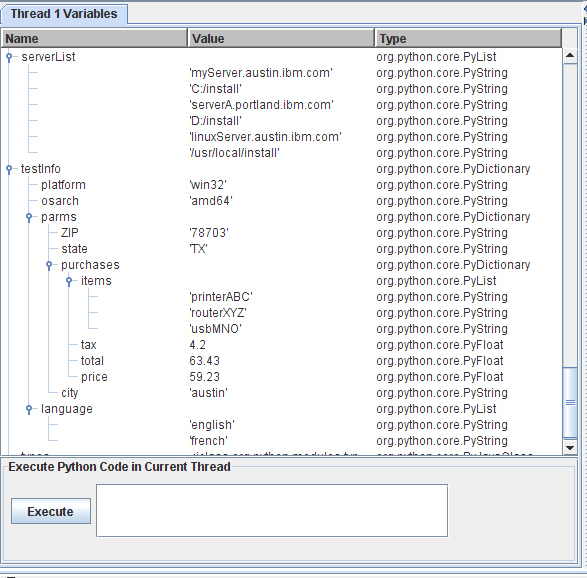
You can enter any Python code in the "Execute Python Code in Current Thread"
field. Clicking on "Execute" will submit a PYEXEC request for the selected thread.
If the PYEXEC request results in an error, a dialog will be displayed with the
error deteails. If the PYEXEC request is successful, a success dialog will be
displayed and then the table will be refreshed with the current variables defined
in the thread's Python interpreter
If you wanted to append another item to the "language" list in
the "testInfo" dictionary, and change the "tax" float value in the "purchases"
dictionary in the "parms" dictionary, you can add the following in "Execute
Python Code in Current Thread":

When you click on "Execute" you will get a popup indicating the request
was successful:

The "Thread Variables" view will automatically be refreshed. If you expand the
variables again, you will see the expected updates for "language" and "tax":

The "Thread 1 Information" tab will show the "QUERY THREAD" output in a table
format.

The "XML File" tab will diplay the XML file for the action the thread is currently
executing

The tab name will include the XML file path/name and the XML file
machine. The tab will show a text panel with the XML file contents, including
the line numbers (note that the line numbers are displayed in a right-justified
format, calculated based on the total number of lines in the XML file (i.e. if
the XML file contained 15345 lines, the first line number would show as " 1").
The text panel will automatically be scrolled to the line corresponding to the
action that the thread is currently executing; the line will also be highlighted.
If you scroll to another location in the XML file, you can right-click in
the text panel to get a popup menu item "Scroll to current line". Note that the
STAX Monitor needs a trust level 4 for the XML file machine so that it can retrieve
the file; if the STAX Monitor does not have a sufficient trust level, the RC 25
error will be displayed in the text panel.
Notes:
- When you start monitoring a job that is already executing,
the "Active Job Elements", "Processes", "STAFCmds", "Sub-jobs", "Debug", and
"TestCase Info" tabs will show the same information
as if you had been monitoring the job from its beginning. However,
the "Messages" tab only displays messages that have occurred after you started
monitoring the job.
- All of the tables in the Job Monitor are sortable:
- To sort the table in ascending order by a column, click on the table's column header for that column.
- To sort the table in descending order by a column, hold the Shift key while clicking on the table's
column header for that column.
There are several menu options to display Job Logs. Here is an example of the dialog that is shown when a Log is displayed.

The File menu bar contains the following menu items:
- Save As Text... - Displays a dialog that allows you to select
a file name where the formatted output will be saved and formats
the log as text, where the timestamp, level, and message fields
for each log record are printed in a single line with the fields
separated by a space.
- Save As Html... - Displays a dialog that allows you to select
a file name where the formatted output will be saved and formats
the log as html. The html document will have a title containing
the STAF LOG QUERY request that was submitted and will contain a
table with three columns (timestamp, level, and message) where
each row contains a log record. It will use the font specified
for the Log Viewer.
- Exit - This option closes the Job Log.
Note: If you want to set the directory name that will be
displayed as the default directory when the "Save As Text..." or
"Save As Html..." menu item is selected, you need to set the
"Log Viewer Save As Directory" field via the STAX Monitor Properties
panel (on the "Options" tab) and save this property change.
The View menu bar contains the following menu items:
- Refresh - This option refreshes the Job Log (the latest log
information will be queried and the table will be updated).
- Change Font... - Displays a dialog that allows you to change the font
for the log records. Note that this font change is only while you're
viewing this log.
To change the font to be used when displaying any STAX log, you need to
select the "Log Viewer Font Name" via the STAX Monitor Properties panel
(on the "Options" tab) and save this property change.
The Levels menu bar contains the following menu items (note that when any of the level options are changed, the information in the table will be refreshed with the latest information from the Log):
- All - Selecting this option controls whether all of the log levels will be displayed in the table.
- Fatal - Selecting this option controls whether Fatal log messages will be displayed in the table.
- Error - Selecting this option controls whether Error log messages will be displayed in the table.
- Warning - Selecting this option controls whether Warning log messages will be diplayed in the table.
- Info - Selecting this option controls whether Info log messages will be displayed in the table.
- Trace - Selecting this option controls whether Trace log messages will be displayed in the table.
- Trace2 - Selecting this option controls whether Trace2 log messages will be displayed in the table.
- Trace3 - Selecting this option controls whether Trace3 log messages will be displayed in the table.
- Debug - Selecting this option controls whether Debug log messages will be displayed in the table.
- Debug2 - Selecting this option controls whether Debug2 log messages will be displayed in the table.
- Debug3 - Selecting this option controls whether Debug3 log messages will be displayed in the table.
- Start - Selecting this option controls whether Start log messages will be displayed in the table.
- Stop - Selecting this option controls whether Stop log messages will be displayed in the table.
- Pass - Selecting this option controls whether Pass log messages will be displayed in the table.
- Fail - Selecting this option controls whether Fail log messages will be diplayed in the table.
- Status - Selecting this option controls whether Status log messages will be displayed in the table.
- User1 - Selecting this option controls whether User1 log messages will be displayed in the table.
- User2 - Selecting this option controls whether User2 log messages will be displayed in the table.
- User3 - Selecting this option controls whether User3 log messages will be displayed in the table.
- User4 - Selecting this option controls whether User4 log messages will be displayed in the table.
- User5 - Selecting this option controls whether User5 log messages will be displayed in the table.
- User6 - Selecting this option controls whether User6 log messages will be displayed in the table.
- User7 - Selecting this option controls whether User7 log messages will be displayed in the table.
- User8 - Selecting this option controls whether User8 log messages will be displayed in the table.
You can select the font name used when displaying log information via the
"Log Viewer Font Name" on the "Options" tab of the STAX Monitor Properties
panel. Here is an example of the dialog that is shown when a Log is displayed
if you selected "Monospaced" for the "Log Viewer Font Name":

Each Java service that is registered with STAF runs in a JVM (Java Virtual Machine).
Each JVM created by STAF has a JVM Log file associated with it. Note that more
than one Java service may use the same JVM (and thus the same JVM Log file)
depending on the options used when registering the service.
A JVM Log file contains JVM start information such as the date/time when the JVM
was created, the JVM executable, and the J2 options used to start the JVM.
It also contains any other information logged by the JVM. This includes any
errors that may have occurred while the JVM was running.
Also, the output from any print statements that you use within a <script> element
in a STAX xml file can be be written to the STAX JVM Log if the "Python Output"
setting for the STAX job is set to "JVMLog". The default value for "Python Output"
in the STAX Job User Log.
STAF stores JVM Log files in the {STAF/DataDir}/lang/java/jvm/<JVMName> directory.
STAF retains a configurable number of JVM Logs (5 by default) for each JVM.
The current JVM log file is named JVMLog.1 and older saved JVM log files, if any,
are named JVMLog.2 to JVMLog.<MAXLOGS>. When a JVM is started, if the size of
the JVMLog.1 file exceeds the maximum configurable size (1M by default), the
JVMLog.1 file is copied to JVMLog.2 and so on for any older JVM Logs, and a new
JVMLog.1 file will be created.
Following is the STAX Job Monitor window with the Display menu bar selected:

To display the JVM Log for the STAX service or for any Java service
on any machine, from the main STAX Job Monitor window's Display menu bar,
select one of the following menu items:
- Display STAX JVM Log - Selecting this option causes the current JVM Log
for the STAX service to be displayed. Only the entries in the JVM Log from the last time
the JVM was created are shown (though you can later use the "View->Show All" option to
change it to display all entries in the JVM Log).
This option is only enabled if STAF V3.2.1 or later is running on the STAX Monitor machine.
- Display Other JVM Log... - Selecting this option allows you to display the
current JVM Log for any service currently registered on any machine.
This option is only enabled if STAF V3.2.1 or later is running on the STAX Monitor machine.
Here is an example of the dialog that could be shown when you select the
Display STAX JVM Log menu item:

If you select the Display Other JVM Log... option, the following dialog is
displayed so you can enter the machine endpoint where the STAF Java service
whose JVM Log you want to display is currently registered.
The default machine is the STAX Service machine that the STAX Monitor is
configured to use.

Once you enter the machine name and select the OK button, the following dialog is
displayed which shows a list of Java services currently registered
on that machine.

Click on the drop-down list to see all of the Java services registered on
this machine. Select a Java service, and then select the OK button to display
the JVM Log for this Java service.
Here is an example of the dialog that is shown when the STAX JVM Log for machine
staf3f is displayed along with the menu items on the View menu bar:

The File menu bar contains the following menu items:
- Exit - This option closes the JVM Log Viewer.
The View menu bar contains the following menu items:
- Refresh - This option refreshes the JVM Log (i.e. the latest JVM
Log information will be displayed) and scrolls down to the end of
the JVM Log.
- Show Current - This option displays only the entries in the
JVM Log from the "current" JVM (the JVM that is currently running).
- Show All - This option displays all of the entries in the JVM Log
This includes logs from any previous times the JVM was created,
instead of just the entries from the current JVM.
- Select JVM Log Name... - This option displays a dialog which allows
you to select a different JVM Log to display if older saved JVM Logs are
available.
- Change Font - This option displays a dialog which allows you to
change the font used when displaying the JVM Log file. The default font
used is the Monospaced font.
Changing the font also refreshes the JVM Log (i.e. the latest JVM Log
information will be displayed) and scrolls down to the end of the JVM Log.
STAX uses the STAF Log Service for logging, so the Log Service must be registered in
order for STAX logs to be created.
There are three types of STAX logs:
- STAX service log - This log contains messages generated by the STAX Service
for all jobs. This log contains a start and stop message for each STAX Job.
The job start message includes additional information about the job such as job ID,
XML file name, machine name, starting function, job name, and arguments passed to the
starting function.
- STAX job logs - There is a STAX job log generated by the STAX Service for
each STAX job ID. Each log contains messages for the job such as a start and stop
message for the job. In addition, a message is logged if:
- A job is held, released, or terminated.
- A signal is raised by the STAX service during job execution and the
default signal handler is invoked.
- A <tcstatus> element or UPDATE request for a testcase is successfully
executed, and a message (additional information about the testcase status)
was specified with a Pass or Fail status. This logs a message with level
"Pass" or "Fail" (based on the testcase status) and the format of the
message text is:
Testcase: <Testcase Name>, Pass: <NumPasses>, Fail: <NumFails>, Last Status: <Last Status>, Message: <Message>
- If "Log TC Start/Stop" is enabled for the job and a <testcase> element is encountered or
a START request for a testcase is successfully executed. This logs a message
with level "Start" and the format of the message text is:
Testcase: <Testcase Name>
- If "Log TC Start/Stop" is enabled for the job and a </testcase> element is encountered or
a STOP request for a testcase is successfully executed.
This logs a message with level "Stop" and the format of the message text is:
Testcase: <Testcase Name>, ElapsedTime: <Elapsed Time>"
- A job terminates, a summary of the number of times each testcase passed or
failed is logged with level "Status". If "Log TC Elapsed Time" is enabled
for the job, the elapsed time for each testcase is also logged.
If "Log TC Num Starts" is enabled for the job, the number of times each
testcase was started is also logged. The format of the message text is:
Testcase: <Testcase Name>, Pass: <NumPasses>, Fail: <NumFails>[, ElapsedTime: <ElapsedTime>][, NumStarts: <NumStarts>]
Notes:
- If the default mode is specified for a testcase for which no passes
or fails were recorded, no summary for that testcase is logged.
- If a testcase is started more than once via a <testcase> element or a
START testcase request, the elapsed times for each testcase started
are accumulated. So, it is possible that the elapsed time for a testcase
is more than the elapsed time for a job if the same testcase is run
in parallel multiple times.
- The format for elapsed time is HH:MM:SS or if the elapsed time exceeds
99 hours, the format is: HHH:MM:SS.
- A job terminates, a summary of the job's total number of testcases, passes, and fails is logged.
- STAX job user logs - If a STAX job uses the <log> element or
the <message log="1"> element, or if a LOG MESSAGE request is submitted
for the job, then a STAX job user log is generated for the job ID.
The message is written to this log. STAF variables are allowed in the
message. However, they will only be resolved if one of the STAF Log service
options which specify to resolve variables is set.
Note: The maximum length of a message logged to all STAF logs, including
STAX job and job user logs, is controlled by the STAF Log service's MaxRecordSize
setting. The default MaxRecordSize for the STAF Log service is 100K (100,000
characters). It is possible that a STAX job may try to log a message that is
longer than 100K, so the STAX service automatically increases the Log service's
MaxRecordSize to 1M (1,048,576 characters) if it is set to a smaller value.
For example, if a STAX job contains a <script> element which consists of more
than 100K of Python code, when a STAXPythonEvaluationError signal is raised, a
message is written to the STAX job log which includes all the Python code
contained in the <script> element where the error occurred, as well as the
line number and a description of the problem. So, if the MaxRecordSize was not
increased, the message logged would be truncated and important information for
fixing the error could be missing. If desired, you can increase the maximum log
record size even more. See the "Log Service" section in the STAF User's Guide for
how to specify a MAXRECORDSIZE parameter when registering the Log service in the
STAF.cfg file or to dynamically change it by submitting a SET MAXRECORDSIZE
request to the Log service.
The STAX logs are machine logs. The names of the STAX logs begin with the
STAX service name in uppercase (e.g. STAX). To get a list of all the logs on a STAX service machine named
"stax1.company.com", use the following STAF log list request.
The log files listed whose name begins with STAX are the STAX logs. For example:
STAF stax1.company.com LOG LIST MACHINE {STAF/Config/MachineNickname}
An example of output from listing STAX logs is:
Log Name         Date-Time         Size
---------------- ----------------- ------
STAX_Service     20130510-11:54:50 558601
STAX_Job_1       20130510-11:52:48 597216
STAX_Job_1_User  20130510-11:52:48 228688
STAX_Job_2       20130510-11:53:26 223540
STAX_Job_3       20130510-11:54:34 198001
STAX_Job_3_User  20130510-11:54:34 56788
STAX_Job_4       20130510-11:54:50 76624
STAX_Job_4_User  20130510-11:54:50 13111
To query a STAX service log, use the following STAF log query machine request
(assuming STAX is the registered name for the service):
STAF -verbose stax1 LOG QUERY MACHINE {STAF/Config/MachineNickname} LOGNAME STAX_Service
An example of the output from a query of a STAX service log is:
Response
--------
[
{
Date-Time: 20151213-09:26:14
Level : Info
Message :
Registered Extensions for STAX Version 3.5.17:
Jar File Name : C:\STAF\services\ExtDelay.jar
Version : 1.0.0
Description : Delay STAX Extensions
Parameter #1 : delay=5
Service Version Prereq: 1.5.0
Element Name #1 : ext-delay
Element Name #2 : ext-sleep
Element Name #3 : ext-wait
Monitor Version Prereq: 1.5.0
Monitor Extension #1 : ext-delay
Jar File Name : C:\STAF\services\mts\ManualTestExt.jar
Version : 3.0.0
Description : Manual Test System (MTS) STAX Extensions
Parameter #1 : servicename=MTS
Parameter #2 : servicemachine=lucas
Service Version Prereq: 3.0.0
Element Name #1 : manual-test
Monitor Version Prereq: 3.0.0
Monitor Extension #1 : manual-test
}
{
Date-Time: 20151213-16:36:51
Level : Start
Message : JobID: 1, File: c:\dev\src\stax\testSignalCallStack.xml, Machine:
local://local, Function: Main, Args: null, JobName: Signal Call Stack
}
{
Date-Time: 20151213-16:36:58
Level : Stop
Message : JobID: 1
}
{
Date-Time: 20151213-16:43:43
Level : Start
Message : JobID: 2, File: c:\dev\src\stax\STAFTest.xml, Machine: tcp://clie
nt1.austin.ibm.com, Function: DoAll, Args: [1, 2], JobName: STAFTest
}
{
Date-Time: 20151213-16:43:56
Level : Stop
Message : JobID: 2
}
]
To query a STAX job log for Job ID 45, use the following STAF log query machine
request (assuming stax1 is the STAX service machine and STAX is the registered
name for the service):
STAF stax1 LOG QUERY MACHINE {STAF/Config/MachineNickname} LOGNAME STAX_Job_45
An example of the output from a query of a STAX job log is:
Response
--------
Date-Time Level Message
--------- ------ --------------------------------------------------------------
20041201- Start JobID: 45, File: c:\dev\src\stax\job1.xml, Machine: stax1.aust
13:43:14 in.ibm.com, Function: Main, Args: null, JobName: Job Test
20041201- Info Holding block: main
13:43:14
20041201- Info Received RELEASE BLOCK main request
13:43:15
20041201- Info Releasing block: main
13:43:15
20041201- Fail Testcase: Fail Tests, Pass: 0, Fail: 1, Last Status: fail, Mes
13:43:17 sage: Sub-job "Fail Test 1" could not be started. RC: 4001 ST
AFResult: Caught com.ibm.staf.service.stax.STAXXMLParseExcepti
on: Line 7: Element type "unknown" must be declared. STAXResu
lt: None STAXSubJobID: 0
20041201- Fail Testcase: Fail Tests, Pass: 0, Fail: 2, Last Status: fail, Mes
13:43:18 sage: Sub-job "Fail Test 2" could not be started. RC: 48 STAF
Result: C:/dev/src/stax/DoesNotExist.xml STAXResult: None STAX
SubJobID: 0
20041201- Fail Testcase: Fail Tests, Pass: 0, Fail: 3, Last Status: fail, Mes
13:43:18 sage: Sub-job "Fail Test 3" could not be started. RC: 13 STAF
Result: MySubJobFileName STAXResult: None STAXSubJobID: 0
20041201- Fail Testcase: Fail Tests, Pass: 0, Fail: 4, Last Status: fail, Mes
13:43:20 sage: Sub-job "Fail Test 4" (Job ID 51) failed. STAXResult: N
one
20041201- Fail Testcase: Test A, Pass: 0, Fail: 1, Last Status: fail, Message
13:43:44 : Sub-job "Test A" (Job ID 46) failed. STAXResult: None
20041201- Status Testcase: Fail Tests, Pass: 0, Fail: 4, ElapsedTime: 00:00:03,
13:43:45 NumStarts: 1
20041201- Status Testcase: Test A, Pass: 0, Fail: 1, ElapsedTime: 00:00:30, Num
13:43:45 Starts: 1
20041201- Status Testcase: Test B, Pass: 1, Fail: 0, ElapsedTime: 00:00:13, Num
13:43:45 Starts: 1
20041201- Status Testcase: Test C, Pass: 1, Fail: 0, ElapsedTime: 00:00:13, Num
13:43:45 Starts: 1
20041201- Status Testcase: Test D, Pass: 1, Fail: 0, ElapsedTime: 00:00:03, Num
13:43:45 Starts: 1
20041201- Status Testcase: Test E, Pass: 1, Fail: 0, ElapsedTime: 00:00:06, Num
13:43:45 Starts: 1
20041201- Status Testcase Totals: Tests: 6, Pass: 4, Fail: 5
13:43:45
20041201- Stop JobID: 45
13:43:45
To query a STAX job log for Job ID 2, but just its last "Testcase Totals:" entry,
use the following STAF log query machine request (assuming stax1 is the STAX service machine
and STAX is the registered name for the service):
STAF stax1 LOG QUERY MACHINE {STAF/Config/MachineNickname} LOGNAME STAX_Job_2 CONTAINS "Testcase Totals:" LAST 1
An example of the output from this query of a STAX job log is:
Response
--------
Date-Time Level Message
----------------- ------ -------------------------------------------
20041201-13:43:01 Status Testcase Totals: Tests: 3, Pass: 2, Fail: 7
Note that if you have not enabled the CLEARLOGS option and you have not disabled
the RESETJOBID parameter when registering the STAX service, logs for from multiple
STAX job runs can be contained in a single logfile, so you may want to use
additional options in your LOG QUERY request to refine the query. For example,
to display only the log information for the last STAX Job in the log, you can
use the FROM option, specifying the date/time that the last STAX job
began.
STAF stax1 LOG QUERY MACHINE {STAF/Config/MachineNickname} LOGNAME STAX_Job_2 FROM 200412-1@13:43:14 ALL
To query a STAX job user log for Job ID 3, use the following STAF log query machine request
(assuming stax1.austin.ibm.com is the STAX service machine and STAX is the registered
name for the service):
STAF stax1.austin.ibm.com LOG QUERY MACHINE {STAF/Config/MachineNickname} LOGNAME STAX_Job_3_User
An example of the output from a query of a STAX job user log is:
Response
--------
Date-Time Level Message
----------------- ------ ----------------------------------------------
20041208-11:16:46 Start Starting the STAXMonitor test on machine machA
20041208-11:16:51 Info TestProcess on machine machA RC = 0
20041208-11:16:51 Info Delaying 1453 on machine machA
20041208-11:16:53 Info Machine machA is running STAF Version 3.0.0
20041208-11:16:57 Info TestProcess on machine machA RC = 1
20041208-11:17:04 Stop Finished the STAXMonitor Test on machine machA
Note that if you have not enabled the CLEARLOGS option and you have not disabled
the RESETJOBID parameter when registering the STAX service, logs from multiple STAX
job runs can be contained in a single logfile, so you may want to use additional
options in your LOG QUERY request to refine the query. For example, to display
only the log information for the last STAX Job in the log, you can use the FROM <Timestamp>
option, specifying the date/time that the last STAX job began, e.g. FROM 20041208-11:16:46.
You can use the STAX Monitor Java application to display STAX logs in a formatted, graphical
representation. Refer to the "STAX Monitoring" section
for more information on how to display a STAX log using the STAX Monitor.
Note that only the log information for the last STAX Job in the log is displayed.
Or, you can use the STAX Log Viewer Java application,
com.ibm.staf.service.stax.STAXMonitorLogViewer, provided in
the STAXMon.jar file. You can run the STAX Log Viewer Java application
independently from the STAX Monitor.
When running this Java application, make sure that the STAXMon.jar
and JSTAF.jar files are in your classpath and then type the following
(the class name is case sensitive) to get help for running the STAX Log Viewer:
java com.ibm.staf.service.stax.STAXMonitorLogViewer -help
Or you can specify the fully-qualified names of the STAXMon.jar and JSTAF.jar files
using the -cp (classpath) parameter when running the STAX Log Viewer.
For example:
java -cp C:\STAF\services\stax\STAXMon.jar;C:\STAF\lib\JSTAF.jar com.ibm.staf.service.stax.STAXMonitorLogViewer -help
The STAX Log Viewer accepts the following command line parameters:
-name <STAX Log Name>
-machine <STAX Service Machine Name>
-machineNickname <STAX Service Machine Nickname>
-fontName <Font Name>
-help
-version
You must specify either -name <STAX Log Name> or -help or -version.
-name specifies the name of an existing STAX Job log to display.
This option will resolve variables. This parameter is required.
You can specify the name of a STAX Job log (e.g. STAX_Job_1), a STAX Job User
log (e.g. STAX_Job_1_User), or the STAX Service log (e.g. STAX_Service).
-machine specifies the name of the machine where the STAX logs are located.
This option will resolve variables. This parameter is optional.
The default is local.
-machineNickname specifies the machine nickname for the STAX service machine.
This option will resolve variables. This parameter is optional.
The default is {STAF/Config/MachineNickname}.
-fontName specifies the name of the font to use when displaying the STAX log.
This parameter is optional. The default is Dialog.
-help displays help information for the STAX Log Viewer.
This parameter is optional.
-version displays the version of the STAX Log Viewer.
This parameter is optional.
Note that only the log information for the last STAX Job in the log is displayed.
Examples Starting the STAX Job Viewer
- Start the STAX Job Viewer specifying to display the STAX Job log on the local machine
for STAX job 1:
java com.ibm.staf.service.stax.STAXMonitorLogViewer -name STAX_Job_1
- Start the STAX Job Viewer specifying to display the STAX Job User log for STAX job 2 on
STAX service machine server1.company.com:
java com.ibm.staf.service.stax.STAXMonitorLogViewer -name STAX_Job_2_User -machine server1.company.com
- Start the STAX Job Viewer specifying to display the STAX Service log on
STAX service machine server1:
java com.ibm.staf.service.stax.STAXMonitorLogViewer -name STAX_Service -machine server1
- Start the STAX Job Viewer speicfying to display the STAX Job log for STAX job 3
on machine server1 using a Monospaced font:
java com.ibm.staf.service.stax.STAXMonitorLogViewer -name STAX_Job_3 -machine server1 -fontName Monospaced
The STAFLogFormatter class allows you to format a STAX log (which
is a binary file that has been created by the STAF Log service) as html
or text.
This Java class can be run as an application via the command line or can be
run via another Java program. When run as an application, it submits the
specified Log query request to query a STAF log on any machine currently
running STAF and then formats the output as either html or text.
Or, when run via a Java program that has already submitted a LOG QUERY request,
you can use the STAFLogFormatter class to format the log query result
as either html or text. You can specify various options including whether you
want the formatted output written to a file.
For more detailed information on using the STAFLogFormatter class,
see section "3.6.3 Class STAFLogFormatter" in the
STAF Java User's Guide.
Note that you can also format a STAX log as html or text in a file using the STAX Monitor.
Refer to the "Displaying a Job Log" section
for more information on how to display a STAX log using the STAX Monitor and
then click on File->Save As Html... or File->Save As Text... to
save the STAX log formatted as html or as text in a file.
Here's an example of the contents of the STAX Job Log for a job run with "Log TC Elapsed Time",
"Log TC Num Starts", and "Log TC Start/Stop" enabled. Note that "Start" and "Stop" records
are logged each time a testcase begins and ends and the elapsed time and number of starts
for each testcase are provided in the "Status" records written at the end of the job.
This also shows how the log is displayed via the STAX Monitor.

The following variables are set in Python during Job Execution by the STAX service and can be
referenced by your job definition. However, do not change their values.
- RC
- Description: the return code from a <stafcmd>, <process>, <job>,
or <timer> element
- Assigned: each time a <stafcmd>, <process>, <job>, or <timer> element
completes
- Type: numeric. Note that the actual return code from a <process> element (if an error
starting the process did not occur) is a PyLong numeric type (e.g 0L, 25L). In other cases,
the return code will be a PyInteger type.
- STAFResult
- Description: the result from a <stafcmd>, <process>, or <job> element
- Assigned: each time a <stafcmd>, <process>, or <job> element completes
- Type: string, PyList, or PyDictionary (aka Map)
- STAFResultContext
- Description: the marshalling context object for the result from a <stafcmd> element.
Its string representation is equivalent to the "verbose format" (the hierarchical
nested format) provided by the STAF executable.
- Assigned: each time a <stafcmd> element completes
- Type: org.python.core.PyInstance
- STAFResultString
- Description: the result string from a <stafcmd> element. If the result is marshalled,
it is the marshalled result string.
- Assigned: each time a <stafcmd> element completes
- Type: string
- STAFRC
- Description: the alias for the imported com.ibm.staf.STAFResult Java class. It
contains constant definitions for STAF return codes (e.g. STAFRC.Ok, STAFRC.DoesNotExist).
For more information on the STAFRC alias for the com.ibm.staf.STAFResult Java class,
see the STAF Java Classes (STAFUtil, STAFRC, STAFVersion, etc)
section.
- Assigned: at the beginning of the execution of a STAX job
- Type: Java class com.ibm.staf.STAFResult
- STAXResult
- Description: the result from a function <call>, <call-with-list>, <call-with-map>,
<process>, <job>, or <import> element
- Assigned: each time a <call>, <call-with-list>, <call-with-map>, <process>,
<job>, or <import> element completes
- Type: anything (integer, string, variable, list, nothing, etc.)
- STAXBlockRC
- Description: the return code from a <block> element
- Assigned: each time a <block> element completes
- Type: numeric.
- STAXJobID
- Description: the Job ID of the STAX job
- Assigned: at the beginning of the execution of a STAX job
- Type: numeric
- STAXSubJobID
- Description: the Job ID of the STAX sub-job (executed via a <job> element)
- Assigned: each time a <job> element begins
- Type: numeric
- STAXSubJobStatus
- Description: the completion status of the STAX sub-job (executed via a <job>
element)
- Assigned: each time a <job> element completes
- Type: string
- STAXJobName
- Description: the name of the job specified on the EXECUTE request
- Assigned: at the beginning of the execution of a STAX job
- Type: string
- STAXJobWriteLocation
- Description: the name of a directory on the STAX service machine that the
job can use to store data in
- Assigned: at the beginning of the execution of a STAX job
- Type: string
- STAXJobXMLFile
- Description: the fully qualified name of the file containing the XML document; this is
the value of the FILE parameter, if specified, on the EXECUTE request; otherwise,
if DATA <xml data> was specified on the EXECUTE request instead of FILE, it is set
to "<inline data>"
- Assigned: at the beginning of the execution of a STAX job
- Type: string
- STAXJobXMLMachine
- Description: the machine where the file containing the XML document is located; this is
the value of the MACHINE parameter, if specified, on the EXECUTE request; if not specified,
then it is the endpoint of the machine submitting the EXECUTE request
- Assigned: at the beginning of the execution of a STAX job
- Type: string
- STAXJobSourceMachine
- Description: the endpoint of the machine submitting the EXECUTE request
- Assigned: at the beginning of the execution of a STAX job
- Type: string
- STAXJobSourceHandle
- Description: the handle of the process submitting the EXECUTE request
- Assigned: at the beginning of the execution of a STAX job
- Type: numeric
- STAXJobSourceHandleName
- Description: the name of the handle of the process submitting the EXECUTE request
- Assigned: at the beginning of the execution of a STAX job
- Type: string
- STAXJobScriptFileMachine
- Description: the endpoint for the machine where the script files
are located. This is the value of the SCRIPTFILEMACHINE parameter,
if specified, on the EXECUTE request. If the SCRIPTFILEMACHINE
parameter was not specified on an EXECUTE request, it defaults to the
value specified for the the MACHINE option on the EXECUTE request.
If the MACHINE option was not specified, it assumes the script file(s)
are on the machine submitting the STAX EXECUTE request.
- Assigned: at the beginning of the execution of a STAX job
- Type: string
- STAXJobScriptFiles
- Description: a list of names of script files; this is a list of the values
of the SCRIPTFILE parameter(s), if specified, on the EXECUTE request; if no
SCRIPTFILE parameters are specified, then it is an empty list
- Assigned: at the beginning of the execution of a STAX job
- Type: PyArray
- STAXJobStartDate
- Description: the date the job started in format yyyymmdd
- Assigned: at the beginning of the execution of a STAX job
- Type: string
- STAXJobStartTime
- Description: the time the job started in format hh:mm:ss
- Assigned: at the beginning of the execution of a STAX job
- Type: string
- STAXJobStartFunctionName
- Description: the name of the starting function for the STAX job
- Assigned: at the beginning of the execution of a STAX job
- Type: string
- STAXJobStartFunctionArgs
- Description: the arguments passed to the starting function for the STAX job
(in string format)
- Assigned: at the beginning of the execution of a STAX job
- Type: string
- STAXJobUserLog
- STAXThreadID
- Description: the Thread ID currently running
- Assigned: at the creation of a new Thread. For example, a new thread is created when a job begins execution,
when each task element contained in a <parallel> element is executed, and when each iteration of the task element
contained in a <paralleliterate> element is executed.
- Type: numeric
- STAXCurrentFunction
- Description: the name of the current STAX function running in a thread
- Assigned: when calling a STAX function (e.g. upon encountering
a <call name="..."> element.
- Type: string
- STAXCurrentXMLFile
- Description: the name of the xml file that contains the STAX function
that's currently running in a thread. If the current STAX function was not
provided via a file by instead via the DATA option on an EXECUTE request,
it is set to "<inline data>".
- Assigned: at the beginning of the execution of a STAX job and each time a
STAX function is called (e.g. upon encountering a <call name="..."> element.
- Type: string
- STAXCurrentXMLMachine
- Description: the machine where the xml file resides that contains the
STAX function that's currently running in a thread.
- Assigned: at the beginning of the execution of a STAX job and each time a
STAX function is called (e.g. upon encountering a <call name="..."> element.
- Type: string
- STAXCurrentBlock
- Description: the name of the current block running in a thread
- Assigned: when entering a block (e.g. upon encountering
a <block name="..."> element and when entering the default 'main' block).
- Type: string
- STAXCurrentTestcase
- Description: the name of the current testcase running in a thread
- Assigned: when entering a testcase (e.g. upon encountering
a <testcase name="..."> element). If no testcase is currently running, then
it is assigned None (a special object provided by Python which serves as an empty
placeholder, much like null in Java).
- Type: string
- STAXProcessHandle
- Description: the process handle
- Assigned: when the process has started executing. Only the <process-action> element
can use this variable to access the handle for its process.
- Type: string
- STAXServiceName
- Description: the registered name of the STAX service executing the job
- Assigned: at the beginning of the execution of a STAX job
- Type: string
- STAXServiceMachine
- Description: the machine name (logical machine identifier) of the STAX service machine (the local machine)
- Assigned: at the beginning of the execution of a STAX job
- Type: string
- STAXServiceMachineNickname
- Description: the machine nickname of the STAX service machine (the local machine).
It can be useful when querying STAX job logs, etc.
- Assigned: at the beginning of the execution of a STAX job
- Type: string
- STAXServicePath
- Description: the directory containing the STAX service jar file
- Assigned: at the beginning of the execution of a STAX job
- Type: string
- STAXEventServiceName
- Description: the registered name of the Event service (to which the
STAX service submits requests)
- Assigned: at the beginning of the execution of a STAX job
- Type: string
- STAXEventServiceMachine
- Description: the machine name of the Event service machine
- Assigned: at the beginning of the execution of a STAX job
- Type: string
- STAXJobLogName
- Description: the name of the STAX job log for the current job (e.g. STAX_Job_1)
- Assigned: at the beginning of the execution of a STAX job
- Type: string
- STAXJobUserLogName
- Description: the name of the STAX job user log for the current job (e.g. STAX_Job_1_User)
- Assigned: at the beginning of the execution of a STAX job
- Type: string
- STAXMessageLog
- Description: a flag indicating if the message being logged via a <log> element
should also be sent to the STAX Monitor's message panel (if the message attribute is
not specified for a <log> element.
1 indicates to send the message to the STAX Monitor;
0 indicates not to send the message to the STAX Monitor.
Defaults ot 0.
- Assigned: at the beginning of the execution of a STAX job
- Type: numeric (0 or 1)
- STAXLogMessage
- Description: a flag indicating if the message being sent to the STAX Monitor's message
panel via a <message> element should also be logged to the STAX Job User log
(if the log attribute is not specified for a <message> element.
1 indicates to log the message; 0 indicates not to log the messages.
Defaults ot 0.
- Assigned: at the beginning of the execution of a STAX job
- Type: numeric (0 or 1)
- STAXLogTCElapsedTime
- Description: a flag indicating if "Log TC Elapsed Time" is enabled or disabled for the
STAX job. 1 means enabled; 0 means disabled.
- Assigned: once at the beginning of the execution of a STAX job
- Type: numeric (0 or 1)
- STAXLogTCNumStarts
- Description: a flag indicating if "Log TC Num Starts" is enabled or disabled for the
STAX job. 1 means enabled; 0 means disabled.
- Assigned: once at the beginning of the execution of a STAX job
- Type: numeric (0 or 1)
- STAXLogTCStartStop
- Description: a flag indicating if "Log TC Start/Stop" is enabled or disabled for the
STAX job. 1 means enabled; 0 means disabled.
- Assigned: once at the beginning of the execution of a STAX job
- Type: numeric (0 or 1)
- STAXPythonOutput
- Description: the value specified for "Python Output" for the STAX job
('e.g. 'JobUserLog', 'Message', 'JobUserLogAndMsg', or 'JVMLog')
- Assigned: once at the beginning of the execution of a STAX job
- Type: string
- STAXPythonLogLevel
- Description: the value specified for "Python Log Level" for the STAX job
('e.g. 'Info', 'Error', 'User1', etc.)
- Assigned: once at the beginning of the execution of a STAX job
- Type: string
- STAXInvalidLogLevelAction
- Description: the value specified for "Invalid Log Level Action" for the
STAX job (e.g. 'RaiseSignal' or 'LogInfo')
- Assigned: once at the beginning of the execution of a STAX job
- Type: string
- STAXArg
- Description: the arguments passed when calling a function that did not define its
arguments (via <function-list-args>, <function-map-args>, etc.)
- Assigned: each time a <call>, <call-with-list>, <call-with-map> element
begins if the function being called did not define its arguments
- Type: anything (integer, string, variable, list, nothing, etc.)
The STAXGlobal class is a Python class which STAX provides as a wrapper to
provide for the creation of truly global variables, even across STAX-Threads
and when used in functions declared with a local scope.
Whenever a new STAX-Thread is created, existing variables are cloned from the parent
STAX-Thread. STAX elements that can create STAX-Threads include the
following:
- function elements with a local scope
- parallel
- paralleliterate
- process-action
- job-action
To create a global variable that can be accessed across STAX-Threads, create a
variables that is an instance of the STAXGlobal class.
A STAXGlobal variable allows you to modify it's value if it is passed into a
local-scoped function or if it is shared across multiple threads.
However, creating a STAXGlobal inside a local-scoped function
will not cause it to appear once that function has returned. Any variable
created within a local-scoped function will disappear when that function ends.
Normally, any updates to variables disappear as well, but STAXGlobals
allow updates to persist, so long as the STAXGlobal variable was created before
the local-scoped function was called.
The STAXGlobal class provides the following constructor and methods:
- STAXGlobal(value = None) - Constructs a new
instance of a STAXGlobal variable. If no value is specified, it's value
defaults to None.
- set(value) - Sets a value for the STAXGlobal variable
- get() - Returns the value for the STAXGlobal variable
Note that you will generally want to use a list to define a STAXGlobal variable
even if its value is just an integer or a string. For example, when function
Main (see below) is called, the message it displays is (2, 3, 3, 3, 3), not (3, 3, 3, 3, 3)
as you may have thought would be displayed.
<function name="Main" scope="local">
<sequence>
<script>
ctr = STAXGlobal(2) # Be careful if you don't use a list
gCtr = STAXGlobal([2]) # Instead, use a list to define
gCtr2 = STAXGlobal(2) # No list, but set method is used
gCtr3 = STAXGlobal(2) # No list, but set and get methods are used
gCtr4 = STAXGlobal(2) # Be careful if you don't use a list
</script>
<call function="'TestSTAXGlobal'"/>
<message>ctr, gCtr[0], gCtr2, gCtr3, gCtr4</message>
</sequence>
</function>
<function name="TestSTAXGlobal" scope="local">
<script>
ctr = ctr + 1 # Now ctr is bound to an integer
# object, not a STAXGlobal
gCtr[0] = gCtr[0] + 1 # Still a STAXGlobal
gCtr2.set(gCtr2 + 1) # Still a STAXGlobal
gCtr3.set(gCtr3.get() + 1) # Still a STAXGlobal
gCtr4 += 1 # Still a STAXGlobal
</script>
</function>
Note that STAXGlobal variables are not atomic across STAX-Threads. That is,
if you created the following STAX variable:
<script>gTestIndex = STAXGlobal([0])</script>
And then in a paralleliterate or in a parallel element you incremented
this variable as follows:
<script>gTestIndex[0] += 1</script>
If two STAX-Threads updated the counter at exactly the same time, you could
end up with the wrong value.
There are several ways to protect against this:
- If you had a STAF job that used paralleliterate element to run tests
on multiple machines in parallel and you wanted to keep track of the
total number of tests that ran successfully and the total number of
tests that failed, you can use a couple of STAXGlobal variables to
do this. However, to avoid problems if two STAX-Threads updated a
STAXGlobal variable at exactly the same time, instead of just having
one number that each STAX-Thread iteration updates, you could specify
that the STAXGlobal variable is a list (or map) where each entry in
the list keeps that keeps track of the number of testcases that ran
successfully or failed on each machine and then after the
paralleliterate completed, you could add those entries in the list
to get the total number of tests that passed and failed on all machines.
Since no two STAX-Threads are accessing the same entry in the list,
there isn't a synchronization issue.
<?xml version="1.0" encoding="UTF-8" standalone="no"?>
<!DOCTYPE stax SYSTEM "stax.dtd">
<stax>
<defaultcall function="Main"/>
<script>
# Create a testList of lots of tests for demonstration purposes.
# You would replace this list with your real tests.
numTests = 10
testList = []
for i in range(1, numTests + 1):
testList.append('Test%s' % (i))
machineList = [ 'machine1', 'machine2', 'machine3' ]
numMachines = len(machineList)
# Create a global variable that can be accessed across STAX
# Threads (as paralleliterate elements create a new STAX-thread).
# Set it's value to a list, where each entry in the list will
# contain the number of testcases that passes and failed.
gTestsRanList = STAXGlobal( [] ) # Create an empty list
for i in range(numMachines):
# Initialize each entry in the list to be a list of 0 passes and 0 fails
gTestsRanList.append([0, 0])
</script>
<function name="Main">
<function-prolog>
This function dispatches tests on machines. It runs a list of tests
sequentially on each of the machines in machineList in parallel.
</function-prolog>
<sequence>
<paralleliterate var="machine" in="machineList" indexvar="i">
<iterate var="test" in="testList">
<sequence>
<call function="'setupAndRunTestCase'">
{ 'testcase': test, 'testMachineName': machine }
</call>
<if expr="STAXResult == 'Success'">
<script>gTestsRanList[i][0] += 1</script>
<else>
<script>gTestsRanList[i][1] += 1</script>
</else>
</if>
</sequence>
</iterate>
</paralleliterate>
<script>
totalPasses = 0
totalFails = 0
for i in range(numMachines):
totalPasses += gTestsRanList[i][0]
totalFails += gTestsRanList[i][1]
</script>
<log message="1">'Total Passes: %s' % (totalPasses)</log>
<log message="1">'Total Fails : %s' % (totalFails)</log>
</sequence>
</function>
<function name="setupAndRunTestCase" scope="local">
<function-prolog>
For demonstration purposes, this function is simply delaying
for a random length of time to simulate running a testcase.
Replace this function with one that actually runs a testcase
via a process element.
</function-prolog>
<function-map-args>
<function-required-arg name="testcase"/>
<function-required-arg name="testMachineName"/>
</function-map-args>
<testcase name="testcase">
<sequence>
<log message="1">
'Running %s on machine %s' % (testcase, testMachineName)
</log>
<script>
maxDelay = 10000 # 10 seconds (in microseconds)
import random
randomDelay = random.choice(range(maxDelay))
</script>
<stafcmd name="'%s running on %s' % (testcase, testMachineName)">
<location>'local'</location>
<service>'DELAY'</service>
<request>'DELAY %s' % (randomDelay)</request>
</stafcmd>
<tcstatus result="'pass'"/>
<return>'Success'</return>
</sequence>
</testcase>
</function>
</stax>
- You may want to use the STAF SEM service to create a mutex semaphore
and use it to synchronize access to a STAXGlobal variable.
Here's a sample STAX job that dispatches tests on machines, keeping all
the machines busy, so that in parallel, each machine is running one test,
until there are no more tests to run. It uses a STAXGlobal variable
named gTestIndex to keep track of the index of the test to be run next
when a machine becomes available. This STAX job's synchronizes access
to gTestIndex via it's getNextIndex function. This function requests a
STAF mutex semaphore (with a unique name) before incrementing the
gTestIndex variable and then releases the mutex semaphore.
<?xml version="1.0" encoding="UTF-8" standalone="no"?>
<!DOCTYPE stax SYSTEM "stax.dtd">
<stax>
<defaultcall function="Main"/>
<script>
machineList = [ 'machine1', 'machine2', 'machine3' ]
# Create a testList of lots of tests for demonstration purposes.
# You would replace this list with your real tests.
numTests = 50
testList = []
for i in range(1, numTests + 1):
testList.append('Test%s' % (i))
</script>
<function name="Main">
<function-prolog>
This function dispatches tests on machines. It keeps all the
machines in machineList busy, so that in parallel, each machine
is running one test at a time from the testList until there are
no more tests to run.
</function-prolog>
<sequence>
<log message="1">
'Run %s tests on %s machines' % (len(testList), len(machineList))
</log>
<log message="1">'machineList: %s' % (machineList)</log>
<log message="1">'testList: %s' % (testList)</log>
<script>
# Create a global variable that can be accessed across STAX
# Threads (as paralleliterate elements create a new STAX-thread).
# Note that you will generally want to use a list to define a
# STAXGlobal variable even if its value is just an integer or
# string.
gTestIndex = STAXGlobal( [0] )
</script>
<paralleliterate var="machine" in="machineList">
<sequence>
<script>numTestsRun = 0</script>
<loop>
<sequence>
<call function="'getNextTestIndex'"/>
<script>testIndex = STAXResult</script>
<if expr="testIndex >= len(testList)">
<break/>
</if>
<call function="'setupAndRunTestCase'">
{
'testcase': testList[testIndex],
'testMachineName': machine
}
</call>
<script>numTestsRun += 1</script>
</sequence>
</loop>
<log message="1">
'Ran %s tests on machine %s' % (numTestsRun, machine)
</log>
</sequence>
</paralleliterate>
</sequence>
</function>
<function name="getNextIndex" scope="local">
<function-prolog>
This function returns the index of the next test to be run.
It uses the STAF SEM service to create a mutex semaphore to
synchronize access to gTestIndex (a STAXGlobal variable).
</function-prolog>
<sequence>
<stafcmd>
<location>'local'</location>
<service>'SEM'</service>
<request>'REQUEST MUTEX DispatchTest/TestIndexSem TIMEOUT 30000'</request>
</stafcmd>
<if expr="RC != 0">
<sequence>
<log message="1">
'Request TestIndexSem mutex semaphore failed: RC=%s Result=%s' % \
(RC, STAFResult)
</log>
<terminate block="'main'"/>
</sequence>
</if>
<script>
saveTestIndex = gTestIndex[0]
gTestIndex[0] += 1
</script>
<stafcmd>
<location>'local'</location>
<service>'SEM'</service>
<request>'RELEASE MUTEX DispatchTest/TestIndexSem'</request>
</stafcmd>
<if expr="RC != 0">
<sequence>
<log message="1">
'Release TestIndexSem mutex semaphore failed: RC=%s Result=%s' % \
(RC, STAFResult)
</log>
<terminate block="'main'"/>
</sequence>
</if>
<return>saveTestIndex</return>
</sequence>
</function>
<function name="setupAndRunTestCase" scope="local">
<function-prolog>
For demonstration purposes, this function is simply delaying
for a random length of time to simulate running a testcase.
Replace this function with one that actually runs a testcase
via a process element.
</function-prolog>
<function-map-args>
<function-required-arg name="testcase"/>
<function-required-arg name="testMachineName"/>
</function-map-args>
<testcase name="testcase">
<sequence>
<log message="1">
'Running %s on machine %s' % (testcase, testMachineName)
</log>
<script>
maxDelay = 10000 # 10 seconds (in microseconds)
import random
randomDelay = random.choice(range(maxDelay))
</script>
<stafcmd name="'%s running on %s' % (testcase, testMachineName)">
<location>'local'</location>
<service>'DELAY'</service>
<request>'DELAY %s' % (randomDelay)</request>
</stafcmd>
<tcstatus result="'pass'"/>
</sequence>
</testcase>
</function>
</stax>
The following Python classes, functions, and variables can be used by a STAX job
when unmarshalling or formatting marshalled data, or to create marshalled data.
These Python interfaces are provided in a Python module named STAFMarshalling.py,
which is imported automatically by the STAX service.
Note: You cannot import module PySTAF (described in the
Python User's Guide for STAF
within a STAX job (e.g. within a <script> element) because it uses some C libraries
which cannot be used by Jython (which is what STAX uses to execute code within a
<script> element). PySTAF should only be imported by Python scripts that are
executed via Python, not Jython. Instead, you can use the Python classes, functions,
and variables defined in the STAFMarshalling module described in this section, as well
as the STAF Java classes talked about in the
STAF Java Classes (STAFUtil, STAFRC, STAFVersion, etc) section and defined in
the Java User's Guide for STAF
since Jython allows you to import Java classes in addition to Python modules.
Some useful top-level functions that are not part of a class that are provided
in STAFMarshalling.py (and thus don't require an instance of the
STAFMarshallingContext class to be invoked) include:
- Function isMarshalledData
- Function marshall
- Function unmarshall
- Function formatObject
- formatObject(obj[,
context][),
- A function used to convert a data structure into a verbose formatted
hierarchical string that can be used when you want a "pretty print"
representation of an object.
The required keyword argument obj specifies the object to
be formatted in a verbose, more readable format.
The optional keyword argument context specifies the
STAFMarshallingContext object that should be used when
generating the "pretty print" output. The default is None.
For example, if you had a Python list of maps and wanted to log a verbose
formatted string representation of the object, you could do the following:
<script>
testList = [{'name': 'TestA', 'exec': '/tests/TestA.sh'}, {'name': 'TestB', 'exec': '/tests/TestB.py'}]
</script>
<log message="1">STAFMarshalling.formatObject(testList)</log>
This would create a message that looked like:
[
{
exec: /tests/TestA.sh
name: TestA
}
{
exec: /tests/TestB.py
name: TestB
}
]
Or, if you used the <stafcmd> element to submit a STAF request that returns
marshalled data (e.g. such as a QUERY, LIST, etc. request) and you wanted to log
a verbose formatted representation for the result, you could use the
STAFMarshalling.formatObject function and pass it the STAFResult and
STAFResultContext variables. For example:
<log message="1">STAFMarshalling.formatObject(STAFResult, STAFResultContext)</log>
Note that you can simply log the string representation of the STAFResultContext
variable to get the same result. For example, to log a verbose formatted
representation for the following QUERY POOL request submitted to the RESPOOL
service, you could do the following:
<stafcmd>
<location>'local'
<service>'RESPOOL'
<request>'QUERY POOL Test'
</stafcmd>
<if expr="RC == 0">
<log message="1">STAFResultContext</log>
</if>
This could create a message that looked like:
{
Description : Test Pool
Pending Requests: []
Resources : [
{
Entry: Resource1
Owner:
}
]
}
If you compare this with logging the STAFResult variable instead, you can
see that the verbose formatted representation is more human-readable, but
more verbose. For example, if you specified to log STAFResult instead as
follows:
<log message="1">STAFResult</log>
the following would be the message generated (on a single line):
{'requestList': [], 'staf-map-class-name': 'STAF/Service/ResPool/PoolInfo', 'description': 'Test Pool', 'resourceList': [{'owner': None, 'staf-map-class-name': 'STAF/Service/ResPool/Resource', 'entry': 'Resource1'}]}
Class STAFMapClassDefinition
Definition
-
class STAFMapClassDefinition([name])
- A class which provides the metadata associated with a map class.
In particular, it defines the keys associated with the map class.
This class is used to create and/or access a STAF map class definition which can
be useful if you want to generate a STAF marshalling context with map classes.
The map class definition is used to reduce the size of a
marshalling map class in comparison to a map containing the same data.
It also contains information about how to display instances of the map class,
such as the order in which to display the keys and the display names to
use for the keys. You get and set map class definitions using the
STAFMarshallingContext class setMapClassDefinition and
getMapClassDefinition functions.
The optional keyword argument name specifies the name of the STAF
map class definition. The default is None.
STAFMapClassDefinition defines the following methods:
- createInstance()
- Returns a map containing one entry with a key name of 'staf-map-class-name'
with a value set to the name of the map class definition.
- addKey(keyName[,
displayName])
- Adds a key to the map class definition.
The required keyword argument keyName specifies the name of a key.
The optional keyword argument displayName specifies a string to
use when displaying the key. The default is None which indicates to
use the actual key name when displaying the key.
- setKeyProperty(keyName, property, value)
- Sets a property such as a short display name ("display-short-name")
for a key in the map class definition.
The required keyword argument keyName specifies the name of
a key for which this property is being set.
The required keyword argument property specifies the name of
the property being set. The only property name currently recognized isropery name currently recognized is
'display-short-name'.
The required keyword argument value specifies the value for
the property being set.
- keys()
- Returns a list of all of the keys. Each entry in the list is a
map containing a key named 'key', and optionally, a key named
'display-name', and optionally, any key property names such as
'display-short-name'.
- name()
- Returns the name for the map class definition.
- getMapClassDefinitionObject()
- Returns the map class definition map which consists of a map containing
two entries: 'name' and 'keys'.
Example
The following is an example of how to create a map class definition
named 'Test/MyMap' containing four keys, each with a display name,
and one with a short display name.
<script>
myMapClassDef = STAFMapClassDefinition('Test/MyMap')
myMapClassDef.addKey('name', 'Name')
myMapClassDef.addKey('exec', 'Executable')
myMapClassDef.addKey('testType', 'Test Type')
myMapClassDef.setKeyProperty('testType', 'display-short-name', 'Test')
myMapClassDef.addKey('outputList', 'Outputs')
</script>
<log message="1">
"The keys for map class definition '%s' are:\n%s" % \
(myMapClassDef.name(), STAFMarshalling.formatObject(myMapClassDef.keys()))
</log>
This example logs the following message:
Class STAFMarshallingContext
Definition
-
class STAFMarshallingContext([obj])
- A class is used to create and/or access a STAF marshalling context which
is used by STAF to help in marshalling and unmarshalling data.
A marshalling context is simply a container for map class definitions
and a data structure that uses (or is defined in terms of) them.
In order to use a map class when marshalling data, you must add the
map class definition to the marshalling context, set the root object
of the marshalling context to the object you want to marshall,
and then marshall the marshalling context itself.
When you unmarshall a data structure, you will always receive a
marshalling context. Any map class definitions referenced by map
classes within the data structure will be present in the marshalling context.
The primary use of this class is to represent multi-valued results
that consist of a data structure (e.g. results from a QUERY/LIST
service request, etc.) as a string that can also
be converted back into the data structure. This string can be
assigned to the string result buffer returned from the service request.
The optional keyword argument obj specifies the root object to be marshalled.
The default is None.
STAFMarshallingContext defines the following methods:
- isMarshalledData(someData)
- Tests if the keyword argument someData is a string-based
marshalled representation. Returns a true value if is a marshalled string.
- setMapClassDefinition(mapClassDef)
- Called to add a map class definition to the marshalling context's
mapClassMap.
- getMapClassDefinition(mapClassName)
- Returns the map class definition for the specified map class name
from the mapClassMap.
- hasMapClassDefinition(mapClassName)
- Called to determine whether the marshalling context mapClassMap contains
the specified map class definition.
- getMapClassMap()
- Returns the mapClassMap for the marshalling context.
- mapClassDefinitionIterator()
- Returns a map of the keys in mapClassMap.
- setRootObject(rootObject)
- Sets the root object for the marshalling context.
- getRootObject()
- Returns the root object for the marshalling context.
- getPrimaryObject()
- Returns the primary object for the marshalling context which is
the marshalling context object itself if the mapClassMap contains
one or more map class definitions. Otherwise, it returns the
root object.
- marshall()
- This is the marshalling function that creates marshalled data for
the marshalling context.
Examples
The following is an example of how to create a marshalling context
containing one map class definition named 'Test/MyMap' and a root object
which is a list of maps defined by the map class definition.
Then it shows how to marshall and unmarshall the marshalling context.
<script>
# Create a map class definition
myMapClassDef = STAFMapClassDefinition('Test/MyMap')
myMapClassDef.addKey('name', 'Name')
myMapClassDef.addKey('exec', 'Executable')
testList = [
{'name': 'TestA', 'exec': '/tests/TestA.py'},
{'name': 'TestB', 'exec': '/tests/TestB.sh'},
{'name': 'TestC', 'exec': '/tests/TestC.cmd'}
]
# Create a marshalling context with testList
mc = STAFMarshallingContext()
mc.setMapClassDefinition(myMapClassDef)
myTestList = []
for test in testList:
testMap = myMapClassDef.createInstance()
testMap['name'] = test['name']
testMap['exec'] = test['exec']
myTestList.append(testMap)
mc.setRootObject(myTestList)
</script>
<log message="1">'Test List:\n%s' % (mc)</log>
<script>
# Create a string from the marshalling context
# This string could be a message that you log or send to a queue, etc.
stringResult = mc.marshall()
# Convert the marshalled string representation back into a list
mc2 = STAFMarshalling.unmarshall(stringResult)
theTestList = mc2.getRootObject()
</script>
This example logs the following message:
STAFMarshalling Constants
Constants defined in STAFMarshalling.py include:
- UNMARSHALLING_DEFAULTS
- Set to 0 to indicate that nested objects should be
recursively unmarshalled.
- IGNORE_INDIRECT_OBJECTS
- Set to 1 to indicate that nested objects should not
be recursively unmarshalled.
- MARSHALLED_DATA_MARKER
- Set to '@SDT/'.
- NONE_MARKER
- Set to '@SDT/$0:0:'.
- SCALAR_MARKER
- Set to '@SDT/$'.
- SCALAR_STRING_MARKER
- Set to '@SDT/$S'.
- LIST_MARKER
- Set to '@SDT/['.
- MAP_MARKER
- Set to '@SDT/{'.
- MC_INSTANCE_MARKER
- Set to '@SDT/%'.
- CONTEXT_MARKER
- Set to '@SDT/*'.
- NONE_STRING
- Set to ''.
- DISPLAY_NAME_KEY
- Set to 'display-name'.
- MAP_CLASS_MAP_KEY
- Set to 'map-class-map'.
- MAP_CLASS_NAME_KEY
- Set to 'staf-map-class-name'.
- ENTRY_SEPARATOR
- Set to ''.
- INDENT_DELTA
- Set to 2.
- SPACES
- Set to a string containing 80 spaces.
STAX uses Jython to execute Python code within a STAX job, which means that
you can import Java classes, as well as Python modules, in a <script> element.
This means that you can use the STAF Java classes that are provided in the JSTAF.jar
file and that are described in the
STAF Java User's Guide.
This section shows you how to import these classes and how to use them within a STAX job.
The Java class that is most commonly used in STAX jobs is the
com.ibm.staf.STAFUtil class which provides some general utility APIs
for STAF. This Java class is automatically imported by the STAX service (starting
in STAX V3.5.3) so that you do not need to import this class in your STAX job.
Static methods that are provided by the STAFUtil class include the
wrapData() method which generates a length-delimited version of a
string (the :length: format) and is useful when generating a request string for a
STAF service request in a <stafcmd> element when you have option values that
can contain spaces. For example, when using the <stafcmd> element to submit a
request to the FS service to copy a file whose name may contain spaces, you can
call the STAFUtil.wrapData() method passing it the FILE and TOFILE option
values as follows:
<script>
fromMachine = 'client1.company.com'
fromFile = 'C:\Program Files\MyApp\file1.txt'
toMachine = 'client2.company.com'
toFile = 'C:\My Documents\file1.txt'
request = 'COPY FILE %s TOFILE %s TOMACHINE %s' % \
(STAFUtil.wrapData(fromFile), STAFUtil.wrapData(toFile), toMachine)
</script>
<stafcmd>
<location>fromMachine</location>
<service>'FS'</service>
<request>request</request>
</stafcmd>
Another static method provided by the STAFUtil class is the
addPrivacyDelimiters() method which adds STAF privacy delimiters
to a value that you want to keep private, like a password. For example, when
using the <process> element, if you needed to provide a password in the
<command> element that you wanted to keep private, you could call the
addPrivacyDelimiters() method to add privacy delimiters around the
password as follows:
Another Java class provided in the JSTAF.jar file is the com.ibm.staf.STAFResult
class. This class contains the constant definitions for STAF return codes.
This Java class is automatically imported as STAFRC (instead of STAFResult
because STAFResult is the name of a variable set after elements like <stafcmd> are
run), so you should not import this class yourself within a STAX job.
You may want to use the STAFRC constants in your STAX jobs when comparing the RC
(return code) variable set by the <stafcmd> and <process> elements.
For example, if you wanted to check if a particular file exists on a remote machine,
you could use the <stafcmd> element to submit a QUERY ENTRY request to the FS service.
If the file exists, the RC will be set to 0 (Ok). If the file does not exist, the RC
will be set to 48 (DoesNotExist). If the remote machine is not running STAFProc,
the RC will be set to 16 (NoPathToMachine). So, you could use STAFRC constants for
these return codes, such as STAFRC.Ok, STAFRC.DoesNotExist, and
STAFRC.NoPathToMachine, instead of using return codes 0, 48, and 16 to improve
the readability of your code. For example:
<stafcmd>
<location>machine</location>
<service>'FS'</service>
<request>'QUERY ENTRY %s' % (STAFUtil.wrapData(fileName))</request>
</stafcmd>
<if expr="RC == STAFRC.Ok">
<log>'File %s exists on machine %s' % (fileName, machine)</log>
<elseif expr="RC == STAFRC.DoesNotExist">
<log>'File %s does not exist on machine %s' % (fileName, machine)</log>
</elseif>
<elseif expr="RC == STAFRC.NoPathToMachine">
<log>'Error: Machine %s does not appear to be running STAFProc' % (machine)</log>
</elseif>
<else>
<log>
'Error: STAF %s FS QUERY ENTRY %s failed with RC=%s STAFResult=%s' % \
(fileName, machine, RC, STAFResult)
</log>
</else>
</if>
Another Java class provided in the JSTAF.jar file is the
com.ibm.staf.STAFVersion class. This class, and its compareTo()
method can be used to check if a machine is running at a minimum required
STAF version. Here's an example of a STAX job that contains a function named
compareStafVersion that compares the STAF version running on a specified machine
with a specified version to verify if the machine is running this required STAF
version or later. In this STAX job, the main function calls the
compareStafVersion function to check if STAF Version 3.1.0 or later is running
on machine client1.austin.ibm.com. This STAX job imports not only the
com.ibm.staf.STAFVersion class, but also imports other Java classes such as
java.lang.NumberFormatException and java.lang.Error.
This STAX job also uses the STAFRC alias for the com.ibm.staf.STAFResult class
talked about in the above section.
<?xml version="1.0" encoding="UTF-8" standalone="no"?>
<!DOCTYPE stax SYSTEM "stax.dtd">
<stax>
<defaultcall function="main" />
<function name="main">
<sequence>
<call function="'compareStafVersion'">
{'requiredVersion': '3.1', 'machine': 'client1.austin.ibm.com'}
</call>
<script>
[rc, result] = STAXResult
</script>
<if expr="rc == 0">
<log message="1">'Valid STAF version: %s' % (result)</log>
<else>
<log message="1">result</log>
</else>
</if>
</sequence>
</function>
<function name="compareStafVersion">
<function-prolog>
<![CDATA[
This function compares the STAF version of a machine with the specified
minimum required STAF version.
]]>
</function-prolog>
<function-epilog>
<![CDATA[
<h4>Returns:</h4>
This function returns a list containing the return code (an integer) and
a string. The string will either be the version of the specified machine
if the return code is 0 indicating a success, or if the return code != 0,
it the string will be an error message.
<h4>Examples:</h4>
<pre>
<call function="'compareStafVersion'">
{'requiredVersion': '3.3.3', 'machine': 'client1.company.com'}
</call>
<call function="'compareStafVersion'">
{'requiredVersion': '3.1'}
</call>
</pre>
</ol>
]]>
</function-epilog>
<function-map-args>
<function-required-arg name="requiredVersion">
This is the minimum required STAF version
</function-required-arg>
<function-optional-arg name="machine" default="'local'">
This is the machine's host name or IP address whose STAF version is
to be compared with the minimum required STAF version
</function-optional-arg>
</function-map-args>
<sequence>
<stafcmd>
<location>machine</location>
<service>'MISC'</service>
<request>'VERSION'</request>
</stafcmd>
<if expr="RC != STAFRC.Ok">
<sequence>
<script>
errMsg = 'STAF %s MISC VERSION failed with RC=%s STAFResult=%s' % \
(machine, RC, STAFResult)
</script>
<return>[RC, errMsg]</return>
</sequence>
</if>
<script>
versionStr = STAFResult
# Verify that the required STAF version, or later, is running on
# the specified machine
rc = 0
errMsg = versionStr
from com.ibm.staf import STAFVersion
from java.lang import NumberFormatException, Error
try:
version = STAFVersion(versionStr)
reqVersion = STAFVersion(requiredVersion)
if version.compareTo(reqVersion) < 0:
# Version is lower than the minimum required version
rc = STAFRC.InvalidSTAFVersion
errMsg = 'Version is %s. Version %s or later is required' % \
(versionStr, requiredVersion)
except NumberFormatException, e:
rc = STAFRC.InvalidValue
errMsg = 'compareStafVersion: Invalid STAF required version: ' + \
'%s, Exception info: %s' % (requiredVersion, str(e))
except Error:
# Class STAFVersion was added in STAF V3.1.0 so need to catch a
# NoSuchMethod error
rc = STAFRC.InvalidSTAFVersion
errMsg = 'compareStafVersion: Version is %s. ' % (versionStr) + \
'Version %s or later is required.' % (requiredVersion)
</script>
<return>[rc, errMsg]</return>
</sequence>
</function>
</stax>
For more information on the STAF Java classes that are provided in the JSTAF.jar
file, see the
STAF Java User's Guide.
STAX file and machine caching can improve performance when you re-run a STAX job
using the same STAX xml file and/or when you import the same STAX xml file that
has already been imported by another job because no re-parsing of the STAX xml
file is required and no additional information about the machine where the STAX
xml file resides is required.
The file cache stores parsed STAX XML files that have been loaded from
a machine. When file caching is enabled, the cache will be checked during the
following operations:
- When submitting an EXECUTE request using the FILE option.
- When a function imports file(s) using the function-import element.
- When a STAX job file imports a file using the import element.
The machine cache stores information (e.g. file separator) about the machines
where the STAX XML files that have been loaded reside if the machine where
the STAX XML file resides is remote (e.g. not the STAX service machine).
The machine cache is checked during the same operations as above if the
STAX XML file resides on a remote machine.
The file and machine cache stores entries based on the machine name and file path from which the STAX
XML file was loaded. The cache cannot correlate different machine names that actually
refer to the same physical machine (such as IP address vs host name). To maximize the benefits
of the cache, the machine names supplied to an EXECUTE request and to <function-import> and
<import> elements should be consistent for the same physical machines. The exception is
with the local machine. The following machine names will all be treated as local:
- local
- 127.0.0.1
- localhost
- The resolved value of STAF variable {STAF/Config/Machine}
- The local ip address
- The local host name (if it can be resolved)
The file and machine cache will strip the interface and port from the machine (endpoint) name. The
following machine names will all be interpreted as myhost:
- tcp://myhost
- tcp2://myhost@6501
- myhost@6500
The file cache normalizes file names and treats file names as case-sensitive on
Unix machines and case-insensitive on Windows machines. But, there are still some
cases where the STAX file cache cannot detect if a file name matches one that is in
the file cache. For example, if the following Windows file names were specified,
the STAX file cache would not detect a match:
- c:\test\myfile.xml
- \test\myfile.xml
So, it is best to specify consistent file names in EXECUTE requests and in
<function-import> and <import> elements.
STAX File Cache Tuning
The STAX file cache first attempts to retrieve the modification time of the file from
the target machine. If the modification time is different than that of the copy in the
cache, the file will be reloaded and the cached copy will be updated. If the modification
time cannot be retrieved, the cache will be bypassed.
You can set a maximum number of entries in the file cache. The default is 20, but you
can change this by specifying the MAXFILECACHESIZE parameter when registering
the STAX service, or you can change it dynamically by submitting a SET MAXFILECACHESIZE
request to the STAX service.
You can set the cache replacement algorithm that you want the file cache to use.
When the cache is full (or when the maximum size of the cache is changed to a smaller
value), this algorithm chooses which files to discard to make room for the new files.
The default is LRU (Least Recently Used), but you can change this by specifying the
FILECACHEALGORITHM parameter when registering the STAX service, or you can change
it dynamically by submitting a SET FILECACHEALGORITHM request to the STAX service.
STAX file caching supports two cache replacement algorithms:
- LRU specifies the "Least Recently Used" cache algorithm which removes
the least recently used file first (e.g. the file with the oldest
"Last Hit Date-Time"). This is the default.
- LFU specifies the "Least Frequently Used" cache algorithm which removes
the file that is used least often (e.g. the file with the least number
of "Hits"). If cached files have the same number of hits, the file
with the oldest "Last Hit Date-Time" will be removed.
In addition, you can set a maximum age for a file in the file cache
by specifying the MAXFILECACHEAGE so that this
algorithm will also take into account if a file hasn't been used
for the specified maximum age which means it is considered to be stale.
The maximum age is 0 by default, which means that there is no maximum age.
If you set the maximum age to a non-zero value, this indicates that
a file in the cache will be considered to be "stale" if it hasn't
been used (last hit) for this maximum age. Stale files with the oldest
"Last Hit Date-Time" will be removed before any non-stale files.
You can specify the MAXFILECACHEAGE parameter when registering
the STAX service, or you can change it dynamically by submitting a
SET FILECACHEALGORITHM request to the STAX service.
To help you choose which file cache replacement algorithm is best for your STAX service,
you can submit a "LIST FILECACHE" request to the STAX service at any time to see the
contents of the file cache. In addition, you can submit a "LIST FILECACHE SUMMARY" request
to the STAX service to get a file cache summary information which includes a "Hit Ratio".
In general, the better your hit ratio is, the better your selected file cache algorithm
is performing for you. Note that you can change your file cache algorithm at any time.
And if using the LFU file cache algorithm, you can tune its performance by changing the
MAXFILECACHEAGE setting if desired.
You can clear the file cache by submitting a PURGE FILECACHE request to the
STAX service. This also clears the overall cache statistics provided via a "LIST
FILECACHE SUMMARY" request like Hit Count, Miss Count, Total Requests, and the Hit Ratio.
STAX Machine Cache Tuning
You can set a maximum number of entries in the machine cache. The default is 20, but you
can change this by specifying the MAXMACHINECACHESIZE parameter when registering
the STAX service, or you can change it dynamically by submitting a SET MAXMACHINECACHESIZE
request to the STAX service. STAX machine caching uses a least recently used (LRU) algorithm
for clearing the cache when it becomes full. The items with the oldest "Last Hit Date-Time"
will be removed when the cache extends beyond its bounds, or when the size of the cache is
changed to a smaller value. You can also clear the machine cache by submitting a
PURGE MACHINECACHE request to the STAX service.
You can add extensions to the STAX service. For example, you can write a STAX service extension
to define one or more new elements and you can write a STAX monitor extension to define a
new plug-in view that can be displayed via the STAX Monitor. See the
"STAX Extensions Developer's Guide" for more information on how to write extensions.
This section discusses how to register STAX service extensions when configuring the STAX service.
STAX service extensions allow you to extend the STAX DTD and define additional
XML elements that can be used in STAX jobs.
STAX extensions are registered via the PARMS option when configuring the STAX
service (either in the STAF.cfg file or dynamically using a SERVICE ADD request).
Each STAX extension is provided in a jar file. You can specify the
STAX extension jar files that you want to register using an EXTENSIONXMLFILE
parameter or using EXTENSION parameters (or using an EXTENSIONFILE
parameter, but this parameter has been deprecated).
Syntax
SERVICE <Name> LIBRARY JSTAF EXECUTE <STAX Jar File Name>
[OPTION <Name[=Value]>]...
[PARMS <"> [EVENTSERVICEMACHINE <EventMachine>]
[EVENTSERVICENAME <EventName>]
[EVENTGENERATION <Enabled | Disabled>]
[NUMTHREADS <NumThreads>]
[PROCESSTIMEOUT <ProcessTimeout>]
[FILECACHING <Enabled | Disabled>]
[MAXFILECACHESIZE <Max Files>]
[FILECACHEALGORITHM <LRU | LFU>]
[MAXFILECACHEAGE <Number>[s|m|h|d|w]]]
[MAXMACHINECACHESIZE <Max Machines>]
[RESETJOBID <Enabled | Disabled>]
[CLEARLOGS <Enabled | Disabled>]
[LOGTCELAPSEDTIME <Enabled | Disabled>]
[LOGTCNUMSTARTS <Enabled | Disabled>]
[LOGTCSTARTSTOP <Enabled | Disabled>]
[PYTHONOUTPUT <PythonOutput>]
[PYTHONLOGLEVEL <Log Level>]
[INVALIDLOGLEVLEACTION <RaiseSignal | LogInfo>]
[TIMEDEVENTQUEUE <Common | Job>]
[DEBUGTHREAD <Enabled | Disabled>]
[DEBUGCLONEFUNCTION <Enabled | Disabled>]
[DEBUGPROCESS <Enabled | Disabled>]
[DEBUGXMLPARSE <Enabled | Disabled>]
[EXTENSIONXMLFILE <Extension XML File> |
EXTENSIONFILE <Extension Text File>]
[EXTENSION <Extension Jar File>...
<">]
EXTENSIONXMLFILE
specifies the fully-qualified name of an extension XML file
that defines all of the STAX extensions to be registered in an XML format.
This XML file must conform to the stax-extensions DTD.
Refer to the "Creating a STAX Extensions XML File"
section for more information on how to create an extension xml file.
We recommend using the EXTENSIONXMLFILE parameter to register STAX extensions
as it provides the ability to specify parameters for extensions (if the extension
supports parameters) and to include or exclude specific elements provided in
the extension jar file. This option resolves STAF variables.
EXTENSION
specifies the fully-qualified name of an extension jar file that
defines a STAX extension to be registered. You may specify multiple EXTENSION
parameters. You may optionally specify to only register some of the elements
provided in the extension jar file by specifying one or more spaces after the
jar file name, a #, one or spaces, and then a space separated list of the
element names that to be registered. The format is:
<Jar File Name> [ # elementName1 elementName2 ...]
If no elements are specified when registering the extension, all of the elements with
staf/stax/extension/<element> entries in the extension jar file's manifest file
will be registered. This option resolves STAF variables.
EXTENSIONFILE
specifies the fully-qualified name of a text file that contains entries
where each line has the same format as described above for the EXTENSION parameter.
This parameter has been deprecated as of STAX V1.5.0. Use the EXTENSIONXMLFILE
parameter instead. This option resolves STAF variables.
Examples
Goal: Configure the STAX service and register all the STAX extensions
specified in an extension xml file named extensions.xml in the services
directory off the STAF root directory.
SERVICE STAX LIBRARY JSTAF EXECUTE {STAF/Config/STAFRoot}/services/stax/STAX.jar \
OPTION J2=-Xmx512 \
PARMS "EXTENSIONXMLFILE {STAF/Config/STAFRoot}/services/stax/extensions.xml"
Goal: Configure the STAX service using the EXTENSION option to specify
extension jar files C:/STAXExt/ExtDelay.jar and C:/STAXExt/MyExt.jar.
SERVICE STAX LIBRARY JSTAF EXECUTE C:/STAF/services/stax/STAX.jar \
OPTION J2=-Xm512 \
PARMS "EXTENSION C:/STAXExt/ExtDelay.jar EXTENSION C:/STAXExt/MyExt.jar"
Goal: Configure the STAX service using the EXTENSION option to specify
extension jar file C:/STAXExt/ExtDelay.jar and to only register the ext-delay
and ext-wait elements). Note that double quotes are needed around the
value specified for EXTENSION because the value contains spaces. Note also that
because these double quotes are within the double quotes specified for the PARMS
option, they need to be escaped (using \).
SERVICE STAX LIBRARY JSTAF EXECUTE {STAF/Config/STAFRoot}/services/stax/STAX.jar \
PARMS "EXTENSION \"C:/STAXExt/ExtDelay.jar # ext-delay ext-wait\""
Goal: Configure the STAX service using the EXTENSIONFILE option to specify
the name of a text file, extensions.txt, located in the services/stax directory off
the STAF root directory. This text file contains the names of extension jar
files to be registered.
SERVICE STAX LIBRARY JSTAF EXECUTE {STAF/Config/STAFRoot}/services/stax/STAX.jar \
PARMS "EXTENSIONFILE {STAF/Config/STAFRoot}/services/stax/extensions.txt"
A STAX extensions XML file defines the STAX extensions to be registered
when configuring the STAX service. This XML file must comply with the
STAX Extensions document type definition (DTD) shown in appendix
"STAX Extensions DTD". Note that the stax-extensions DTD is provided
as part of the STAX zip/tar file (called ext/stax-extensions.dtd).
This section describes how to create a STAX Extensions XML file.
The first line in a STAX Extensions XML file should start with an XML declaration.
This indicates the document is written in XML and specifies the XML version,
the language encoding for the document, and indicates that the document refers
to an external DTD (standalone="no").
The second line in a STAX Extensions XML file should be the document type declaration. This
is used to indicate the DTD used for the document. It defines the name of the root
element (stax-extensions), and the DTD to be used. STAX checks the syntax of XML
documents using a validating XML parser to verify that the document complies with the DTD.
Note that DTDs are all about specifying the structure and syntax of XML documents (not their content).
So, the first two lines in a STAX Extensions XML file should look like:
<?xml version="1.0" encoding="UTF-8" standalone="no"?>
<!DOCTYPE stax-extensions SYSTEM "stax-extensions.dtd">
A STAX Extensions XML file must contain a root element which contains all other elements
in the document. The root element of a STAX Extensions XML file is stax-extensions.
The stax-extensions element consists of one or more extension elements,
extension
The extension element is used to specify a STAX extension to register.
All extension elements are contained within the root stax-extensions
element.
The extension element has one attribute:
-
jarfile - specifies the fully-qualified name of the STAX extension jar
file to be registered. This attribute is required.
This attribute will resolve STAF variables.
The extension element can optionally contain the following sub-elements:
- parameter - specifies the name and value for a parameter to this
STAX extension. Any number of parameter elements may be specified for an
extension. See the extension provider's documentation for each extension
to see what parameters it supports, if any.
The parameter element has two attributes:
- name - specifies the name of the parameter. It is required.
- value - specifies the value for the parameter. It is required.
- include-element - specifies the name of an element supported
by the STAX extension jar file to be included. Any number of
include-elements may be specified for an extension. However,
if an include-element is specified, no exclude-elements can be
specified. If one or more include-elements are specified, then
only those elements named by each include-element are registered.
Any other elements supported by the STAX extension jar file are
excluded (not registered).
The include-element has one attribute:
- name - specifies the name of the element to include.
It is required.
- exclude-element - specifies the name of an element supported
by the STAX extension jar file to be excluded (not registered).
Any number of exclude-elements may be specified for an extension.
However, if an exclude-element is specified, no include-elements
can be specified. If one or more exclude-elements are specified,
then only those elements supported by the STAX extension jar file
that are not named by an exclude-element are registered.
The exclude-element has one attribute:
- name - specifies the name of the element to exclude.
It is required.
Note:
- If no include-element or exclude-element elements
are specified, all of the elements supported by the STAX extension jar
file will be registered.
Usage:
The following STAX Extensions XML file defines three STAX extensions.
In this example, all three extension elements are empty elements.
<?xml version="1.0" encoding="UTF-8" standalone="no"?>
<!DOCTYPE stax-extensions SYSTEM "stax-extensions.dtd">
<stax-extensions>
<extension jarfile="C:/STAF/services/stax/ExtDelay.jar"/>
<extension jarfile="C:/STAF/services/stax/ExtMessageText.jar"/>
<extension jarfile="C:/STAF/services/stax/EmailExt.jar"/>
</stax-extensions>
The following STAX Extensions XML file defines four STAX extensions.
All three extension files are located in the services/stax directory off
the root of the STAF directory.
- The first extension jar file, named ExtMessageText.jar,
has no parameters, no include-elements, and no exclude-elements.
- The second extension jar file, named ExtDelay.jar,
has one parameter specified named delay and
specifies to include all elements supported by this extension jar file
except for the ext-wait and ext-sleep elements.
- The third extension jar file, named EmailExt.jar
specifies to include just one element named email so that any
other elements supported by this extension jar file are excluded
(not registered).
<?xml version="1.0" encoding="UTF-8" standalone="no"?>
<!DOCTYPE stax-extensions SYSTEM "stax-extensions.dtd">
<stax-extensions>
<extension jarfile="{STAF/Config/STAFRoot}/services/stax/ExtMessageText.jar"/>
<extension jarfile="{STAF/Config/STAFRoot}/services/stax/ExtDelay.jar">
<parameter name="delay" value="5"/>
<exclude-element name="ext-wait"/>
<exclude-element name="ext-sleep"/>
</extension>
<extension jarfile="{STAF/Config/STAFRoot}/services/stax/EmailExt.jar">
<include-element name="email"/>
</extension>
</stax-extensions>
STAX monitor extensions define a new plug-in views that can be displayed via the STAX Monitor.
For example, you may want to register a STAX monitor extension that displays a new
extension element in the "Active Job Elements" panel. Or you may want to register
a STAX monitor extension that displays a new tab in the "Active Job Elements" or
"Info" panel.
As of STAX V1.5.0, any STAX monitor extensions that are registered with the STAX
service will be automatically made available to the STAX Monitor. You should only
specify local extension jar files that are not registered with the STAX service or
that contain monitor extensions that you want to override (e.g. with a later
version of the extension). See the "Registering
STAX Service Extensions" section for more information on how to register
STAX extensions with the STAX service.
To view monitor extensions that are registered with the STAX Monitor, from
the main "STAX Job Monitor" panel, click on the File->Properties->Extensions tab.
See the "Extensions" tab section for more information.
You can also display the monitor extensions that are registered by specifying
the -extensions option when starting the STAX Monitor.
To view, add, or delete a local extension jar file, from the main "STAX Job Monitor"
panel, click on the File->Properties->Extension Jars tab.
See the "Extension Jars" tab section for more
information.
Note: The "View" menu for the "STAX Job Monitor" panel does not currently
support the ability to de-select registered monitor extensions.
As you grow your library of STAX functions, you will probably find it useful
to document the STAX functions to make it easier to reuse them and share
them with other test groups.
We provide the following tools to generate documentation for your STAX xml files.
STAXDoc is a tool used to generate documentation for your STAX xml files.
STAXDoc is provided as a jar file, STAXDoc.jar, as part of the STAX service
zip/tar file.
STAXDoc is a Java application that parses the documentation elements in a
set of STAX xml files and generates an HTML document describing all of the
functions defined in the STAX xml files.
STAXDoc uses an XSLT stylesheet processor to transform function information
provided in STAX xml files into HTML files which are nicely formatted.
You can run STAXDoc on a set of directories that contains STAX xml files.
Each sub-directory is considered a source "package" and can be passed
to the STAXDoc command line.
STAXDoc also allows you to include other information, such as overview comments,
in the HTML file it generates.
The documentation elements defined for a STAX xml file that STAXDoc parses
include:
- function-prolog (or the deprecated function-description element)
- function-epilog
- Description text for the following function argument elements:
- function-required-arg
- function-optional-arg
- function-other-arg
- function-arg-def
See the STAXDoc User's Guide
for more information on how to use STAXDoc.
Here's an example of how to use STAXDoc to generate documentation for the
"samples" and "libraries" directories in C:\STAF\services\stax.
java -jar STAXDoc.jar -d c:\STAXDoc\samples -sourcepath C:\STAF\services\stax samples libraries
Here's a view of the HTML documentation generated by STAXDoc for the overall
documentation obtained by specifying the index.html file
in the destination directory:

Here's a view of part of the HTML documentation generated by STAXDoc for file sample1.xml
obtained by clicking on sample1.xml.
Note that a summary of all of the functions defined in the xml file are shown
first, followed by a detailed description of each function.

Instead of using STAXDoc, you can create your own XSL StyleSheet(s) to generate documentation
about your STAX Functions. We provide a sample XSL Stylesheet, FunctionList.xsl.
FunctionList.xsl describes how to transform information provided in
the <function-prolog element (or the deprecated <function-description element),
the <function-epilog> element and the function argument elements into readable documentation.
It can be used in conjunction with an XSLT stylesheet processor, such as Xalan, to
transform function information provided in a STAX XML document to an HTML document.
Many JREs (V1.3 oand later) provide an XSLT processor that you can use. Or, you can
use an XSLT processor such as Xalan. The Xalan-Java XSLT processor is available for download
from http://xml.apache.org/xalan-j/index.html.
Other XSLT processors are also available.
The FunctionList.xsl file can be found in the samples directory from the
extracted STAX zip/tar file you downloaded. You may want to customize this stylesheet
to generate function documentation in the form that best suites your purposes.
Here is part of the HTML document generated from the sample1.xml file provided with STAX.
This HTML documentation was generated using STAXDoc.
Note that we had to comment out the DOCTYPE line in sample1.xml to avoid
an error that STAX.DTD is not available (unless you create it using the STAX GET DTD request
and redirect its output to a file). See section GET DTD
for more information on how to create a stax.dtd file.

If you have a question or are experiencing a problem, first check out the STAF/STAX FAQ at
http://staf.sourceforge.net/current/STAFFAQ.htm to see if it provides an answer
to your question or problem.
Note that since STAX is a Java service, errors that occur running the STAX service
may be logged to its JVM log. If you're experiencing a problem configuring the
STAX service, or an RC 6 submitting a request to the STAX service, or a problem
running a STAX job, such as the job hanging, check its JVM log to see if any
additional information about the problem is logged, such as a Java exception.
The JVM logs are stored in the {STAF/DataDir}/lang/java/jvm/<JVMName> directory on
the system where the STAX service is registered, where <JVMName> is either STAFJVM1 if
you're using the default JVM name or it's the value specified for the JVMName option
when the STAX service was registered. The current JVM log is named JVMLog.1.
Or, to display the STAX JVM Log via the STAX Monitor, see the
Displaying a JVM Log section.
If the JVM log contains an OutOfMemory error, any Java services using this JVM will have
to be removed and added (registered) in order to start accepting requests. You may want
to look at increasing the JVM's maximum heap size as the Java service(s) using this JVM
may require more memory than can be allocated and also possibly increasing the JVM's
maximum permanent generation space.
See the answer to question
Why is the STAX JVM crashing with a java.lang.OutOfMemoryError logged in the
STAX JVM log? in the STAF/STAX FAQ for suggestions on how to tune the JVM
to prevent OutOfMemory errors. Also, note that section
4.4.3 JSTAF service
proxy library in the STAF User's Guide contains more information on how to
set JVM options when registering a STAF Java service.
If the JVM crashed, any Java services using this JVM will have to be removed and
added (registered) in order to start accepting requests.
If a STAX job appears to be hung or you just want to see what it's currently executing,
submit the LIST JOB <Job ID> THREADS request
to the STAX service to get a list of the threads currently running in the specified STAX job.
Then, for each thread, submit a QUERY JOB <Job ID>
THREAD <Thread ID> request to the STAX service to get more information on the
curent state of a thread. Note that querying a thread provides a "Call Stack" and a
"Condition Stack" for the thread which can be useful for debugging a STAX job.
See the QUERY JOB <Job ID> THREAD <Thread ID>
section for more information on the "Call Stack" and "Condition Stack".
Note that the "Call Stack" shows you which elements in a STAX job are currently
being executed.
For example, if debugging job 10 that's currently running, you could submit
the following requests:
C:\>STAF local STAX LIST JOB 10 THREADS
Response
--------
Thread ID Parent TID State
--------- ---------- -------
1 <None> Blocked
C:\>STAF local STAX QUERY JOB 10 THREAD 1
Response
--------
{
Thread ID : 1
Parent TID : <None>
Start Date-Time: 20071002-14:17:36
Call Stack : [
function: Main (Line: 11, File: c:\tests\Test1.xml, Machine: client1)
finally: (Line: 31, File: c:\tests\Test1.xml, Machine: client1)
try: (Line: 13, File: c:\tests\Test1.xml, Machine: client1)
iterate: 2/2 client1.company.com clientMachines (Line: 15, File: c:\tests\Te
st1.xml, Machine: client1)
sequence: 2/3 (Line: 16, File: c:\tests\Test1.xml, Machine: client1)
stafcmd: Delay 5 seconds (Line: 20, File: c:\tests\Test1.xml, Machine: clien
t1)
]
Condition Stack: [
HoldThread: Source=STAFCommand, Priority=1000
]
}
Note that this is the output when querying the following STAX job when
while it is currently running the <stafcmd> element that delays for 5 seconds.
<!DOCTYPE stax SYSTEM "stax.dtd">
<stax>
<defaultcall function="Main"/>
<script>
clientMachines = ['client1.company.com', 'client2.company.com']
</script>
<function name="Main">
<try>
<iterate var="machine" in="clientMachines">
<sequence>
<log message="1">'Starting Try Block for machine %s' % (machine)</log>
<stafcmd name="'Delay 5 seconds'">
<location>'local'</location>
<service>'DELAY'</service>
<request>'DELAY 5000'</request>
</stafcmd>
<log message="1">'Ending Try Block for machine %s' % (machine)</log>
</sequence>
</iterate>
<finally>
<block name="'FinallyBlock'">
<log message="1">'Starting Finally Block...'</log>
</block>
</finally>
</try>
</function>
</stax>
Other LIST and QUERY requests for the STAX service can be submitted to get more
information on the processes, staf commands, testcases, and blocks
currently executing, well as functions that are available to be called,
which can also be helpful when debugging a STAX job.
When debugging a STAX job, you may also find it useful to hold a STAX job and
then query the job. You can submit a HOLD request to the STAX service via the
command line or via the STAX Monitor. You can also add the hold element
at various points in your STAX job and then you can query information about the
STAX job.
When debugging a STAX job, you may find it useful to add log and/or message
elements to your STAX job, or Python print statements in script elements. Note that
output from a Python print statement will be written to the STAX Job User Log by default,
but this can be changed via the PYTHONOUTPUT setting.
Also, when debugging a STAX job, check the STAX JVM Log to see if it contains any
error information. To display the STAX JVM Log via the STAX Monitor, see
the Displaying a JVM Log section.
When executing a STAX job, you can specify (either when submitting the job
for execution, or dynamically after the job has started) any number of
breakpoints for the following:
- A function name, or
- A line number, with an optional (fully-qualified path) XML file and an
optional XML file machine.
If a function name is specified, the STAX job will break whenever the function
with that name is called (regardless of the XML file where the function is
located). If you dynamically set a function name breakpoint, the STAX job
will break the next time the function is called.
If a line number is specified, and the XML file is not specified, the
STAXJobXmlFile will be used. If the XML file machine is not specified,
the STAX job will break immediately prior to executing the STAX task whose
line number and XML file match (regardless of the task's XML file machine)
The line number must be the line number of the beginning task element
(i.e. to break on a <stafcmd>, the line number must be the line number for
the <stafcmd>, not the <location>, <service>, <request>, or </stafcmd>).
You can also include <breakpoint> elements within your STAX job to denote
a breakpoint.
When a breakpoint is reached within the STAX job, the current STAX thread's
execution will pause, and you will be able to retrieve all of the
Python variables that are currently set in the thread. You will also
be able to execute Python code when a thread is at a breakpoint (to change
the values of existing variables or define new variables).
When a breakpoint is reached, you can resume the breakpoint, or step
into or over the breakpoint. Stepping into the breakpoint means that the
next task in the STAX job will execute, after which another breakpoint will
be reached. Stepping over the breakpoint means that the next task, including
any sub-tasks, in the STAX job will execute, after which another breakpoint
will be reached. As an example, if you were at a breakpoint for a <call>
element, stepping into the breakpoint would mean that the next breakpoint
will be at the <function> element. Stepping over the breakpoint would mean
that the entire function would execute, and another breakpoint would be
reached after the function returns.
When stepping through elements, if the next task in the STAX job spawns
multiple STAX threads (i.e. <parallel>, <paralleliterate>), then each of
the spawned threads will reach a breakpoint. Note that the parent thread
will still be in a "step" mode if all of its child threads are "resumed".
When stepping through elements, if a child STAX thread ends, then the
parent thread will reach a breakpoint.
You can also arbitrarily "stop" a running thread, meaning
that after the task currently running in the thread completes, the thread will
reach a breakpoint. This is similar to using CTRL-C inside GDB to stop a
thread's execution.
When a breakpoint is set for a STAX job (either when the job is submitted,
or dynamically after the job has started), a unique breakpoint ID (starting
at ID "1"). This breakpoint ID can be used to remove the breakpoint.
When a thread reaches a breakpoint, you use the Thread ID to
access the information about the breakpoint.
If you are at a breakpoint for a <job> element, and step into the
breakpoint, when the subjob starts, it will be at a breakpoint at
the first <function> (regardless of whether the
BREAKPOINTSUBJOBFIRSTFUNCTION option was specified).
Breakpoints (lines/functions) do not propagate to subjobs.
Here are some examples of using line number breakpoints:
21: <sequence>
22:
23: <script>
24: from random import random
25: r1 = random()*100
26: r2 = random()*100
27: </script>
28:
29: <stafcmd>
30: <location>'local'</location>
31: <service>'PING'</service>
32: <request>'PING'</request>
33: </stafcmd>
34:
35: <log if="RC != STAFRC.Ok" level="'warning'">
36: 'RC=%s on %s' % (RC, machName)
37: </log>
38:
39: </sequence>
To set a breakpoint for the sequence, you must specify line number 21.
To set a breakpoint for the script, you must specify line number 23.
To set a breakpoint for the stafcmd, you must specify line number 29.
To set a breakpoint for the log, you must specify line number 35.
When the STAX service is executing STAX jobs, it will generate events, via the
Event service, about the elements that are being executed. These event
notifications are used by the STAX Monitor to display the current execution
status of a STAX job.
For example, when the STAX service encounters a <message> element in a
STAX job, it will generate an event with TYPE
"<STAX service name>/<STAX machine name>/<Job ID>" and SUBTYPE
"Message". Details about the element will be contained in the event properties.
The STAX Monitor registers to receive a notification about the job's
Messages, and when it receives the notification, it will update the "Messages"
tab with the information received in the event notifcation.
If you have a need to receive notifications about STAX jobs, you can register
with the Event service to receive the notifications. The following table shows
the TYPEs and SUBTYPEs for which the STAX service
will generate events:
| TYPE
| SUBTYPE
| DESCRIPTION
|
| <STAX service name>/<STAX machine name> |
Job |
Event generated when any STAX job begins or ends |
| <STAX service name>/<STAX machine name>/<Job ID> |
Job |
Event generated for the specified Job ID when the job begins or ends |
| <STAX service name>/<STAX machine name>/<Job ID> |
Block |
Event generated for the specified Job ID when a block begins or ends,
and when it is held, released, or terminated |
| <STAX service name>/<STAX machine name>/<Job ID> |
Process |
Event generated for the specified Job ID when a process starts or stops |
| <STAX service name>/<STAX machine name>/<Job ID> |
STAFCommand |
Event generated for the specified Job ID when a STAF command starts or stops |
| <STAX service name>/<STAX machine name>/<Job ID> |
Message |
Event generated for the specified Job ID when a message is executed |
| <STAX service name>/<STAX machine name>/<Job ID> |
Testcase |
Event generated for the specified Job ID when a testcase begins or ends |
| <STAX service name>/<STAX machine name>/<Job ID> |
TestCaseStatus |
Event generated for the specified Job ID when a testcase's pass/fail status is updated |
| <STAX service name>/<STAX machine name>/<Job ID> |
subjob |
Event generated for the specified Job ID when a subjob starts or stops |
| <STAX service name>/<STAX machine name>/<Job ID> |
thread |
Event generated for the specified Job ID when a thread starts or stops
|
| <STAX service name>/<STAX machine name>/<Job ID> |
breakpoint |
Event generated for the specified Job ID when a breakpoint is added or
removed, a thread reaches a breakpoint, or a thread at a breakpoint is resumed
or stepped.
|
When you receive a queued notification for these events, details about the
event will be contained in the message map for a "STAF/Service/Event" type
queued message, and can be accessed via the "propertyMap" key. The following
tables describe each property that will be included in the "propertyMap".
| Definition of propertyMap for TYPE <STAX service
name>/<STAX machine name> SUBTYPE Job |
| Key Name
| Type
| Format / Value
|
| type |
<String> |
'job' |
| block |
<String> |
'main' |
| status |
<String> |
'begin' | 'run' | 'end' |
| jobID |
<String> |
|
| startFunction |
<String> |
|
| jobName |
<String> |
|
| startTimestamp |
<String> |
<YYYYMMDD-HH:MM:SS> |
| result |
<String> |
|
| jobCompletionStatus |
<String> |
'Normal' | 'Terminated' | 'Abnormal' | 'Unknown' |
Notes:
- startFunction is only present when status='begin' or 'run'
- jobName is only present when status='begin' or 'run'
- startTimestamp is only present when status='begin' or 'run'
- result is only present when status='end'
- jobCompletionStatus is only present when status='end'
|
| Definition of propertyMap for TYPE <STAX service
name>/<STAX machine name>/<Job ID> SUBTYPE Job |
| Key Name
| Type
| Format / Value
|
| type |
<String> |
'job' |
| block |
<String> |
'main' |
| status |
<String> |
'begin' | 'run' | 'end' |
| jobID |
<String> |
|
| startFunction |
<String> |
|
| jobName |
<String> |
|
| startTimestamp |
<String> |
<YYYYMMDD-HH:MM:SS> |
| result |
<String> |
|
| jobCompletionStatus |
<String> |
'Normal' | 'Terminated' | 'Abnormal' | 'Unknown' |
Notes:
- startFunction is only present when status='begin' or 'run'
- jobName is only present when status='begin' or 'run'
- startTimestamp is only present when status='begin' or 'run'
- result is only present when status='end'
- jobCompletionStatus is only present when status='end'
|
| Definition of propertyMap for TYPE <STAX service
name>/<STAX machine name>/<Job ID> SUBTYPE Block |
| Key Name
| Type
| Format / Value
|
| type |
<String> |
'block' |
| block |
<String> |
|
| status |
<String> |
'begin' | 'end' | 'hold' | 'release' | 'terminate' |
| name |
<String> |
|
Notes:
|
| Definition of propertyMap for TYPE <STAX service
name>/<STAX machine name>/<Job ID> SUBTYPE Process |
| Key Name
| Type
| Format / Value
|
| type |
<String> |
'process' |
| block |
<String> |
|
| status |
<String> |
'start' | 'stop' |
| location |
<String> |
|
| command |
<String> |
|
| handle |
<String> |
|
| parms |
<String> |
|
| name |
<String> |
|
| mode |
<String> |
|
| workload |
<String> |
|
| title |
<String> |
|
| workdir |
<String> |
|
| shell |
<String> |
|
| varList |
<List> of <String> |
|
| envList |
<List> of <String> |
|
| useprocessvars |
<None> |
|
| stopusing |
<String> |
|
| newconsole |
<String |
|
| sameconsole |
<String> |
|
| focus |
<String> |
|
| username |
<String> |
|
| password |
<String> |
'*******' |
| disabledauthiserror |
<String> |
|
| ignoredisabledauth |
<String> |
|
| stdin |
<String> |
|
| stdout |
<String> |
|
| stdoutappend |
<String> |
|
| stderr |
<String> |
|
| stderrappend |
<String> |
|
| stderrtostdout |
<String> |
|
| returnstdout |
<None> |
|
| returnstderr |
<None> |
|
| returnfilelist |
<List> of <String> |
|
| statichandlename |
<String> |
|
| other |
<String> |
|
Notes:
-
The following keys are only present if the corresponding option was
specified:
shell
varList
envList
useprocessvars
newconsole
sameconsole
focus
password
disabledauthiserror
ignoredisabledauth
stdout
stdoutappend
stderr
stderrappend
stderrtostdout
returnstdout
returnstderr
-
The following keys are only present when status='start':
mode workload title workdir shell varList envList
useprocessvars stopusing
newconsole sameconsole focus username password disabledauthiserror
ignoredisabledauth stdin stdout stdoutappend stderr stderrappend stderrtostdout
returnstdout
returnstderr returnfilelist statichandlename other
|
| Definition of propertyMap for TYPE <STAX service
name>/<STAX machine name>/<Job ID> SUBTYPE STAFCommand |
| Key Name
| Type
| Format / Value
|
| type |
<String> |
'command' |
| block |
<String> |
|
| status |
<String> |
'start' | 'stop' |
| location |
<String> |
|
| requestNumber |
<String> |
|
| service |
<String> |
|
| request |
<String> |
|
| name |
<String> |
|
Notes:
|
| Definition of propertyMap for TYPE <STAX service
name>/<STAX machine name>/<Job ID> SUBTYPE Message |
| Key Name
| Type
| Format / Value
|
| messagetext |
<String> |
|
Notes:
|
| Definition of propertyMap for TYPE <STAX service
name>/<STAX machine name>/<Job ID> SUBTYPE Testcase |
| Key Name
| Type
| Format / Value
|
| name |
<String> |
|
| status |
<String> |
'begin' | 'end' |
| status-pass |
<String> |
<number of passes> |
| status-fail |
<String> |
<number of fails> |
| startedTimestamp |
<String> |
<start timestamp> |
| lastStatusTimestamp |
<String> |
<last status timestamp> |
| laststatus |
<String> |
'pass' | 'fail' | 'info' |
| elapsed-time |
<String> |
'<Pending>' | <HH[H]:MM:SS> |
| num-starts |
<String> |
|
Notes:
|
| Definition of propertyMap for TYPE <STAX service
name>/<STAX machine name>/<Job ID> SUBTYPE TestCaseStatus |
| Key Name
| Type
| Format / Value
|
| name |
<String> |
|
| status |
<String> |
'update' |
| status-pass |
<String> |
<number of passes> |
| status-fail |
<String> |
<number of fails> |
| startedTimestamp |
<String> |
<start timestamp> |
| lastStatusTimestamp |
<String> |
<last status timestamp> |
| laststatus |
<String> |
'pass' | 'fail' | 'info' |
| elapsed-time |
<String> |
'<Pending>' | <HH[H]:MM:SS> |
| num-starts |
<String> |
|
| message |
<String> |
|
Notes:
|
| Definition of propertyMap for TYPE <STAX service
name>/<STAX machine name>/<Job ID> SUBTYPE subjob |
| Key Name
| Type
| Format / Value
|
| type |
<String> |
'command' |
| block |
<String> |
|
| status |
<String> |
'start' | 'stop' |
| jobID |
<String> |
|
| jobName |
<String> |
|
| jobfile |
<String> | '<include data>' |
|
| jobfilemachine |
<String> |
|
| function |
<String> |
|
| functionargs |
<String> |
|
| clearlogs |
<String> |
'Enabled' | 'Disabled' |
| monitor |
<String> |
'true' | 'false' |
| logtcelapsedtime |
<String> |
'Enabled' | 'Disabled' |
| logtcnumstarts |
<String> |
'Enabled' | 'Disabled' |
| logtcstartstop |
<String> |
'Enabled' | 'Disabled' |
| pythonoutput |
<String> |
'JobUserLog' | 'Message' | 'JobUserLogAndMsg' | 'JVMLog' |
| pythonloglevel |
<String> |
|
| invalidloglevelaction |
<String> |
'RaiseSignal' | 'LogInfo' |
| scriptfilesmachine |
<String> |
|
| scriptFileList |
<List> of <String> |
|
| scriptList |
<List> of <String> |
|
| hold |
<String> |
Length of time to hold the sub-job |
| startdate |
<String> |
<YYYYMMDD> |
| starttime |
<String> |
<HH:MM:SS> |
| result |
<String> |
|
Notes:
-
The following keys are only present when status='start':
jobName, jobfile, jobfilemachine, function, functionargs, clearlogs, monitor,
logtcelapsedtime, logtcnumstarts, logtcstartstop, pythonoutput, pythonloglevel,
invalidloglevelaction, scriptfilesmachine, scriptFileList, scriptList,
startdate, starttime
-
The "hold" key is only present when status='start' and a job-hold element
was specified and its "if" attribute evaluated via Python to a true value.
Then it will contain the maximum length of time in milliseconds to hold the
sub-job or 0 to hold it indefinitely.
-
The following keys are only present when status='stop':
result
|
| Definition of propertyMap for TYPE <STAX service
name>/<STAX machine name>/<Job ID> SUBTYPE thread |
| Key Name
| Type
| Format / Value
|
| type |
<String> |
'thread' |
| id |
<String> |
|
| status |
<String> |
'start' | 'stop' |
| parent |
<String> |
|
| parentHierarchy |
<String> |
|
Notes:
-
|
| Definition of propertyMap for TYPE <STAX service
name>/<STAX machine name>/<Job ID> SUBTYPE breakpoint |
| Key Name
| Type
| Format / Value
|
| type |
<String> |
'breakpoint' |
| id |
<String> |
|
| status |
<String> |
'add' | 'remove' | 'start' | 'stop' |
| function |
<String> |
|
| line |
<String> |
|
| file |
<String> |
|
| machine |
<String> |
|
| block |
<String> |
|
| threadID |
<String> |
|
| lineNumber |
<String> |
|
| xmlFile |
<String> |
|
| xmlMachine |
<String> |
|
| info |
<String> |
|
Notes:
-
The following keys are only present when status='add':
function, line, file, machine
-
The following keys are only present when status='start' | 'stop':
block, lineNumber, xmlFile, xmlMachine
-
The following keys are only present when status='start':
threadID
|
Here is a sample Java program that executes a STAX job and registers to
be notified about the events that the STAX service will generate for the job.
import com.ibm.staf.*;
import java.util.Map;
public class STAXExecuteListener extends Thread
{
STAFHandle handle = null;
String separator = "\n=======================================" +
"========================================\n";
public static void main(String[] args) throws STAFException
{
if (args.length < 3)
{
System.out.println();
System.out.println("Usage: STAXExecuteListener " +
"<STAX-service-machine> <STAX-service-name> " +
"EXECUTE <execute-request-options>");
System.out.println();
System.out.println("Note: The HOLD option will be " +
"appended to the STAX EXECUTE REQUEST");
System.out.println("Note: The EVENT service must be running on the "
+ "STAX service machine and be named EVENT");
System.exit(1);
}
String staxServiceMachine = args[0];
String staxServiceName = args[1];
String staxExecuteRequest = "";
for (int i = 2; i < args.length; i++)
{
staxExecuteRequest += args[i] + " ";
}
staxExecuteRequest = staxExecuteRequest.trim();
new STAXExecuteListener(staxServiceMachine,
staxServiceName,
staxExecuteRequest);
}
public STAXExecuteListener(String staxServiceMachine,
String staxServiceName,
String staxExecuteRequest)
{
try
{
handle = new STAFHandle("STAXExecuteListener");
}
catch(STAFException e)
{
e.printStackTrace();
System.exit(1);
}
STAFResult result = handle.submit2(staxServiceMachine,
staxServiceName,
staxExecuteRequest + " HOLD");
if (result.rc != STAFResult.Ok)
{
System.out.println(staxServiceName + " EXECUTE rc=" + result.rc +
", result=" + result.result);
System.exit(result.rc);
}
String staxJobID = result.result;
System.out.println(separator);
System.out.println("STAX Job ID: " + staxJobID);
System.out.println(separator);
String eventType = staxServiceName.toUpperCase() + "/" +
staxServiceMachine + "/" +
staxJobID;
String eventSubtypes = " SUBTYPE Job SUBTYPE Block SUBTYPE Process" +
" SUBTYPE STAFCommand SUBTYPE Message" +
" SUBTYPE Testcase SUBTYPE TestCaseStatus" +
" SUBTYPE subjob";
result = handle.submit2(staxServiceMachine,
"EVENT",
"REGISTER TYPE " + eventType + eventSubtypes +
" BYHANDLE");
if (result.rc != STAFResult.Ok)
{
System.out.println("EVENT REGISTER rc=" + result.rc +
", result=" + result.result);
System.exit(result.rc);
}
try
{
Thread.sleep(2000);
}
catch(InterruptedException e)
{
e.printStackTrace();
}
start(); // start thread to listen for queued messages
result = handle.submit2(staxServiceMachine,
staxServiceName,
"RELEASE JOB " + staxJobID);
if (result.rc != STAFResult.Ok)
{
System.out.println(staxServiceName + " RELEASE rc=" + result.rc +
", result=" + result.result);
System.exit(result.rc);
}
}
public void run()
{
while (true)
{
STAFResult result = handle.submit2("local", "QUEUE", "GET WAIT");
if (result.rc != STAFResult.Ok)
{
System.out.println("QUEUE GET rc=" + result.rc +
", result=" + result.result);
System.exit(result.rc);
}
STAFMarshallingContext outputContext =
STAFMarshallingContext.unmarshall(result.result);
Map queueMap = (Map)outputContext.getRootObject();
String queueType = (String)queueMap.get("type");
if (queueType.equalsIgnoreCase("STAF/Service/Event"))
{
Map messageMap = (Map)queueMap.get("message");
String type = (String)messageMap.get("type");
String subtype = (String)messageMap.get("subtype");
System.out.println("TYPE : " + type);
System.out.println("SUBTYPE: " + subtype);
System.out.println();
Map propertyMap = (Map)messageMap.get("propertyMap");
System.out.println(STAFMarshallingContext.formatObject(
propertyMap));
System.out.println(separator);
// Exit if the job has completed
String staxType = (String)(propertyMap.get("type"));
if ((staxType != null) && staxType.equals("job"))
{
String jobStatus = (String)(propertyMap.get("status"));
if (jobStatus.equals("end"))
{
break;
}
}
}
}
}
}
Here are examples of running this sample Java program to submit some of the
sample STAX jobs described in the
Getting Started with STAX document:
CheckSTAFCmdRC.xml example:
$ java STAXExecuteListener staf3a.austin.ibm.com STAX EXECUTE FILE C:\STAF\services\stax\CheckSTAFCmdRC.xml
===============================================================================
STAX Job ID: 5
===============================================================================
TYPE : STAX/staf3a.austin.ibm.com/5
SUBTYPE: Block
{
type : block
status: release
name : main
block : main
}
===============================================================================
TYPE : STAX/staf3a.austin.ibm.com/5
SUBTYPE: STAFCommand
{
service : var
type : command
requestNumber: 1560
status : start
request : resolve string {STAF/Config/OS/Name}
location : local
name : STAFCommand1
block : main
}
===============================================================================
TYPE : STAX/staf3a.austin.ibm.com/5
SUBTYPE: STAFCommand
{
service : var
type : command
requestNumber: 1560
status : stop
request : resolve string {STAF/Config/OS/Name}
location : local
name : STAFCommand1
block : main
}
===============================================================================
TYPE : STAX/staf3a.austin.ibm.com/5
SUBTYPE: Message
{
messagetext: 20070926-13:00:38 Great! STAF/Config/OS/Name = WinXP
}
===============================================================================
TYPE : STAX/staf3a.austin.ibm.com/5
SUBTYPE: Block
{
type : block
status: end
name : main
block : main
}
===============================================================================
TYPE : STAX/staf3a.austin.ibm.com/5
SUBTYPE: Job
{
type : job
result: None
jobID : 5
status: end
block : main
}
===============================================================================
FunctionParametersLogging.xml example:
$ java STAXExecuteListener staf3a.austin.ibm.com STAX EXECUTE FILE C:\STAF\services\stax\FunctionParametersLogging.xml ARGS \"{ 'parms': '20 1 25' }\"
===============================================================================
STAX Job ID: 8
===============================================================================
TYPE : STAX/staf3a.austin.ibm.com/8
SUBTYPE: Block
{
type : block
status: release
name : main
block : main
}
===============================================================================
TYPE : STAX/staf3a.austin.ibm.com/8
SUBTYPE: Process
{
stderrtostdout :
handle : 71
other :
type : process
title :
mode : default
envList : [
CLASSPATH={STAF/Config/STAFRoot}/bin/JSTAF.jar;{STAF/Config/STAFRoot}/servic
es/stax/STAXMon.jar
]
stdin :
status : start
block : main
parms :
command : java com.ibm.staf.service.stax.TestProcess 20 1 25
workdir :
statichandlename:
username :
varList : []
returnstdout :
stopusing :
location : local
workload :
returnFileList : []
name : My Test Process with parms 20 1 25
}
===============================================================================
TYPE : STAX/staf3a.austin.ibm.com/8
SUBTYPE: Process
{
handle : 71
command : java com.ibm.staf.service.stax.TestProcess 20 1 25
type : process
status : stop
location: local
name : My Test Process with parms 20 1 25
parms :
block : main
}
===============================================================================
TYPE : STAX/staf3a.austin.ibm.com/8
SUBTYPE: Message
{
messagetext: 20070926-13:14:44 My Test Process with parms 20 1 25 Error: RC=25
, STAXResult=[[0, '']]
}
===============================================================================
TYPE : STAX/staf3a.austin.ibm.com/8
SUBTYPE: Block
{
type : block
status: end
name : main
block : main
}
===============================================================================
TYPE : STAX/staf3a.austin.ibm.com/8
SUBTYPE: Job
{
type : job
result: 25L
jobID : 8
status: end
block : main
}
===============================================================================
Block.xml example:
$ java STAXExecuteListener staf3a.austin.ibm.com STAX EXECUTE FILE C:\STAF\services\stax\Block.xml
===============================================================================
STAX Job ID: 11
===============================================================================
TYPE : STAX/staf3a.austin.ibm.com/11
SUBTYPE: Block
{
type : block
status: release
name : main
block : main
}
===============================================================================
TYPE : STAX/staf3a.austin.ibm.com/11
SUBTYPE: Block
{
type : block
status: begin
name : main.SVT_Regression
block : main.SVT_Regression
}
===============================================================================
TYPE : STAX/staf3a.austin.ibm.com/11
SUBTYPE: Process
{
stderrtostdout :
handle : 90
other :
type : process
title :
mode : default
envList : [
CLASSPATH={STAF/Config/STAFRoot}/bin/JSTAF.jar;{STAF/Config/STAFRoot}/servic
es/stax/STAXMon.jar
]
stdin :
status : start
block : main.SVT_Regression
parms :
command : java com.ibm.staf.service.stax.TestProcess 30 1 0
workdir :
statichandlename:
username :
varList : []
returnstdout :
stopusing :
location : local
workload :
returnFileList : []
name : My Test Process with parms 30 1 0
}
===============================================================================
TYPE : STAX/staf3a.austin.ibm.com/11
SUBTYPE: Process
{
handle : 90
command : java com.ibm.staf.service.stax.TestProcess 30 1 0
type : process
status : stop
location: local
name : My Test Process with parms 30 1 0
parms :
block : main.SVT_Regression
}
===============================================================================
TYPE : STAX/staf3a.austin.ibm.com/11
SUBTYPE: Message
{
messagetext: 20070926-13:29:10 SUCCESS: My Test Process with parms 30 1 0
STAXResult=[[0, '']]
}
===============================================================================
TYPE : STAX/staf3a.austin.ibm.com/11
SUBTYPE: Process
{
stderrtostdout :
handle : 92
other :
type : process
title :
mode : default
envList : [
CLASSPATH={STAF/Config/STAFRoot}/bin/JSTAF.jar;{STAF/Config/STAFRoot}/servic
es/stax/STAXMon.jar
]
stdin :
status : start
block : main.SVT_Regression
parms :
command : java com.ibm.staf.service.stax.TestProcess 15 2 0
workdir :
statichandlename:
username :
varList : []
returnstdout :
stopusing :
location : local
workload :
returnFileList : []
name : My Test Process with parms 15 2 0
}
===============================================================================
TYPE : STAX/staf3a.austin.ibm.com/11
SUBTYPE: Process
{
handle : 92
command : java com.ibm.staf.service.stax.TestProcess 15 2 0
type : process
status : stop
location: local
name : My Test Process with parms 15 2 0
parms :
block : main.SVT_Regression
}
===============================================================================
TYPE : STAX/staf3a.austin.ibm.com/11
SUBTYPE: Message
{
messagetext: 20070926-13:29:40 SUCCESS: My Test Process with parms 15 2 0
STAXResult=[[0, '']]
}
===============================================================================
TYPE : STAX/staf3a.austin.ibm.com/11
SUBTYPE: Block
{
type : block
status: end
name : main.SVT_Regression
block : main.SVT_Regression
}
===============================================================================
TYPE : STAX/staf3a.austin.ibm.com/11
SUBTYPE: Block
{
type : block
status: end
name : main
block : main
}
===============================================================================
TYPE : STAX/staf3a.austin.ibm.com/11
SUBTYPE: Job
{
type : job
result: None
jobID : 11
status: end
block : main
}
===============================================================================
Testcase.xml example (updated to only loop 3 times):
$ java STAXExecuteListener staf2c.austin.ibm.com STAX EXECUTE FILE C:/STAF/services/stax/Testcase.xml
===============================================================================
STAX Job ID: 17
===============================================================================
TYPE : STAX/staf2c.austin.ibm.com/17
SUBTYPE: Block
{
type : block
status: release
name : main
block : main
}
===============================================================================
TYPE : STAX/staf2c.austin.ibm.com/17
SUBTYPE: Process
{
stderrtostdout :
handle : 100
other :
type : process
title :
mode : default
envList : [
CLASSPATH={STAF/Config/STAFRoot}/bin/JSTAF.jar;{STAF/Config/STAFRoot}/servic
es/stax/STAXMon.jar
]
stdin :
status : start
block : main
parms :
command : java com.ibm.staf.service.stax.TestProcess 1 1 97
workdir :
statichandlename:
username :
varList : []
returnstdout :
stopusing :
location : local
workload :
returnFileList : []
name : My Test Process with parms 1 1 97
}
===============================================================================
TYPE : STAX/staf2c.austin.ibm.com/17
SUBTYPE: Process
{
handle : 100
command : java com.ibm.staf.service.stax.TestProcess 1 1 97
type : process
status : stop
location: local
name : My Test Process with parms 1 1 97
parms :
block : main
}
===============================================================================
TYPE : STAX/staf2c.austin.ibm.com/17
SUBTYPE: Message
{
messagetext: 20080827-20:18:44 My Test Process with parms 1 1 97 Error: RC=97,
STAXResult=[[0, '']]
}
===============================================================================
TYPE : STAX/staf2c.austin.ibm.com/17
SUBTYPE: TestcaseStatus
{
elapsed-time : <Pending>
num-starts : 1
laststatus : fail
lastStatusTimestamp: 20080827-20:18:45
message :
startedTimestamp : 20080827-20:18:42
status-pass : 0
status-fail : 1
status : update
name : Test Process
}
===============================================================================
TYPE : STAX/staf2c.austin.ibm.com/17
SUBTYPE: Testcase
{
elapsed-time : 00:00:04
num-starts : 1
laststatus : fail
startedTimestamp: 20080827-20:18:42
status-pass : 0
status-fail : 1
status : end
name : Test Process
}
===============================================================================
TYPE : STAX/staf2c.austin.ibm.com/17
SUBTYPE: Process
{
stderrtostdout :
handle : 101
other :
type : process
title :
mode : default
envList : [
CLASSPATH={STAF/Config/STAFRoot}/bin/JSTAF.jar;{STAF/Config/STAFRoot}/servic
es/stax/STAXMon.jar
]
stdin :
status : start
block : main
parms :
command : java com.ibm.staf.service.stax.TestProcess 1 1 78
workdir :
statichandlename:
username :
varList : []
returnstdout :
stopusing :
location : local
workload :
returnFileList : []
name : My Test Process with parms 1 1 78
}
===============================================================================
TYPE : STAX/staf2c.austin.ibm.com/17
SUBTYPE: Process
{
handle : 101
command : java com.ibm.staf.service.stax.TestProcess 1 1 78
type : process
status : stop
location: local
name : My Test Process with parms 1 1 78
parms :
block : main
}
===============================================================================
TYPE : STAX/staf2c.austin.ibm.com/17
SUBTYPE: Message
{
messagetext: 20080827-20:18:50 My Test Process with parms 1 1 78 Error: RC=78,
STAXResult=[[0, '']]
}
===============================================================================
TYPE : STAX/staf2c.austin.ibm.com/17
SUBTYPE: TestcaseStatus
{
elapsed-time : 00:00:04
num-starts : 2
laststatus : fail
lastStatusTimestamp: 20080827-20:18:51
message :
startedTimestamp : 20080827-20:18:42
status-pass : 0
status-fail : 2
status : update
name : Test Process
}
===============================================================================
TYPE : STAX/staf2c.austin.ibm.com/17
SUBTYPE: Testcase
{
elapsed-time : 00:00:09
num-starts : 2
laststatus : fail
startedTimestamp: 20080827-20:18:42
status-pass : 0
status-fail : 2
status : end
name : Test Process
}
===============================================================================
TYPE : STAX/staf2c.austin.ibm.com/17
SUBTYPE: Process
{
stderrtostdout :
handle : 102
other :
type : process
title :
mode : default
envList : [
CLASSPATH={STAF/Config/STAFRoot}/bin/JSTAF.jar;{STAF/Config/STAFRoot}/servic
es/stax/STAXMon.jar
]
stdin :
status : start
block : main
parms :
command : java com.ibm.staf.service.stax.TestProcess 1 1 44
workdir :
statichandlename:
username :
varList : []
returnstdout :
stopusing :
location : local
workload :
returnFileList : []
name : My Test Process with parms 1 1 44
}
===============================================================================
TYPE : STAX/staf2c.austin.ibm.com/17
SUBTYPE: Process
{
handle : 102
command : java com.ibm.staf.service.stax.TestProcess 1 1 44
type : process
status : stop
location: local
name : My Test Process with parms 1 1 44
parms :
block : main
}
===============================================================================
TYPE : STAX/staf2c.austin.ibm.com/17
SUBTYPE: Message
{
messagetext: 20080827-20:18:56 My Test Process with parms 1 1 44 Error: RC=44,
STAXResult=[[0, '']]
}
===============================================================================
TYPE : STAX/staf2c.austin.ibm.com/17
SUBTYPE: TestcaseStatus
{
elapsed-time : 00:00:09
num-starts : 3
laststatus : pass
lastStatusTimestamp: 20080827-20:18:57
message :
startedTimestamp : 20080827-20:18:42
status-pass : 1
status-fail : 2
status : update
name : Test Process
}
===============================================================================
TYPE : STAX/staf2c.austin.ibm.com/17
SUBTYPE: Testcase
{
elapsed-time : 00:00:14
num-starts : 3
laststatus : pass
startedTimestamp: 20080827-20:18:42
status-pass : 1
status-fail : 2
status : end
name : Test Process
}
===============================================================================
TYPE : STAX/staf2c.austin.ibm.com/17
SUBTYPE: Block
{
type : block
status: end
name : main
block : main
}
===============================================================================
TYPE : STAX/staf2c.austin.ibm.com/17
SUBTYPE: Job
{
type : job
result: None
jobID : 17
status: end
block : main
}
===============================================================================
If you have a question or are experiencing a problem, first check out the STAF/STAX FAQ at
http://staf.sourceforge.net/current/STAFFAQ.htm to see if it provides an answer
to your question or problem.
Please report bugs or request features via the STAF SourceForge website at:
http://staf.sourceforge.net
You may also post questions, problems, comments and suggestions via this website.
It is our goal to retain backward compatibility in future versions of STAX.
Here are some of the known problems and issues with this version of STAX.
You may view a complete list of bugs and requested features via the STAF SourceForge website at:
http://staf.sourceforge.net
These problems will be resolved in a future version of STAX.
- More detailed tracing of a job for debugging purposes will be provided in a
future version of STAX.
- More information about how to override and then restore the default signal handlers
will be provided in a future version of STAX.
See the History file provided in the STAX zip/tar file you downloaded for a history of the
changes that have been made to the STAX service.
Some examples of STAX XML documents are provided in the samples and libraries directories as
part of the STAX zip/tar file. The samples directory contains examples of STAX jobs. The
libraries directory contain STAX XML documents that contain common functions that you may
want to import and call from STAX XML documents that you write.
The libraries directory provided in the STAX zip/tar file contains the following
xml files that provide some common STAX utility functions:
- STAFUpgradeUtil.xml - contains a function called UpgradeSTAF that you
can call to upgrade the version of STAF running on a remote machine.
Note that a sample job is also provided, samples/UpgradeSTAF.xml, that
imports the STAFUpgradeUtil.xml file and uses it's UpgradeSTAF function
to upgrade the version of STAF running on one or more remote machines simultaneously.
- STAXUtil.xml - contains some common STAX utility functions
You may want to import functions from these files (using the <function-import> or
<import> element) so that you can call these functions from STAX XMl documents that
you write. This allows you to reuse common functions and makes integration of tests written
by different parties easier. See
http://staf.sourceforge.net/current/STAXLibraries/index.html for
STAXDoc documentation on these functions, including a description of the
arguments to pass in, what is returned, and usage examples.
Note: This HTML file was generated using STAXDoc
which converts information in these library xml files into readable HTML documentation.
STAX library file STAFUpgradeUtil.xml contains the following functions:
- UpgradeSTAF
Upgrades the version of STAF running on a remote target machine.
The target machine where STAF will be upgraded to a new version must
already have STAF running.
Note that this version of STAFUpgradeUtil.xml only supports upgrading
target machine(s} to STAF V3.3.0 or later.
The minimum version of STAF that must be running on the target
machine is:
- 3.0.0 if the target machine is a Windows machine
- 3.1.3 if the target machine is a Unix machine
The STAX machine must be running STAF V3.1.0 or later.
The target machine(s) must give the STAX machine trust level 5
and must give the installer machine trust level 4 or higher.
The installer machine must give the STAX machine trust level
4 or higher.
The STAF installer files must be downloaded to a single directory on
the installer machine so that this function can copy the appropriate
STAF installer file from the installer machine to the remote target
machine. Note that only the InstallAnywhere Bundled JVM installer
files (e.g. STAFxxxx-setup-linux.bin, STAFxxxx-setup-win32.exe) and
GNU zipped tar installer files (e.g. STAFxxxx-linux.tar.gz) are
supported by this function. The InstallAnywhere NoJVM installer files
(e.g. STAFxxxx-setup-linux-NoJVM.bin) are not supported.
A STAF upgrade does not automatically use the same settings that were
selected by the previous STAF install. Also, this function doesn't
support every STAF installation option, such as overriding the version
of STAF Python, Perl, or Tcl support installed by default.
Notes:
- This is the function you call to upgrade STAF. All of the other
functions in this library file are just "helper" functions and are not
intended to be called by other functions.
- You must import all of the functions in this library file to use
this function.
- This function also requires that you import functions from the
STAXUtil.xml library file.
STAX library file STAXUtil.xml contains the following functions:
- STAF
Submits a request to STAF. It's a shortcut for the <stafcmd> element.
- STAFProcess
Submits a STAF request to start a process in a separate shell
(using the default shell command). It's a shortcut for the <process> element when you
only need to specify the command to be started in a separate shell.
- STAFProcessUsing
Submits a STAF request to start a process using a map to define values
for the process element's sub-elements.
It's a shortcut for the <process> element when additional options
need to be specified.
- STAXUtilLogAndMsg
Logs a message and sends the message to the STAX Monitor.
It's a shortcut for specifying the <message> and <log> elements for the same message.
- STAXUtilWaitForSTAF
Waits for STAF to become available (that is, for the STAFProc daemon
to be running) on one or more machines. A maximum wait time can be
specified, overriding the default maximum wait time of 5 minutes.
If one or more machines are not available, and the maximum wait time
has not been exceeded, delays 5 seconds and then retries.
This function can be useful after rebooting one or more systems.
- STAXUtilCopyFiles
Copies files from a directory on a machine to a directory on the same or
different machine. You can specify which files to copy from a directory
using the name pattern, extension pattern, case sensitivity, and/or regular
expression arguments.
The regular expression allows you to define complicated pattern matching
rules to determine which files to copy.
Note that this function only copies files; no subdirectories will be copied.
For performance reasons, the files are copied in groups of up to 5
in parallel. If the toDirectory does not exist, it will be created.
If any of the files being copied already exist on the toMachine, they
will be replaced.
- STAXUtilListDirectory
Lists files in a directory on a machine. You can specify which files
to list using the name pattern, extension pattern, case sensitivity,
and/or regular expression arguments.
The regular expression allows you to define complicated pattern matching
rules to determine which files to copy.
- STAXUtilCheckSuccess
Checks if a result indicates success or failure. If the result
evaluates to a true value:
- If a pass message is provided, it is logged in the STAX User Log
and, optionally, sent to the STAX Monitor.
- A testcase status of pass is recorded if the recordStatus
evaluates to a true expression.
Otherwise, if the result evaluates to a false value:
- If a failure message is provided, it is logged in the STAX User
Log and, optionally, sent to the STAX Monitor.
- A testcase status of fail is recorded if the recordStatus
evaluates to a true expression.
- STAXUtilImportSTAFVars
Imports STAF variables on the specified machines, creating STAX
variables from them.
If only one machine is specified, for each STAF variable name that is
specified, a STAX variable with the specified name is created with
the resolved contents of the STAF variable for the specified machine
assigned to it.
If a list of machines is specified, for each STAF variable name that
is specified, a STAX map is created with the specified name which
contains an entry for each machine (key) with a value of the resolved
contents of the STAF variable for that machine assigned.
- STAXUtilImportSTAFConfigVars
Imports STAF Configuration variables (such as STAF/Config/OS/Name
and STAF/Config/Sep/File) on the specified machine, creating a STAX
variable map containing their values and returning the map.
- STAXUtilExportSTAFVars
Exports STAX variables, creating STAF variables from them on the
specified machines.
For each STAX variable name that is specified, a STAF variable with
the specified name is created for the specified machines.
- STAXUtilQueryAllTests
For each STAX variable name that is specified, a STAF variable with
the specified name is created for the specified machines.
Query the results for all testcases in the currently running job,
accumulating the total number of testcases, passes, and fails
recorded so far as well as a map of all the testcases and their
passes, fails, elapsed times, and number of starts.
- STAXUtilQueryTest
Query the results for a single testcase in the currently running job.
Here are some of examples of a STAX jobs.
This STAX job executes various STAF commands and processes and sends
messages to the STAX Job Monitor. The following example is the
sample1.xml file provided in the samples directory as part of the STAX
zip/tar file.
<?xml version="1.0" encoding="UTF-8" standalone="no"?>
<!DOCTYPE stax SYSTEM "stax.dtd">
<!--
sample1.xml - Sample of a job definition file for STAX
Job Description:
This job executes various STAF commands and processes and
sends messages to the STAX Job Monitor.
-->
<stax>
<!--
Change the values specified for MachList and/or duration
and/or STAXJarFile as desired by changing the values passed to
function MonitorTest via the <defaultcall> element in this file
or override them by specifying the arguments parameter when
submitting the job for execution. Examples of values for the
arguments parameter:
{ 'duration': '10m', 'MachList': ['machA', machB', 'machC'] }
{ 'MachList': ['myMachine'] }
{ 'duration': '1h' }
{ 'STAXJarFile': '/usr/local/staf/services/stax/STAXMon.jar' }
-->
<script>
STAXServicesDir = '{STAF/Config/STAFRoot}{STAF/Config/Sep/File}services{STAF/Config/Sep/File}stax'
STAXJarFile = '%s{STAF/Config/Sep/File}STAXMon.jar' % STAXServicesDir
</script>
<defaultcall function="MonitorTest">
{ 'MachList': ['local', 'local'], 'duration': '2m', 'STAXJarFile': STAXJarFile }
</defaultcall>
<function name="MonitorTest" scope="local" requires="RunProcesses">
<function-prolog>
For each machine specified by the MachList argument, function
RunProcesses is called and run in parallel. This is done in a
continous loop until the time specified by the duration argument
is reached.
</function-prolog>
<function-map-args>
<function-optional-arg name="duration" default="'2m'">
Timer duration to run the test. e.g. '5m', '1h', '90s', etc.
</function-optional-arg>
<function-optional-arg name="MachList" default="['local', 'local']">
List of machines where the test will be run
</function-optional-arg>
<function-optional-arg name="STAXJarFile" default="STAFJarFile">
Fully-qualified name of STAX jar file on each machine where the test will be run
</function-optional-arg>
</function-map-args>
<testcase name = "'Timer'">
<sequence>
<script>
import time
starttime = time.time(); # record starting time
</script>
<message>
'duration=%s, MachList=%s' % (duration, MachList)
</message>
<!-- Resolve the STAXJarFile which may contain STAF variables -->
<stafcmd>
<location>'local'</location>
<service>'var'</service>
<request>'resolve string %s' % STAXJarFile</request>
</stafcmd>
<if expr="RC == 0">
<sequence>
<script>STAXJarFile = STAFResult</script>
<message>'STAXJarFile=%s' % (STAXJarFile)</message>
</sequence>
<else>
<sequence>
<message>
'Error resolving STAXJarFile: RC=%s, STAFResult=%s, \
STAXJarFile=%s' % (RC, STAFResult, STAXJarFile)
</message>
<message>'Terminating job'</message>
<terminate block="'main'"/>
</sequence>
</else>
</if>
<!-- Loop continuously for the specified duration -->
<timer duration="duration">
<loop var="loopNum">
<paralleliterate var="machName" in="MachList" indexvar="i">
<block name="'%s_%d' % (machName, i)">
<testcase name="machName">
<call-with-map function="'RunProcesses'">
<call-map-arg name="'machName'">machName</call-map-arg>
<call-map-arg name="'loopNum'">loopNum</call-map-arg>
<call-map-arg name="'blockNum'">i</call-map-arg>
</call-with-map>
</testcase>
</block>
</paralleliterate>
</loop>
</timer>
<script>
stoptime = time.time() # record ending time
elapsedSecs = stoptime - starttime # difference yields time elapsed in seconds
</script>
<message>'Test complete - ran for %d seconds' % elapsedSecs</message>
<if expr="RC == 1">
<tcstatus result="'pass'">
'Timer ran for %d seconds' % elapsedSecs
</tcstatus>
<else>
<tcstatus result="'fail'">
'Timer only ran for %d seconds. RC=%d' % (elapsedSecs, RC)
</tcstatus>
</else>
</if>
</sequence>
</testcase>
</function>
<function name="RunProcesses" scope="local"
requires="PASS-if-0 RunSTAFCommands">
<function-prolog>
This function runs multiple processes. Each process runs a Java
program called TestProcess (which is included in the STAXMon.jar file)
and passes it different parameters which effect how long it runs
until it completes and whether it is successful or not.
The parameters for TestProcess are number of loops, seconds to wait
between loops, and RC to return at the end of the process.
</function-prolog>
<function-map-args>
<function-required-arg name="machName">
Location (machine name) to run the process
</function-required-arg>
<function-required-arg name="blockNum">
Number used in conjunction with the machine name to get a unique
block name (in case running multiple times on the same machine)
</function-required-arg>
<function-required-arg name="loopNum">
Current loop number
</function-required-arg>
</function-map-args>
<sequence>
<message>
'Starting run #%d on %s' % (loopNum, machName)
</message>
<script>
className = 'com.ibm.staf.service.stax.TestProcess'
</script>
<process name="'TestProcess'">
<location>machName</location>
<command>'java'</command>
<parms>'%s 5 6 0' % className</parms>
<title>'First title example'</title>
<env>'CLASSPATH=%s{STAF/Config/Sep/Path}{STAF/Env/ClassPath}' % STAXJarFile</env>
<console use="'same'"/>
</process>
<call function="'PASS-if-0'">RC</call>
<message>
'Process RC=%d on machine %s' % (RC, machName)
</message>
<call function="'RunSTAFCommands'">
{ 'machName': machName, 'blockNum': blockNum }
</call>
<call function="'PASS-if-0'">STAXResult</call>
<process name="'TestProcess'">
<location>machName</location>
<command>'java'</command>
<parms>'%s 3 4 99' % className</parms>
<env>'CLASSPATH=%s{STAF/Config/Sep/Path}{STAF/Env/ClassPath}' % STAXJarFile</env>
<console use="'same'"/>
</process>
<call function="'PASS-if-0'">RC</call>
<message>
'Process RC=%d on machine %s' % (RC, machName)
</message>
<process name="'TestProcess'">
<location>machName</location>
<command>'java'</command>
<parms>'%s 5 5 100' % className</parms>
<title>'Second title example with many Process elements'</title>
<workload>'STAX Monitor Workload'</workload>
<vars>['firstName=Dave','middleInitial=M.','lastName=Bender']</vars>
<vars>['pet=cat','petName=Fluffy']</vars>
<env>'CLASSPATH=%s{STAF/Config/Sep/Path}{STAF/Env/ClassPath}' % STAXJarFile</env>
<env>'JAVA_APP=javaw.exe'</env>
<useprocessvars/>
<disabledauth action="'ignore'"/>
<console use="'same'"/>
</process>
<call function="'PASS-if-0'">RC</call>
<message>
'Process RC=%d on machine %s' % (RC, machName)
</message>
<message>
'Finished run #%d on machine %s' % (loopNum, machName)
</message>
</sequence>
</function>
<function name="RunSTAFCommands" scope="local">
<function-prolog>
This function runs several STAF Commands using following
STAF services: DELAY, MISC, and SERVICE.
</function-prolog>
<function-map-args>
<function-required-arg name="machName">
Location (machine name) to run the process
</function-required-arg>
<function-required-arg name="blockNum">
Number used in conjunction with the machine name to get a unique
block name (in case running multiple times on the same machine)
</function-required-arg>
</function-map-args>
<block name="'STAFCommandBlock%d' % blockNum">
<sequence>
<script>from random import random;r=random();r=r*10000</script>
<message>'Delaying %d ms on machine %s' % (r,machName)</message>
<stafcmd name="'STAF Command: RANDOM DELAY'">
<location>machName</location>
<service>'delay'</service>
<request>'delay %d' % r</request>
</stafcmd>
<if expr="RC != 0">
<return>RC</return>
</if>
<stafcmd name="'STAF Command: MISC VERSION'">
<location>machName</location>
<service>'misc'</service>
<request>'version'</request>
</stafcmd>
<if expr="RC != 0">
<return>RC</return>
<else>
<message>
'Machine %s has STAF Version %s' % (machName,STAFResult)
</message>
</else>
</if>
<stafcmd name="'STAF Command: SERVICE LIST'">
<location>machName</location>
<service>'service'</service>
<request>'list'</request>
</stafcmd>
<if expr="RC != 0">
<return>RC</return>
<else>
<message>
'Machine %s has STAF services:\n%s' % (machName,STAFResult)
</message>
</else>
</if>
<return>0</return>
</sequence>
</block>
</function>
<function name="PASS-if-0" scope="local">
<function-prolog>
This function checks if a value is 0. If 0, it sets the
testcase status result to 'pass'; otherwise, it sets it
to 'fail' and sends a message to the STAXMonitor.
</function-prolog>
<function-single-arg>
<function-required-arg name="value">
Value (usually RC or STAXResult variable) to compare with 0
</function-required-arg>
</function-single-arg>
<if expr="value == 0">
<tcstatus result="'pass'"/>
<else>
<tcstatus result="'fail'">
'value=%d. Expected 0.' % value
</tcstatus>
</else>
</if>
</function>
</stax>
This STAX job executes a set of automated tests on multiple machines in parallel.
<?xml version="1.0" encoding="UTF-8" standalone="no"?>
<!DOCTYPE stax SYSTEM "stax.dtd">
<!--
j13auto.xml
XML Sample for STAX (STAf eXecution)
Job Description:
This job executes a set of automated tests on each machine
defined in the "TestMachines" List. Each machine executes
in parallel. The setup and tests run serially on each machine.
On each machine, the "Setup" Function is executed, and then the
"RunVariations" Function is executed first for the "Java2D API
variations" list and then for the "Print API variations" List.
This job imports functions from STAXUtil.xml.
-->
<stax>
<defaultcall function="j13auto"/>
<script>
# Make sure the importDir is where you put STAXUtil.xml
importDir = 'C:/staf/services/stax/libraries'
TestCaseServer = 'AL1B4'
TestCaseDir = 'D:/jdk13/tests/api'
TestCaseFiles = ['Java2DAPI.jar','PrintAPI.jar']
TestMachines = ['AL2C4','AM3D4','AA3B4','CE1A4','AH2D4']
Java2DAPI = ['AlphaComposite001', 'AlphaComposite002',
'AlphaComposite003', 'GraphicsEnvironment001',
'GraphicsEnvironment002','ICC_ProfileRGB001',
'ICC_ProfileRGB002', 'ICC_ProfileRGB003',
'ICC_ProfileRGB004', 'ICC_ProfileRGB005',
'ICC_ProfileRGB006', 'GlyphMetrics001',
'GlyphMetrics002', 'DirectColorModel001',
'DirectColorModel002', 'DirectColorModel003',
'DirectColorModel004', 'DirectColorModel005']
PrintAPI = ['PageFormat001', 'PageFormat002',
'PrinterJob001', 'PrinterJob002',
'PrinterJob003', 'PrinterJob004',
'PageAttributes001', 'PageAttributes002',
'PageAttributes003']
</script>
<function name="j13auto">
<sequence>
<import machine="'local'" file="'%s/STAXUtil.xml' % importDir"/>
<paralleliterate var="machName" in="TestMachines">
<sequence>
<call function="'Setup'"/>
<testcase name="'Java2D'">
<sequence>
<script>variationList = Java2DAPI[:]</script>
<script>jarName = '%s/%s' % (TestCaseDir, TestCaseFiles[0])</script>
<call function="'RunVariations'"/>
</sequence>
</testcase>
<testcase name="'Print'">
<sequence>
<script>variationList = PrintAPI[:]</script>
<script>jarName = '%s/%s' % (TestCaseDir, TestCaseFiles[1])</script>
<call function="'RunVariations'"/>
</sequence>
</testcase>
</sequence>
</paralleliterate>
</sequence>
</function>
<function name="Setup">
<iterate var="file" in="TestCaseFiles">
<stafcmd>
<location>TestCaseServer</location>
<service>'FS'</service>
<request>
'COPY FILE %s/%s TOMACHINE %s' % (TestCaseDir, file, machName)
</request>
</stafcmd>
</iterate>
</function>
<function name="RunVariations">
<testcase name="machName">
<iterate var="variationName" in="variationList">
<sequence>
<process>
<location>machName</location>
<command>'java'</command>
<parms>'-jar ' + jarName + ' ' + variationName</parms>
</process>
<call function="'STAXUtilCheckSuccess'">
{ 'result': RC == 0,
'failMsg': 'Process failed. RC=%s Result=%s' % (RC, STAFResult),
'sendToMonitor': 1, 'recordStatus': 1 }
</call>
</sequence>
</iterate>
</testcase>
</function>
</stax>
If you performed a STAX EXECUTE request specifying a file containing
the above sample XML file and then ran the following STAX request to query
the job's testcase information right before the job completed:
LIST JOB 15 TESTCASES
you would see output similar to the following (depending on how many testcase
variations passed or failed on each machine) if "Log TC Elapsed Time" and
"Log TC Num Starts" are disabled:
Java2D.AL2C4;18;0
Java2D.AM3D4;16;2
Java2D.AA3B4;5;13
Java2D.CE1C4;18;0
Java2D.AH2D4;18;0
Print.AL2C4;9;0
Print.AM3D4;9;0
Print.AA3B4;7;2
Print.CE1C4;8;1
Print.AH2D4;9;0
This STAX job demonstrates how to create your own STAF handle within a
STAX job and use it's queue to get messages.
Note that you should not use the STAX job handle's queue as that
can interfere with the use of the queue by the STAX service as described
in the Concepts section, sub-section "Queues".
A new STAF handle can be created within a STAX job using the Java constructor
for STAFHandle. The com.ibm.staf.STAFHandle class must be imported before
using it. See the
STAF Java User's Guide for more information.
Note that Jython allows you to access Java classes, so that's why this works.
<script>
from com.ibm.staf import STAFHandle
# Create a STAF handle
myHandle = STAFHandle("MySTAXJobHandle")
</script>
Then you can use this newly created handle to submit a GET WAIT 60000
request to the QUEUE service (which waits for a message to be placed on
the queue for up to 60 seconds) using the Java STAFHandle's submit2 method.
You can customize this QUEUE GET request to meet your needs.
Again, see the
STAF Java User's Guide for more information on the submit2 method
and it's result.
<script>
# Submit a STAF request using this handle
request = 'GET WAIT 60000'
result = myHandle.submit2('local', 'QUEUE', request)
</script>
If the QUEUE GET WAIT 60000 request is successful, it's result
is a marshalled string. The result must be unmarshalled to get the
marshalling context and it's root object which is a map containing the
queued message information. See the
"STAX Python Interfaces" section for a description of the Python
marshalling functions available like STAFMarshalling.unmarshall()
and STAFMarshalling.formatObject().
<script>
mc = STAFMarshalling.unmarshall(result.result)
queueMsgMap = mc.getRootObject();
</script>
Then you can do whatever you want with the message you get from the queue.
This job simply logs the message map info (using the
STAFMarshalling.formatObject() method to "pretty print" it).
It also shows how to access the "message" element in the message map.
You can access other elements in the message map similarly (e.g. 'type',
'handle', etc). The keys for this map are documented in the
STAF User's Guide
under the result from a QUEUE service's GET request.
<log message="1">
STAFMarshalling.formatObject(mc)
</log>
<log message="1">
'Queued message: %s' % (queueMsgMap['message'])
</log>
This job uses a <loop> element to continually check the
queue for a message. Note that anytime the job is waiting on the
STAFHandle to get data off the queue, a STAX Thread is being used.
If you have too many jobs/threads waiting on STAF queues, the STAX
service can run out of STAX Threads. You can largely get around this by
not doing an infinite wait using the QUEUE GET command. Instead,
provide a timeout, like QUEUE GET WAIT 60000 (which waits
for a message for 60 seconds). This causes a polling loop, which is
generally not a good thing, but it will prevent any deadlocking in STAX.
To show how this STAX job works, you can execute this STAX job via the
STAX Monitor and while it's running, from the command line submit a
QUEUE request to the STAX machine specifying the handle that you created
(which is logged by the STAX job to the STAX Job User log and is sent to
the STAX Monitor). For example, if the handle you created in the STAX
job is 133 (and you're submitting this request from the STAX machine):
STAF local QUEUE QUEUE HANDLE 133 MESSAGE "Hello"
STAF local QUEUE QUEUE HANDLE 133 MESSAGE "Hello again"
You'll see that the STAX job then gets these messages and logs them.
To stop the loop that the job is in waiting for more messages on
it's queue (and to terminate the job), you could send a message
to the queue that tells it to stop waiting for more messages.
For example, this job checks for a message of type "MyJob/StopGettingMsgs"
and breaks out of the loop when it receives any message with this type.
STAF local QUEUE QUEUE HANDLE 133 TYPE MyJob/StopGettingMsgs MESSAGE Goodbye
Here's the sample STAX job that demonstrates how to create your own
STAF handle within a STAX job and use it's queue to get messages:
<?xml version="1.0" encoding="UTF-8" standalone="no"?>
<!DOCTYPE stax SYSTEM "stax.dtd">
<stax>
<defaultcall function="QueueGetMessage"/>
<function name="QueueGetMessage">
<sequence>
<script>
from com.ibm.staf import STAFHandle
# Create a STAF handle
myHandle = STAFHandle("MySTAXJobHandle")
</script>
<log message="1">
'MySTAXJobHandle handle #: %s' % (myHandle.getHandle())
</log>
<loop>
<sequence>
<script>
# Submit a STAF request using this handle
request = 'GET WAIT 60000'
result = myHandle.submit2('local', 'QUEUE', request)
</script>
<if expr="result.rc == STAFRC.Ok">
<sequence>
<script>
# The result is a marshalled string so need to unmarshall
# it to get the marshalling context and it's root object
# which is a map containing the queued message information
# with keys documented in the STAF User's Guide for the
# QUEUE service's GET request.
mc = STAFMarshalling.unmarshall(result.result)
queueMsgMap = mc.getRootObject();
</script>
<if expr="queueMsgMap['type'] == 'MyJob/StopGettingMsgs'">
<break/>
</if>
<log message="1">
STAFMarshalling.formatObject(mc)
</log>
<log message="1">
'Queued message: %s' % (queueMsgMap['message'])
</log>
</sequence>
</if>
</sequence>
</loop>
<script>
# Unregister the STAF handle
myHandle.unRegister()
</script>
</sequence>
</function>
</stax>
In addition to the common STAF return codes, the following STAX service
return codes are defined:
| Error Code |
Meaning |
Comment |
| 4001 |
Error submitting execute request |
Additional information about the error is put into the STAF Result.
An example of additional information that may be provided is:
Caught com.ibm.staf.service.stax.STAXXMLParseException:
Line 78: The element type "sequence" must be terminated by the matching end-tag "</sequence>".
In this case, it indicates an error in your XML file that you must correct.
|
| 4002 |
Block not held |
Requested to release a block that is not held. |
| 4003 |
Block already held |
Requested to hold a block that is already held. |
| 4004 |
Job not complete |
Requested to get results for a job that is still running. |
| 4005 |
Unable to step/resume breakpoint - block held |
Requested to step/resume a breakpoint whose block is currently held. |
| 4006 |
Parent block already held |
Requested to hold a block that is already held by a parent block. |
This section contains the DTD for the STAX service (without any extensions). You can
display the DTD that the STAX service is using (including any extensions) by
issuing the GET DTD request and you can redirect the output to a file to create
a stax.dtd file as described in section GET DTD.
<!--
STAf eXecution (STAX) Document Type Definition (DTD)
STAX Version: 3.5.17
STAX Extension Elements: []
Generated Date: 20160627-19:58:01
This DTD module is identified by the SYSTEM identifier:
SYSTEM 'stax.dtd'
-->
<!-- Parameter entities referenced in Element declarations -->
<!ENTITY % stax-elems 'function | script | signalhandler'>
<!ENTITY % task 'try | release | continue |
sequence | call-with-map | signalhandler |
message | process | testcase |
log | stafcmd | nop |
call-with-list | script | job |
return | hold | parallel |
rethrow | tcstatus | import |
loop | timer | if |
paralleliterate | throw | break |
iterate | block | breakpoint |
raise | terminate | call'>
<!--================= STAX Job Definition ========================== -->
<!--
The root element STAX contains all other elements. It consists
of an optional defaultcall element and any number of function,
script, and/or signalhandler elements.
-->
<!ELEMENT stax ((%stax-elems;)*, defaultcall?, (%stax-elems;)*)>
<!--================= The Default Call Function Element ============ -->
<!--
The defaultcall element defines the function to call by default
to start the job. This can be overridden by the 'FUNCTION'
parameter when submitting the job to be executed.
The function attribute's value is a literal.
-->
<!ELEMENT defaultcall (#PCDATA)>
<!ATTLIST defaultcall
function IDREF #REQUIRED
>
<!--=============== The Try / Catch / Finally Elements ============= -->
<!--
The try element allows you to perform a task and to catch
exceptions that are thrown. Also, if a finally element is
specified, then the finally task is executed, no matter whether
the try task completes normally or abruptly, and no matter whether
a catch element is first given control.
-->
<!ELEMENT try ((%task;), ((catch+) | ((catch*), finally)))>
<!--
The catch element performs a task when the specified exception is
caught. The var attribute specifies the name of the variable to
receive the data specified within the throw element. The typevar
attribute specifies the name of the variable to receive the type
of the exception. The sourcevar attribute specifies the name
of the variable to receive the source information for the exception.
-->
<!ELEMENT catch (%task;)>
<!ATTLIST catch
exception CDATA #REQUIRED
var CDATA #IMPLIED
typevar CDATA #IMPLIED
sourcevar CDATA #IMPLIED
>
<!ELEMENT finally (%task;)>
<!--================= The Release Element ========================== -->
<!--
The release element specifies to release a block in the job.
If an if attribute is specified and it evaluates via Python to
false, the release element is ignored.
-->
<!ELEMENT release EMPTY>
<!ATTLIST release
block CDATA #IMPLIED
if CDATA "1"
>
<!--================= Continue Element ============================= -->
<!--
The continue element can be used to continue to the top of a loop
or iterate element.
-->
<!ELEMENT continue EMPTY>
<!--================= The Sequence Element ========================= -->
<!--
The sequence element performs one or more tasks in sequence.
-->
<!ELEMENT sequence (%task;)+>
<!--================= The Call-With-Map Element ==================== -->
<!--
Perform a function with the referenced name with any number of
arguments in the form of a map of named arguments. The function
and name attribute values as well as the argument value are
evaluated via Python.
-->
<!ELEMENT call-with-map (call-map-arg*)>
<!ATTLIST call-with-map
function CDATA #REQUIRED
>
<!ELEMENT call-map-arg (#PCDATA)>
<!ATTLIST call-map-arg
name CDATA #REQUIRED
>
<!--================= The Signal Handler Element =================== -->
<!--
The signalhandler element defines how to handle a specified signal.
The signal attribute value is evaluated via Python.
-->
<!ELEMENT signalhandler (%task;)>
<!ATTLIST signalhandler
signal CDATA #REQUIRED
>
<!--================= The Message Element ========================== -->
<!--
Generates an event and makes the message value available to the
STAX Job Monitor. The message must evaluate via Python to a string.
The log attribute is evaluated via Python to a boolean. If it
evaluates to true, the message text will also be logged in the STAX
Job User log. The log attribute defaults to the STAXLogMessage
variable whose value defaults to 0 (false) but can by changed within
the STAX job to turn on logging.
The log level is ignored if the log attribute does not evaluate to
true. It defaults to 'info'. If specified, it must evaluate via
Python to a string containing one of the following STAF Log Service
logging levels:
fatal, warning, info, trace, trace2, trace3, debug, debug2,
debug3, start, stop, pass, fail, status, user1, user2, user3,
user4, user5, user6, user7, user8
If an if attribute is specified and it evaluates via Python to
false, the message element is ignored.
-->
<!ELEMENT message (#PCDATA)>
<!ATTLIST message
log CDATA "STAXLogMessage"
level CDATA "'info'"
if CDATA "1"
>
<!--================= The STAF Process Element ===================== -->
<!--
Specifies a STAF process to be started.
All of its non-empty element values are evaluated via Python.
-->
<!ENTITY % procgroup1 '((parms?, workdir?) | (workdir?, parms?))'>
<!ENTITY % procgroup2 '((title?, workload?) | (workload?, title?))'>
<!ENTITY % procgroup1a '((parms?, workload?) | (workload?, parms?))'>
<!ENTITY % procgroup2a '((title?, workdir?) | (workdir?, title?))'>
<!ENTITY % procgroup3 '(((vars | var | envs | env)*, useprocessvars?) |
(useprocessvars?, (vars | var | envs | env)*))'>
<!ENTITY % procgroup4 '(((username, password?)?, disabledauth?) |
((disabledauth?, (username, password?)?)))'>
<!ENTITY % procgroup5 '((stdin?, stdout?, stderr?) |
(stdout?, stderr?, stdin?) |
(stderr?, stdin?, stdout?) |
(stdin?, stderr?, stdout?) |
(stdout?, stdin?, stderr?) |
(stderr?, stdout?, stdin?))'>
<!ENTITY % returnfileinfo '(returnfiles | returnfile)*'>
<!ENTITY % procgroup5a '((%returnfileinfo;, returnstdout?, returnstderr?) |
(returnstdout?, returnstderr?, %returnfileinfo;) |
(returnstderr?, %returnfileinfo;, returnstdout?) |
(%returnfileinfo;, returnstderr?, returnstdout?) |
(returnstdout?, %returnfileinfo;, returnstderr?) |
(returnstderr?, returnstdout?, %returnfileinfo;))'>
<!ENTITY % procgroup6 '((stopusing?, console?, focus?, statichandlename?) |
(stopusing?, console?, statichandlename?, focus?) |
(stopusing?, focus?, console?, statichandlename?) |
(stopusing?, focus?, statichandlename?, console?) |
(stopusing?, statichandlename?, console?, focus?) |
(stopusing?, statichandlename?, focus?, console?) |
(console?, focus?, stopusing?, statichandlename?) |
(console?, focus?, statichandlename?, stopusing?) |
(console?, stopusing?, focus?, statichandlename?) |
(console?, stopusing?, statichandlename?, focus?) |
(console?, statichandlename?, focus?, stopusing?) |
(console?, statichandlename?, stopusing?, focus?) |
(focus?, console?, stopusing?, statichandlename?) |
(focus?, console?, statichandlename?, stopusing?) |
(focus?, stopusing?, console?, statichandlename?) |
(focus?, stopusing?, statichandlename?, console?) |
(focus?, statichandlename?, console?, stopusing?) |
(focus?, statichandlename?, stopusing?, console?) |
(statichandlename?, stopusing?, console?, focus?) |
(statichandlename?, stopusing?, focus?, console?) |
(statichandlename?, console?, focus?, stopusing?) |
(statichandlename?, console?, stopusing?, focus?) |
(statichandlename?, focus?, console?, stopusing?) |
(statichandlename?, focus?, stopusing?, console?))'>
<!ELEMENT process (location, command,
((%procgroup1;, %procgroup2;) |
(%procgroup2;, %procgroup1;) |
(%procgroup1a;, %procgroup2a;) |
(%procgroup2a;, %procgroup1a;)),
%procgroup3;,
((%procgroup4;, %procgroup5;, %procgroup5a;, %procgroup6;) |
(%procgroup4;, %procgroup6;, %procgroup5;, %procgroup5a;) |
(%procgroup5;, %procgroup5a;, %procgroup4;, %procgroup6;) |
(%procgroup5;, %procgroup5a;, %procgroup6;, %procgroup4;) |
(%procgroup6;, %procgroup4;, %procgroup5;, %procgroup5a;) |
(%procgroup6;, %procgroup5;, %procgroup5a;, %procgroup4;)),
other?, process-action?)>
<!ATTLIST process
name CDATA #IMPLIED
>
<!--
The process element must contain a location element and a
command element.
-->
<!ELEMENT location (#PCDATA)>
<!ELEMENT command (#PCDATA)>
<!ATTLIST command
mode CDATA "'default'"
shell CDATA #IMPLIED
>
<!--
The parms element specifies any parameters that you wish to
pass to the command.
The value is evaluated via Python to a string.
-->
<!ELEMENT parms (#PCDATA)>
<!ATTLIST parms
if CDATA "1"
>
<!--
The workload element specifies the name of the workload for
which this process is a member. This may be useful in
conjunction with other process elements.
The value is evaluated via Python to a string.
-->
<!ELEMENT workload (#PCDATA)>
<!ATTLIST workload
if CDATA "1"
>
<!--
The title element specifies the program title of the process.
Unless overridden by the process, the title will be the text
that is displayed on the title bar of the application.
The value is evaluated via Python to a string.
-->
<!ELEMENT title (#PCDATA)>
<!ATTLIST title
if CDATA "1"
>
<!--
The workdir element specifies the directory from which the
command should be executed. If you do not specify this
element, the command will be started from whatever directory
STAFProc is currently in.
The value is evaluated via Python to a string.
-->
<!ELEMENT workdir (#PCDATA)>
<!ATTLIST workdir
if CDATA "1"
>
<!--
The vars (and var) elements specify STAF variables that go into the
process specific STAF variable pool.
The value must evaluate via Python to a string or a list of
strings. Multiple vars elements may be specified for a process.
The format for each variable is:
'varname=value'
So, a list containing 3 variables could look like:
['var1=value1', 'var2=value2', 'var3=value3']
Specifying only one variable could look like either:
['var1=value1'] or
'var1=value1'
-->
<!ELEMENT vars (#PCDATA)>
<!ATTLIST vars
if CDATA "1"
>
<!ELEMENT var (#PCDATA)>
<!ATTLIST var
if CDATA "1"
>
<!--
The envs (and env) elements specify environment variables that will
be set for the process. Environment variables may be mixed case,
however most programs assume environment variable names will
be uppercase, so, in most cases, ensure that your environment
variable names are uppercase.
The value must evaluate via Python to a string or a list of
strings. Multiple envs elements may be specified for a process.
The format for each variable is:
'varname=value'
So, a list containing 3 variables could look like:
['ENV_VAR_1=value1', 'ENV_VAR_2=value2', 'ENV_VAR_3=value3']
Specifying only one variable could look like either:
['ENV_VAR_1=value1'] or
'ENV_VAR_1=value1'
-->
<!ELEMENT envs (#PCDATA)>
<!ATTLIST envs
if CDATA "1"
>
<!ELEMENT env (#PCDATA)>
<!ATTLIST env
if CDATA "1"
>
<!--
The useprocessvars element specifies that STAF variable
references should try to be resolved from the STAF variable
pool associated with the process being started first.
If the STAF variable is not found in this pool, the STAF
global variable pool should then be searched.
-->
<!ELEMENT useprocessvars EMPTY>
<!ATTLIST useprocessvars
if CDATA "1"
>
<!--
The stopusing element allows you to specify the method by
which this process will be STOPed, if not overridden on the
STOP command.
The value is evaluated via Python to a string.
-->
<!ELEMENT stopusing (#PCDATA)>
<!ATTLIST stopusing
if CDATA "1"
>
<!--
The console element allows you to specify if the process should
get a new console window or share the STAFProc console.
use Must evaluate via Python to a string containing either:
- 'new' specifies that the process should get a new console
window. This option only has effect on Windows systems.
This is the default for Windows systems.
- 'same' specifies that the process should share the
STAFProc console. This option only has effect on Windows
systems. This is the default for Unix systems.
-->
<!ELEMENT console EMPTY>
<!ATTLIST console
if CDATA "1"
use CDATA #REQUIRED
>
<!--
The focus element allows you to specify the focus that is to be
given to any new windows opened when starting a process on a Windows
system. The window(s) it effects depends on whether you are using
the 'default' or the 'shell' command mode:
- Default command mode (no SHELL option): The focus specified is
given to any new windows opened by the command specified.
- Shell command mode: The focus specified is given only to the
new shell command window opened, not to any windows opened by
the specified command.
The focus element only has effect on Windows systems and requires
STAF V3.1.4 or later on the machine where the process is run.
mode Must evaluate via Python to a string containing one of the
following values:
- 'background' specifies to display a window in the background
(e.g. not give it focus) in its most recent size and position.
This is the default.
- 'foreground' specifies to display a window in the foreground
(e.g. give it focus) in its most recent size and position.
- 'minimized' specifies to display a window as minimized.
-->
<!ELEMENT focus EMPTY>
<!ATTLIST focus
if CDATA "1"
mode CDATA #REQUIRED
>
<!--
The username element specifies the username under which
the process should be started.
The value is evaluated via Python to a string.
-->
<!ELEMENT username (#PCDATA)>
<!ATTLIST username
if CDATA "1"
>
<!--
The password element specifies the password with which to
authenticate the user specified with the username element.
The value is evaluated via Python to a string.
-->
<!ELEMENT password (#PCDATA)>
<!ATTLIST password
if CDATA "1"
>
<!-- The disabledauth element specifies the action to take if a
username/password is specified but authentication has been disabled.
action Must evaluate via Python to a string containing either:
- 'error' specifies that an error should be returned.
- 'ignore' specifies that any username/password specified
is ignored if authentication is disabled.
This action overrides any default specified in the STAF
configuration file.
-->
<!ELEMENT disabledauth EMPTY>
<!ATTLIST disabledauth
if CDATA "1"
action CDATA #REQUIRED
>
<!--
Specifies that a static handle should be created for this process.
The value is evaluated via Python to a string. It will be the
registered name of the static handle. Using this option will also
cause the environment variable STAF_STATIC_HANDLE to be set
appropriately for the process.
-->
<!ELEMENT statichandlename (#PCDATA)>
<!ATTLIST statichandlename
if CDATA "1"
>
<!--
The stdin element specifies the name of the file from which
standard input will be read. The value is evaluated via
Python to a string.
-->
<!ELEMENT stdin (#PCDATA)>
<!ATTLIST stdin
if CDATA "1"
>
<!--
The stdout element specifies the name of the file to which
standard output will be redirected.
The mode and filename are evaluated via Python to a string.
-->
<!ELEMENT stdout (#PCDATA)>
<!-- mode specifies what to do if the file already exists.
The value must evaluate via Python to one of the
following:
'replace' - specifies that the file will be replaced.
'append' - specifies that the process' standard
output will be appended to the file.
-->
<!ATTLIST stdout
if CDATA "1"
mode CDATA "'replace'"
>
<!--
The stderr element specifies the file to which standard error will
be redirected. The mode and filename are evaluated via Python to a
string.
-->
<!ELEMENT stderr (#PCDATA)>
<!-- mode specifies what to do if the file already exists or to
redirect standard error to the same file as standard output.
The value must evaluate via Python to one of the following:
'replace' - specifies that the file will be replaced.
'append' - specifies that the process's standard error will
be appended to the file.
'stdout' - specifies to redirect standard error to the
same file to which standard output is redirected.
If a file name is specified, it is ignored.
-->
<!ATTLIST stderr
if CDATA "1"
mode CDATA "'replace'"
>
<!--
The returnstdout element specifies to return in STAXResult
the contents of the file where standard output was redirected
when the process completes.
-->
<!ELEMENT returnstdout EMPTY>
<!ATTLIST returnstdout
if CDATA "1"
>
<!--
The returnstderr element specifies to return in STAXResult
the contents of the file where standard error was redirected
when the process completes.
-->
<!ELEMENT returnstderr EMPTY>
<!ATTLIST returnstderr
if CDATA "1"
>
<!--
The returnfiles (and returnfile) elements specify that the
contents of the specified file(s) should be returned in
STAXResult when the process completes. The value must evaluate
via Python to a string or a list of strings. Multiple returnfile(s)
elements may be specified for a process.
-->
<!ELEMENT returnfiles (#PCDATA)>
<!ATTLIST returnfiles
if CDATA "1"
>
<!ELEMENT returnfile (#PCDATA)>
<!ATTLIST returnfile
if CDATA "1"
>
<!--
The process-action element specifies a task to be executed
when a process has started.
-->
<!ELEMENT process-action (%task;)>
<!ATTLIST process-action
if CDATA "1"
>
<!--
The other element specifies any other STAF parameters that
may arise in the future. It is used to pass additional data
to the STAF PROCESS START request.
The value is evaluated via Python to a string.
-->
<!ELEMENT other (#PCDATA)>
<!ATTLIST other
if CDATA "1"
>
<!--================= The Testcase Element ========================= -->
<!--
Defines a testcase. Used in conjunction with the tcstatus
element to mark the status for a testcase.
The name attribute value is evaluated via Python.
-->
<!ELEMENT testcase (%task;)>
<!ATTLIST testcase
name CDATA #REQUIRED
mode CDATA "'default'"
>
<!--================= The Log Element ============================== -->
<!--
Writes a message and its log level to a STAX Job User Log file.
The message must evaluate via Python to a string.
The log level specified defaults to 'info'. If specified, it
must evaluate via Python to a string containing one of the
following STAF Log Service Log levels:
fatal, warning, info, trace, trace2, trace3, debug, debug2,
debug3, start, stop, pass, fail, status, user1, user2, user3,
user4, user5, user6, user7, user8
The message attribute is evaluated via Python. If it evaluates
to true, the message text will also be sent to the STAX Job Monitor.
The message attribute defaults to the STAXMessageLog variable whose
value defaults to 0 (false) but can by changed within the STAX job
to turn on messaging.
If an if attribute is specified and it evaluates via Python to
false, then the log element is ignored.
-->
<!ELEMENT log (#PCDATA)>
<!ATTLIST log
level CDATA "'info'"
message CDATA "STAXMessageLog"
if CDATA "1"
>
<!--================= The STAF Command Element ===================== -->
<!--
Specifies a STAF command to be executed.
Its name and all of its element values are evaluated via Python.
-->
<!ELEMENT stafcmd (location, service, request)>
<!ATTLIST stafcmd
name CDATA #IMPLIED
>
<!ELEMENT service (#PCDATA)>
<!ELEMENT request (#PCDATA)>
<!--================= The No Operation Element ===================== -->
<!--
No operation action.
-->
<!ELEMENT nop EMPTY>
<!--================= The Call-With-List Element =================== -->
<!--
Perform a function with the referenced name with any number of
arguments in the form of a list. The function attribute value
and argument values are evaluated via Python.
-->
<!ELEMENT call-with-list (call-list-arg*)>
<!ATTLIST call-with-list
function CDATA #REQUIRED
>
<!ELEMENT call-list-arg (#PCDATA)>
<!--================= The Script Element =========================== -->
<!--
Specifies Python code to be executed.
-->
<!ELEMENT script (#PCDATA)>
<!--================== The STAX Job Element ===================== -->
<!--
Specifies a STAX sub-job to be executed. This element is equivalent
to a STAX EXECUTE request.
The name attribute specifies the name of the job. The job name
defaults to the value of the function name called to start the job.
Its name and all of its element values are evaluated via Python.
The job element must contain a location element and either a
file or data element. This attribute is equivalent to the
JOBNAME option for a STAX EXECUTE command.
The clearlogs attribute specifies to delete the STAX Job and Job
User logs before the job is executed to ensure that only one job's
contents are in the log. This attribute is equivalent to the
CLEARLOGS option for a STAX EXECUTE command. The default is the
same option that was specified for the parent job. Valid values
include 'parent', 'default', 'enabled', and 'disabled'.
The monitor attribute specifies whether to automatically monitor the
subjob. Note that 'Automatically monitor recommended sub-jobs' must
be selected in the STAX Job Monitor properties in order for it to be
used. The default value for the monitor attribute is 0, a false
value.
The logtcelapsedtime attribute specifies to log the elapsed time
for a testcase in the summary record in the STAX Job log and on a
LIST TESTCASES request. This attribute is equivalent to the
LOGTCELAPSEDTIME option for a STAX EXECUTE command. The default is
the same option that was specified for the parent job. Valid values
include 'parent', 'default', 'enabled', and 'disabled'.
The logtcnumstarts attribute specifies to log the number of starts
for a testcase in the summary record in the STAX Job log and on a
LIST TESTCASES request. This attribute is equivalent to the
LOGNUMSTARTS option for a STAX EXECUTE command. The default is
the same option that was specified for the parent job. Valid values
include 'parent', 'default', 'enabled', and 'disabled'.
The logtcstartstop attribute specifies to log start/stop records
for testcases in the STAX Job log. This attribute is equivalent to
the LOGTCSTARTSTOP option for a STAX EXECUTE command. The default
is the same option that was specified for the parent job. Valid
values include 'parent', 'default', 'enabled', and 'disabled'.
The pythonoutput attribute specifies where to write Python stdout/stderr
(e.g. from a print statement in a script element). This attribute
is equivalent to the PYTHONOUTPUT option for a STAX EXECUTE command.
The default is the same option that was specified for the parent job.
Valid values include 'parent', 'default', 'jobuserlog', 'message',
'jobuserlogandmsg', and 'jvmlog'.
The pythonloglevel attribute specifies the log level to use when writing
Python stdout (e.g. from a print statement in a script element) if the
python output is written to the STAX Job User Log. This attribute is
equivalent to the PYTHONLOGLEVEL option for a STAX EXECUTE command.
The default is the same option that was specified for the parent job.
Valid values include 'parent', 'default', or a valid STAF log level
such as 'Info', 'Trace', 'User1', etc.
The invalidloglevelaction attribute specifies the action to take when a
log or message element uses an invalid STAF logging level. This attribute
is equivalent to the INVALIDLOGLEVELACTION option for a STAX EXECUTE
command. The default is the same option that was specified for the parent
job. Valid values include 'parent', 'default', 'raisesignal', and
'loginfo'.
The job element must contain either a job-file or job-data element.
The job element has the following optional elements:
job-function, job-function-args, job-scriptfile(s), job-script,
job-hold, and job-action
Each of these optional elements may specify an if attribute.
The if attribute must evaluate via Python to a true or false value.
If it does not evaluate to a true value, the element is ignored.
The default value for the if attribute is 1, a true value.
Note that in Python, true means any nonzero number or nonempty
object; false means not true, such as a zero number, an empty
object, or None. Comparisons and equality tests return 1 or 0
(true or false).
-->
<!ELEMENT job ((job-file | job-data),
job-function?, job-function-args?,
(job-scriptfile | job-scriptfiles)?,
job-script*, job-hold?, job-action?)>
<!ATTLIST job
name CDATA #IMPLIED
clearlogs CDATA "'parent'"
monitor CDATA #IMPLIED
logtcelapsedtime CDATA "'parent'"
logtcnumstarts CDATA "'parent'"
logtcstartstop CDATA "'parent'"
pythonoutput CDATA "'parent'"
pythonloglevel CDATA "'parent'"
invalidloglevelaction CDATA "'parent'"
>
<!--
The job-file element specifies the fully qualified name of a file
containing the XML document for the STAX job to be executed.
The job-file element is equivalent to the FILE option for a STAX
EXECUTE command.
The machine attribute specifies the name of the machine where the
xml file is located. If not specified, it defaults to Python
variable STAXJobXMLMachine. The machine attribute is equivalent
to the MACHINE option for a STAX EXECUTE command.
-->
<!ELEMENT job-file (#PCDATA)>
<!ATTLIST job-file
machine CDATA "STAXJobXMLMachine"
>
<!--
The job-data element specifies a string containing the XML document
for the job to be executed. This element is equivalent to the
DATA option for a STAX EXECUTE command.
The eval attribute specifies whether the data is be evaluated by
Python in the parent job. For example, if the job-data information
is dynamically generated and assigned to a Python variable, rather
than just containing the literal XML information, then you would
need to set the eval attribute to true (e.g. eval="1").
The default for the eval attribute is false ("0").
-->
<!ELEMENT job-data (#PCDATA)>
<!ATTLIST job-data
eval CDATA "0"
>
<!--
The job-function element specifies the name of the function element
to call to start the job, overriding the defaultcall element, if any,
specified in the XML document. The <function name> must be the name
of a function element specified in the XML document. This element is
equivalent to the FUNCTION option for a STAX EXECUTE command.
-->
<!ELEMENT job-function (#PCDATA)>
<!ATTLIST job-function
if CDATA "1"
>
<!--
The job-function-args element specifies arguments to pass to the
function element called to start the job, overriding the arguments,
if any, specified for the defaultcall element in the XML document.
This element is equivalent to the ARGS option for a STAX EXECUTE
command.
The eval attribute specifies whether the data is to be evaluated
by Python in the parent job. The default for the eval attribute
is false ("0").
-->
<!ELEMENT job-function-args (#PCDATA)>
<!ATTLIST job-function-args
if CDATA "1"
eval CDATA "0"
>
<!--
The job-script element specifies Python code to be executed.
This element is equivalent to the SCRIPT option for a STAX
EXECUTE command. Multiple job-script elements may be specified.
The eval attribute specifies whether the data is to be evaluated
by Python in the parent job. The default for the eval attribute
is false ("0").
-->
<!ELEMENT job-script (#PCDATA)>
<!ATTLIST job-script
if CDATA "1"
eval CDATA "0"
>
<!--
The job-scriptfile element (equivalent to the job-scriptfiles
element) specifies the fully qualified name of a file containing
Python code to be executed, or a list of file names containing
Python code to be executed. The value must evaluate via Python to
a string or a list of strings. This element is equivalent to the
SCRIPTFILE option for a STAX EXECUTE command.
Specifying only one scriptfile could look like either:
['C:/stax/scriptfiles/scriptfile1.py'] or
'C:/stax/scriptfiles/scriptfiel1.py'
Specifying a list containing 3 scriptfiles could look like:
['C:/stax/scriptfiles/scriptfile1.py',
'C:/stax/scriptfiles/scriptfile2.py',
C:/stax/scriptfiles/scriptfile2.py' ]
The machine attribute specifies the name of the machine where the
SCRIPTFILE(s) are located. If not specified, it defaults to Python
variable STAXJobScriptFileMachine. This attribute is equivalent
to the SCRIPTFILEMACHINE option for a STAX EXECUTE command.
-->
<!ELEMENT job-scriptfile (#PCDATA)>
<!ATTLIST job-scriptfile
if CDATA "1"
machine CDATA "STAXJobScriptFileMachine"
>
<!ELEMENT job-scriptfiles (#PCDATA)>
<!ATTLIST job-scriptfiles
if CDATA "1"
machine CDATA "STAXJobScriptFileMachine"
>
<!--
The job-hold element specifies to hold the job. This element is
equivalent to the HOLD option for a STAX EXECUTE command,
The default timeout is 0 which specifies to hold the job indefinitely.
A non-zero timeout value specifies the maximum time that the job
will be held, The timeout can be expressed in milliseconds, seconds,
minutes, hours, days, weeks, or years. It is evaluated via Python.
Examples: timeout="'1000'" (1000 milliseconds or 1 second)
timeout="'5s'" (5 seconds)
timeout="'1m'" (1 minute)
timeout="'2h'" (2 hours)
timeout="'0'" (hold indefinitely)
-->
<!ELEMENT job-hold (#PCDATA)>
<!ATTLIST job-hold
if CDATA "1"
timeout CDATA "0"
>
<!--
The job-action element specifies a task to be executed after the
sub-job has started. This task will be executed in parallel with
the sub-job via a new STAX-Thread. The task will be able to use the
STAXSubJobID variable to obtain the sub-job ID in order to interact
with the job. If the job completes before the task completes, the
job will remain in a non-complete state until the task completes.
If the job cannot be started, the job-action task is not executed.
-->
<!ELEMENT job-action (%task;)>
<!ATTLIST job-action
if CDATA "1"
>
<!--================= The Return Element =========================== -->
<!--
Specifies a value to return from a function.
-->
<!ELEMENT return (#PCDATA)>
<!--================= The Hold Element ============================= -->
<!--
The hold element specifies to hold a block in the job.
If an if attribute is specified and it evaluates via Python to
false, the hold element is ignored.
The default timeout is 0 which specifies to hold the block
indefinitely. A non-zero timeout value specifies the maximum time
that the block will be held, The timeout can be expressed in
milliseconds, seconds, minutes, hours, days, or weeks.
It is evaluated via Python.
Examples: timeout="'1000'" (1000 milliseconds or 1 second)
timeout="'5s'" (5 seconds)
timeout="'1m'" (1 minute)
timeout="'2h'" (2 hours)
timeout="0" (hold indefinitely)
-->
<!ELEMENT hold EMPTY>
<!ATTLIST hold
block CDATA #IMPLIED
if CDATA "1"
timeout CDATA "0"
>
<!--================= The Parallel Element ========================= -->
<!--
The parallel element performs one or more tasks in parallel.
-->
<!ELEMENT parallel (%task;)+>
<!--================= The Rethrow Element ========================= -->
<!--
The rethrow element specifies to rethrow the current exception.
-->
<!ELEMENT rethrow EMPTY>
<!--================= The Testcase Status Element ================== -->
<!--
Marks status result ('pass' or 'fail' or 'info') for a testcase
and allows additional information to be specified. The status
result and the additional info is evaluated via Python.
-->
<!ELEMENT tcstatus (#PCDATA)>
<!ATTLIST tcstatus
result CDATA #REQUIRED
>
<!--================= The Import Element =========================== -->
<!--
Allows importing of functions from other STAX XML job file(s).
Either the file or directory attribute must be specified.
All attributes and sub-elements are evaluated via Python.
-->
<!ELEMENT import (import-include?, import-exclude?)?>
<!ATTLIST import
file CDATA #IMPLIED
directory CDATA #IMPLIED
machine CDATA #IMPLIED
replace CDATA "0"
mode CDATA "'error'"
>
<!ELEMENT import-include (#PCDATA)>
<!ELEMENT import-exclude (#PCDATA)>
<!--================= The Loop Element ============================= -->
<!--
The loop element performs a task a specified number of times,
allowing specification of an upper and lower bound with an
increment value and where the index counter is available to
sub-tasks. Also, while and/or until expressions can be
specified.
-->
<!ELEMENT loop (%task;)>
<!-- var is the name of a variable which will contain the loop
index variable. It is a literal.
from is the starting value of the loop index variable.
It must evaluate to an integer value via Python.
to is the maximum value of the loop index variable
It must evaluate to an integer value via Python.
by is the increment value for the loop index variable
It must evaluate to an integer value via Python.
while is an expression that must evaluate to a boolean value
and is performed at the top of each loop. If it
evaluates to false, it breaks out of the loop.
until is an expression that must evaluate to a boolean value
and is performed at the bottom of each loop. If it
evaluates to false, it breaks out of the loop.
-->
<!ATTLIST loop
var CDATA #IMPLIED
from CDATA '1'
to CDATA #IMPLIED
by CDATA '1'
while CDATA #IMPLIED
until CDATA #IMPLIED
>
<!--================= The Timer Element ============================ -->
<!--
The timer element runs a task for a specified duration.
If the task is still running at the end of the specified duration,
then the RC variable is set to 1, else if the task ended before
the specified duration, the RC variable is set to 0, else if the
timer could not start due to an invalid duration, the RC variable
is set to -1.
-->
<!ELEMENT timer (%task;)>
<!-- duration is the maximum length of time to run the task.
Time can be expressed in milliseconds, seconds, minutes,
hours, days, weeks, or years. It is evaluated via Python.
Examples: duration='50' (50 milliseconds)
duration='90s' (90 seconds)
duration='5m' ( 5 minutes)
duration='36h' (36 hours)
duration='3d' ( 3 days)
duration='1w' ( 1 week)
duration='1y' ( 1 year)
-->
<!ATTLIST timer
duration CDATA #REQUIRED
>
<!--================= The Conditional Element (if-then-else) ======= -->
<!--
Allows you to write an if or a case construct with zero or more
elseifs and one or no else statements.
The expr attribute value is evaluated via Python and must evaluate
to a boolean value.
-->
<!ELEMENT if ((%task;), elseif*, else?)>
<!ATTLIST if
expr CDATA #REQUIRED
>
<!ELEMENT elseif (%task;)>
<!ATTLIST elseif
expr CDATA #REQUIRED
>
<!ELEMENT else (%task;)>
<!--================= The Parallel Iterate Element ================ -->
<!--
The parallel iterate element iterates through a list of items,
performing its contained task while substituting each item in
the list. The iterated tasks are performed in parallel.
-->
<!ELEMENT paralleliterate (%task;)>
<!-- var is the name of a variable which will contain the current
item in the list or tuple being iterated.
It is a literal.
in is the list or tuple to be iterated. It is evaluated
via Python and must evaluate to be a list or tuple.
indexvar is the name of a variable which will contain the index of
the current item in the list or tuple being iterated.
It is a literal. The value of the first index is 0.
maxthreads is the maximum number of STAX-Threads that can be running
simultaneously at a time. It must evaluate to an integer
value >= 0 via Python. The default is 0 which means
there is no maximum.
-->
<!ATTLIST paralleliterate
var CDATA #REQUIRED
in CDATA #REQUIRED
indexvar CDATA #IMPLIED
maxthreads CDATA "0"
>
<!--================= The Throw Element ============================ -->
<!--
The throw element specifies an exception to throw.
The exception attribute value and any additional information
is evaluated via Python.
-->
<!ELEMENT throw (#PCDATA)>
<!ATTLIST throw
exception CDATA #REQUIRED
>
<!--================= Break Element ================================ -->
<!--
The break element can be used to break out of a loop or iterate
element.
-->
<!ELEMENT break EMPTY>
<!--================= The Function Element ========================= -->
<!--
The function element defines a named task which can be called.
The name, requires, and scope attribute values are literals.
If desired, the function can be described using a function-prolog
element (or the deprecated function-description element) and/or a
function-epilog element. Also, if desired, the function element
can define the arguments that can be passed to the function.
The function element can also define any number of function-import
elements if it requires functions from other xml files. The
function-import element must specify either the file or directory
attribute.
-->
<!ELEMENT function ((function-prolog | function-description)?,
(function-epilog)?,
(function-import)*,
(function-no-args | function-single-arg |
function-list-args | function-map-args)?,
(%task;))>
<!ATTLIST function
name ID #REQUIRED
requires IDREFS #IMPLIED
scope (local | global) "global"
>
<!ELEMENT function-prolog (#PCDATA)>
<!ELEMENT function-epilog (#PCDATA)>
<!ELEMENT function-description (#PCDATA)>
<!ELEMENT function-import (#PCDATA)>
<!ATTLIST function-import
file CDATA #IMPLIED
directory CDATA #IMPLIED
machine CDATA #IMPLIED
>
<!ELEMENT function-no-args EMPTY>
<!ELEMENT function-single-arg (function-required-arg |
function-optional-arg |
function-arg-def)>
<!ELEMENT function-list-args ((((function-required-arg+,
function-optional-arg*) |
(function-required-arg*,
function-optional-arg+)),
(function-other-args)?) |
function-arg-def+)>
<!ELEMENT function-map-args (((function-required-arg |
function-optional-arg)+,
(function-other-args+)?) |
function-arg-def+)>
<!ELEMENT function-required-arg (#PCDATA)>
<!ATTLIST function-required-arg
name CDATA #REQUIRED
>
<!ELEMENT function-optional-arg (#PCDATA)>
<!ATTLIST function-optional-arg
name CDATA #REQUIRED
default CDATA "None"
>
<!ELEMENT function-other-args (#PCDATA)>
<!ATTLIST function-other-args
name CDATA #REQUIRED
>
<!ELEMENT function-arg-def (function-arg-description?,
function-arg-private?,
function-arg-property*)>
<!ATTLIST function-arg-def
name CDATA #REQUIRED
type (required | optional | other) "required"
default CDATA "None"
>
<!ELEMENT function-arg-description (#PCDATA)>
<!ELEMENT function-arg-private EMPTY>
<!ELEMENT function-arg-property (function-arg-property-description?,
function-arg-property-data*)>
<!ATTLIST function-arg-property
name CDATA #REQUIRED
value CDATA #IMPLIED
>
<!ELEMENT function-arg-property-description (#PCDATA)>
<!ELEMENT function-arg-property-data (function-arg-property-data)*>
<!ATTLIST function-arg-property-data
type CDATA #REQUIRED
value CDATA #IMPLIED
>
<!--================= The Iterate Element ========================= -->
<!--
The iterate element iterates through a list of items, performing
its contained task while substituting each item in the list.
The iterated tasks are performed in sequence.
-->
<!ELEMENT iterate (%task;)>
<!-- var is the name of the variable which will contain the
current item in the list or tuple being iterated.
It is a literal.
in is the list or tuple to be iterated. It is evaluated
via Python and must evaluate to be a list or tuple.
indexvar is the name of a variable which will contain the index of
the current item in the list or tuple being iterated.
It is a literal. The value for the first index is 0.
-->
<!ATTLIST iterate
var CDATA #REQUIRED
in CDATA #REQUIRED
indexvar CDATA #IMPLIED
>
<!--================= The Block Element ============================ -->
<!--
Defines a task block that can be held, released, or terminated.
Used in conjunction with the hold/terminate/release elements to
define a task block that can be held, terminated, or released.
The name attribute value is evaluated via Python.
-->
<!ELEMENT block (%task;)>
<!ATTLIST block
name CDATA #REQUIRED
>
<!--================= The Breakpoint Element ============================ -->
<!--
The breakpoint element allows you to denote a breakpoint.
-->
<!ELEMENT breakpoint EMPTY>
<!--================= The Raise Element ============================ -->
<!--
A raise signal element raises a specified signal.
Signals can also be raised by the STAX execution engine.
The signal attribute value is evaluated via Python.
-->
<!ELEMENT raise EMPTY>
<!ATTLIST raise
signal CDATA #REQUIRED
>
<!--================= The Terminate Element ======================== -->
<!--
The terminate element specifies to terminate a block in the job.
If an if attribute is specified and it evaluates via Python to
false, the terminate element is ignored.
-->
<!ELEMENT terminate EMPTY>
<!ATTLIST terminate
block CDATA #IMPLIED
if CDATA "1"
>
<!--================= The Call Element ============================= -->
<!--
Perform a function with the referenced name.
The function attribute value is evaluated via Python.
Arguments can be specified as data to the call element.
Arguments are evaluated via Python.
-->
<!ELEMENT call (#PCDATA)>
<!ATTLIST call
function CDATA #REQUIRED
>
Although in most cases Jython behavior is identical to the C-language
implementation of Python (CPython), there are still cases where the
two implementations differ. If you are already a CPython programmer,
or are hoping to use CPython code under Jython, you need to be aware
of these differences. Also, there is a time lag between a new CPython
release and the corresponding Jython release. STAX uses Jython 2.5.2
which implements the same set of language features as CPython 2.5.
Jython 2.5.2 cannot execute Python code that uses functions that were
provided in later versions of Python, such as Python 2.6.
Most Python modules that are written in Python work fine in Jython.
A few types of modules will not run under Jython such as:
- Modules that contain functionality not included in a JVM
Some standard CPython modules depend on operating system calls
that are not available under Java. The most notable of these
is os, which actually does run in Jython, but is missing
much of its functionality.
- Modules that are implemented in C
A number of common CPython modules are implemented in C rather
than Python, either for a speed boost or because the module is
a C wrapper around an external C library. The C modules, or
any modules that depend on them, will not run in Jython.
See the "Jython Essentials" book, written by Samuele Pedroni and
Noel Rappin, for more information about the differences between
Jython and CPython.
Jython
Jython is an implementation of the high-level, dynamic, object-oriented language Python
written in 100% Pure Java, and seamlessly integrated with the Java platform. It thus
allows you to run Python on any Java platform.
Acknowledgement
This product includes software developed by the Jython Developers (http://www.jython.org/).
Licence
PYTHON SOFTWARE FOUNDATION LICENSE VERSION 2
--------------------------------------------
1. This LICENSE AGREEMENT is between the Python Software Foundation
("PSF"), and the Individual or Organization ("Licensee") accessing and
otherwise using this software ("Jython") in source or binary form and
its associated documentation.
2. Subject to the terms and conditions of this License Agreement, PSF
hereby grants Licensee a nonexclusive, royalty-free, world-wide
license to reproduce, analyze, test, perform and/or display publicly,
prepare derivative works, distribute, and otherwise use Jython alone
or in any derivative version, provided, however, that PSF's License
Agreement and PSF's notice of copyright, i.e., "Copyright (c) 2007
Python Software Foundation; All Rights Reserved" are retained in
Jython alone or in any derivative version prepared by Licensee.
3. In the event Licensee prepares a derivative work that is based on
or incorporates Jython or any part thereof, and wants to make
the derivative work available to others as provided herein, then
Licensee hereby agrees to include in any such work a brief summary of
the changes made to Jython.
4. PSF is making Jython available to Licensee on an "AS IS"
basis. PSF MAKES NO REPRESENTATIONS OR WARRANTIES, EXPRESS OR
IMPLIED. BY WAY OF EXAMPLE, BUT NOT LIMITATION, PSF MAKES NO AND
DISCLAIMS ANY REPRESENTATION OR WARRANTY OF MERCHANTABILITY OR FITNESS
FOR ANY PARTICULAR PURPOSE OR THAT THE USE OF JYTHON WILL NOT
INFRINGE ANY THIRD PARTY RIGHTS.
5. PSF SHALL NOT BE LIABLE TO LICENSEE OR ANY OTHER USERS OF JYTHON
FOR ANY INCIDENTAL, SPECIAL, OR CONSEQUENTIAL DAMAGES OR LOSS AS
A RESULT OF MODIFYING, DISTRIBUTING, OR OTHERWISE USING JYTHON,
OR ANY DERIVATIVE THEREOF, EVEN IF ADVISED OF THE POSSIBILITY THEREOF.
6. This License Agreement will automatically terminate upon a material
breach of its terms and conditions.
7. Nothing in this License Agreement shall be deemed to create any
relationship of agency, partnership, or joint venture between PSF and
Licensee. This License Agreement does not grant permission to use PSF
trademarks or trade name in a trademark sense to endorse or promote
products or services of Licensee, or any third party.
8. By copying, installing or otherwise using Jython, Licensee
agrees to be bound by the terms and conditions of this License
Agreement.
Jython 2.0, 2.1 License
================================
Copyright (c) 2000-2009 Jython Developers.
All rights reserved
Redistribution and use in source and binary forms, with or without
modification, are permitted provided that the following conditions
are met:
- Redistributions of source code must retain the above copyright
notice, this list of conditions and the following disclaimer.
- Redistributions in binary form must reproduce the above copyright
notice, this list of conditions and the following disclaimer in
the documentation and/or other materials provided with the distribution.
- Neither the name of the Jython Developers nor the names of
its contributors may be used to endorse or promote products
derived from this software without specific prior written permission.
THIS SOFTWARE IS PROVIDED BY THE COPYRIGHT HOLDERS AND CONTRIBUTORS
``AS IS'' AND ANY EXPRESS OR IMPLIED WARRANTIES, INCLUDING, BUT NOT
LIMITED TO, THE IMPLIED WARRANTIES OF MERCHANTABILITY AND FITNESS FOR
A PARTICULAR PURPOSE ARE DISCLAIMED. IN NO EVENT SHALL THE REGENTS OR
CONTRIBUTORS BE LIABLE FOR ANY DIRECT, INDIRECT, INCIDENTAL, SPECIAL,
EXEMPLARY, OR CONSEQUENTIAL DAMAGES (INCLUDING, BUT NOT LIMITED TO,
PROCUREMENT OF SUBSTITUTE GOODS OR SERVICES; LOSS OF USE, DATA, OR
PROFITS; OR BUSINESS INTERRUPTION) HOWEVER CAUSED AND ON ANY THEORY
OF LIABILITY, WHETHER IN CONTRACT, STRICT LIABILITY, OR TORT (INCLUDING
NEGLIGENCE OR OTHERWISE) ARISING IN ANY WAY OUT OF THE USE OF THIS
SOFTWARE, EVEN IF ADVISED OF THE POSSIBILITY OF SUCH DAMAGE.
XML Parser for Java (Xerces)
XML Parser for Java is a validating XML parser and processor written in 100% pure
Java; it is a library for parsing and generating XML documents. This parser easily
enables an application to read and write XML data.
Acknowledgement
This product includes software developed by the Apache Software Foundation (http://www.apache.org/).
License
/*
* The Apache Software License, Version 1.1
*
*
* Copyright (c) 1999-2004 The Apache Software Foundation. All rights
* reserved.
*
* Redistribution and use in source and binary forms, with or without
* modification, are permitted provided that the following conditions
* are met:
*
* 1. Redistributions of source code must retain the above copyright
* notice, this list of conditions and the following disclaimer.
*
* 2. Redistributions in binary form must reproduce the above copyright
* notice, this list of conditions and the following disclaimer in
* the documentation and/or other materials provided with the
* distribution.
*
* 3. The end-user documentation included with the redistribution,
* if any, must include the following acknowledgment:
* "This product includes software developed by the
* Apache Software Foundation (http://www.apache.org/)."
* Alternately, this acknowledgment may appear in the software itself,
* if and wherever such third-party acknowledgments normally appear.
*
* 4. The names "Xerces" and "Apache Software Foundation" must
* not be used to endorse or promote products derived from this
* software without prior written permission. For written
* permission, please contact apache@apache.org.
*
* 5. Products derived from this software may not be called "Apache",
* nor may "Apache" appear in their name, without prior written
* permission of the Apache Software Foundation.
*
* THIS SOFTWARE IS PROVIDED ``AS IS'' AND ANY EXPRESSED OR IMPLIED
* WARRANTIES, INCLUDING, BUT NOT LIMITED TO, THE IMPLIED WARRANTIES
* OF MERCHANTABILITY AND FITNESS FOR A PARTICULAR PURPOSE ARE
* DISCLAIMED. IN NO EVENT SHALL THE APACHE SOFTWARE FOUNDATION OR
* ITS CONTRIBUTORS BE LIABLE FOR ANY DIRECT, INDIRECT, INCIDENTAL,
* SPECIAL, EXEMPLARY, OR CONSEQUENTIAL DAMAGES (INCLUDING, BUT NOT
* LIMITED TO, PROCUREMENT OF SUBSTITUTE GOODS OR SERVICES; LOSS OF
* USE, DATA, OR PROFITS; OR BUSINESS INTERRUPTION) HOWEVER CAUSED AND
* ON ANY THEORY OF LIABILITY, WHETHER IN CONTRACT, STRICT LIABILITY,
* OR TORT (INCLUDING NEGLIGENCE OR OTHERWISE) ARISING IN ANY WAY OUT
* OF THE USE OF THIS SOFTWARE, EVEN IF ADVISED OF THE POSSIBILITY OF
* SUCH DAMAGE.
* ====================================================================
*
* This software consists of voluntary contributions made by many
* individuals on behalf of the Apache Software Foundation and was
* originally based on software copyright (c) 1999, International
* Business Machines, Inc., http://www.ibm.com. For more
* information on the Apache Software Foundation, please see
* <http://www.apache.org/>.
*/
Xalan-Java
Xalan-Java is an XSLT processor for transforming XML documents into HTML, text,
or other XML document types.
Acknowledgement
This product includes software developed by the Apache Software Foundation (http://www.apache.org/).
License
Apache License
Version 2.0, January 2004
http://www.apache.org/licenses/
TERMS AND CONDITIONS FOR USE, REPRODUCTION, AND DISTRIBUTION
1. Definitions.
"License" shall mean the terms and conditions for use, reproduction,
and distribution as defined by Sections 1 through 9 of this document.
"Licensor" shall mean the copyright owner or entity authorized by
the copyright owner that is granting the License.
"Legal Entity" shall mean the union of the acting entity and all
other entities that control, are controlled by, or are under common
control with that entity. For the purposes of this definition,
"control" means (i) the power, direct or indirect, to cause the
direction or management of such entity, whether by contract or
otherwise, or (ii) ownership of fifty percent (50%) or more of the
outstanding shares, or (iii) beneficial ownership of such entity.
"You" (or "Your") shall mean an individual or Legal Entity
exercising permissions granted by this License.
"Source" form shall mean the preferred form for making modifications,
including but not limited to software source code, documentation
source, and configuration files.
"Object" form shall mean any form resulting from mechanical
transformation or translation of a Source form, including but
not limited to compiled object code, generated documentation,
and conversions to other media types.
"Work" shall mean the work of authorship, whether in Source or
Object form, made available under the License, as indicated by a
copyright notice that is included in or attached to the work
(an example is provided in the Appendix below).
"Derivative Works" shall mean any work, whether in Source or Object
form, that is based on (or derived from) the Work and for which the
editorial revisions, annotations, elaborations, or other modifications
represent, as a whole, an original work of authorship. For the purposes
of this License, Derivative Works shall not include works that remain
separable from, or merely link (or bind by name) to the interfaces of,
the Work and Derivative Works thereof.
"Contribution" shall mean any work of authorship, including
the original version of the Work and any modifications or additions
to that Work or Derivative Works thereof, that is intentionally
submitted to Licensor for inclusion in the Work by the copyright owner
or by an individual or Legal Entity authorized to submit on behalf of
the copyright owner. For the purposes of this definition, "submitted"
means any form of electronic, verbal, or written communication sent
to the Licensor or its representatives, including but not limited to
communication on electronic mailing lists, source code control systems,
and issue tracking systems that are managed by, or on behalf of, the
Licensor for the purpose of discussing and improving the Work, but
excluding communication that is conspicuously marked or otherwise
designated in writing by the copyright owner as "Not a Contribution."
"Contributor" shall mean Licensor and any individual or Legal Entity
on behalf of whom a Contribution has been received by Licensor and
subsequently incorporated within the Work.
2. Grant of Copyright License. Subject to the terms and conditions of
this License, each Contributor hereby grants to You a perpetual,
worldwide, non-exclusive, no-charge, royalty-free, irrevocable
copyright license to reproduce, prepare Derivative Works of,
publicly display, publicly perform, sublicense, and distribute the
Work and such Derivative Works in Source or Object form.
3. Grant of Patent License. Subject to the terms and conditions of
this License, each Contributor hereby grants to You a perpetual,
worldwide, non-exclusive, no-charge, royalty-free, irrevocable
(except as stated in this section) patent license to make, have made,
use, offer to sell, sell, import, and otherwise transfer the Work,
where such license applies only to those patent claims licensable
by such Contributor that are necessarily infringed by their
Contribution(s) alone or by combination of their Contribution(s)
with the Work to which such Contribution(s) was submitted. If You
institute patent litigation against any entity (including a
cross-claim or counterclaim in a lawsuit) alleging that the Work
or a Contribution incorporated within the Work constitutes direct
or contributory patent infringement, then any patent licenses
granted to You under this License for that Work shall terminate
as of the date such litigation is filed.
4. Redistribution. You may reproduce and distribute copies of the
Work or Derivative Works thereof in any medium, with or without
modifications, and in Source or Object form, provided that You
meet the following conditions:
(a) You must give any other recipients of the Work or
Derivative Works a copy of this License; and
(b) You must cause any modified files to carry prominent notices
stating that You changed the files; and
(c) You must retain, in the Source form of any Derivative Works
that You distribute, all copyright, patent, trademark, and
attribution notices from the Source form of the Work,
excluding those notices that do not pertain to any part of
the Derivative Works; and
(d) If the Work includes a "NOTICE" text file as part of its
distribution, then any Derivative Works that You distribute must
include a readable copy of the attribution notices contained
within such NOTICE file, excluding those notices that do not
pertain to any part of the Derivative Works, in at least one
of the following places: within a NOTICE text file distributed
as part of the Derivative Works; within the Source form or
documentation, if provided along with the Derivative Works; or,
within a display generated by the Derivative Works, if and
wherever such third-party notices normally appear. The contents
of the NOTICE file are for informational purposes only and
do not modify the License. You may add Your own attribution
notices within Derivative Works that You distribute, alongside
or as an addendum to the NOTICE text from the Work, provided
that such additional attribution notices cannot be construed
as modifying the License.
You may add Your own copyright statement to Your modifications and
may provide additional or different license terms and conditions
for use, reproduction, or distribution of Your modifications, or
for any such Derivative Works as a whole, provided Your use,
reproduction, and distribution of the Work otherwise complies with
the conditions stated in this License.
5. Submission of Contributions. Unless You explicitly state otherwise,
any Contribution intentionally submitted for inclusion in the Work
by You to the Licensor shall be under the terms and conditions of
this License, without any additional terms or conditions.
Notwithstanding the above, nothing herein shall supersede or modify
the terms of any separate license agreement you may have executed
with Licensor regarding such Contributions.
6. Trademarks. This License does not grant permission to use the trade
names, trademarks, service marks, or product names of the Licensor,
except as required for reasonable and customary use in describing the
origin of the Work and reproducing the content of the NOTICE file.
7. Disclaimer of Warranty. Unless required by applicable law or
agreed to in writing, Licensor provides the Work (and each
Contributor provides its Contributions) on an "AS IS" BASIS,
WITHOUT WARRANTIES OR CONDITIONS OF ANY KIND, either express or
implied, including, without limitation, any warranties or conditions
of TITLE, NON-INFRINGEMENT, MERCHANTABILITY, or FITNESS FOR A
PARTICULAR PURPOSE. You are solely responsible for determining the
appropriateness of using or redistributing the Work and assume any
risks associated with Your exercise of permissions under this License.
8. Limitation of Liability. In no event and under no legal theory,
whether in tort (including negligence), contract, or otherwise,
unless required by applicable law (such as deliberate and grossly
negligent acts) or agreed to in writing, shall any Contributor be
liable to You for damages, including any direct, indirect, special,
incidental, or consequential damages of any character arising as a
result of this License or out of the use or inability to use the
Work (including but not limited to damages for loss of goodwill,
work stoppage, computer failure or malfunction, or any and all
other commercial damages or losses), even if such Contributor
has been advised of the possibility of such damages.
9. Accepting Warranty or Additional Liability. While redistributing
the Work or Derivative Works thereof, You may choose to offer,
and charge a fee for, acceptance of support, warranty, indemnity,
or other liability obligations and/or rights consistent with this
License. However, in accepting such obligations, You may act only
on Your own behalf and on Your sole responsibility, not on behalf
of any other Contributor, and only if You agree to indemnify,
defend, and hold each Contributor harmless for any liability
incurred by, or claims asserted against, such Contributor by reason
of your accepting any such warranty or additional liability.
END OF TERMS AND CONDITIONS
APPENDIX: How to apply the Apache License to your work.
To apply the Apache License to your work, attach the following
boilerplate notice, with the fields enclosed by brackets "[]"
replaced with your own identifying information. (Don't include
the brackets!) The text should be enclosed in the appropriate
comment syntax for the file format. We also recommend that a
file or class name and description of purpose be included on the
same "printed page" as the copyright notice for easier
identification within third-party archives.
Copyright [yyyy] [name of copyright owner]
Licensed under the Apache License, Version 2.0 (the "License");
you may not use this file except in compliance with the License.
You may obtain a copy of the License at
http://www.apache.org/licenses/LICENSE-2.0
Unless required by applicable law or agreed to in writing, software
distributed under the License is distributed on an "AS IS" BASIS,
WITHOUT WARRANTIES OR CONDITIONS OF ANY KIND, either express or implied.
See the License for the specific language governing permissions and
limitations under the License.